
.netcore consul实现服务注册与发现-集群完整版
原文:.netcore consul实现服务注册与发现-集群完整版
一、Consul的集群介绍
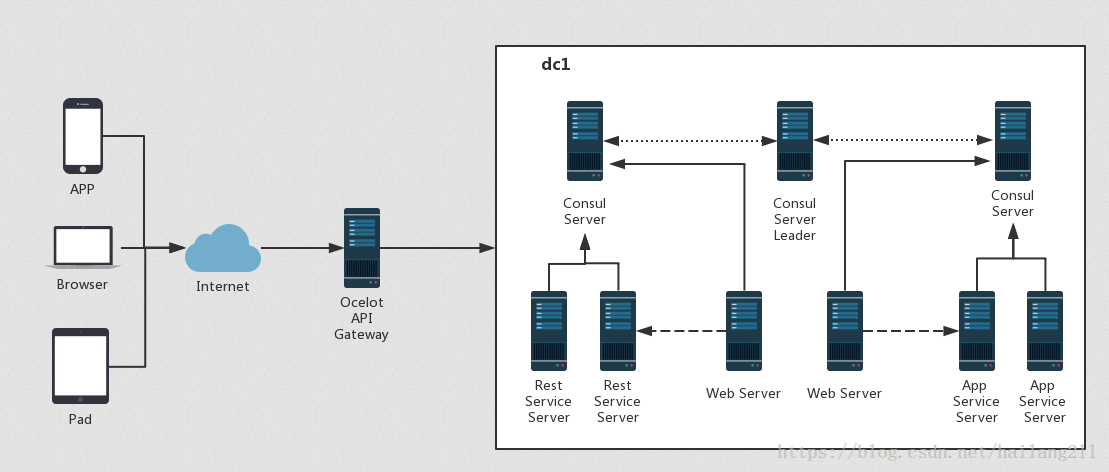
Consul Agent有两种运行模式:Server和Client。这里的Server和Client只是Consul集群层面的区分,与搭建在Cluster之上的应用服务无关, 以Server模式运行的Consul Agent节点用于维护Consul集群的状态,官方建议每个Consul Cluster至少有3个或以上的运行在Server Mode的Agent,Client节点不限。
1、Server节点需要三台或以上机器
2、Client节点不限
二、Consul环境准备
准备了三台Linux(CentOS)虚拟机(Consul Server)二台Linux(CentOS)虚拟机(Consul Client)
Consul Server服务IP分别为:
192.168.31.175
192.168.31.176
192.168.31.177
Consul Client服务IP分别为:
192.168.31.178
192.168.31.179
其中,192.168.31.175会作为leader角色,其余两台192.168.31.176和192.168.31.177会作为follower角色。当然,实际环境中leader角色不会是一个固定的,会随着环境的变化(比如Leader宕机或失联)由算法选出新的leader。在进行下面的操作会前,请确保三台节点能够相互ping通,并能够和宿主机也ping通。另外,192.168.31.178和192.168.31.179会作为client角色,并且和其余三台虚拟机互相ping通。
三、Consul正式安装
可以参考上一篇文章的安装方法:.netcore consul实现服务注册与发现-单台节点
一定保证以上五台安装成功
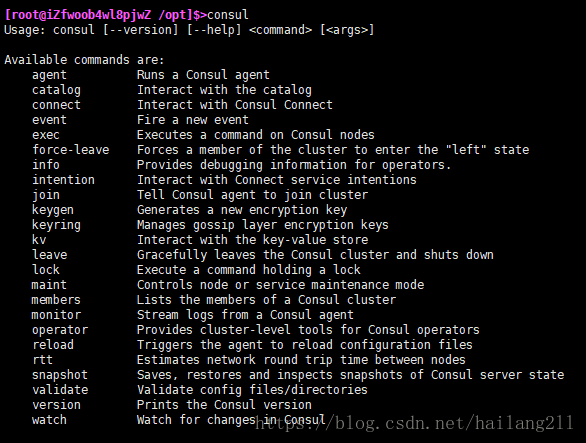
1、测试Consul是否安装成功
> consul
如下图表示成功:
2、Consul Server服务端安装(启动与配置Consul服务)
服务端192.168.31.175执行
> consul agent -server -ui -bootstrap-expect=3 -data-dir=/tmp/consul -node=consul-175 -client=0.0.0.0 -bind=192.168.31.175 -datacenter=dc1
服务端192.168.31.176执行
> consul agent -server -ui -bootstrap-expect=3 -data-dir=/tmp/consul -node=consul-176 -client=0.0.0.0 -bind=192.168.31.176 -datacenter=dc1 -join 192.168.31.175
服务端192.168.31.177执行
> consul agent -server -ui -bootstrap-expect=3 -data-dir=/tmp/consul -node=consul-177 -client=0.0.0.0 -bind=192.168.31.177 -datacenter=dc1 -join 192.168.31.175
注:因为是集群安装,bootstrap-expect=3,以服务端的数量为准
datacenter=dc1,三台必须在一个数据中心
176和177的启动命令中,有一句 -join 192.168.31.175 => 有了这一句,就把176和177加入到了175所在的集群中。
启动之后,集群就开始了Vote(投票选Leader)的过程
命令:查看各个server的情况:
> consul members

命令:查看目前全部的consul的角色状态:
> consul operator raft list-peers

3、通过UI查看集群状态
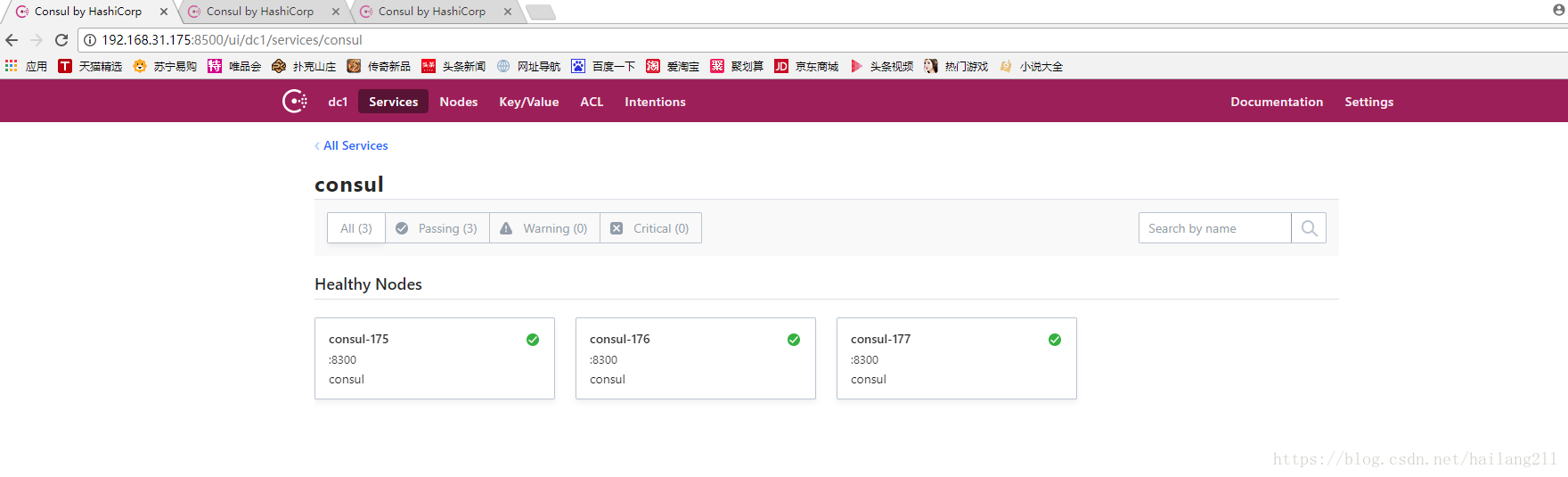
Consul不仅提供了丰富的命令查看集群情况,还提供了一个WebUI,默认端口8500,我们可以通过访问这个URL(eg. http://192.168.31.175:8500)得到如下图所示的WebUI:
4、模拟Leader挂掉,查看Consul集群的新选举Leader
直接停止192.168.31.175的服务,或者暴力直接关机
输入命令查看服务状态
> consul members


查看其余两个节点的日志或者命令可以发现,consul-176被选为了新的leader
我们也可以在次通过UI界面来查看状态:
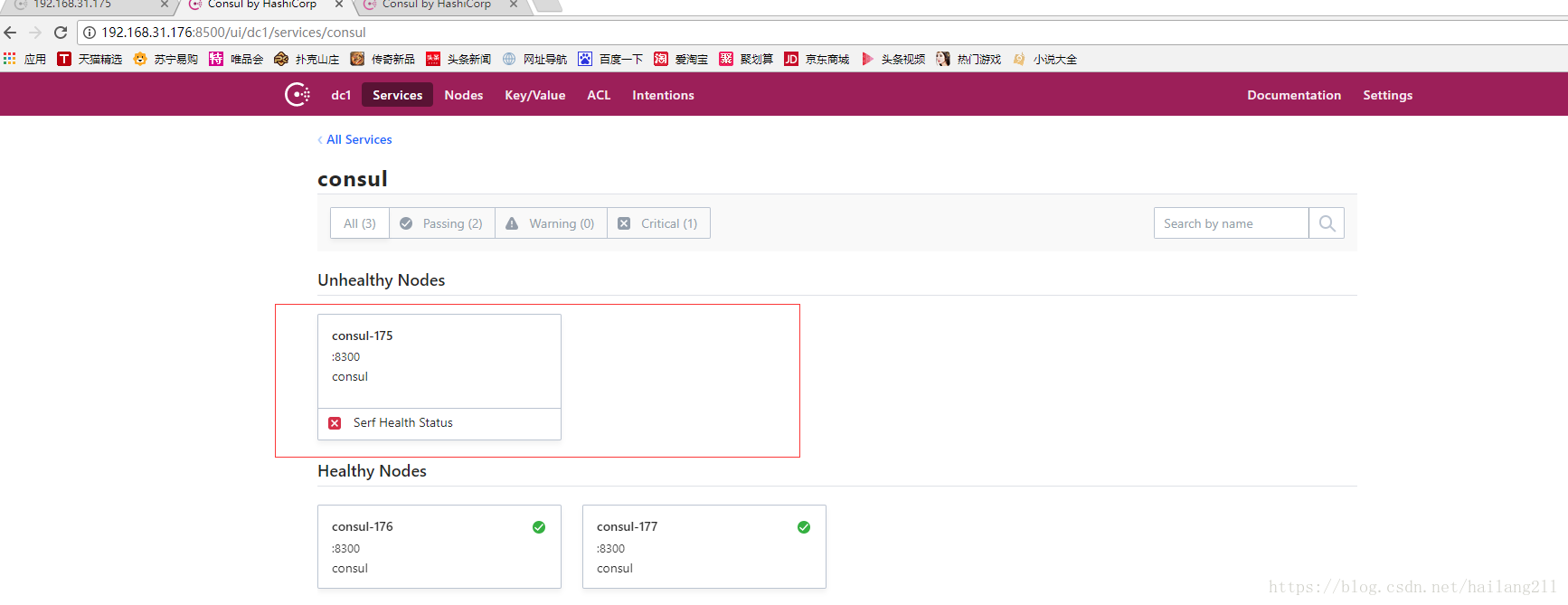
虽然这里192.168.31.175这个原leader节点挂掉了,但是只要超过一半的Server(这里是2/3还活着)还活着,集群是可以正常工作的,这也是为什么像Consul、ZooKeeper这样的分布式管理组件推荐我们使用3个或5个节点来部署的原因。
注:以上也可以将.netcore项目部署在Consul Server上,但官方建议用Consul Client来关联,分别做各自的事情,互不影响。
5、Consul Client安装
为了节约虚拟机,目前在192.168.31.178部署.netcore项目
> mkdir /data/mvc

> mkdir /data/api

> cd /data/mvc/

> dotnet new mvc

> cd /data/api/

> dotnet new webapi

>dotnet run
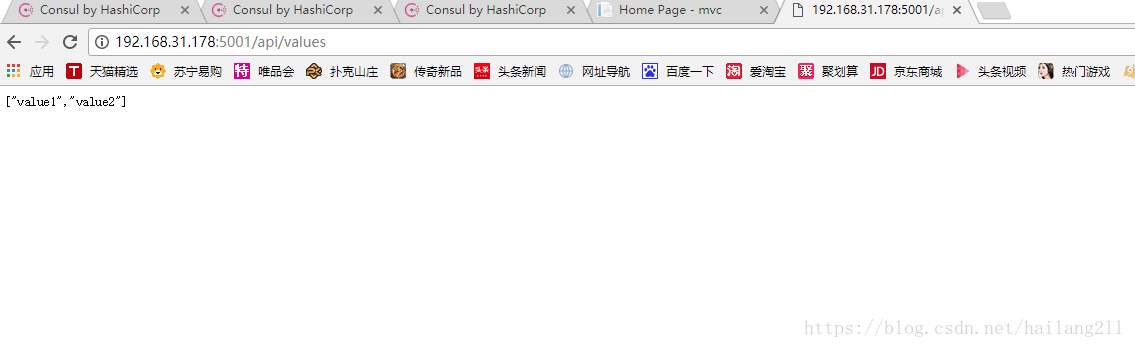
启动并运行mvc,webapi两个项目,保证能正常访问,如图正常访问
6、将.netcore服务注册到Consul(通过配置文件来注册服务)
vi /etc/consul/services_config.json

{

    "services":[

        {

            "id": "CLIENT_SERVICE_01",

            "name" : "MVCClientService",

            "tags": [

                "urlprefix-/MVCClientService01"

            ],

            "address": "192.168.31.178",

            "port": 5000,

            "checks": [

                {

                    "name": "clientservice_check",

                    "http": "http://192.168.31.178:5000",

                    "interval": "10s",

                    "timeout": "5s"

                }

            ]

        },

         {

            "id": "CLIENT_SERVICE_02",

            "name" : "APIClientService",

            "tags": [

                "urlprefix-/APIClientService02"

            ],

            "address": "192.168.31.178",

            "port": 5000,

            "checks": [

                {

                    "name": "clientservice_check",

                    "http": "http://192.168.31.178/api/values",

                    "interval": "10s",

                    "timeout": "5s"

                }

            ]

        }

     ]

}
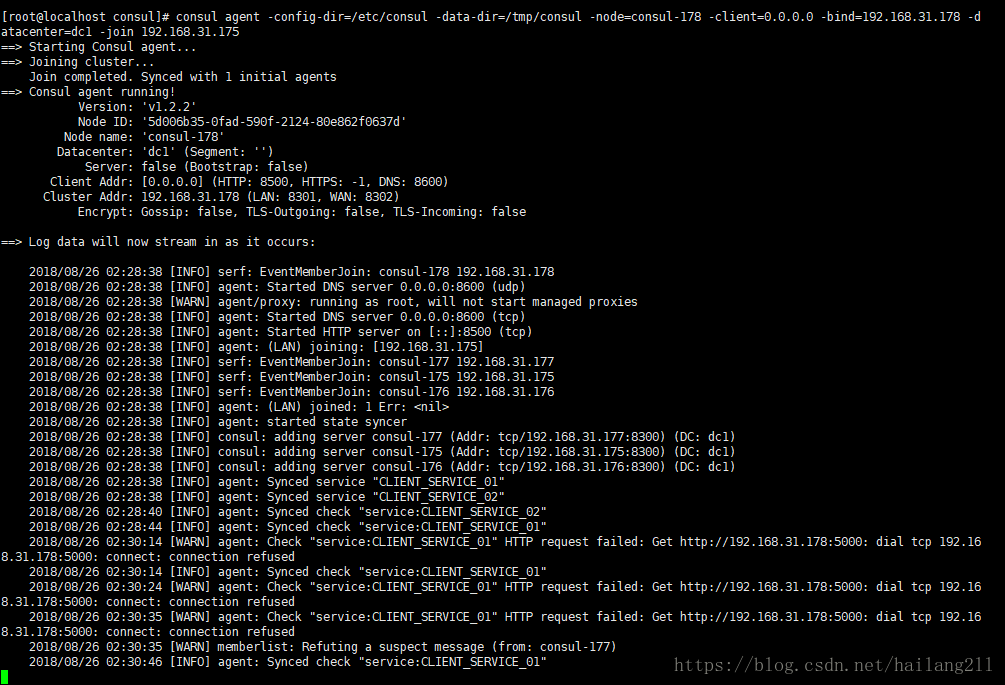
在Consul Client 192.168.31.178运行命令:
consul agent -config-dir=/etc/consul -data-dir=/tmp/consul -node=consul-178 -client=0.0.0.0 -bind=192.168.31.178 -datacenter=dc1 -join 192.168.31.175
如下图表示正常启动,并将192.168.31.178加入到服务集群192.168.31.175中
7、查看Consul集群状态
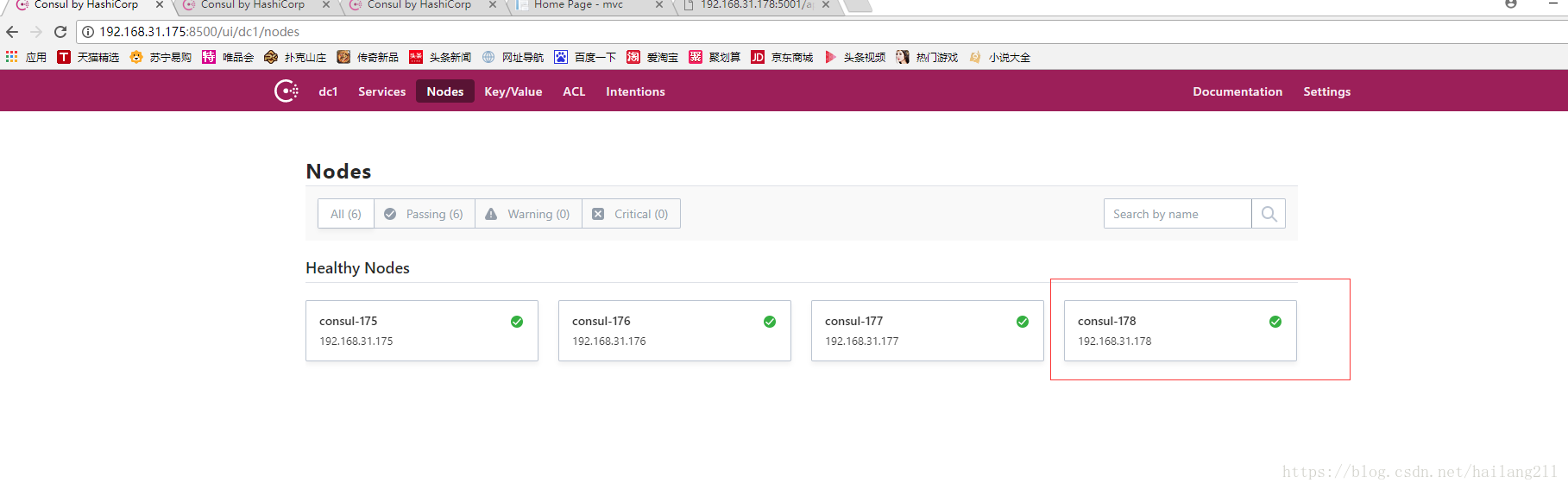
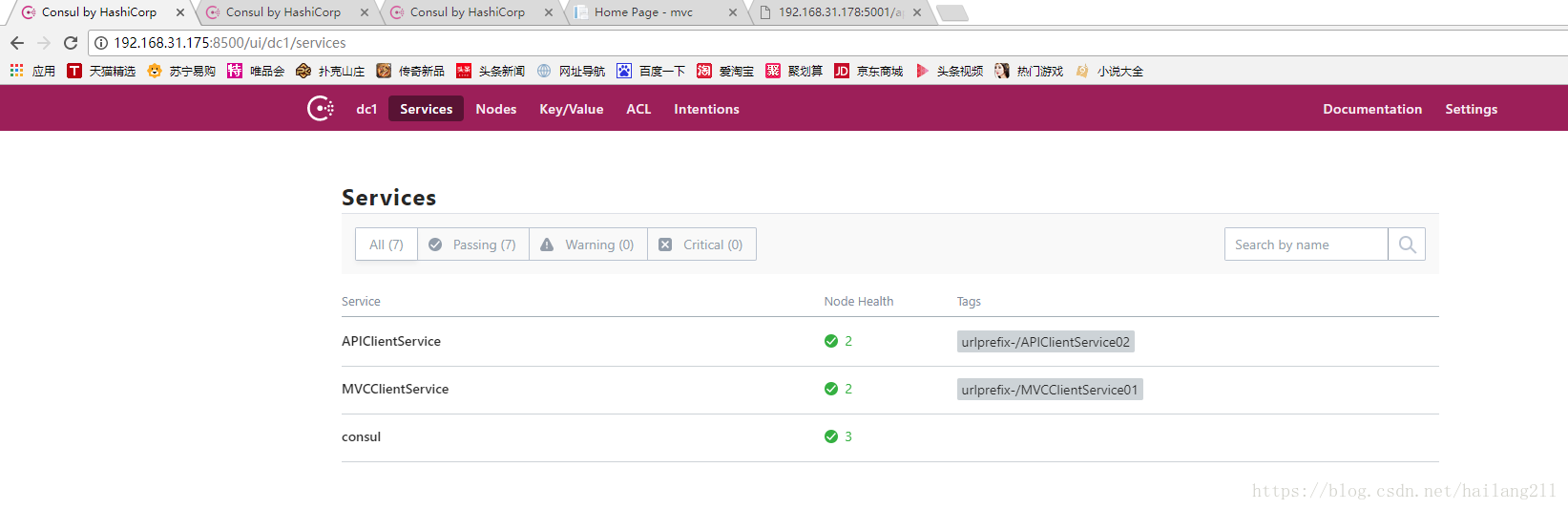
可以看到192.168.31.178加入到了集群中,表示正常,还能看到.netcore的两个服务哦,也表示正常
Consul不仅仅提供了服务注册,还提供了服务发现,我们可以通过调用其提供的API来发现服务的IP和Port。

8、通过consul api 接口注册服务
创建一个ASP.NET Core WebAPI程序
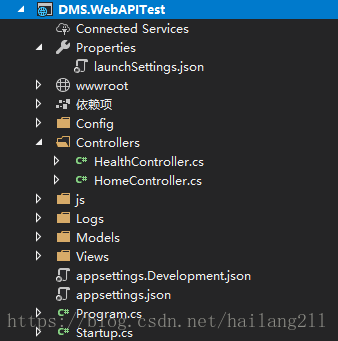
创建一个HealthController用于Consul的健康检查
[Produces("application/json")]

[Route("api/Health")]

public class HealthController : Controller

{

[HttpGet]

public IActionResult Get() => Ok("ok");

}
注:Consul会通过call这个API来确认Service的健康状态。
基于IApplicationBuilder写一个扩展方法,用于调用Consul API
在nuge管理器中引入Consul包
public static class ConsulBuilderExtensions

    {

        // 服务注册

        public static IApplicationBuilder RegisterConsul(this IApplicationBuilder app, IApplicationLifetime lifetime, HealthService healthService, ConsulService consulService)

        {

            var consulClient = new ConsulClient(x => x.Address = new Uri($"http://{consulService.IP}:{consulService.Port}"));//请求注册的 Consul 地址

            var httpCheck = new AgentServiceCheck()

            {

                DeregisterCriticalServiceAfter = TimeSpan.FromSeconds(5),//服务启动多久后注册

                Interval = TimeSpan.FromSeconds(10),//健康检查时间间隔,或者称为心跳间隔

                HTTP = $"http://{healthService.IP}:{healthService.Port}/api/health",//健康检查地址

                Timeout = TimeSpan.FromSeconds(5)

            };

            // Register service with consul

            var registration = new AgentServiceRegistration()

            {

                Checks = new[] { httpCheck },

                ID = healthService.Name + "_" + healthService.Port,

                Name = healthService.Name,

                Address = healthService.IP,

                Port = healthService.Port,

                Tags = new[] { $"urlprefix-/{healthService.Name}" }//添加 urlprefix-/servicename 格式的 tag 标签,以便 Fabio 识别

            };

            consulClient.Agent.ServiceRegister(registration).Wait();//服务启动时注册,内部实现其实就是使用 Consul API 进行注册(HttpClient发起)

            lifetime.ApplicationStopping.Register(() =>

            {

                consulClient.Agent.ServiceDeregister(registration.ID).Wait();//服务停止时取消注册

            });

            return app;

        }

    }
在Starup类的Configure方法中,调用此扩展方法
 #region register this service

            ConsulService consulService = new ConsulService()

            {

                IP = Configuration["Consul:IP"],

                Port = Convert.ToInt32(Configuration["Consul:Port"])

            };

            HealthService healthService = new HealthService()

            {

                IP = Configuration["Service:IP"],

                Port = Convert.ToInt32(Configuration["Service:Port"]),

                Name = Configuration["Service:Name"],

            };

            app.RegisterConsul(lifetime, healthService, consulService);

            #endregion
其中用到了appSettings.json配置文件,其定义如下:
  "Service": {

    "Name": "DMSWebAPITest",

    "IP": "localhost",

    "Port": "5001"

  },

  "Consul": {

    "IP": "localhost",

    "Port": "8500"

  }
其中ConsulService类定义如下:
public class ConsulService

    {

        public string IP { get; set; }

        public int Port { get; set; }

    }
其中HealthService类定义如下:
public class HealthService

    {

        public string Name { get; set; }

        public string IP { get; set; }

        public int Port { get; set; }

    }
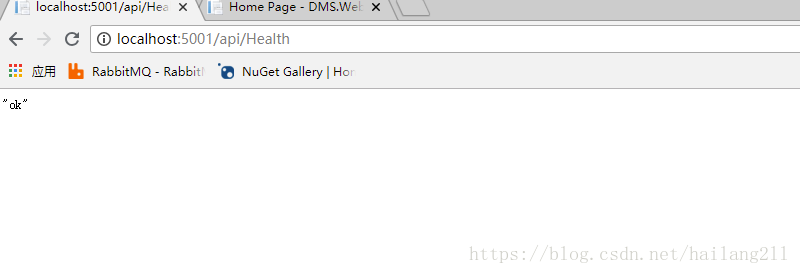
确保HealthController的API能正常访问,以便做健康检查
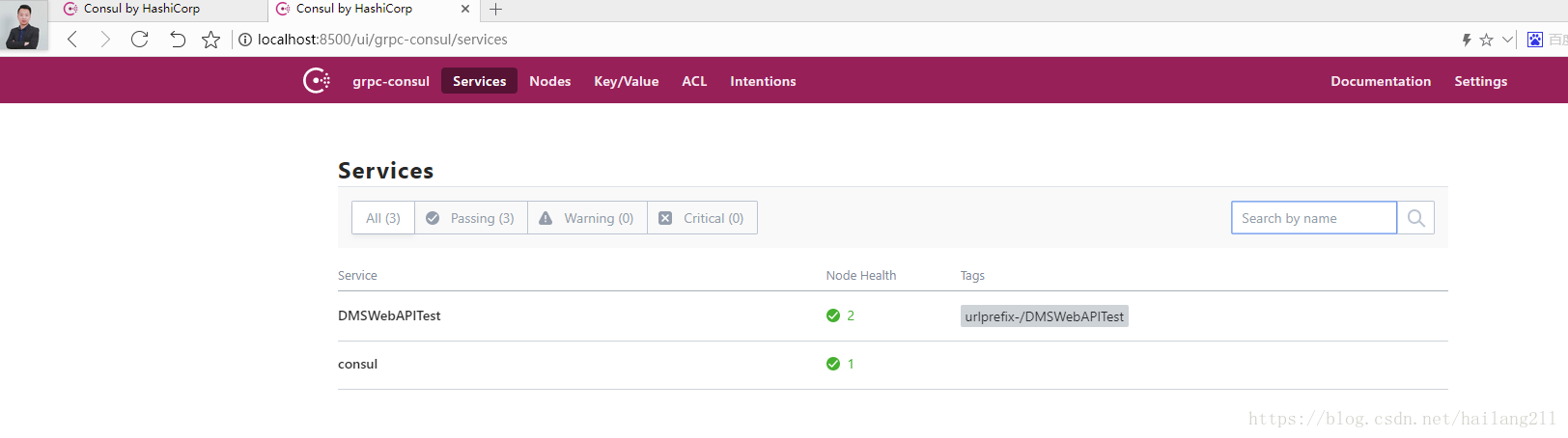
成功运行后,查看Consul集群的状态,UI界面
Exceptionless作分布式日志开源框架,Log4net,NLog,Autofac属性注入,Consul API接口服务注册实例等开源地址:https://github.com/hailang2ll/DMS
实战中参考的资料:https://www.cnblogs.com/edisonchou/p/9124985.html
交流qq群:18362376
.netcore consul实现服务注册与发现-集群完整版的更多相关文章
- .netcore consul实现服务注册与发现-集群部署
一.Consul的集群介绍 Consul Agent有两种运行模式:Server和Client.这里的Server和Client只是Consul集群层面的区分,与搭建在Cluster之上的应用服务无关 ...
- .netcore consul实现服务注册与发现-单节点部署
原文:.netcore consul实现服务注册与发现-单节点部署 一.Consul的基础介绍 Consul是HashiCorp公司推出的开源工具,用于实现分布式系统的服务发现与配置.与其他分 ...
- spring Cloud服务注册中心Eureka集群
spring Cloud服务注册中心Eureka集群配置: 在application.yml文件加以下配置: server: port: 8761 tomcat: uri-encoding: UTF- ...
- Consul初探-服务注册和发现
前言 经过上一篇的学习,现在已经来到了服务注册发现环节:Consul 的核心功能就是服务注册和发现,Consul 客户端通过将自己注册到 Consul 服务器集群,然后等待调用方去发现服务,实现代理转 ...
- Spring Cloud Consul 实现服务注册和发现
Spring Cloud 是一个基于 Spring Boot 实现的云应用开发工具,它为基于 JVM 的云应用开发中涉及的配置管理.服务发现.断路器.智能路由.微代理.控制总线.全局锁.决策竞选.分布 ...
- 一个故事,一段代码告诉你如何使用不同语言(Golang&C#)提供相同的能力基于Consul做服务注册与发现
目录 引言 什么是微服务 传统服务 微服务 什么是服务注册与服务发现 为什么要使用不同的语言提供相同的服务能力 服务协调器 服务注册 Golang C#(.NetCore3.1) 服务发现 通过Htt ...
- python使用consul进行服务注册和发现
阅读目录 一.安装启动consul 二.python服务注册 三.golang服务注册 四.通过API的方式获取信息 回到顶部 一.安装启动consul 1.通过docker快速安装 #获取docke ...
- 简单RPC框架-基于Consul的服务注册与发现
*:first-child { margin-top: 0 !important; } body>*:last-child { margin-bottom: 0 !important; } /* ...
- Spring Cloud Consul使用——服务注册与发现(注册中心)
整理自该文章 一.Consul 服务端接下来我们开发 Consul 的服务端,创建一个 spring-cloud-consul-producer 项目 1.添加依赖包 <dependencies ...
随机推荐
- 腾讯2016实习生面试经验(已经拿到offer)
忐忑了好几天,今天最终收到深圳总部的电话.允许录用我为2016年实习生,感觉整个天空都放晴了.坐标:武汉大学,给大家说说我的面试经历吧,我投的是软件开发--应用开发方向. 一.校招流程 投递简历- ...
- [Python] Different ways to test multiple flags at once in Python
x, y, z = 0, 1, 0 if x == 1 or y == 1 or z == 1: print('passed') if 1 in (x, y, z): print('passed') ...
- HTML5梦幻星空,可用作网页背景
<html> <head> <title>星空</title> <META http-equiv="X-UA-Compatible&qu ...
- session 、cookie、token的区别及联系
本文转自:https://blog.csdn.net/jikeehuang/article/details/51488020:https://blog.csdn.net/weixin_37196194 ...
- 【河南省多校脸萌第六场 A】巴什博弈?
[链接]http://acm.nyist.me/JudgeOnline/problem.php?cid=1013&pid=5 [题意] 在这里写题意 [题解] 0..a-1 YES a..a+ ...
- SQL_wm_concat函数实验:实现字段合并
原创作品,出自 "深蓝的blog" 博客.欢迎转载.转载时请务必注明下面出处,否则追究版权法律责任. 深蓝的blog:http://blog.csdn.net/huangyanlo ...
- datagridview合并相同单元格
private void dataGridView1_CellPainting(object sender, DataGridViewCellPaintingEventArgs e) { // 对第日 ...
- 为什么我要选择erlang+go进行server架构(2)
原创文章,转载请注明出处:server非业余研究http://blog.csdn.net/erlib 作者Sunface 为什么我要选择Erlang呢? 一.erlang特别适合中小团队创业: erl ...
- 基于深度学习的人脸识别系统(Caffe+OpenCV+Dlib)【二】人脸预处理
前言 基于深度学习的人脸识别系统,一共用到了5个开源库:OpenCV(计算机视觉库).Caffe(深度学习库).Dlib(机器学习库).libfacedetection(人脸检测库).cudnn(gp ...
- ZOJ 2770 Burn the Linked Camp 差分约束 ZOJ排名第一~
http://acm.zju.edu.cn/onlinejudge/showProblem.do?problemId=1770 题目大意: 陆逊为了火烧连营七百里,派出了间谍刺探敌情,得之刘备的军营以 ...