
一步一步学Silverlight 2系列(13):数据与通信之WebRequest
概述
Silverlight 2 Beta 1版本发布了,无论从Runtime还是Tools都给我们带来了很多的惊喜,如支持框架语言Visual Basic, Visual C#, IronRuby, Ironpython,对JSON、Web Service、WCF以及Sockets的支持等一系列新的特性。《一步一步学Silverlight 2系列》文章带您快速进入Silverlight 2开发。
本文将简单介绍在Silverlight 2中如何使用WebRequest进行数据的提交和获取。
简单示例
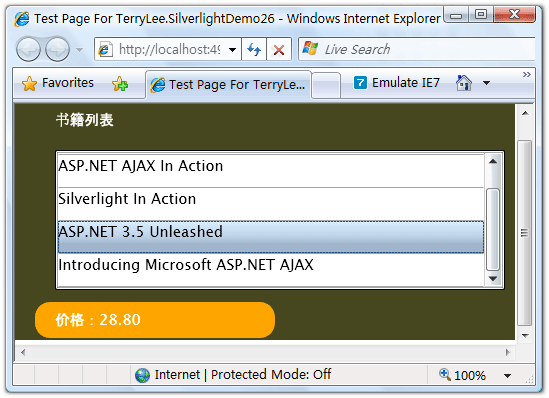
在本文中,我们仍然使用在一步一步学Silverlight 2系列(12):数据与通信之WebClient中用过的示例,只不过稍微做一点小的改动,使用WebRequest提交书籍编号数据,并根据书籍号返回价格信息。最终运行的结果如下图:
编写界面布局,XAML如下:
<Grid Background="#46461F">

    <Grid.RowDefinitions>

        <RowDefinition Height="40"></RowDefinition>

        <RowDefinition Height="*"></RowDefinition>

        <RowDefinition Height="40"></RowDefinition>

    </Grid.RowDefinitions>

    <Grid.ColumnDefinitions>

        <ColumnDefinition></ColumnDefinition>

    </Grid.ColumnDefinitions>

    <Border Grid.Row="0" Grid.Column="0" CornerRadius="15"

            Width="240" Height="36"

            Margin="20 0 0 0" HorizontalAlignment="Left">

        <TextBlock Text="书籍列表" Foreground="White"

                   HorizontalAlignment="Left" VerticalAlignment="Center"

                   Margin="20 0 0 0"></TextBlock>

    </Border>

    <ListBox x:Name="Books" Grid.Row="1" Margin="40 10 10 10"

             SelectionChanged="Books_SelectionChanged">

        <ListBox.ItemTemplate>

            <DataTemplate>

                <StackPanel>

                    <TextBlock Text="{Binding Name}" Height="32"></TextBlock>

                </StackPanel>

            </DataTemplate>

        </ListBox.ItemTemplate>

    </ListBox>

    <Border Grid.Row="2" Grid.Column="0" CornerRadius="15"

            Width="240" Height="36" Background="Orange"

            Margin="20 0 0 0" HorizontalAlignment="Left">

        <TextBlock x:Name="lblPrice" Text="价格:" Foreground="White"

                   HorizontalAlignment="Left" VerticalAlignment="Center"

                   Margin="20 0 0 0"></TextBlock>

    </Border>

</Grid>
编写HttpHandler,注意我使用了context.Request.Form["No"],在后面我们将使用WebRequest在RequestReady方法中将数据写入请求流:
public class BookHandler : IHttpHandler

{

    public static readonly string[] PriceList = new string[] {

        "66.00",

        "78.30",

        "56.50",

        "28.80",

        "77.00"

    };

    public void ProcessRequest(HttpContext context)

    {

        context.Response.ContentType = "text/plain";

        context.Response.Write(PriceList[Int32.Parse(context.Request.Form["No"])]);

    }

    public bool IsReusable

    {

        get

        {

            return false;

        }

    }

}
在界面加载时绑定书籍列表,关于数据绑定可以参考一步一步学Silverlight 2系列(11):数据绑定。
private void UserControl_Loaded(object sender, RoutedEventArgs e)

{

    List<Book> books = new List<Book>() {

        new Book("Professional ASP.NET 3.5"),

        new Book("ASP.NET AJAX In Action"),

        new Book("Silverlight In Action"),

        new Book("ASP.NET 3.5 Unleashed"),

        new Book("Introducing Microsoft ASP.NET AJAX")

    };

    Books.ItemsSource = books;

}
接下来在SelectionChanged事件中实现用户选择书籍时,我们使用WebRequest提交书籍编号,并且获得价格数据,仍然采用异步模式,提供RequestReady和ResponseReady两个回调函数:
private string bookNo;

void Books_SelectionChanged(object sender, SelectionChangedEventArgs e)

{

    bookNo = Books.SelectedIndex.ToString();

    Uri endpoint = new Uri("http://localhost:49955/BookHandler.ashx");

    WebRequest request = WebRequest.Create(endpoint);

    request.Method = "POST";

    request.ContentType = "application/x-www-form-urlencoded";

    request.BeginGetRequestStream(new AsyncCallback(RequestReady), request);

    request.BeginGetResponse(new AsyncCallback(ResponseReady), request);

}
实现RequestReady方法,将书籍的编号写入请求流中。
void RequestReady(IAsyncResult asyncResult)

{

    WebRequest request = asyncResult.AsyncState as WebRequest;

    Stream requestStream = request.EndGetRequestStream(asyncResult);

    using (StreamWriter writer = new StreamWriter(requestStream))

    {

        writer.Write(String.Format("No={0}", bookNo));

        writer.Flush();

    }

}
实现ResponseReady方法,显示返回的结果。
void ResponseReady(IAsyncResult asyncResult)

{

    WebRequest request = asyncResult.AsyncState as WebRequest;

    WebResponse response = request.EndGetResponse(asyncResult);

    using (Stream responseStream = response.GetResponseStream())

    {

        StreamReader reader = new StreamReader(responseStream);

        lblPrice.Text = "价格:" + reader.ReadToEnd();

    }

}
最后运行的结果如下:

用户选择一本书籍后,将显示其价格:
结束语
本文简单介绍了在Silverlight 2中如何使用WebRequest提交和获取数据,你可以从这里下载示例程序。
出处:http://terrylee.cnblogs.com
本文版权归作者和博客园共有,欢迎转载,但未经作者同意必须保留此段声明,且在文章页面明显位置给出原文连接,否则保留追究法律责任的权利。
一步一步学Silverlight 2系列(13):数据与通信之WebRequest的更多相关文章
- 一步一步学Silverlight 2系列文章
概述 由TerryLee编写的<Silverlight 2完美征程>一书,已经上市,在该系列文章的基础上补充了大量的内容,敬请关注.官方网站:http://www.dotneteye.cn ...
- 一步一步学Silverlight 2系列(32):图形图像综合实例—“功夫之王”剧照播放
概述 Silverlight 2 Beta 1版本发布了,无论从Runtime还是Tools都给我们带来了很多的惊喜,如支持框架语言Visual Basic, Visual C#, IronRuby, ...
- 一步一步学Silverlight 2系列(31):图形图像综合实例—实现水中倒影效果
概述 Silverlight 2 Beta 1版本发布了,无论从Runtime还是Tools都给我们带来了很多的惊喜,如支持框架语言Visual Basic, Visual C#, IronRuby, ...
- 一步一步学Silverlight 2系列(30):使用Transform实现更炫的效果(下)
概述 Silverlight 2 Beta 1版本发布了,无论从Runtime还是Tools都给我们带来了很多的惊喜,如支持框架语言Visual Basic, Visual C#, IronRuby, ...
- 一步一步学Silverlight 2系列(29):使用Transform实现更炫的效果(上)
概述 Silverlight 2 Beta 1版本发布了,无论从Runtime还是Tools都给我们带来了很多的惊喜,如支持框架语言Visual Basic, Visual C#, IronRuby, ...
- 一步一步学Silverlight 2系列(28):图片处理
概述 Silverlight 2 Beta 1版本发布了,无论从Runtime还是Tools都给我们带来了很多的惊喜,如支持框架语言Visual Basic, Visual C#, IronRuby, ...
- 一步一步学Silverlight 2系列(27):使用Brush进行填充
概述 Silverlight 2 Beta 1版本发布了,无论从Runtime还是Tools都给我们带来了很多的惊喜,如支持框架语言Visual Basic, Visual C#, IronRuby, ...
- 一步一步学Silverlight 2系列(26):基本图形
概述 Silverlight 2 Beta 1版本发布了,无论从Runtime还是Tools都给我们带来了很多的惊喜,如支持框架语言Visual Basic, Visual C#, IronRuby, ...
- 一步一步学Silverlight 2系列(25):综合实例之Live Search
概述 Silverlight 2 Beta 1版本发布了,无论从Runtime还是Tools都给我们带来了很多的惊喜,如支持框架语言Visual Basic, Visual C#, IronRuby, ...
- 一步一步学Silverlight 2系列(24):与浏览器交互相关辅助方法
概述 Silverlight 2 Beta 1版本发布了,无论从Runtime还是Tools都给我们带来了很多的惊喜,如支持框架语言Visual Basic, Visual C#, IronRuby, ...
随机推荐
- 更改App名称
To change the installed application name, in Xcode: 1. Select your Target on the left side under Gro ...
- go1.11新特性,mark一下
包管理新特性: export GO111MODULE=on #开启modules go mod init # 创建go.mod (我是在项目根目录下输入的命令) ls // 可以看下创建成功 cat ...
- eslint 在webstorm配置
1.安装nodejs和eslint 2.在 webstorm 的 file - setting搜索eslint,配置eslint路径 3.在项目目录下新建.eslintrc文件 4.配置eslint ...
- Maven项目配置外部依赖(本地依赖)
加入有一些公共jar包只限于公司内部使用,不能暴露在外部时,有如下的方案: 1.搭建私有远程仓库(nexus) 2.使用http.ftp.共享地址,github地址等(主要是通过maven-deplo ...
- foobar2000播放APE格式音乐的解决办法
要使foobar2000能播放APE格式的音乐需要安装Monkey's Audio Decoder的插件.操作如下: 1.登录官方插件列表,找到Monkey's Audio Decoder插件 官方插 ...
- Maven插件开发教程收集(待实践)
官方教程:http://maven.apache.org/plugin-developers/index.html http://blog.csdn.net/csfreebird/article/de ...
- 关于linter
各类代码都有规则格式检查工具,称之为linter 比如:csslint/jslint/eslint/pylint sumlime提供了一个linter的框架SublimeLinter,在里面可以使用各 ...
- 创建git仓库及简单操作命令
1.把已有的项目代码纳入git管理 $ cd projectdir #projectdir项目代码所在的文件夹 $ git init 2.新建的项目直接使用git管理 $ cd dir #dir ...
- 关于OC的内存管理-01
1.什么是内存管理? 大家都知道手机的内存是有限的,app应用的内存也应该是受限制的,随着app应用的使用会导致内存的占用率增大.当内存占用率达到一种程度时.系统会发出内存警告.这时我们须要把一些不用 ...
- mac上的xampp出现Access forbidden! You don’t have permission to access the requested object. It is either
一个Joomla!程序,之前是在win上的xampp上运行得非常好的,当我把它拿到mac下面的xampp上去运行的时候,发现有问题,没法运行,报以下的错误: Access forbidden! Yo ...