
unity googleplay随手记
googleplay设置
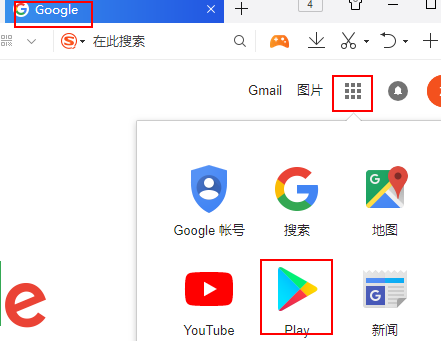

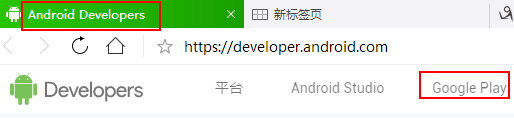
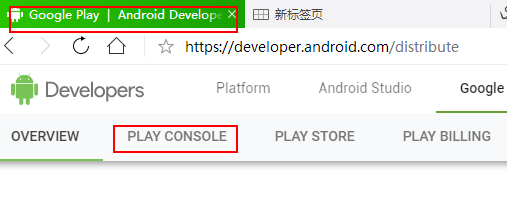
进入play console后可以发布应用
点击所有应用->创建应用(这部经常报错误码,多试几次就ok可能和vpn有关)

创建一个应用成功后,这个应用就会包含上面所有选项
先在应用版本中传包,
然后商品详情中填写游戏相关说明图片,
内容分级中填写分级调查问卷,
定价和分发范围中填写游戏付费类型
应用内商品填写内购商品信息,这里注意商品id要与后面代码中的的id一致,eg:
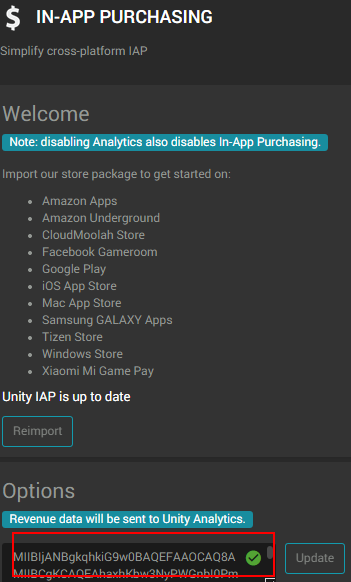
服务和API中有个key,这个key要填写到unity service in-purchase googlePlay需要的那个key的位置
付费测试说明
新建号应用后,查看应用版本,能看到可以上传4个版本,内部测试渠道,封闭测试渠道,开放式渠道,正式版渠道
每个里面都可以管理添加测试账号,添加了测试账号后,测试计费时会提示当前是测试版本不会真正收取费用相关的提示

unity配置
Services->
IN-APP PURCHASING 中设置好googleplay中得到的的keyid
代码
在商店启动前初始化这个类
using System;

using System.Collections.Generic;

using UnityEngine;

using UnityEngine.Purchasing;

	public class Purchaser : MonoBehaviour, IStoreListener

	{

		private static IStoreController m_StoreController;

		private static IExtensionProvider m_StoreExtensionProvider;

		public static string kProductIDSubscription = "subscription";

		private static string kProductNameAppleSubscription = "com.unity3d.subscription.new";

		private static string kProductNameGooglePlaySubscription = "com.unity3d.subscription.original";

		public string[] kPurchaserIdList = {

			"com.diffcolor.gaincoins1",

			"com.diffcolor.gaincoins2",

			"com.diffcolor.gaincoins3",

			"com.diffcolor.gaincoins4",

		};

		private static Purchaser Ins;

		public static Purchaser GetIns ()

		{

			return Ins;

		}

		void Awake ()

		{

			Ins = this;

		}

		void Start ()

		{

			DontDestroyOnLoad (gameObject);

			if (m_StoreController == null) {

				Debug.Log ("[n]----Purchaser.Start Init");

				InitializePurchasing ();

			}

		}

		#region init

		public void InitializePurchasing ()

		{

			if (IsInitialized ()) {

				Debug.Log ("[n]----Purchaser.InitializePurchasing Already.Init");

				return;

			}

			Debug.Log ("[n]----Purchaser.InitializePurchasing Begain Init");

			var builder = ConfigurationBuilder.Instance (StandardPurchasingModule.Instance ());

			builder.AddProduct (kProductIDSubscription, ProductType.NonConsumable, new IDs () {

				{ kProductNameAppleSubscription, AppleAppStore.Name },

				{ kProductNameGooglePlaySubscription, GooglePlay.Name },

			});

			//初始化各分类内购 ID

			for (int x = 0; x < kPurchaserIdList.Length - 1; x++) {

				String purchaseID = kPurchaserIdList [x];

				builder.AddProduct (purchaseID, ProductType.Consumable);

			}

			//初始化广告内购 ID

			builder.AddProduct (kPurchaserIdList [kPurchaserIdList.Length - 1], ProductType.NonConsumable);

			UnityPurchasing.Initialize (this, builder);

		}

		private bool IsInitialized ()

		{

			//bool b = m_StoreController != null && m_StoreExtensionProvider != null;

			bool b0 = m_StoreController != null;

			bool b1 = m_StoreExtensionProvider != null;

			bool b = b0 && b1;

			Debug.Log ("[n]----Purchaser.IsInitialized b0:" + b0 + " b1:" + b1);

			return b;

		}

		public void OnInitialized (IStoreController controller, IExtensionProvider extensions)

		{

			Debug.Log ("[n]----Purchaser.OnInitialized   init CB success ");

			m_StoreController = controller;

			m_StoreExtensionProvider = extensions;

		}

		public void OnInitializeFailed (InitializationFailureReason error)

		{

			Debug.Log ("[ne]----Purchaser.OnInitializeFailed   init CB faile errer:" + error);

		}

		#endregion

		#region buy

		public string getPrice (string id)

		{

			string tstr = null;

			Product product = m_StoreController.products.WithID (id);

			if (product != null && product.availableToPurchase) {

				tstr = m_StoreController.products.WithID (id).metadata.localizedPriceString.ToString ();

			}

			Debug.Log ("[n]----Purchaser.getPrice  id:" + id + " content:" + tstr);

			return tstr;

		}

		public void BuyConsumable (string id)

		{

			BuyProductID (id);

		}

		void BuyProductID (string productId)

		{

			if (IsInitialized ()) {

				Debug.Log ("[n]----Purchaser.BuyProductID productId:" + productId);

				Product product = m_StoreController.products.WithID (productId);

				if (product != null && product.availableToPurchase) {

					Debug.Log ("[n]----Purchaser.BuyProductID 启动计费 productId:" + product.definition.id);

					//Debug.Log(string.Format("Purchasing product asychronously: '{0}'", product.definition.id));

					m_StoreController.InitiatePurchase (product);

				} else {

					if (product == null)

						Debug.Log ("[ne]----Purchaser.BuyProductID  product==null  productId:" + productId);

					if (!product.availableToPurchase)

						Debug.Log ("[ne]----Purchaser.BuyProductID  availableToPurchase==false  productId:" + productId);

					onPurchaseFailed ("Not Found product.");

				}

			} else {

				Debug.Log ("[ne]----Purchaser.BuyProductID fail,Not Init productId:" + productId);

				onPurchaseFailed ("Not initialized.");

			}

		}

		#endregion

		#region restore

		public void RestorePurchases ()

		{

			if (!IsInitialized ()) {

				Debug.Log ("[n]----Purchaser.RestorePurchases fail,Not initialized");

				return;

			}

			if (Application.platform == RuntimePlatform.IPhonePlayer ||

			             Application.platform == RuntimePlatform.OSXPlayer) {

				Debug.Log ("[n]----Purchaser.RestorePurchases restoreStart!");

				var apple = m_StoreExtensionProvider.GetExtension<IAppleExtensions> ();

				apple.RestoreTransactions ((result) => {

					if (result) {

						Debug.Log ("[n]----Purchaser.RestorePurchases Success!");

						GameManager.instance.onRestorePurchasesSuccess ();

					} else {

						Debug.Log ("[ne]----Purchaser.RestorePurchases Fail!");

						GameManager.instance.onRestorePurchasesFailed ();

					}

				});

			} else {

				Debug.Log ("[ne]----Purchaser.RestorePurchases platform error current=" + Application.platform);

				GameManager.instance.onRestorePurchasesFailed ();

			}

		}

		#endregion

		#region cb

		//success;

		public PurchaseProcessingResult ProcessPurchase (PurchaseEventArgs args)

		{

			Product product = args.purchasedProduct;

			Dictionary<string, object> parameters = new Dictionary<string, object> ();

			//parameters[AppEventParameterName.ContentID] = product.definition.id;

			float price = (float)product.metadata.localizedPrice;

			string currency = product.metadata.isoCurrencyCode;

			Debug.Log ("[n]----Purchaser.ProcessPurchase PayCB===>productID:"

			+ product.definition.id +

			" price:" + price

			+ " currentcy:" + currency);

			if (String.Equals (args.purchasedProduct.definition.id, kPurchaserIdList [0], StringComparison.Ordinal)) {

				GameManager.instance.purchansedCallback (450);

				AnalyticsUtils.analyPurchase (1.99f, price, currency, product.definition.id, parameters);

			} else if (String.Equals (args.purchasedProduct.definition.id, kPurchaserIdList [1], StringComparison.Ordinal)) {

				GameManager.instance.purchansedCallback (2000);

				AnalyticsUtils.analyPurchase (7.99f, price, currency, product.definition.id, parameters);

			} else if (String.Equals (args.purchasedProduct.definition.id, kPurchaserIdList [2], StringComparison.Ordinal)) {

				GameManager.instance.purchansedCallback (5600);

				AnalyticsUtils.analyPurchase (20.99f, price, currency, product.definition.id, parameters);

			} else if (String.Equals (args.purchasedProduct.definition.id, kPurchaserIdList [3], StringComparison.Ordinal)) {

				GameManager.instance.purchansedCallback (15200);

				AnalyticsUtils.analyPurchase (53.99f, price, currency, product.definition.id, parameters);

			} else if (String.Equals (args.purchasedProduct.definition.id, kPurchaserIdList [4], StringComparison.Ordinal)) {

				GameManager.instance.onPurchaseNoAdsSuccess ();

				AnalyticsUtils.analyPurchase (2.99f, price, currency, product.definition.id, parameters);

			}

			Debug.Log ("[n]----Purchaser.ProcessPurchase befor data report!!!");

			//添加购买成功统计

			Dictionary<string, object> dict = new Dictionary<string, object> ();

			dict.Add ("Level", "Level_" + GameData.instance.cLevel);

			dict.Add ("productId", product.definition.id);

			AnalyticsUtils.analyticsEvent ("Purchase Success", dict);

			Debug.Log ("[n]----Purchaser.ProcessPurchase after data report!!!");

			return PurchaseProcessingResult.Complete;

		}

		void onPurchaseFailed (string failureReason)

		{

			Debug.Log ("[ne]----Purchaser.onPurchaseFailed befor data report!!! errorMsg:" + failureReason);

			GameManager.instance.onPurchaseFailed ();

			Dictionary<string, object> dict = new Dictionary<string, object> ();

			dict.Add ("FailureReason", failureReason);

			AnalyticsUtils.analyticsEvent ("Purchase Fail", dict);

			Debug.Log ("[ne]----Purchaser.onPurchaseFailed after data report!!!");

		}

		#endregion

		#region unuse

		public void OnPurchaseFailed (Product product, PurchaseFailureReason failureReason)

		{

			Debug.Log (string.Format ("[ne]----OnPurchaseFailed: FAIL. Product: '{0}', PurchaseFailureReason: {1}", product.definition.storeSpecificId, failureReason));

			onPurchaseFailed (string.Format ("Product: '{0}', FailureReason: {1}", product.definition.storeSpecificId, failureReason));

		}

		#endregion

	}
unity googleplay随手记的更多相关文章
- [Unity优化] Unity CPU性能优化
前段时间本人转战unity手游,由于作者(Chwen)之前参与端游开发,有些端游的经验可以直接移植到手游,比如项目框架架构.代码设计.部分性能分析,而对于移动终端而言,CPU.内存.显卡甚至电池等硬件 ...
- Unity随手记
过年11天假期,带娃带了7天,吃吃喝喝.也看了点书,<射雕英雄传>(书)看了一半,还有就是在看<unity官方案例精讲>这本. 随手记一些自觉有价值或者有意思的点. 1. 对脚 ...
- Unity自带IAP插件使用(googleplay)
https://blog.csdn.net/ar__ha/article/details/64439872 Unity Services里的Unity IAP对于IOS和GooglePlay的支付用这 ...
- Unity AssetBundle爬坑手记
这篇文章从AssetBundle的打包,使用,管理以及内存占用各个方面进行了比较全面的分析,对AssetBundle使用过程中的一些坑进行填补指引以及喷! AssetBundle是Unity推荐的 ...
- (转)Unity AssetBundle爬坑手记
转自:http://www.cnblogs.com/ybgame/p/3973177.html 这篇文章从AssetBundle的打包,使用,管理以及内存占用各个方面进行了比较全面的分析,对Asset ...
- HoloLens开发手记 - Unity之Tracking loss
当HoloLens设备不能识别到自己在世界中的位置时,应用就会发生tracking loss.默认情况下,Unity会暂停Update更新循环并显示一张闪屏图片给用户.当设备重新能追踪到位置时,闪屏图 ...
- HoloLens开发手记 - Unity之Recommended settings 推荐设置
Unity提供了大量的设置选项来满足全平台的配置,对于HoloLens,Unity可以通过切换一些特定的设置来启用HoloLens特定的行为. Holographic splash screen 闪屏 ...
- HoloLens开发手记 - Unity development overview 使用Unity开发概述
Unity Technical Preview for HoloLens最新发行版为:Beta 24,发布于 09/07/2016 开始使用Unity开发HoloLens应用之前,确保你已经安装好了必 ...
- HoloLens开发手记 - Unity之摄像头篇
当你穿戴好HoloLens后,你就会处在全息应用世界的中心.当你的项目开启了"Virtual Reality Support"选项并选中了"Windows Hologra ...
随机推荐
- OracleParameter中参数名必须是DB中已有字段:【 ORA-01745: 无效的主机/绑定变量名】
错误例子: 错误原因:查询的变量是自己随便命名的,不是数据库表中已有的字段, 因此,在进行OracleParameter(":rownum",10)时,在数据库中无法自动进行字段匹 ...
- [转载]create_proc_read_entry中函数的说明
原型: struct proc_dir_entry *create_proc_read_entry (const char *name, mode_t mode, struct proc_dir_en ...
- HTML5离线应用
本地缓存与浏览器缓存 本地缓存是为整个web应用程序服务的而网页缓存值服务与单个网页 本地缓存是为你指定的资源进行缓存,而我们不知道网页缓存会春初哪些内容,他是不安全不可靠的 在没有网络的时候还是可以 ...
- RabbitMQ 消息队列 应用
安装参考 详细介绍 学习参考 RabbitMQ 消息队列 RabbitMQ是一个在AMQP基础上完整的,可复用的企业消息系统.他遵循Mozilla Public License开源协议. M ...
- 问题:table 可否实现对角线;结果:用div+css模拟表格对角线
首先声明: 这只是探讨一种CSS模拟表格对角线的用法,实际在工作中可能觉得这样做有点小题大作,这不是本主题讨论的重点.如果对此深以为然的朋友,请一笑过之... 有时在插入文档时,要用到表格对角线,常见 ...
- linux命令-sudo普通用户拥有root权限
普通用户权限不够 [root@wangshaojun ~]# su - dennywang[dennywang@wangshaojun ~]$ ls /root/ls: 无法打开目录/root/: 权 ...
- 9-EasyNetQ之基于主题的路由
RabbitMQ有一个很酷的功能,基于主题的路由,这个功能允许订阅者基于多个条件去过滤消息.一个主题是由点号分隔的单词列表,随消息一同发布.例如:"stock.usd.nyse" ...
- volatile关键字在多线程中的作用
- springmvc 初始化参数绑定(使用属性编辑器) 来处理类型转换问题
处理一种日期格式 处理器中的写法: index.jsp中的写法: 处理多种日期格式: 处理器的写法: 自定义的属性编辑器: index.jsp的写法:
- Internet Intranet Extranet
Internet: There's only one of it, and you're on it now. Intranet: An internal network local to a com ...