
WCF学习--我的第一个WCF例子
Windows Communication Foundation(WCF)是由微软发展的一组数据通信的应用程序开发接口,可以翻译为Windows通讯接口。
通信双方的沟通方式,由合约来订定。通信双方所遵循的通信方法,由协议绑定来订定。通信期间的安全性,由双方约定的安全性层次来订定。
契约(Contract)
协议绑定 (Binding)
由于 WCF 支持了HTTP,TCP,Named Pipe,MSMQ,Peer-To-Peer TCP 等协议,而 HTTP 又分为基本 HTTP 支持 (BasicHttpBinding) 以及 WS-HTTP 支持 (WsHttpBinding),而 TCP 亦支持 NetTcpBinding,NetPeerTcpBinding 等通信方式,因此,双方必须要统一通信的协议,并且也要在编码以及格式上要有所一致。
安全性层次

    [ServiceContract]

   public interface IHelloWorld

    {

        [OperationContract]

        string GetData();

    }
通过应用ServiceContractAttribute特性将接口定义成服务契约,要在相应的操作方法上面显式地应用OperationContractAttribute特性。
HelloWorld实现IHelloWorld接口,并具体实现接口定义的方法。
    public class HelloWorld :IHelloWorld

    {

       public string GetData()

        {

            return "Hello World";

        }

    }
在Program中实现WCF服务的启动
   class Program

    {

        static void Main(string[] args)

        {

            using (ServiceHost host = new ServiceHost(typeof(HelloWorld)))

              {

                  host.AddServiceEndpoint(typeof(IHelloWorld), new WSHttpBinding(), "http://127.0.0.1:9999/HelloWord");

                  if (host.Description.Behaviors.Find<ServiceMetadataBehavior>() == null)

                  {

                      ServiceMetadataBehavior behavior = new ServiceMetadataBehavior();

                      behavior.HttpGetEnabled = true;

                      behavior.HttpGetUrl = new Uri("http://127.0.0.1:9999/HelloWord/HelloWord");

                      host.Description.Behaviors.Add(behavior);

                  }

                  host.Opened += delegate

                  {

                      Console.WriteLine("CalculaorService已经启动,按任意键终止服务!");

                  };

                  host.Open();

                  Console.Read();

              }

        }

    }
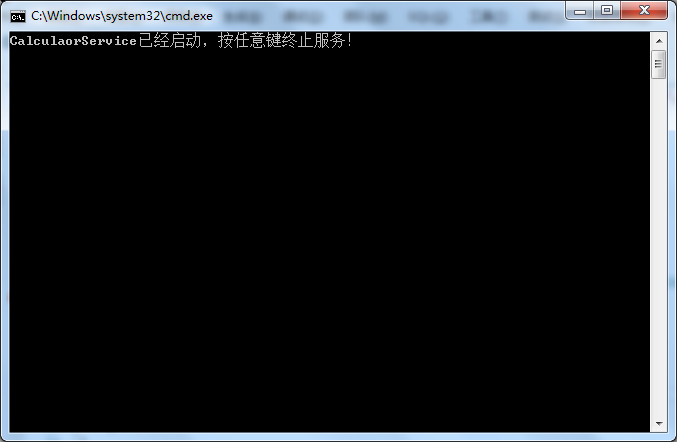
现在服务已经启动,下面实现客户端的调用。(Client层)
有两种实现方式:
1:客户端层引用服务端DLL(WCF_Console_Service)
   class Program

    {

        static void Main(string[] args)

        {

            using (ChannelFactory<IHelloWorld> channelFactory = new ChannelFactory<IHelloWorld>(new WSHttpBinding(), "http://127.0.0.1:9999/HelloWord"))

           {

               IHelloWorld proxy = channelFactory.CreateChannel();

               using (proxy as IDisposable)

               {

                   string t = proxy.GetData();

               }

           }

        }

    }
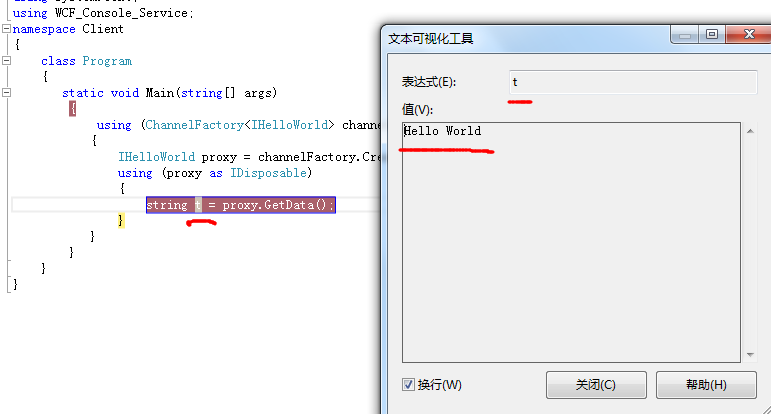
2:添加服务引用
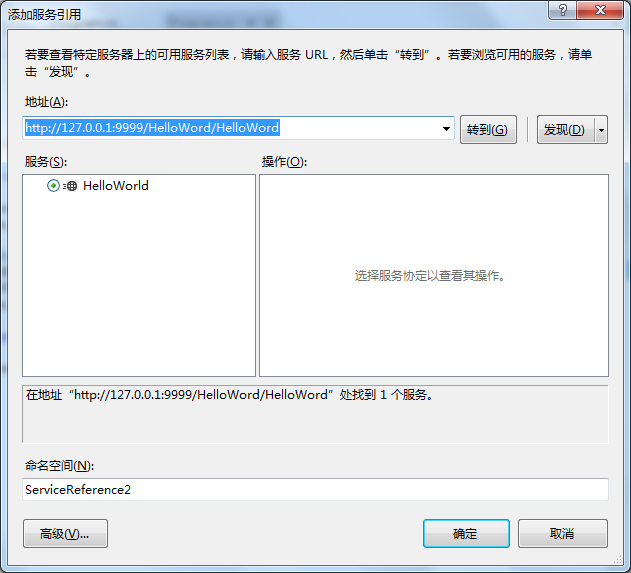
利用svcUtil.exe生成代码,输入http://127.0.0.1:9999/HelloWord/HelloWord参数(添加svcutil.exe见http://www.cnblogs.com/scottckt/archive/2012/05/20/2510716.html)
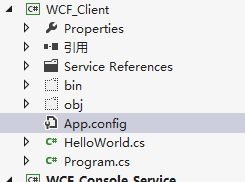
//------------------------------------------------------------------------------

// <auto-generated>

//     此代码由工具生成。

//     运行时版本:2.0.50727.5472

//

//     对此文件的更改可能会导致不正确的行为,并且如果

//     重新生成代码,这些更改将会丢失。

// </auto-generated>

//------------------------------------------------------------------------------

[System.CodeDom.Compiler.GeneratedCodeAttribute("System.ServiceModel", "3.0.0.0")]

[System.ServiceModel.ServiceContractAttribute(ConfigurationName="IHelloWorld")]

public interface IHelloWorld

{

    [System.ServiceModel.OperationContractAttribute(Action="http://tempuri.org/IHelloWorld/GetData", ReplyAction="http://tempuri.org/IHelloWorld/GetDataResponse")]

    string GetData();

}

[System.CodeDom.Compiler.GeneratedCodeAttribute("System.ServiceModel", "3.0.0.0")]

public interface IHelloWorldChannel : IHelloWorld, System.ServiceModel.IClientChannel

{

}

[System.Diagnostics.DebuggerStepThroughAttribute()]

[System.CodeDom.Compiler.GeneratedCodeAttribute("System.ServiceModel", "3.0.0.0")]

public partial class HelloWorldClient : System.ServiceModel.ClientBase<IHelloWorld>, IHelloWorld

{

    public HelloWorldClient()

    {

    }

    public HelloWorldClient(string endpointConfigurationName) :

            base(endpointConfigurationName)

    {

    }

    public HelloWorldClient(string endpointConfigurationName, string remoteAddress) :

            base(endpointConfigurationName, remoteAddress)

    {

    }

    public HelloWorldClient(string endpointConfigurationName, System.ServiceModel.EndpointAddress remoteAddress) :

            base(endpointConfigurationName, remoteAddress)

    {

    }

    public HelloWorldClient(System.ServiceModel.Channels.Binding binding, System.ServiceModel.EndpointAddress remoteAddress) :

            base(binding, remoteAddress)

    {

    }

    public string GetData()

    {

        return base.Channel.GetData();

    }

}
生成的config为
<?xml version="1.0" encoding="utf-8"?>

<configuration>

    <system.serviceModel>

        <bindings>

            <wsHttpBinding>

                <binding name="WSHttpBinding_IHelloWorld" closeTimeout="00:01:00"

                    openTimeout="00:01:00" receiveTimeout="00:10:00" sendTimeout="00:01:00"

                    bypassProxyOnLocal="false" transactionFlow="false" hostNameComparisonMode="StrongWildcard"

                    maxBufferPoolSize="524288" maxReceivedMessageSize="65536"

                    messageEncoding="Text" textEncoding="utf-8" useDefaultWebProxy="true"

                    allowCookies="false">

                    <readerQuotas maxDepth="32" maxStringContentLength="8192" maxArrayLength="16384"

                        maxBytesPerRead="4096" maxNameTableCharCount="16384" />

                    <reliableSession ordered="true" inactivityTimeout="00:10:00"

                        enabled="false" />

                    <security mode="Message">

                        <transport clientCredentialType="Windows" proxyCredentialType="None"

                            realm="" />

                        <message clientCredentialType="Windows" negotiateServiceCredential="true"

                            algorithmSuite="Default" establishSecurityContext="true" />

                    </security>

                </binding>

            </wsHttpBinding>

        </bindings>

        <client>

            <endpoint address="http://127.0.0.1:9999/HelloWord" binding="wsHttpBinding"

                bindingConfiguration="WSHttpBinding_IHelloWorld" contract="IHelloWorld"

                name="WSHttpBinding_IHelloWorld">

                <identity>

                    <userPrincipalName value="zb-PC\Administrator" />

                </identity>

            </endpoint>

        </client>

    </system.serviceModel>

</configuration>
Program代码为
   class Program

    {

        static void Main(string[] args)

        {

            HelloWorldClient client = new HelloWorldClient();

            string s = client.GetData();

            Console.WriteLine(s);

        }

    }
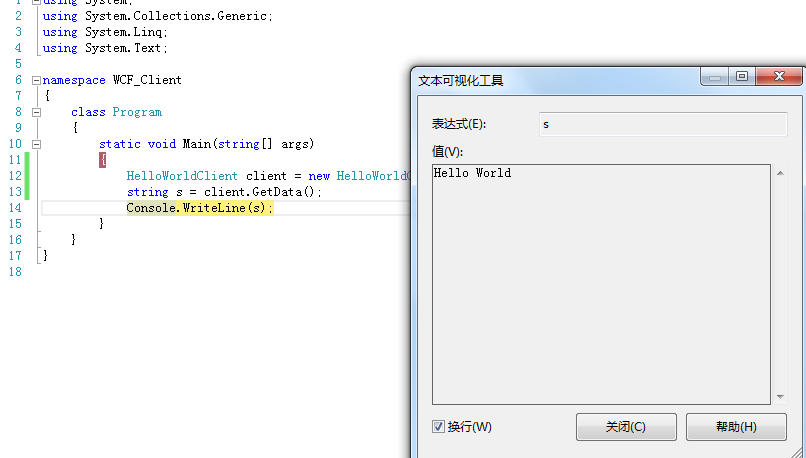
运行结果
以上为新手学习,高手大神就绕过啦,和大家一起学习
WCF学习--我的第一个WCF例子的更多相关文章
- WCF学习之旅——第一个WCF示例(一)
最近需要用到WCF,所以对WCF进行了解.在实践中学习新知识是最快的,接下来先做了一个简单的WCF服用应用示例. 本文的WCF服务应用功能很简单,却涵盖了一个完整WCF应用的基本结构.希望本文能对那些 ...
- WCF学习之旅——第一个WCF示例(三)
第五步:创建客户端 WCF应用服务被成功寄宿后,WCF服务应用便开始了服务调用请求的监听工作.此外,服务寄宿将服务描述通过元数据的形式发布出来,相应的客户端就可以获取这些元数据.接下来我们来创建客户端 ...
- WCF学习之旅——第一个WCF示例(二)
第四步:通过自我寄宿的方式寄宿服务 WCF服务需要依存一个运行着的进程(宿主),服务寄宿就是为服务指定一个宿主的过程.WCF是一个基于消息的通信框架,采用基于终结点(Endpoint)的通信手段. 终 ...
- WCF学习笔记——Day1:一个WCF demo
Visual Studio2017,使用IIS托管.文中涉及一些WCF的基本概念,e.g.服务契约.托管等.可以先阅读<WCF服务编程>第一章. 1.新建一个WCF服务库(WCF Serv ...
- WCF学习之旅—第三个示例之五(三十一)
上接WCF学习之旅—第三个示例之一(二十七) WCF学习之旅—第三个示例之二(二十八) WCF学习之旅—第三个示例之三(二十九) WCF学习 ...
- WCF学习之旅—TcpTrace工具(二十五)
前面的几篇文章,我们学习了怎么开发WCF应用程序与服务,也学习了如何进行WCF的配置.对于Web Service与WCF服务应用,服务端与客户端的通信是通过收发SOAP Message进行,我们如何有 ...
- WCF学习之旅—WCF第二个示例(五)
二.WCF服务端应用程序 第一步,创建WCF服务应用程序项目 打开Visual Studio 2015,在菜单上点击文件—>新建—>项目—>WCF服务应用程序.在弹出界面的“名称”对 ...
- WCF学习之旅—WCF第二个示例(七)
三.创建客户端应用程序 若要创建客户端应用程序,你将另外添加一个项目,添加对该项目的服务引用,配置数据源,并创建一个用户界面以显示服务中的数据. 在第一个步骤中,你将 Windows 窗体项目添加到解 ...
- WCF学习之旅—WCF第二个示例(六)
第五步,创建数据服务 在“解决方案资源管理器”中,使用鼠标左键选中“SCF.WcfService”项目,然后在菜单栏上,依次选择“项目”.“添加新项”. 在“添加新项”对话框中,选择“Web”节点,然 ...
随机推荐
- ThoughtWorks、Teambition、Trello、Slack、DevCloud 主流敏捷软件开发工具平台比较
在大公司做了6年程序员,2年项目经理的小王,正在创业公司迎来他焦虑的而立之年. 但是对于3个月前加入创业公司的决定,他现在有些烦躁和怀疑人生.在他过往的经验看来,公司新接的小项目,在过去的大公司里1个 ...
- C# 8.0 预览特性
初试C# 8.0 Visual Studio 2019的第一个预览版(使用Visual Studio 2019提高每个开发人员的工作效率)和.NET Core 3.0(宣布.NET Core 3预览1 ...
- spring boot——结合docker
spring boot——结合docker 前言 Docker 是一个开源的应用容器引擎,让开发者可以打包他们的应用以及依赖包到一个可移植的容器中,然后发布到任何流行的 liunx机器上,也可以实现虚 ...
- CMake生成OpenCV解决方案&&编译OpenCV源码
生成OpenCV工程需要用到CMake,所以第一步需要下载CMake软件,下载链接:CMake下载 目前最新的版本是3.7.1,这里选择下载Platform下的Windows win32-x86 ZI ...
- Linux性能测试 ulimit命令
功能说明:控制shell程序的资源. 语 法:ulimit [-aHS][-c <core文件上限>][-d <数据节区大小>][-f <文件大 小>][-m &l ...
- silverlight,WPF动画终极攻略之白云飘,坐车去旅游篇(Blend 4开发)
原文:silverlight,WPF动画终极攻略之白云飘,坐车去旅游篇(Blend 4开发) 这章有点长,所以我分成了两章.这一章主要是准备工作,差不多算美工篇吧,这章基本不会介绍多少动画效果,主要讲 ...
- PO、VO、BO、DTO、POJO、DAO之间的关系
J2EE开发中大量的专业缩略语很是让人迷惑,尤其是跟一些高手讨论问题的时候,三分钟就被人家满口的专业术语喷晕了,PO VO BO DTO POJO DAO,一大堆的就来了(听过老罗对这种现象的批判的朋 ...
- Program for Linux USB-devices driver step by step (ONE)
Program for Linux USB-devices driver 開始啃硬骨头~ 这里我打算一步步给出USB device driver 的demo.希望有心能可以共同交流学习. 希望认识很多 ...
- C# 操作XML文档 使用XmlDocument类方法
W3C制定了XML DOM标准.很多编程语言中多提供了支持W3C XML DOM标准的API.我在之前的文章中介绍过如何使用Javascript对XML文档进行加载与查询.在本文中,我来介绍一下.Ne ...
- 关于WPF你应该知道的2000件事
原文 关于WPF你应该知道的2000件事 以下列出了迄今为止为WPF博客所知的2,000件事所创建的所有帖子. 帖子总数= 1,201 动画 #7 - 基于属性的动画 #686 - 使用动画制作图像脉 ...