
吴裕雄 python 神经网络——TensorFlow 图、张量及会话
import tensorflow as tf

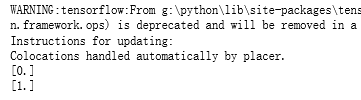
g1 = tf.Graph()

with g1.as_default():

    v = tf.get_variable("v", [1], initializer = tf.zeros_initializer()) # 设置初始值为0

g2 = tf.Graph()

with g2.as_default():

    v = tf.get_variable("v", [1], initializer = tf.ones_initializer())  # 设置初始值为1

with tf.Session(graph = g1) as sess:

    tf.global_variables_initializer().run()

    with tf.variable_scope("", reuse=True):

        print(sess.run(tf.get_variable("v")))

with tf.Session(graph = g2) as sess:

    tf.global_variables_initializer().run()

    with tf.variable_scope("", reuse=True):

        print(sess.run(tf.get_variable("v")))
import tensorflow as tf

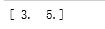
a = tf.constant([1.0, 2.0], name="a")

b = tf.constant([2.0, 3.0], name="b")

result = a + b

print result

sess = tf.InteractiveSession ()

print(result.eval())

sess.close()

# 创建一个会话。

sess = tf.Session()

# 使用会话得到之前计算的结果。

print(sess.run(result))

# 关闭会话使得本次运行中使用到的资源可以被释放。

sess.close()
with tf.Session() as sess:

    print(sess.run(result))

sess = tf.Session()

with sess.as_default():

     print(result.eval())

sess = tf.Session()

# 下面的两个命令有相同的功能。

print(sess.run(result))

print(result.eval(session=sess))

sess = tf.InteractiveSession ()

print(result.eval())

sess.close()

config=tf.ConfigProto(allow_soft_placement=True, log_device_placement=True)

sess1 = tf.InteractiveSession(config=config)

sess2 = tf.Session(config=config)
吴裕雄 python 神经网络——TensorFlow 图、张量及会话的更多相关文章
- 吴裕雄 python 神经网络——TensorFlow 循环神经网络处理MNIST手写数字数据集
#加载TF并导入数据集 import tensorflow as tf from tensorflow.contrib import rnn from tensorflow.examples.tuto ...
- 吴裕雄 python 神经网络——TensorFlow 训练过程的可视化 TensorBoard的应用
#训练过程的可视化 ,TensorBoard的应用 #导入模块并下载数据集 import tensorflow as tf from tensorflow.examples.tutorials.mni ...
- 吴裕雄 python 神经网络——TensorFlow 使用卷积神经网络训练和预测MNIST手写数据集
import tensorflow as tf import numpy as np from tensorflow.examples.tutorials.mnist import input_dat ...
- 吴裕雄 python 神经网络——TensorFlow实现搭建基础神经网络
import numpy as np import tensorflow as tf import matplotlib.pyplot as plt def add_layer(inputs, in_ ...
- 吴裕雄 python 神经网络——TensorFlow图片预处理调整图片
import numpy as np import tensorflow as tf import matplotlib.pyplot as plt def distort_color(image, ...
- 吴裕雄 python 神经网络TensorFlow实现LeNet模型处理手写数字识别MNIST数据集
import tensorflow as tf tf.reset_default_graph() # 配置神经网络的参数 INPUT_NODE = 784 OUTPUT_NODE = 10 IMAGE ...
- 吴裕雄 python 神经网络——TensorFlow pb文件保存方法
import tensorflow as tf from tensorflow.python.framework import graph_util v1 = tf.Variable(tf.const ...
- 吴裕雄 python 神经网络——TensorFlow ckpt文件保存方法
import tensorflow as tf v1 = tf.Variable(tf.random_normal([1], stddev=1, seed=1)) v2 = tf.Variable(t ...
- 吴裕雄 python 神经网络——TensorFlow 数据集高层操作
import tempfile import tensorflow as tf train_files = tf.train.match_filenames_once("E:\\output ...
随机推荐
- WPF 解决无边框产生的相关问题
原文:WPF 解决无边框产生的相关问题 最大化: 在设置WindowStyle="None" AllowsTransparency="True"后,最大化会覆盖 ...
- 快速将Navicat中数据表信息导出
1.使用navicat工具 2.新建查询 SELECT COLUMN_NAME 字段名, COLUMN_TYPE 数据类型, DATA_TYPE 字段类型, CHARACTER_MAXIMUM_L ...
- 剑指offer 面试题43. 1~n整数中1出现的次数
leetcode上也见过一样的题,当时不会做 看了一下解法是纯数学解法就没看,结果剑指offer上也出现了这道题,那还是认真看下吧 对于数字abcde,如果第一位是1,比如12345,即计算f(123 ...
- 手机大厂必备测试技能-GMS 认证
GMS认证背景 在之前的一篇文章有给各位小伙伴们科普过关于GMS的作用,http://www.lemfix.com/topics/266 "墙"内的小伙伴可能很少会用到这样的服务, ...
- 安装node.js后npm不可用
安装node.js后npm不可用 最近要用Vue做项目,依赖node.js,于是按官网下载安装node 下载地址:https://nodejs.org/en/download/ 网上也有很多教程这里就 ...
- count(*)、count(1)、count(column)的区别
count(*)对行的数目进行计算,包含NULL count(column)对特定的列的值具有的行数进行计算,不包含NULL值. count()还有一种使用方式,count(1)这个用法和count( ...
- List数组排序
import java.util.ArrayList; import java.util.Collections; import java.util.Comparator; import java.u ...
- testng如何实现用例间依赖
todo: 参考: https://www.cnblogs.com/znicy/p/6534893.html
- IE的css hack
#element { color:orange; } #element { *color: white; } /* IE6+7, doesn’t work in IE8/9 as IE7 */ #el ...
- 每天进步一点点------Allegro中SYMBOL种类
Allegro 中SYMBOL 种类在Allegro 中, Symbol 有五种, 它们分别是Package Symbol .Mechanical Symbol.Format Symbol.Shape ...