
WPF实现一个简单自定义管道
先看效果
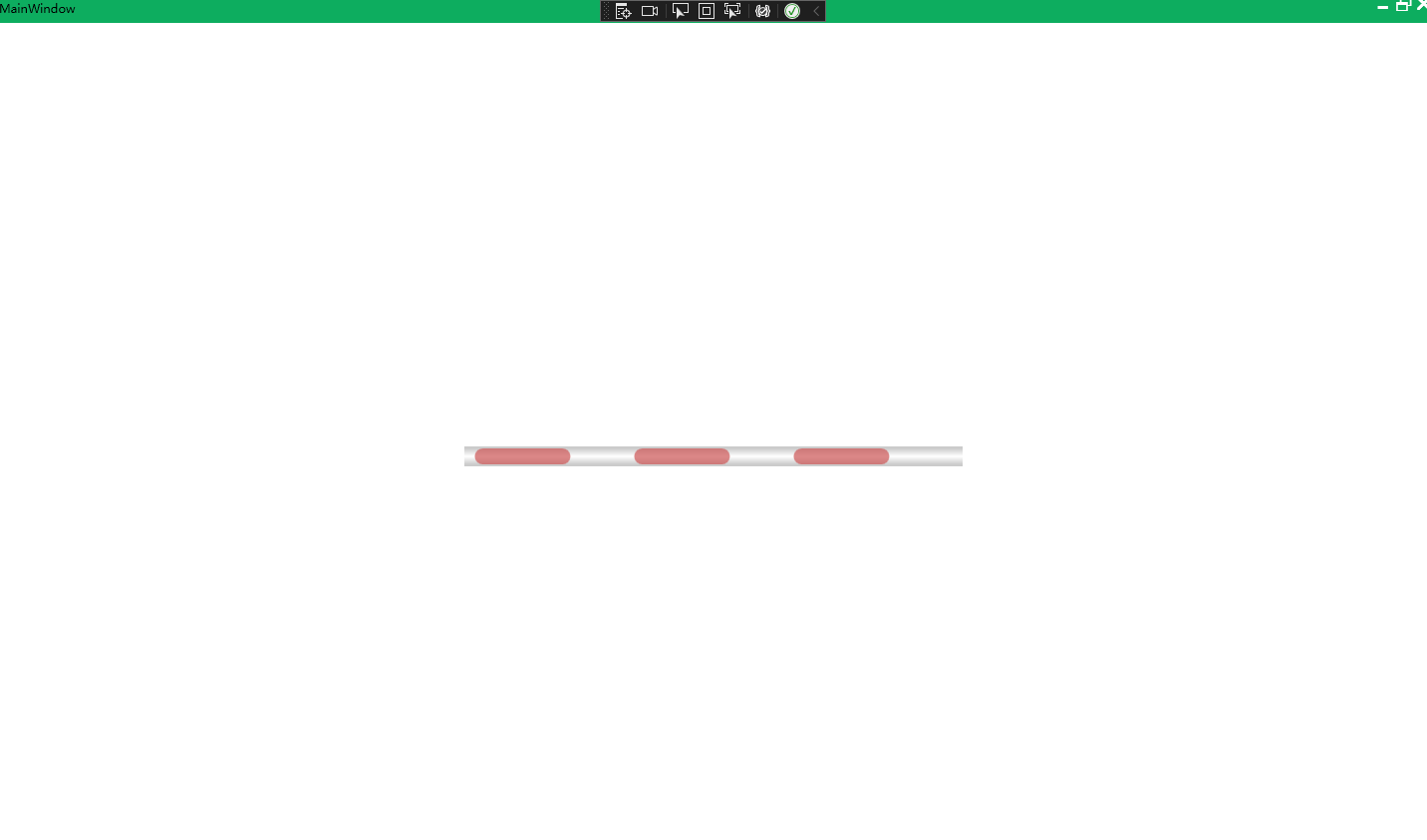
xaml代码
<UserControl x:Class="WPF控件测试.Control.Pipeline"

xmlns="http://schemas.microsoft.com/winfx/2006/xaml/presentation"

xmlns:x="http://schemas.microsoft.com/winfx/2006/xaml"

xmlns:mc="http://schemas.openxmlformats.org/markup-compatibility/2006"

xmlns:d="http://schemas.microsoft.com/expression/blend/2008"

xmlns:local="clr-namespace:WPF控件测试.Control"

mc:Ignorable="d"

d:DesignHeight="30" d:DesignWidth="800">

<Grid>

<VisualStateManager.VisualStateGroups>

<VisualStateGroup>

<VisualState x:Name="WELow">

<Storyboard RepeatBehavior="Forever">

<DoubleAnimation Duration="0:0:1" From="0" To="5"

Storyboard.TargetName="flow" Storyboard.TargetProperty="StrokeDashOffset"/>

</Storyboard>

</VisualState>

<VisualState x:Name="EELow">

<Storyboard RepeatBehavior="Forever">

<DoubleAnimation Duration="0:0:1" From="0" To="-5"

Storyboard.TargetName="flow" Storyboard.TargetProperty="StrokeDashOffset"/>

</Storyboard>

</VisualState>

</VisualStateGroup>

</VisualStateManager.VisualStateGroups>

<Border>

<Border.Background>

<LinearGradientBrush StartPoint="0.5,0" EndPoint="0.5,1">

<GradientStop Color="#ffcbcbcb" Offset="0.9"/>

<GradientStop Color="#ffffffff" Offset="0.5"/>

<GradientStop Color="#ffcbcbcb" Offset="0.1"/>

</LinearGradientBrush>

</Border.Background>

<Border Margin="2" Name="bord">

<Line X1="0" Y1="0" X2="{Binding ActualWidth, RelativeSource={RelativeSource Self}}" Y2="0" Stroke="#CD5555" StrokeThickness="{Binding ElementName=bord,Path=ActualHeight}"

VerticalAlignment="Center" StrokeDashArray="5" Stretch="UniformToFill" StrokeDashCap="Round" StrokeStartLineCap="Round"

Opacity="0.7" Name="flow"/>

</Border>

</Border>

</Grid>

</UserControl>
cs代码
public partial class Pipeline : UserControl

{

public Pipeline()

{

InitializeComponent();

}

public int Direction

{

get { return (int)GetValue(DirectionProperty); }

set { SetValue(DirectionProperty, value); }

}

// Using a DependencyProperty as the backing store for Direction. This enables animation, styling, binding, etc...

public static readonly DependencyProperty DirectionProperty =

DependencyProperty.Register("Direction", typeof(int), typeof(Pipeline), new PropertyMetadata(default(int),new PropertyChangedCallback(OnDirectionChanged)));

private static void OnDirectionChanged(DependencyObject d, DependencyPropertyChangedEventArgs e)

{

// VisualStateManager.GoToState(d as Pipeline, int.Parse(e.NewValue.ToString()!)==1? "WELow" : "EELow", false);

VisualStateManager.GoToState(d as Pipeline,int.Parse(e.NewValue.ToString()!) == 1 ? "WELow" : "EELow", false);

}

}
WPF实现一个简单自定义管道的更多相关文章
- Prism for WPF 搭建一个简单的模块化开发框架(五)添加聊天、消息模块
原文:Prism for WPF 搭建一个简单的模块化开发框架(五)添加聊天.消息模块 中秋节假期没事继续搞了搞 做了各聊天的模块,需要继续优化 第一步画页面 页面参考https://github.c ...
- Prism for WPF 搭建一个简单的模块化开发框架(三) 给TreeView加样式做成菜单
原文:Prism for WPF 搭建一个简单的模块化开发框架(三) 给TreeView加样式做成菜单 昨天晚上把TreeView的样式做了一下,今天给TreeView绑了数据,实现了切换页面功能 上 ...
- Prism for WPF 搭建一个简单的模块化开发框架 (一个节点)
原文:Prism for WPF 搭建一个简单的模块化开发框架 (一个节点) 这里我就只贴图不贴代码了,看看这个节点之前的效果 觉得做的好的地方可以范之前的文章看看 有好的建议也可以说说 填充数据 ...
- Prism for WPF 搭建一个简单的模块化开发框架(六)隐藏菜单、导航
原文:Prism for WPF 搭建一个简单的模块化开发框架(六)隐藏菜单.导航 这个实际上是在聊天之前做的,一起写了,也不分先后了 看一下效果图,上面是模块主导航,左侧是模块内菜单,现在加一下隐藏 ...
- Prism for WPF 搭建一个简单的模块化开发框架(四)异步调用WCF服务、WCF消息头添加安全验证Token
原文:Prism for WPF 搭建一个简单的模块化开发框架(四)异步调用WCF服务.WCF消息头添加安全验证Token 为什么选择wcf? 因为好像wcf和wpf就是哥俩,,, 为什么选择异步 ...
- Prism for WPF 搭建一个简单的模块化开发框架(二)
原文:Prism for WPF 搭建一个简单的模块化开发框架(二) 今天又有时间了,再改改,加了一些控件全局的样式 样式代码 <ResourceDictionary xmlns="h ...
- Prism for WPF 搭建一个简单的模块化开发框架(一)
原文:Prism for WPF 搭建一个简单的模块化开发框架(一) 最近闲来无事又想搞搞WPF..... 做个框架吧,可能又是半途而废....总是坚持不下来 不废话了, 先看一下工程结构 布局大概是 ...
- wpf编写一个简单的PDF转换的程序
wpf 调用Spire.Pdf将PDF文件转换为其他文件模式 首先在Nuget里下载该第三方包Spire.Pdf. 然后可以编写程序 //这里我调用的是解析成流模式,这是因为我要使用ProgressB ...
- c# WPF——完成一个简单的百度贴吧爬虫客户端
话不多说先上图 爬取10页大概500个帖子大概10s,500页2w多个帖子大概2min,由此可见性能并不是特别好,但是也没有很差. 好了话不多说,我们来一步一步实现这么个简易的客户端. 1.创建项目 ...
- UI设计篇·入门篇·绘制简单自定义矩形图/设置按钮按下弹起颜色变化/设置图形旋转
Android的基本控件和图形有限,难以满足所有的实际需要和设计需求,好在Android给出了相对完善的图形绘制和自定义控件的API,利用这些API,可以基本满足设计的需求. 自定义图像和控件的方法: ...
随机推荐
- css 网页置灰
body *{ -webkit-filter: grayscale(100%); /* webkit */ -moz-filter: grayscale(100%); /*firefox*/ -ms- ...
- Kubernetes--资源注解
资源注解 除了标签(label)之外,Pod与其他各种资源还能使用资源注解(annotation).与标签类似,注解也是"键值"类型的数据,不过它不能用于标签及挑选Kubernet ...
- Windows10 WSL开启SSH登录
1.wsl 安装ssh服务(使用的是ubuntu)sudo apt install openssh-server 2.修改配置文件sudo vim /etc/ssh/sshd_config关键的几处修 ...
- Python学习笔记(二)变量的使用
一.变量的定义 把程序运算的中间结果临时存到内存里,以备后面的代码继续调用,这几个名字的学名就叫做"变量" 可以把变量看做保存信息的容器,它们的目的是在内存中标注和存储数据,然后可 ...
- gitlab 安装以及汉化
转载 https://www.bbsmax.com/A/pRdBAg465n/
- go语言学习教程
go语言学习教程 集合了连接go routine.go连接redis.go连接kafka等示例 https://github.com/fastbpmn/go-study TRANSLATE with ...
- Python矩阵作图库matplotlib的初级使用(2)
基础介绍 matplotlib图形对象层级结构: 图形对象(figure) → 子图对象(axes) → 坐标轴对象(axis) → 定位器对象-刻度线(locator)/格式化器对象-刻度线标签(f ...
- LeNet,AlexNet,VGG,GoogLeNet
卷积神经网络-LeNet 理解channel:卷积操作完成后输出的 out_channels ,取决于卷积核的数量.此时的 out_channels 也会作为下一次卷积时的卷积核的 in_channe ...
- Springboot开发微信支付API-V3
前段时间因为项目需要对接微信支付,原本打算拿之前开发好的代码用就行了,后面发现微信支付升级API-V3了,和V2相比安全措施多了很多.最麻烦的就是各种证书的管理.加载. 作者自己也对接过N多支付系统了 ...
- 230219 Business 1-30
1: Packing for a Business TripWhat should I bring on this business trip?Haven't you been on a busine ...