
[UWP]了解模板化控件(8):ItemsControl
1. 模仿ItemsControl
顾名思义,ItemsControl是展示一组数据的控件,它是UWP UI系统中最重要的控件之一,和展示单一数据的ContentControl构成了UWP UI的绝大部分,ComboBox,ListBox,ListView,FlipView,GridView等控件都继承自ItemsControl。曾经有个说法:了解ContentControl和ItemsControl才能算是了解WPF的控件,这一点在UWP中也是一样的。

以我的经验来说,通过继承ItemsControl来自定义模板化控件十分常见,了解ItemsControl对将来要自定义模板化控件十分有用。但ItemsControl的话题十分庞大,和ContentControl不同,不太适合在这里展开讨论,所以这里就只是稍微讨论核心的思想。
虽然ItemsControl及其派生类很复杂,但核心功能很简单,所以索性自己实现一次。这次用于讨论的SimpleItemsControl直接继承自Control,简单地模仿ItemsControl实现了它基本的功能,通过这个控件可以一窥ItemsControl的原理。在XAML中使用如下,基本上和ItemsControl一样:
<StackPanel Margin="20" HorizontalAlignment="Center">

    <local:SimpleItemsControl>

       <ContentPresenter Content="this is ContentPresenter" />

         <Rectangle  Height="50"

                    HorizontalAlignment="Stretch"

                    Fill="Red" />

        <local:ScoreModel />

    </local:SimpleItemsControl>

    <local:SimpleItemsControl Margin="0,20,0,0">

        <local:SimpleItemsControl.ItemTemplate>

            <DataTemplate>

                <TextBlock Text="{Binding Score}" />

            </DataTemplate>

        </local:SimpleItemsControl.ItemTemplate>

        <local:ScoreModel Score="70" />

        <local:ScoreModel Score="80" />

        <local:ScoreModel Score="90" />

        <local:ScoreModel Score="100" />

    </local:SimpleItemsControl>

</StackPanel>
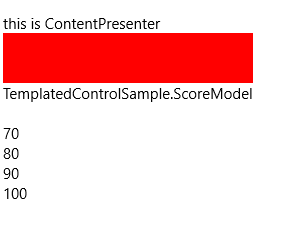
SimpleItemsControl除了没有ItemsSource、ItemsPanelTemplate及虚拟化等功能等功能外,拥有ItemsControl基本的功能。
1.1 Items属性
public ICollection<object> Items

	{

            get;

	}
实现这个控件首要的是提供Items属性,Items在构造函数中实例化成ObservableCollection类型,并且订阅它的CollectionChanged事件。注意:TemplatedControl中的集合属性通常都被可以被实例化成O巴塞尔,以便监视事件。
var items = new ObservableCollection<object>();

items.CollectionChanged += OnItemsCollectionChanged;

Items = items;
当然,为了可以在XAML的子节点直接添加元素,别忘了使用ContentPropertyAttribute。
[ContentProperty(Name = "Items")]
1.2 ItemsPanel
在ItemsControl中,ControlTemplate包含一个ItemsPresenter,它根据ItemsControl的ItemsPanelTemplate生成一个Panel,并且把Items中各个元素放入这个Panel。
SimpleItemsControl由于不是继承自ItemsControl,所以直接在ControlTemplate中放一个StackPanel代替。
_itemsPanel = GetTemplateChild(ItemsPanelPartName) as Panel;
<Style TargetType="local:SimpleItemsControl">

    <Setter Property="Template">

        <Setter.Value>

            <ControlTemplate TargetType="local:SimpleItemsControl">

                <StackPanel Background="{TemplateBinding Background}"

                            BorderBrush="{TemplateBinding BorderBrush}"

                            BorderThickness="{TemplateBinding BorderThickness}">

                    <StackPanel x:Name="ItemsPanel" />

                </StackPanel>

            </ControlTemplate>

        </Setter.Value>

    </Setter>

</Style>
ControlTemplate中只需要一个用于承载Items的ItemsPanel。在这个例子中使用StackPanel。
1.3 ItemTemplate属性
接下来需要提供public DataTemplate ItemTemplate { get; set; }属性,它定义了Items中每一项数据如何显示。事实上Items中每一项通常都默认使用ContentControl或ContentPresenter显示(譬如ListBoxItem和ComboxItem),所以ItemTemplate相当于它们的ContentTemplate。熟悉ContentControl的话会更容易理解这个属性。
1.4 GetContainerForItemOverride
//

// 摘要:

//     创建或标识用于显示给定项的元素。

//

// 返回结果:

//     用于显示给定项的元素。

protected virtual DependencyObject GetContainerForItemOverride()

{

    return new ContentPresenter();

}
ItemsControl使用GetContainerForItemOverride函数为Items中每一个item创建它的容器用于在UI上显示,默认是ContentPresenter。对于不是派生自UIElement的Item,它们无法直接在UI上显示,所以Container是必须的。
1.5 IsItemItsOwnContainerOverride
//

// 摘要:

//     确定指定项是否是为自身的容器,或是否可以作为其自身的容器。

//

// 参数:

//   item:

//     要检查的项。

//

// 返回结果:

//     如果项是其自己的容器(或可以作为自己的容器),则为 true;否则为 false。

protected virtual System.Boolean IsItemItsOwnContainerOverride(System.Object item)

{

    return item is ContentPresenter;

}
对于Items中的每一个item,ItemsControl在为它创建容器前都用这个方法检查它是不是就是容器本身。譬如这段XAML:
<local:SimpleItemsControl>

    <ContentPresenter Content="this is ContentPresenter" />

    <Rectangle  Height="50"

                Width="200"

                Fill="Red" />

    <local:ScoreModel />

</local:SimpleItemsControl>
在这段XAML中,ContentPresenter本身就是容器,所以它将直接被放到ItemsPanel中;Rectangle 不是容器,需要创建一个ContentPresenter,将Rectangle 设置为这个ContentPresenter的Content再放到ItemsPanel中。
1.6 PrepareContainerForItemOverride
//

// 摘要:

//     准备指定元素以显示指定项。

//

// 参数:

//   element:

//     用于显示指定项的元素。

//

//   item:

//     要显示的项。

protected virtual void PrepareContainerForItemOverride(DependencyObject element, System.Object item)

{

    ContentControl contentControl;

    ContentPresenter contentPresenter;

    if ((contentControl = element as ContentControl) != null)

    {

        contentControl.Content = item;

        contentControl.ContentTemplate = ItemTemplate;

    }

    else if ((contentPresenter = element as ContentPresenter) != null)

    {

        contentPresenter.Content = item;

        contentPresenter.ContentTemplate = ItemTemplate;

    }

}
这个方法在Item被呈现到UI前调用,目标是设定ContainerForItem中的某些值,譬如Content及ContentTemplate。其中参数element即之前创建的ContainerForItem(也有可能是Item自己)。在调用这个函数后ContainerForItem将被放到ItemsPanel中。
1.7 UpdateView
private void UpdateView()

{

    if (_itemsPanel == null)

        return;

    _itemsPanel.Children.Clear();

    foreach (var item in Items)

    {

        DependencyObject container;

        if (IsItemItsOwnContainerOverride(item))

        {

            container = item as DependencyObject;

        }

        else

        {

            container = GetContainerForItemOverride();

            PrepareContainerForItemOverride(container, item);

        }

        if (container is UIElement)

            _itemsPanel.Children.Add(container as UIElement);

    }

}
这个函数在OnItemsCollectionChanged或OnApplyTemplate后调用,简单地将ItemsPanel.Children清空,然后将所有Item创建容器(或者不创建)然后放进ItemsPanel。实际上ItemsControl的逻辑要复杂很多,这里只是个极端简化的版本。
到这一步一个简单的ItemsControl就完成了,总共只有100多行代码。
看到这里可能会有个疑惑,GetContainerForItemOverride、IsItemItsOwnContainerOverride、PrepareContainerForItemOverride三个函数明明做的是同一件事(为Item创建Container),为什么要将它们分开?这是因为ItemsControl支持使用UI虚拟化技术。
假设Items中包含一万个项,为这一万个项创建容器并放到ItemsPanel上,将会造成巨大的内存消耗。而且拖动ItemsControl的滚动条时由于要将所有一万个容器同时移动,对CPU造成很大的负担。UI虚拟化就是为了解决这两个问题。通常一个ItemsControl能同时显示的Item最多几十个,ItemsControl就只是创建几十个容器,在拖动滚动条时回收移出可视范围的容器,更改容器的内容(因为容器通常是ContentControl,所以就是更改ContentControl.Content),再重新放到可视范围里面。为了实现这个技术,Item和它的Container就不能是一一对应的,所以才会把上述的三个函数分离。
注意: UWP中ItemsControl默认没有启用UI虚拟化,但它的派生类有。
1.8 完整的代码
[TemplatePart(Name = ItemsPanelPartName, Type = typeof(Panel))]

[ContentProperty(Name = "Items")]

public class SimpleItemsControl : Control

{

    private const string ItemsPanelPartName = "ItemsPanel";

    public SimpleItemsControl()

    {

        this.DefaultStyleKey = typeof(SimpleItemsControl);

        var items = new ObservableCollection<object>();

        items.CollectionChanged += OnItemsCollectionChanged;

        Items = items;

    }

    /// <summary>

    /// 获取或设置ItemTemplate的值

    /// </summary>

    public DataTemplate ItemTemplate

    {

        get { return (DataTemplate)GetValue(ItemTemplateProperty); }

        set { SetValue(ItemTemplateProperty, value); }

    }

    /// <summary>

    /// 标识 ItemTemplate 依赖属性。

    /// </summary>

    public static readonly DependencyProperty ItemTemplateProperty =

        DependencyProperty.Register("ItemTemplate", typeof(DataTemplate), typeof(SimpleItemsControl), new PropertyMetadata(null, OnItemTemplateChanged));

    private static void OnItemTemplateChanged(DependencyObject obj, DependencyPropertyChangedEventArgs args)

    {

        SimpleItemsControl target = obj as SimpleItemsControl;

        DataTemplate oldValue = (DataTemplate)args.OldValue;

        DataTemplate newValue = (DataTemplate)args.NewValue;

        if (oldValue != newValue)

            target.OnItemTemplateChanged(oldValue, newValue);

    }

    protected virtual void OnItemTemplateChanged(DataTemplate oldValue, DataTemplate newValue)

    {

        UpdateView();

    }

    public ICollection<object> Items

    {

        get;

    }

    private Panel _itemsPanel;

    protected override void OnApplyTemplate()

    {

        base.OnApplyTemplate();

        _itemsPanel = GetTemplateChild(ItemsPanelPartName) as Panel;

        UpdateView();

    }

    private void OnItemsCollectionChanged(object sender, NotifyCollectionChangedEventArgs e)

    {

        UpdateView();

    }

    //

    // 摘要:

    //     创建或标识用于显示给定项的元素。

    //

    // 返回结果:

    //     用于显示给定项的元素。

    protected virtual DependencyObject GetContainerForItemOverride()

    {

        return new ContentPresenter();

    }

    //

    // 摘要:

    //     确定指定项是否是为自身的容器,或是否可以作为其自身的容器。

    //

    // 参数:

    //   item:

    //     要检查的项。

    //

    // 返回结果:

    //     如果项是其自己的容器(或可以作为自己的容器),则为 true;否则为 false。

    protected virtual System.Boolean IsItemItsOwnContainerOverride(System.Object item)

    {

        return item is ContentPresenter;

    }

    //

    // 摘要:

    //     准备指定元素以显示指定项。

    //

    // 参数:

    //   element:

    //     用于显示指定项的元素。

    //

    //   item:

    //     要显示的项。

    protected virtual void PrepareContainerForItemOverride(DependencyObject element, System.Object item)

    {

        ContentControl contentControl;

        ContentPresenter contentPresenter;

        if ((contentControl = element as ContentControl) != null)

        {

            contentControl.Content = item;

            contentControl.ContentTemplate = ItemTemplate;

        }

        else if ((contentPresenter = element as ContentPresenter) != null)

        {

            contentPresenter.Content = item;

            contentPresenter.ContentTemplate = ItemTemplate;

        }

    }

    private void UpdateView()

    {

        if (_itemsPanel == null)

            return;

        _itemsPanel.Children.Clear();

        foreach (var item in Items)

        {

            DependencyObject container;

            if (IsItemItsOwnContainerOverride(item))

            {

                container = item as DependencyObject;

            }

            else

            {

                container = GetContainerForItemOverride();

                PrepareContainerForItemOverride(container, item);

            }

            if (container is UIElement)

                _itemsPanel.Children.Add(container as UIElement);

        }

    }

}
2. 扩展ItemsControl
了解过ItemsControl的原理,或通过继承ItemsControl自定义控件就很简单了。譬如要实现这个功能:一个事件列表,自动为事件添加上触发的时间。效果如下:
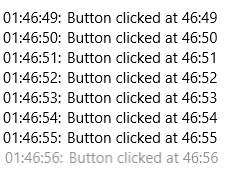
通过重载GetContainerForItemOverride、IsItemItsOwnContainerOverride、PrepareContainerForItemOverride这三个函数,很简单就能实现这个需求:
public class EventListView : ListView

{

    public EventListView()

    {

        _items = new Dictionary<object, DateTime>();

    }

    private Dictionary<object, DateTime> _items;

    protected override DependencyObject GetContainerForItemOverride()

    {

        return new HeaderedContentControl();

    }

    protected override bool IsItemItsOwnContainerOverride(object item)

    {

        return item is HeaderedContentControl;

    }

    protected override void PrepareContainerForItemOverride(DependencyObject element, object item)

    {

        base.PrepareContainerForItemOverride(element, item);

        var control = element as HeaderedContentControl;

        control.Content = item;

        if (_items.ContainsKey(item))

        {

            var time = _items[item];

            control.Header = time.ToString("HH:mm:ss")+": ";

        }

    }

    protected override void OnItemsChanged(object e)

    {

        base.OnItemsChanged(e);

        foreach (var item in Items)

        {

            if (_items.ContainsKey(item) == false)

                _items.Add(item, DateTime.Now);

        }

    }

}
public sealed class EventListViewItem : ListViewItem

{

    public EventListViewItem()

    {

        this.DefaultStyleKey = typeof(EventListViewItem);

    }

    public object Header

    {

        get { return (object)GetValue(HeaderProperty); }

        set { SetValue(HeaderProperty, value); }

    }

    // Using a DependencyProperty as the backing store for Header.  This enables animation, styling, binding, etc...

    public static readonly DependencyProperty HeaderProperty =

        DependencyProperty.Register("Header", typeof(object), typeof(EventListViewItem), new PropertyMetadata(null));

}
3. 集合类型属性
在XAML中使用集合类型属性,通常不会这样:
<ItemsControl>

    <ItemsControl.Items>

        <ItemCollection>

            <local:ScoreModel Score="70" />

            <local:ScoreModel Score="80" />

            <local:ScoreModel Score="90" />

            <local:ScoreModel Score="100" />

        </ItemCollection>

    </ItemsControl.Items>

</ItemsControl>
而是这样:
<ItemsControl>

    <ItemsControl.Items>

        <local:ScoreModel Score="70" />

        <local:ScoreModel Score="80" />

        <local:ScoreModel Score="90" />

        <local:ScoreModel Score="100" />

    </ItemsControl.Items>

</ItemsControl>
因为集合类型属性通常定义为只读的,不必也不可以对它赋值,只可以向它添加内容。
控件中的集合属性一般遵循以下做法:
3.1 只读属性
public IList<HubSection> Sections { get; }
这是Hub的Section属性,模板化控件中的集合类型属性基本都定义成这样的CLR属性。
3.2 监视更改通知
如果需要监视集合项更改,可以将属性定义为继承INotifyCollectionChanged 自的集合类型,譬如 ObservableCollection。
3.3 不使用依赖属性
因为集合属性通常不会使用动画,或者通过Style中的Setter赋值,而且依赖属性标识符是静态的,集合属性的初始值有可能引起单例的问题。集合属性通常在构造函数中初始化。
3.4 绑定到集合属性
通常不会绑定到集合属性,更常见的做法是如ItemsControl那样,绑定到ItemsSource。
[UWP]了解模板化控件(8):ItemsControl的更多相关文章
- [UWP]了解模板化控件(10):原则与技巧
1. 原则 推荐以符合以下原则的方式编写模板化控件: 选择合适的父类:选择合适的父类可以节省大量的工作,从UWP自带的控件中选择父类是最安全的做法,通常的选择是Control.ContentContr ...
- [UWP]了解模板化控件(1):基础知识
1.概述 UWP允许开发者通过两种方式创建自定义的控件:UserControl和TemplatedControl(模板化控件).这个主题主要讲述如何创建和理解模板化控件,目标是能理解模板化控件常见的知 ...
- [UWP]了解模板化控件(2):模仿ContentControl
ContentControl是最简单的TemplatedControl,而且它在UWP出场频率很高.ContentControl和Panel是VisualTree的基础,可以说几乎所有VisualTr ...
- [UWP]了解模板化控件(4):TemplatePart
1. TemplatePart TemplatePart(部件)是指ControlTemplate中的命名元素.控件逻辑预期这些部分存在于ControlTemplate中,并且使用protected ...
- [UWP]了解模板化控件(9):UI指南
1. 使用TemplateSettings统一外观 TemplateSettings提供一组只读属性,用于在新建ControlTemplate时使用这些约定的属性. 譬如,修改HeaderedCont ...
- [UWP]了解模板化控件(2.1):理解ContentControl
UWP的UI主要由布局容器和内容控件(ContentControl)组成.布局容器是指Grid.StackPanel等继承自Panel,可以拥有多个子元素的类.与此相对,ContentControl则 ...
- [UWP]了解模板化控件(3):实现HeaderedContentControl
1. 概述 来看看这段XMAL: <StackPanel Width="300"> <TextBox Header="TextBox" /&g ...
- [UWP]了解模板化控件(5):VisualState
1. 功能需求 使用TemplatePart实现上篇文章的两个需求(Header为空时隐藏HeaderContentPresenter,鼠标没有放在控件上时HeaderContentPresent半透 ...
- [UWP]了解模板化控件(5.2):UserControl vs. TemplatedControl
1. UserControl vs. TemplatedControl 在UWP中自定义控件常常会遇到这个问题:使用UserControl还是TemplatedControl来自定义控件. 1.1 使 ...
随机推荐
- jump堡垒机配置使用
一.用户管理 1)添加用户 点击用户管理 —> 查看用户 —> 添加用户 输入要添加的用户名,姓名,权限,Mail,并且发送邮件 —> 保存 查看添加的用户 查看用户邮件 邮件中包含 ...
- php文件管理与基础功能的实现
文件的基本操作 先来看一下PHP文件基础操作,请看强大注释 <body> <?php var_dump(filetype("./img/11.png")); // ...
- NGINX下配置CACHE-CONTROL
HTTP协议的Cache -Control指定请求和响应遵循的缓存机制.在请求消息或响应消息中设置 Cache-Control并不会影响另一个消息处理过程中的缓存处理过程.请求时的缓存指令包括no-c ...
- python多线程学习笔记(超详细)
python threading 多线程 一. Threading简介 首先看下面的没有用Threading的程序 ): s += i time.sleep( ): s += i time. ...
- python服务器环境搭建(3)——参数配置
前面我们已安装好了python服务器运行所需要的相关软件,而最重要最繁琐的就是参数配置,写这篇就踩了好多坑,花了好多时间,遇到了各种各样的问题.好了费话少说,直接进入本篇话题. PS:本人不是专业的运 ...
- vue的使用总结
1.vue的生命周期
- 4.在浏览器中解析XML
要在浏览器中解析获取XML数据,一般只需经过两个步骤:第一,将XML文档.XML字符串转化成XMLDoc对象.第二,使用JS操作XMLDoc对象. 3.1 将XML文档或XML字符串转化成XMLDoc ...
- 开启 .NET Core 的新篇章
今天开始要开始研究.net core了 规划了一下要学习的点: 1.CentOS7 2.asp.net Core 3.Linux的常用命令与运维 4.nginx的常用配置 5.mysql的使用与日常维 ...
- Wpf之布局
Wpf之布局 上一章大家有了自己的一个Hello World的wpf程序,今天咱们就一起走进WPF,一起来看看wpF的前台xaml这门语言的魅力. 写过web 的人都知道布局这个概念,在web中布局和 ...
- iOS图片填充UIImageView(contentMode)
本文主要形象的介绍一下UIView的contentMode属性: 核心代码 [self.prp_imageView setContentMode:UIViewContentModeScaleAspec ...