
Extensions in UWP Community Toolkit - ViewExtensions
概述
UWP Community Toolkit Extensions 中有一个为 View 提供的扩展 - View Extensions,本篇我们结合代码详细讲解 View Extensions 的实现。
View Extensions 包括了 ApplicationViewExtensions,StatusBarExtensions 和 TitleBarExtensions,让开发者可以方便的定制 AppView,StatusBar 和 TitleBar 的样式,接下来看看官方示例的截图:
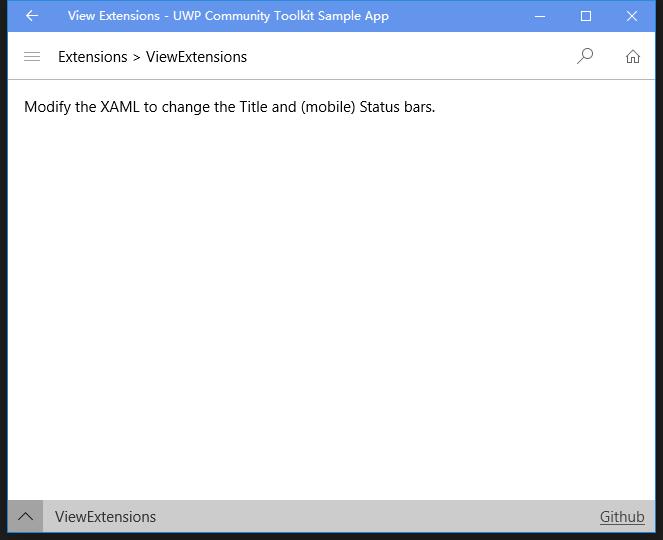
Doc: https://docs.microsoft.com/zh-cn/windows/uwpcommunitytoolkit/extensions/viewextensions
Namespace: Microsoft.Toolkit.Uwp.UI.Extensions; Nuget: Microsoft.Toolkit.Uwp.UI;
开发过程
代码分析
由于 ViewExtensions 分为 ApplicationViewExtensions,StatusBarExtensions 和 TitleBarExtensions 三个部分,我们分别来看一下:
1. ApplicationViewExtensions
先来看一下 ApplicationViewExtensions 的结构:

虽然有两个类组成,但其实 ApplicationView.cs 类是 Obsolete 的,所以现在在使用的是 ApplicationViewExtensions.cs,我们主要看一下这个类,先看一下类结构:
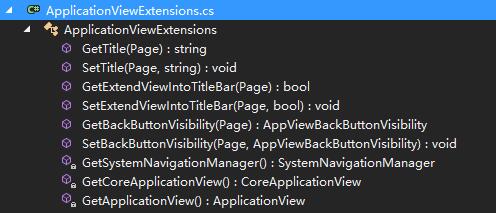
类的功能比较简单,我们主要来看这几个针对 Page 的附加属性对应的 get 和 set 方法:
- Title 对应 GetTitle(page) 和 SetTitle(page, value) - 获取和设置 App 标题,主要处理逻辑是通过 GetApplicationView() 获取 applicationView,然后再获取或设置 Title 属性;
- ExtendViewIntoTitleBar 对应 GetExtendViewIntoTitleBar(page) 和 SetExtendViewIntoTitleBar(page, value) - 获取和设置是否扩展视图到标题栏的布尔值,主要处理逻辑是通过 GetCoreApplicationView() 获取 CoreApplicationView,然后再获取或设置这个属性,如果为 True,那么 App 的 UI 会占据 TitleBar 的位置;
- BackButtonVisibility 对应 GetBackButtonVisibility(page) 和 SetBackButtonVisibility(page, value) - 获取和设置后退按钮是否可用,主要处理逻辑是通过 GetSystemNavigationManager() 来获取 SystemNavigationManager,然后再设置或获取这个属性;
2. StatusBarExtensions
先来看一下 StatusBarExtensions 的结构:

和 ApplicationViewExtensions 类似,StatusBar.cs 类是 Obsolete 的,所以现在在使用的是 StatusBarExtensions.cs,我们主要看一下这个类,先看一下类结构:
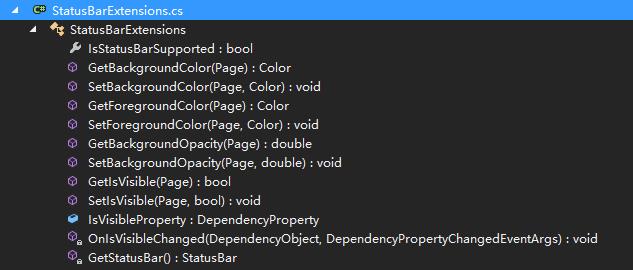
类的功能比较简单,我们主要来看这几个针对 Page 的附加属性对应的 get 和 set 方法:
- BackgroundColor 对应 GetBackgroundColor(page) 和 SetBackgroundColor(page, color) - 获取和设置 StatusBar 的背景颜色,主要通过 GetStatusBar() 获得 StatusBar 实例,然后获取或设置 BackgroundColor 属性;
- ForegroundColor 对应 GetForegroundColor(page) 和 SetForegroundColor(page, color) - 获取和设置 StatusBar 的前景颜色,主要通过 GetStatusBar() 获得 StatusBar 实例,然后获取或设置 ForegroundColor 属性;
- BackgroundOpaticy 对应 GetBackgroundOpaticy(page) 和 SetBackgroundOpaticy(page, color) - 获取和设置 StatusBar 的背景透明度,主要通过 GetStatusBar() 获得 StatusBar 实例,然后获取或设置 BackgroundOpaticy 属性;
- IsVisible 对应 GetIsVisible(page) 和 SetIsVisible(page, double) - 获取和设置 StatusBar 是否可见,获取方法通过获取 OccludedRect Height 的高度来判断是否可见,因为 InputPane 的 VIsible 属性只在 XBox 有效;设置是通过 Page 的 IsVisibleProperty 属性来设置;IsVisibleProperty 是类中定义的依赖属性,改变时触发 OnIsVisibleChanged 事件;
来看一下 OnIsVisibleChanged 事件的处理方法,通过调用 StatusBar 的 ShowAsync() 和 HideAsync() 方法来设置 StatusBar 的可见和不可见;
private static async void OnIsVisibleChanged(DependencyObject d, DependencyPropertyChangedEventArgs e)
{
    var statusBar = GetStatusBar();

    if (statusBar == null)
    {
        return;
    }

    bool isVisible = (bool)e.NewValue;

    if (isVisible)
    {
        await statusBar.ShowAsync();
    }
    else
    {
        await statusBar.HideAsync();
    }
}
3. TitleBarExtensions
先来看一下 TitleBarExtensions 的结构:
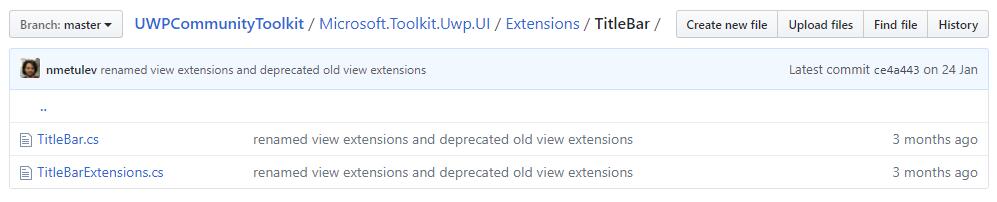
和 ApplicationViewExtensions 类似,TitleBar.cs 类是 Obsolete 的,所以现在在使用的是 TitleBarExtensions.cs,我们主要看一下这个类,先看一下类结构:
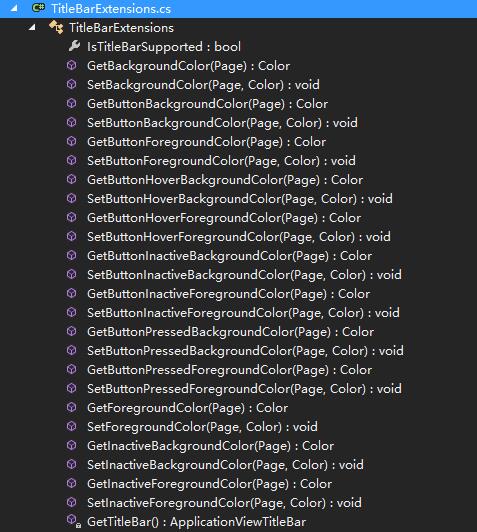
类的功能比较简单,我们主要来看这几个针对 Page 的附加属性对应的 get 和 set 方法:
- BackgroundColor 对应 GetBackgroundColor(page) 和 SetBackgroundColor(page, color) - 获取和设置 TitleBar 的背景色,主要通过 GetTitleBar() 方法获得 TitleBar 实例,然后获取或设置 BackgroundColor 属性;在显示上会覆盖 StatusBar 的对应属性;
- ButtonBackgroundColor 对应 GetButtonBackgroundColor(page) 和 SetButtonBackgroundColor(page, color) - 获取和设置 TitleBar 的右上角三个按钮的背景色,主要通过 GetTitleBar() 方法获得 TitleBar 实例,然后获取或设置 ButtonBackgroundColor 属性;
- ButtonForegroundColor 对应 GetButtonForegroundColor(page) 和 SetButtonForegroundColor(page, color) - 获取和设置 TitleBar 的右上角三个按钮的前景色,主要通过 GetTitleBar() 方法获得 TitleBar 实例,然后获取或设置 ButtonForegroundColor 属性;
- ButtonHoverBackgroundColor 对应 GetButtonHoverBackgroundColor(page) 和 SetButtonHoverBackgroundColor(page, color) - 获取和设置 TitleBar 的右上角三个按钮的鼠标悬浮背景色,主要通过 GetTitleBar() 方法获得 TitleBar 实例,然后获取或设置 ButtonHoverBackgroundColor 属性;
- ButtonHoverForegroundColor 对应 GetButtonHoverForegroundColor(page) 和 SetButtonHoverForegroundColor(page, color) - 获取和设置 TitleBar 的右上角三个按钮的鼠标悬浮前景色,主要通过 GetTitleBar() 方法获得 TitleBar 实例,然后获取或设置 ButtonHoverForegroundColor 属性;
- ButtonInactiveBackgroundColor 对应 GetButtonInactiveBackgroundColor(page) 和 SetButtonInactiveBackgroundColor(page, color) - 获取和设置 TitleBar 的右上角三个按钮在窗口非活动状态时的背景色,主要通过 GetTitleBar() 方法获得 TitleBar 实例,然后获取或设置 ButtonInactiveBackgroundColor 属性;
- ButtonInactiveForegroundColor 对应 GetButtonInactiveForegroundColor(page) 和 SetButtonInactiveForegroundColor(page, color) - 获取和设置 TitleBar 的右上角三个按钮在窗口非活动状态时的前景色,主要通过 GetTitleBar() 方法获得 TitleBar 实例,然后获取或设置 ButtonInactiveForegroundColor 属性;
- ButtonPressedBackgroundColor 对应 GetButtonPressedBackgroundColor(page) 和 SetButtonPressedBackgroundColor(page, color) - 获取和设置 TitleBar 的右上角三个按钮点击时的背景色,主要通过 GetTitleBar() 方法获得 TitleBar 实例,然后获取或设置 ButtonPressedBackgroundColor 属性;
- ButtonPressedForegroundColor 对应 GetButtonPressedForegroundColor(page) 和 SetButtonPressedForegroundColor(page, color) - 获取和设置 TitleBar 的右上角三个按钮点击时的前景色,主要通过 GetTitleBar() 方法获得 TitleBar 实例,然后获取或设置 ButtonPressedForegroundColor 属性;
- ForegroundColor 对应 GetForegroundColor(page) 和 SetForegroundColor(page, color) - 获取和设置 TitleBar 的前景色,主要通过 GetTitleBar() 方法获得 TitleBar 实例,然后获取或设置 ForegroundColor 属性;在显示上会覆盖 StatusBar 的对应属性;
- InactiveBackgroundColor 对应 GetInactiveBackgroundColor(page) 和 SetInactiveBackgroundColor(page, color) - 获取和设置 TitleBar 在窗口非活动时的背景色,主要通过 GetTitleBar() 方法获得 TitleBar 实例,然后获取或设置 InactiveBackgroundColor 属性;在显示上会覆盖 StatusBar 的对应属性;
- InactiveForegroundColor 对应 GetInactiveForegroundColor(page) 和 SetInactiveForegroundColor(page, color) - 获取和设置 TitleBar 在窗口非活动时的前景色,主要通过 GetTitleBar() 方法获得 TitleBar 实例,然后获取或设置 InactiveForegroundColor 属性;在显示上会覆盖 StatusBar 的对应属性;
调用示例
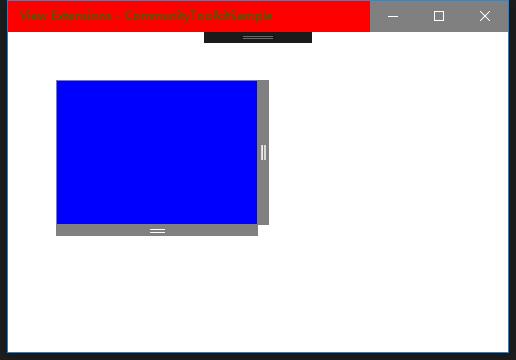
我们定制了 AppView 的 Title,StatusBar 和 TitleBar 的样式,看到运行图和设置的一致;
<Page
    x:Class="CommunityToolkitSample.MainPage"
    xmlns="http://schemas.microsoft.com/winfx/2006/xaml/presentation"
    xmlns:x="http://schemas.microsoft.com/winfx/2006/xaml"
    xmlns:d="http://schemas.microsoft.com/expression/blend/2008"
    xmlns:mc="http://schemas.openxmlformats.org/markup-compatibility/2006"
    xmlns:extensions="using:Microsoft.Toolkit.Uwp.UI.Extensions"
    xmlns:controls="using:Microsoft.Toolkit.Uwp.UI.Controls"
    extensions:ApplicationViewExtensions.Title="View Extensions"
      extensions:TitleBarExtensions.BackgroundColor="Red"
      extensions:TitleBarExtensions.ForegroundColor="Green"
      extensions:TitleBarExtensions.ButtonBackgroundColor="Gray"
      extensions:TitleBarExtensions.ButtonForegroundColor="White"
      extensions:StatusBarExtensions.BackgroundColor="CornflowerBlue"
      extensions:StatusBarExtensions.BackgroundOpacity="0.8"
      extensions:StatusBarExtensions.ForegroundColor="White"
      extensions:StatusBarExtensions.IsVisible="False"
    mc:Ignorable="d">
总结
到这里我们就把 UWP Community Toolkit Extensions 中的 View Extensions 的源代码实现过程和简单的调用示例讲解完成了,希望能对大家更好的理解和使用这个扩展有所帮助。欢迎大家多多交流,谢谢!
最后,再跟大家安利一下 UWPCommunityToolkit 的官方微博:https://weibo.com/u/6506046490, 大家可以通过微博关注最新动态。
衷心感谢 UWPCommunityToolkit 的作者们杰出的工作,Thank you so much, UWPCommunityToolkit authors!!!
Extensions in UWP Community Toolkit - ViewExtensions的更多相关文章
- Extensions in UWP Community Toolkit - Overview
概述 UWP Community Toolkit 中有一个 Extensions 的集合,它们可以帮助开发者实现很多基础功能,省去自己造轮子的过程,本篇我们先来看一下 Extensions 的功能都 ...
- Extensions in UWP Community Toolkit - FrameworkElement Extensions
概述 UWP Community Toolkit Extensions 中有一个为FrameworkElement 提供的扩展 - FrameworkElement Extensions,本篇我们结合 ...
- Extensions in UWP Community Toolkit - Mouse Cursor
概述 UWP Community Toolkit Extensions 中有一个为 Mouse 提供的扩展 - Mouse Cursor Extensions,本篇我们结合代码详细讲解 Mouse C ...
- Extensions in UWP Community Toolkit - SurfaceDialTextbox
概述 UWP Community Toolkit Extensions 中有一个为TextBox 提供的 SurfaceDial 扩展 - SurfaceDialTextbox,本篇我们结合代码详细讲 ...
- Extensions in UWP Community Toolkit - Visual Extensions
概述 UWP Community Toolkit Extensions 中有一个为可视元素提供的扩展 - VisualExtensions,本篇我们结合代码详细讲解 VisualExtensions ...
- Extensions in UWP Community Toolkit - WebViewExtensions
概述 UWP Community Toolkit Extensions 中有一个为 WebView 提供的扩展 - WebViewExtensions,本篇我们结合代码详细讲解 WebView Ext ...
- Extensions in UWP Community Toolkit - ListViewExtensions
概述 UWP Community Toolkit Extensions 中有一个为 ListView 提供的扩展 - ListViewExtensions,本篇我们结合代码详细讲解 ListView ...
- New UWP Community Toolkit
概述 UWP Community Toolkit 是一个 UWP App 自定义控件.应用服务和帮助方法的集合,能够很大程度的简化和指引开发者的开发工作,相信广大 UWPer 并不陌生. 下面是截取自 ...
- Animations in UWP Community Toolkit - Overview
概述 UWP Community Toolkit 中有一个 Animations 的集合,它们可以帮助开发者实现很多的动画,本篇我们先来看一下 Animations 的功能都有哪些,再后面会针对每一 ...
随机推荐
- firemonkey ListView DynamicAppearance
Go Up to FireMonkey Application Design Contents [hide] 1 Customizing the List View Appearance Prope ...
- 基于 Hexo + GitHub Pages 搭建个人博客(一)
前言:我的博客写作之路 15 年刚上大学,第一次接触公众号,就萌生了创建一个公众号写点东西,但最终不了了之. 很快到了 16 年,开始接触网上各大博客网站,接触最多的当属 CSDN,萌生了注册一个博客 ...
- MSF添加ms17-010的exp脚本及攻击复现
原文地址:https://bbs.ichunqiu.com/thread-23115-1-1.html 本来今晚在准备复现最近的CVE-2017-11882,由于本人是小白一枚,不知道这么添加msf的 ...
- 前端的UI设计与交互之布局篇
布局是页面构成的前提,是后续展开交互和视觉设计的基础.设计者在选择布局之前,需要注意以下几点原则:明确用户在此场景中完成的主要任务和需获取的决策信息.明确决策信息和操作的优先级及内容特点,选择合理布局 ...
- 用bat文件启动mongodb
bat文件是dos下的批处理文件.批处理文件是无格式的文本文件,它包含一条或多条命令.它的文件扩展名为 .bat 或 .cmd.在命令提示下键入批处理文件的名称,或者双击该批处理文件,系统就会调用cm ...
- NodeJS FTP模块使用
模块说明:https://www.npmjs.com/package/ftp 上传文件 建立连接-> 判断文件夹是否存在->创建文件夹->上传文件->End 核心代码: 连接参 ...
- k8s实战为aspnetcore.webapi微服务注入配置信息 - kubernetes
1.浅析k8s配置信息 Secret 以密文的形式存储数据,可以用来保存一些敏感信息,例如:OAuth tokens.私钥.密码.数据库连接.事件总线连接等. ConfigMap 以明文的形式存储数据 ...
- zabbix的各种键值
zabbix服务器端通过与zabbix agent通信来获取客户端服务器的数据,agent分为两个版本,在配置主机我们可以看到一个是agent,另一个是agent(active). agent:zab ...
- Matlab绘图基础——绘制向量图,二维三维(绘制参数曲线图)
------------------------------------------- %绘制向量场图 %例一 clear all;clc; [X,Y] = meshgrid(-2:.2:2,-3:. ...
- lua continue实现
--第一种 , do while true do == then break end -- 这里有一大堆代码 -- -- break end end --第二种 i = ) do if () then ...