
使用XIB实现一个简单view
技术处女贴 欢迎来探讨
转帖请注明出处 http://www.cnblogs.com/andy-zhou/p/4962135.html
微信: @Andy
1. AppDelegate
AppDelegate.h 文件
#import <UIKit/UIKit.h>

@interface AppDelegate : UIResponder <UIApplicationDelegate>

@property (strong, nonatomic) UIWindow *window;

@property (strong, nonatomic) UITabBarController *tabBarController;

@end
AppDelegate.m 文件
#import "AppDelegate.h"

#import "ViewController.h"

#import "AZImageViewController.h"

@interface AppDelegate ()

@end

@implementation AppDelegate

- (BOOL)application:(UIApplication *)application didFinishLaunchingWithOptions:(NSDictionary *)launchOptions {

    self.window = [[[UIWindow alloc] initWithFrame:[[UIScreen mainScreen] bounds]] autorelease];

//    ViewController *viewController = [[[ViewController alloc] initWithNibName:@"ViewController" bundle:nil] autorelease];

//    self.window.rootViewController = viewController;

    ViewController *viewController = [[[ViewController alloc] initWithNibName:@"ViewController" bundle:nil] autorelease];

    AZImageViewController *imageViewController = [[[AZImageViewController alloc] initWithNibName:@"AZImageViewController" bundle:nil] autorelease];

    self.tabBarController = [[UITabBarController new] autorelease];

    self.tabBarController.viewControllers = @[viewController, imageViewController];

    self.window.rootViewController = self.tabBarController;

    [self.window makeKeyAndVisible];

    return YES;

}

- (void)dealloc

{

    [_window release];

    [super dealloc];

}

@end
2. ViewController
ViewController.h 文件
#import <UIKit/UIKit.h>

@interface ViewController : UIViewController

@property (retain, nonatomic) IBOutlet UILabel *status;

- (IBAction)leftButtonPress:(id)sender;

- (IBAction)rightButtonPress:(id)sender;

- (IBAction)setStatusText:(id)sender;

@end
ViewController.m 文件
#import "ViewController.h"

@interface ViewController ()

@end

@implementation ViewController

@synthesize status;

- (id)initWithNibName:(NSString *)nibNameOrNil bundle:(NSBundle *)nibBundleOrNil {

    self = [super initWithNibName:nibNameOrNil bundle:nibBundleOrNil];

    if (self) {

        self.title = NSLocalizedString(@"First", @"First");

        self.tabBarItem.image = [UIImage imageNamed:@"first"];

    }

    return self;

}

- (void)viewDidLoad {

    [super viewDidLoad];

    // Do any additional setup after loading the view, typically from a nib.

}

- (void)didReceiveMemoryWarning {

    [super didReceiveMemoryWarning];

    // Dispose of any resources that can be recreated.

}

- (void)dealloc {

    [status release];

    [super dealloc];

}

- (IBAction)leftButtonPress:(id)sender {

     status.text = @"this is left btn";

}

- (IBAction)rightButtonPress:(id)sender {

    status.text = @"this is right btn";

}

- (IBAction)setStatusText:(id)sender {

    NSString *title = [sender titleForState:UIControlStateNormal];

//    status.text = title;

    NSString *newLableText = [NSString stringWithFormat:@"Hello, %@ btn", title];

    status.text = newLableText;

}

@end
ViewController.xib 文件
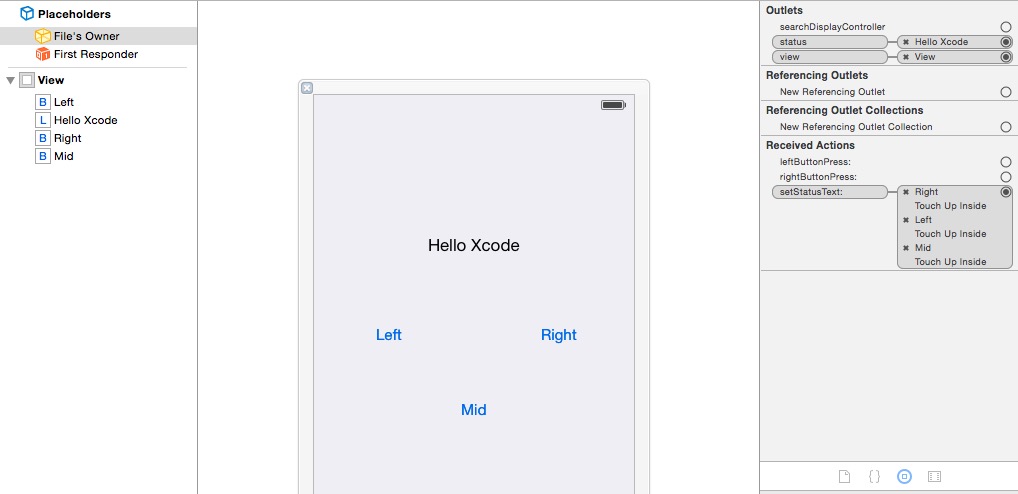
3. AZImageViewController
AZImageViewController.h 文件
#import "ViewController.h"

@interface AZImageViewController : ViewController

@property (retain, nonatomic) IBOutlet UITextField *nameField;

@property (retain, nonatomic) IBOutlet UITextField *numberField;

@property (retain, nonatomic) IBOutlet UILabel *rateLabel;

- (IBAction)textFieldDoneEditing:(id)sender;

- (IBAction)backgroudTap:(id)sender;

- (IBAction)sliderMove:(id)sender;

@end
AZImageViewController.m 文件
#import "AZImageViewController.h"

@interface AZImageViewController ()

@end

@implementation AZImageViewController

@synthesize nameField;

@synthesize numberField;

@synthesize rateLabel;

- (id)initWithNibName:(NSString *)nibNameOrNil bundle:(NSBundle *)nibBundleOrNil {

    self = [super initWithNibName:nibNameOrNil bundle:nibBundleOrNil];

    if (self) {

        self.title = NSLocalizedString(@"Second", @"Second");

        self.tabBarItem.image = [UIImage imageNamed:@"second"];

    }

    return self;

}

#pragma mark - Custom Method

- (IBAction)textFieldDoneEditing:(id)sender {

    [sender resignFirstResponder];

}

- (IBAction)backgroudTap:(id)sender {

    [nameField resignFirstResponder];

    [numberField resignFirstResponder];

}

- (IBAction)sliderMove:(id)sender {

    UISlider *slider = (UISlider *)sender;

    NSInteger _rate = (NSInteger)roundf(slider.value);

    rateLabel.text = [NSString stringWithFormat:@"%ld", _rate];

}

- (void)dealloc {

    [nameField release];

    [numberField release];

    [rateLabel release];

    [super dealloc];

}

@end
AZImageViewController.xib 文件
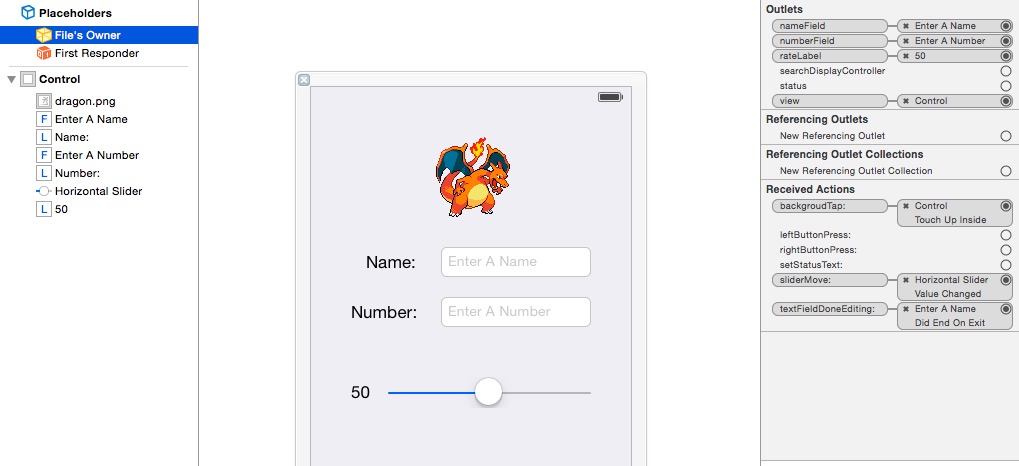
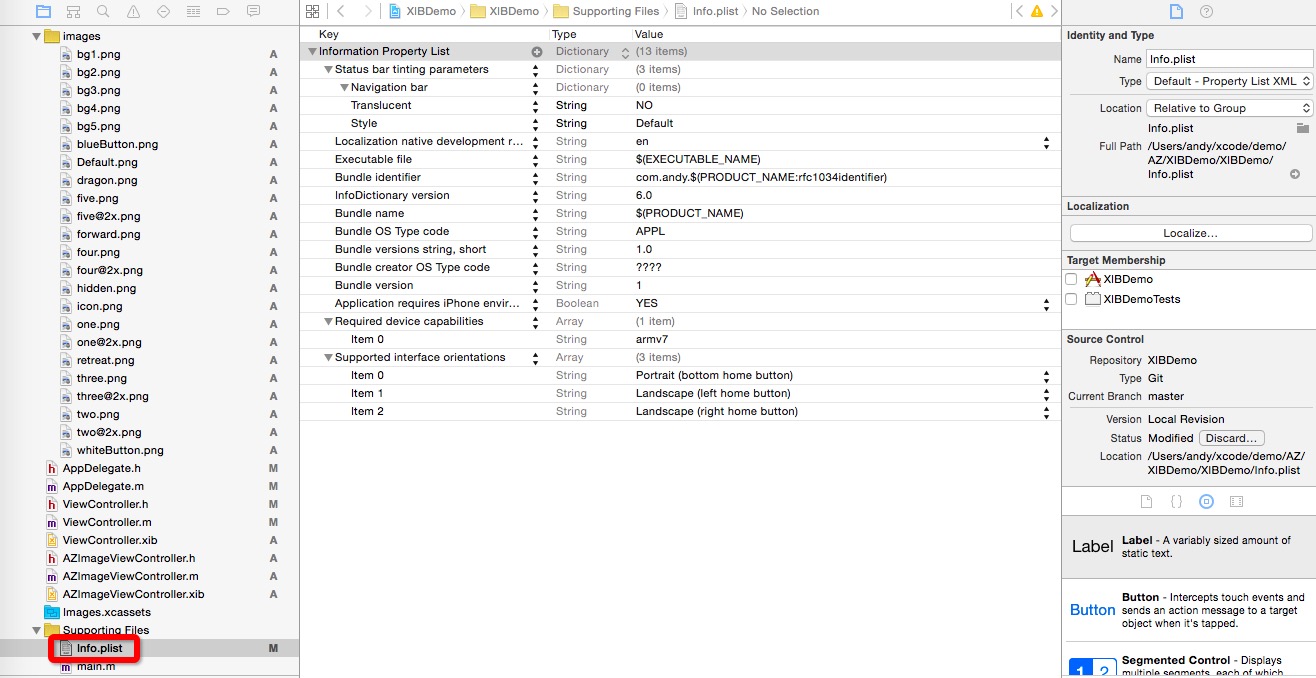
4. info_plist
使用XIB实现一个简单view的更多相关文章
- 使用xib封装一个自定义view的步骤
使用xib封装一个自定义view的步骤 1> 新建一个继承UIView的自定义view,假设类名叫做(MJAppView) 2> 新建一个MJAppView.xib文件来描述MJAppVi ...
- iOS开发UI篇—使用xib自定义UItableviewcell实现一个简单的团购应用界面布局
iOS开发UI篇—使用xib自定义UItableviewcell实现一个简单的团购应用界面布局 一.项目文件结构和plist文件 二.实现效果 三.代码示例 1.没有使用配套的类,而是直接使用xib文 ...
- iOS开发UI篇—使用picker View控件完成一个简单的选餐应用
iOS开发UI篇—使用picker View控件完成一个简单的选餐应用 一.实现效果 说明:点击随机按钮,能够自动选取,下方数据自动刷新. 二.实现思路 1.picker view的有默认高度为162 ...
- 相比xib 使用代码编排view 的一个明显的好处就是可以更好地重复使用已有代码,减少代码冗余。
相比xib 使用代码编排view 的一个明显的好处就是可以更好地重复使用已有代码,减少代码冗余.
- 在iOS中实现一个简单的画板App
在这个随笔中,我们要为iPhone实现一个简单的画板App. 首先需要指出的是,这个demo中使用QuarzCore进行绘画,而不是OpenGL.这两个都可以实现类似的功能,区别是OpenGL更快,但 ...
- 创建一个Table View
在本课程中,您将创建应用程序FoodTracker的主屏幕.您将创建第二个,表视图为主场景,列出了用户的菜谱.你会设计定制表格单元格显示每一个菜谱,它是这样的: 学习目标 在课程结束时,你将能够: 创 ...
- Objective-C ,ios,iphone开发基础:快速实现一个简单的图片查看器
新建一个single view 工程: 关闭ARC , 在.xib视图文件上拖放一个UIImageView 两个UIButton ,一个UISlider ,布局如图. 并为他们连线, UIImage ...
- IOS中一个简单的粒子效果实现
1.效果图展示 2.实现思路 1> 首先要实现上面的效果,第一步要处理的就是一个简单的画板,在View上面用鼠标滑动的时候画出线条,这个功能可使用UIBezierPath实现 2> 关于粒 ...
- CSharpGL(23)用ComputeShader实现一个简单的ParticleSimulator
CSharpGL(23)用ComputeShader实现一个简单的ParticleSimulator 我还没有用过Compute Shader,所以现在把红宝书里的例子拿来了,加入CSharpGL中. ...
随机推荐
- MVC 中使用EF
EF 1)简单查询 后台代码 using MvcApplication18.Models; using System; using System.Collections.Generic; using ...
- ASP.NET导入导出
//创建一个数据链接 // string strCon =" Provider=Microsoft.Jet.OLEDB.4.0;Data Source={0} ;Extended Prope ...
- 。JavaSE------初识Java
我的老师告诉我,命运眷顾有志者,天道酬勤. 有时在梦里幻想的再多终究也只是梦, 不如脚踏实地一步步往前走来的踏实. ------------------------------------------ ...
- External Storage 数据存储
一些数据存储的封装:http://hubingforever.blog.163.com/blog/static/17104057920129198236599/ External Storage数据存 ...
- mimikatz2.0抓取WINDOWS密码
看吾爱的,刚好问同事说这个也用过,以后内网渗透的话比较方便 http://www.52pojie.cn/thread-264895-1-1.html ========================= ...
- QT 加载c语言编译的动态库
QLibrary lib("./libprint.so");//库的路径if(lib.load()){ typedef void(*AddFunction)(char *st ...
- [SAP ABAP开发技术总结]数据引用(data references)、对象引用(object references)
声明:原创作品,转载时请注明文章来自SAP师太技术博客( 博/客/园www.cnblogs.com):www.cnblogs.com/jiangzhengjun,并以超链接形式标明文章原始出处,否则将 ...
- POJ 1142 Smith Numbers(史密斯数)
Description 题目描述 While skimming his phone directory in 1982, Albert Wilansky, a mathematician of Leh ...
- Python语言精要---下
函数: 可以返回多个值,其实函数是返回一个对象,就是元组,元组中的元素被拆分到各个结果变量中了 匿名函数: lambda函数,仅仅由单条语句组成,结果就是返回值 这种函数没有提供名称属性 闭包: cl ...
- LTE Module User Documentation(翻译1)——背景、使用概述、基本的仿真程序和配置LTE模型参数
LTE用户文档 (如有不当的地方,欢迎指正!) 1.背景 假定读者已经熟悉 ns-3 simulator ,能运行一般的仿真程序.如果不是的话,强烈推荐读者参考 [ns3tutorial]. 2. ...