
Messenger
Messenger
Mvvm提倡View和ViewModel的分离,View只负责数据的显示,业务逻辑都尽可能放到ViewModel中,
保持View.xaml.cs中的简洁(没有任何代码,除了构造函数),但是某些场景下也不必一定要保持
View.xaml.cs中的简洁,例如动画。我们想要让界面酷炫一点,就需要故事版,故事版中必然有与
控件相关的,动画和界面耦合很紧,并且也没有办法分离(或许有呢),我们大可直接将动画的逻辑
就放置到View的后台代码中,动画的触发条件由ViewModel发出,这里我们就要借助Messenger来完成
消息的传递。不仅View和ViewModel可以通过消息传递,ViewModel和ViewModel也需要通过消息传递
来完成一些交互。
Messenger的使用首先要注册消息,消息的标志是什么,消息接受的参数是什么,收到消息后执行什么
操作,然后是发送消息,向哪个消息发送信息,参数是什么。使用上和事件的订阅,事件的触发是一样的。
ViewModel之间通信
这个例子中,我们打开两个窗口(注意是同一个程序中,当初接触的时候不了解其原理,以为是Windows通信
机制中的消息通信,还傻傻的打开两个Application,让他们通信),窗口2向窗口1发送消息,窗口1显示接受到的消息。
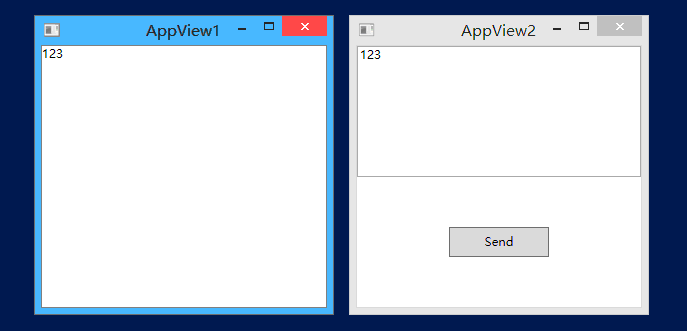
我们先来看窗口1是怎么注册消息的
AppView1.xaml
<Window x:Class="MessengerDemo.Views.AppView1"

    xmlns="http://schemas.microsoft.com/winfx/2006/xaml/presentation"

    xmlns:x="http://schemas.microsoft.com/winfx/2006/xaml"

    xmlns:d="http://schemas.microsoft.com/expression/blend/2008"

    xmlns:mc="http://schemas.openxmlformats.org/markup-compatibility/2006"

    xmlns:local="clr-namespace:MessengerDemo.Views" DataContext="{Binding Source={StaticResource Locator},Path=View1}"

    mc:Ignorable="d"

    Title="AppView1" Height="300" Width="300">

<Grid>

    <TextBlock Text="{Binding Msg}"></TextBlock>

</Grid>

</Window>
AppView1Model.cs
public class AppView1Model : ViewModelBase

{

    private string _msg;

    public string Msg

    {

        get

        {

            return _msg;

        }

        set

        {

            _msg = value;

            RaisePropertyChanged(() => Msg);

        }

    }

    public AppView1Model()

    {

        Messenger.Default.Register<string>(this, MessageToken.SendMessageToken, (msg) =>

        {

            Msg = msg;

        });

    }

}
注意:这里使用了一个静态类MessageToken,它的作用是定义消息标志,也是通过它区分不同的消息
MessageToken.cs
public static class MessageToken

{

    /// <summary>

    /// 动画信息标志

    /// </summary>

    public static readonly string AnimateMessageToken;

    /// <summary>

    /// 发送消息标志

    /// </summary>

    public static readonly string SendMessageToken;

    static MessageToken()

    {

        AnimateMessageToken = nameof(AnimateMessageToken);

        SendMessageToken = nameof(SendMessageToken);

    }

}
这里定义了2个消息类型,一个用于动画演示,一个用于发送消息。
我们再来看窗口2是怎么发送消息的
AppView2.xaml
<Window x:Class="MessengerDemo.Views.AppView2"

    xmlns="http://schemas.microsoft.com/winfx/2006/xaml/presentation"

    xmlns:x="http://schemas.microsoft.com/winfx/2006/xaml"

    xmlns:d="http://schemas.microsoft.com/expression/blend/2008"

    xmlns:mc="http://schemas.openxmlformats.org/markup-compatibility/2006"

    xmlns:local="clr-namespace:MessengerDemo.Views" DataContext="{Binding Source={StaticResource Locator},Path=View2}"

    mc:Ignorable="d"

    Title="AppView2" Height="300" Width="300">

<Grid>

    <Grid.RowDefinitions>

        <RowDefinition/>

        <RowDefinition/>

    </Grid.RowDefinitions>

    <TextBox Text="{Binding Msg}"></TextBox>

    <Button Width="100" Height="30" Grid.Row="1" Content="Send" Command="{Binding SendCommand}"></Button>

</Grid>

</Window>
AppView2Model.cs
public class AppView2Model : ViewModelBase

{

    private string _msg;

    public string Msg

    {

        get

        {

            return _msg;

        }

        set

        {

            _msg = value;

            RaisePropertyChanged(() => Msg);

        }

    }

    public RelayCommand SendCommand

    {

        get; set;

    }

    public AppView2Model()

    {

        SendCommand = new RelayCommand(() =>

          {

              Messenger.Default.Send<string>(Msg, MessageToken.SendMessageToken);

          });

    }

}
这里使用的是同一个MessageToken,这样调试的时候也方便查找。这里我们发送消息时,传递的参数是字符串,
这里可以传递任何类型。
View和ViewModel之间通信
在来看一个动画的,动画的逻辑都写到了View的后台代码中,ViewModel发送触发动画的消息
AppView1.xaml
<Grid>

    <Grid.RowDefinitions>

        <RowDefinition/>

        <RowDefinition/>

    </Grid.RowDefinitions>

    <TextBlock Text="{Binding Msg}"></TextBlock>

    <Button Width="100" Height="30" Grid.Row="1" Content="执行动画" x:Name="btn" Command="{Binding AnimateCommand}">

        <Button.RenderTransform>

            <TransformGroup>

                <ScaleTransform/>

                <SkewTransform/>

                <RotateTransform/>

                <TranslateTransform/>

            </TransformGroup>

        </Button.RenderTransform>

    </Button>

</Grid>
AppView1.xaml.cs
public partial class AppView1 : Window

{

    private Storyboard _storyboard;

    public AppView1()

    {

        InitializeComponent();

        _storyboard = new Storyboard();

        DoubleAnimation doubleAnimation = new DoubleAnimation(0, 180, new Duration(new TimeSpan(0, 0, 2)));

        Storyboard.SetTarget(doubleAnimation, btn);

        Storyboard.SetTargetProperty(doubleAnimation, new PropertyPath("(UIElement.RenderTransform).(TransformGroup.Children)[2].(RotateTransform.Angle)"));

        _storyboard.Children.Add(doubleAnimation);

        Messenger.Default.Register<string>(this, MessageToken.AnimateMessageToken, (msg) =>

         {

             _storyboard.Begin();

         });

    }

}
AppView1Model.cs
public class AppView1Model : ViewModelBase

{

    public RelayCommand AnimateCommand

    {

        get; set;

    }

    public AppView1Model()

    {

        AnimateCommand = new RelayCommand(() =>

          {

              Messenger.Default.Send<string>("", MessageToken.AnimateMessageToken);

          });

    }

}
当然,动画还是使用Blend编写要舒服一些。有了Messenger,使得ViewModel和ViewModel之间一定的
解耦,可以处理更复杂的情况。
Messenger的更多相关文章
- android:使用Messenger进行进程间通信(一)
Messenger简介 Messenger和AIDL是实现进程间通信(interprocess communication)的两种方式. 实际上,Messenger的实现其实是对AIDL的封装. Me ...
- Android进程间通讯之messenger
这两天在看binder,无意间在文档看到messenger这么个东西,感觉这个东西还挺有意思的,给大家分享一下. 平时一说进程间通讯,大家都会想到AIDL,其实messenger和AIDL作用一样,都 ...
- android 史上最简单易懂的跨进程通讯(Messenger)!
不需要AIDL也不需要复杂的ContentProvider,也不需要SharedPreferences或者共享存储文件! 只需要简单易懂的Messenger,它也称为信使,通过它可以在不同进程中传递m ...
- android:使用Messenger进行进程间通信(二)
//继续完善音乐播放器demo 相关文章: android:使用Messenger进行进程间通信(一):http://www.cnblogs.com/happyhacking/p/5318418.ht ...
- How secure FB Messenger is?
It's reported that FB Messenge is the most secure App for instant messaging service. Let's see if FB ...
- Android进程间的通信之Messenger
Android进程间的通信方式可以通过以下两种方式完成: Android接口定义语言(AIDL) 使用Messenger绑定服务 本文我们将学习使用Messenger绑定服务的方式进行进程间的通信. ...
- Android IPC机制之Messenger
Messenger:两个进程通过Messenger传递消息,进程1和进程2中都需要创建一个Messenger,创建过程:首先进程2需要创建一个服务, 并在服务中创建一个Messenger对象,进程1通 ...
- Facebook Messenger的后台架构是什么样的?
后台的架构是由前台的需求决定的.做 mobile app 的需求跟做 web app 是不一样的,比如 mobile app 对实时性的要求比较强(移动用户都没耐性),移动设备网络不稳定(要能做到断点 ...
- Android Programming: Pushing the Limits -- Chapter 7:Android IPC -- Messenger
Messenger类实际是对Aidl方式的一层封装.本文只是对如何在Service中使用Messenger类实现与客户端的通信进行讲解,对Messenger的底层不做说明.阅读Android Prog ...
随机推荐
- 基于分布式、服务化的maven项目文件规划
引言 此文不是纯粹介绍maven概念,而是介绍一个具体的maven项目文件规划 这个规划可能适合于研发比较复杂的业务,这些业务有分布式和服务化的需要. 这个规划能够解决因为分布式和服务化要求而引起的项 ...
- go sync.Mutex 设计思想与演化过程 (一)
go语言在云计算时代将会如日中天,还抱着.NET不放的人将会被淘汰.学习go语言和.NET完全不一样,它有非常简单的runtime 和 类库.最好的办法就是将整个源代码读一遍,这是我见过最简洁的系统类 ...
- 0013 Java学习笔记-面向对象-static、静态变量、静态方法、静态块、单例类
static可以修饰哪些成员 成员变量---可以修饰 构造方法---不可以 方法---可以修饰 初始化块---可以修饰 内部类(包括接口.枚举)---可以修饰 总的来说:静态成员不能访问非静态成员 静 ...
- 如何获得浏览器localStorage的剩余容量
一.如何获取localStorage的剩余容量 在H5大行其道的今天,localStorage(本地存储)对每一个前断攻城师来说都不太陌生.同时localStorage也给我们带来了极大的便利,不用于 ...
- apache指定的网络名不再可用
如果Apache的error.log还是出现大量的:Sat Dec 24 17:21:28 2006] [warn] (OS 64)指定的网络名不再可 用. : winnt_accept: Async ...
- Keil代码中for循环延时问题
- 在ASP.NET MVC中使用Unity进行依赖注入的三种方式
在ASP.NET MVC4中,为了在解开Controller和Model的耦合,我们通常需要在Controller激活系统中引入IoC,用于处理用户请求的 Controller,让Controller ...
- C++浅析——虚函数的动态和静态绑定
源自一道面试题,觉得很有意思 class CBase { public: virtual void PrintData(int nData = 111); }; void CBase::PrintDa ...
- C#基础---C#如何对Json字符串处理
Json字符串对于做web应用的应该很熟悉,其实在很多请求我们返回的都是Json字符串.那对于C#代码如何处理Json字符串呢,.Net封装了一个类叫做JavaScriptSerializer[MSD ...
- 求最大边/最小边的比值最小的路径 codevs 1001 舒适的路线
codevs 1001 舒适的路线 2006年 时间限制: 2 s 空间限制: 128000 KB 题目等级 : 钻石 Diamond 题目描述 Description Z小镇是一个景色宜人 ...