
kubernetes监控-prometheus(十六)
监控方案
|
cAdvisor+Heapster+InfluxDB+Grafana |
Y |
简单 |
容器监控 |
|
cAdvisor/exporter+Prometheus+Grafana |
Y |
扩展性好 |
容器,应用,主机全方面监控 |
Prometheus+Grafana是监控告警解决方案里的后起之秀
通过各种exporter采集不同维度的监控指标,并通过Prometheus支持的数据格式暴露出来,Prometheus定期pull数据并用Grafana展示,异常情况使用AlertManager告警。
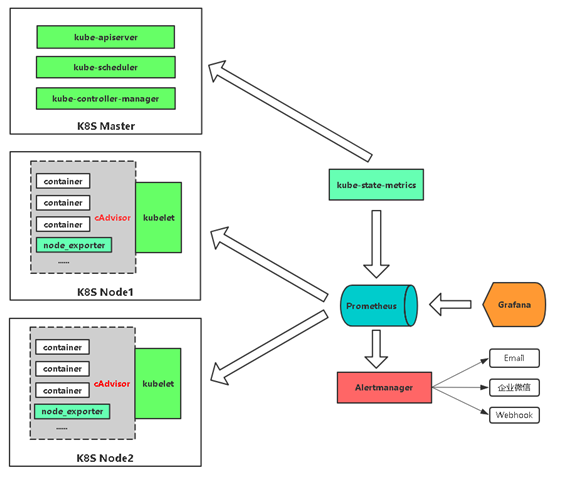
通过cadvisor采集容器、Pod相关的性能指标数据,并通过暴露的/metrics接口用prometheus抓取
通过prometheus-node-exporter采集主机的性能指标数据,并通过暴露的/metrics接口用prometheus抓取
应用侧自己采集容器中进程主动暴露的指标数据(暴露指标的功能由应用自己实现,并添加平台侧约定的annotation,平台侧负责根据annotation实现通过Prometheus的抓取)
通过kube-state-metrics采集k8s资源对象的状态指标数据,并通过暴露的/metrics接口用prometheus抓取
通过etcd、kubelet、kube-apiserver、kube-controller-manager、kube-scheduler自身暴露的/metrics获取节点上与k8s集群相关的一些特征指标数据。
实现思路
|
监控指标 |
具体实现 |
举例 |
|
Pod性能 |
cAdvisor |
容器CPU,内存利用率 |
|
Node性能 |
node-exporter |
节点CPU,内存利用率 |
|
K8S资源对象 |
kube-state-metrics |
Pod/Deployment/Service |
k8s中部署prometheus
官网:https://prometheus.io
下载yaml文件:https://github.com/kubernetes/kubernetes/tree/master/cluster/addons/prometheus
修改yaml文件
#使用nfs存储

[root@localhost prometheus]# kubectl get storageclass

NAME                  PROVISIONER      AGE

managed-nfs-storage   fuseim.pri/ifs   9d

[root@localhost prometheus]# sed -i s/standard/managed-nfs-storage/ prometheus-statefulset.yaml

#修改service使用NOdePort
[root@localhost prometheus]# vim prometheus-service.yaml
。。。。
spec:
  type: NodePort
  ports:
    - name: http
      port: 9090
      protocol: TCP
      targetPort: 9090
  selector:
    k8s-app: prometheus
启动prometheus
[root@localhost prometheus]# kubectl apply -f prometheus-rbac.yaml

serviceaccount/prometheus created

clusterrole.rbac.authorization.k8s.io/prometheus created

clusterrolebinding.rbac.authorization.k8s.io/prometheus created

[root@localhost prometheus]# kubectl apply -f prometheus-configmap.yaml

configmap/prometheus-config created

[root@localhost prometheus]# kubectl apply -f prometheus-statefulset.yaml

statefulset.apps/prometheus created

[root@localhost prometheus]# vim prometheus-service.yaml

[root@localhost prometheus]# kubectl apply -f prometheus-service.yaml

service/prometheus created
查看
[root@localhost prometheus]# kubectl get pod,svc -n kube-system

NAME                                        READY   STATUS    RESTARTS   AGE

pod/coredns-5b8c57999b-z9jh8                /     Running             16d

pod/kubernetes-dashboard-644c96f9c6-bvw8w   /     Running             16d

pod/prometheus-                            /     Running             2m40s

NAME                           TYPE        CLUSTER-IP   EXTERNAL-IP   PORT(S)          AGE

service/kube-dns               ClusterIP   10.0.0.2     <none>        /UDP,/TCP    16d

service/kubernetes-dashboard   NodePort    10.0.0.84    <none>        :/TCP    16d

service/prometheus             NodePort    10.0.0.89    <none>        :/TCP   39s

[root@localhost prometheus]# kubectl get pv,pvc -n kube-system

NAME                                                                                                 CAPACITY   ACCESS MODES   RECLAIM POLICY   STATUS   CLAIM                                      STORAGECLASS          REASON   AGE

persistentvolume/kube-system-prometheus-data-prometheus--pvc-0e92f36c-8d9e-11e9-b018-525400828c1f   16Gi       RWO            Delete           Bound    kube-system/prometheus-data-prometheus-   managed-nfs-storage            25m

NAME                                                 STATUS   VOLUME                                                                              CAPACITY   ACCESS MODES   STORAGECLASS          AGE

persistentvolumeclaim/prometheus-data-prometheus-   Bound    kube-system-prometheus-data-prometheus--pvc-0e92f36c-8d9e-11e9-b018-525400828c1f   16Gi       RWO            managed-nfs-storage   25m
访问
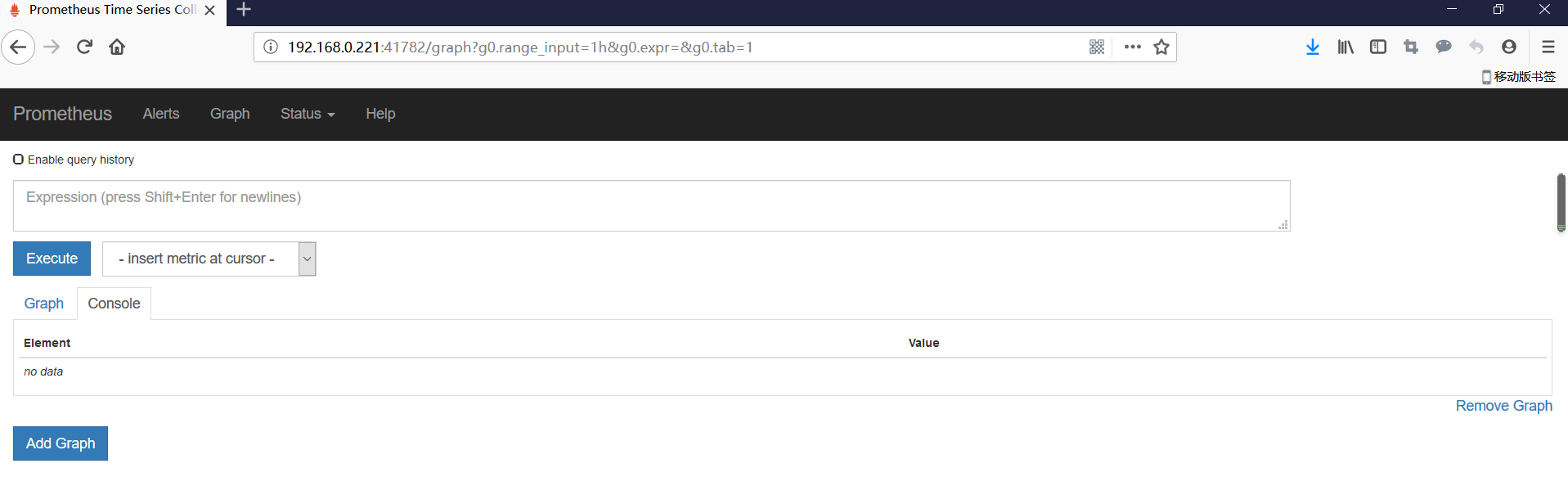
部署grafana
[root@localhost prometheus]# cat grafana.yaml

apiVersion: apps/v1

kind: StatefulSet

metadata:

  name: grafana

  namespace: kube-system

spec:

  serviceName: "grafana"

  replicas: 1

  selector:

    matchLabels:

      app: grafana

  template:

    metadata:

      labels:

        app: grafana

    spec:

      containers:

        - name: grafana

          image: grafana/grafana

          resources:

            limits:

              cpu: 100m

              memory: 256Mi

            requests:

              cpu: 100m

              memory: 256Mi

          volumeMounts:

            - name: grafana-data

              mountPath: /var/lib/grafana

              subPath: grafana

      securityContext:

        fsGroup: 472

        runAsUser: 472

  volumeClaimTemplates:

  - metadata:

      name: grafana-data

    spec:

      storageClassName: managed-nfs-storage

      accessModes:

        - ReadWriteOnce

      resources:

        requests:

          storage: "1Gi"

---

apiVersion: v1

kind: Service

metadata:

  name: grafana

  namespace: kube-system

spec:

  type: NodePort

  ports:

  - port: 80

    targetPort: 3000

    nodePort: 30007

  selector:

    app: grafana

[root@localhost prometheus]# kubectl apply -f grafana.yaml

statefulset.apps/grafana created

service/grafana created

[root@localhost prometheus]# kubectl get pod,svc -n kube-system

NAME                                        READY   STATUS    RESTARTS   AGE

pod/coredns-5b8c57999b-z9jh8                1/1     Running   1          17d

pod/grafana-0                               1/1     Running   0          45s

pod/kubernetes-dashboard-644c96f9c6-bvw8w   1/1     Running   1          17d

pod/prometheus-0                            2/2     Running   0          25h

NAME                           TYPE        CLUSTER-IP   EXTERNAL-IP   PORT(S)          AGE

service/grafana                NodePort    10.0.0.78    <none>        80:30007/TCP     44s

service/kube-dns               ClusterIP   10.0.0.2     <none>        53/UDP,53/TCP    17d

service/kubernetes-dashboard   NodePort    10.0.0.84    <none>        443:30001/TCP    17d

service/prometheus             NodePort    10.0.0.89    <none>        9090:41782/TCP   25h
访问

监控k8s集群中的pod
kubelet的节点使用cAdvisor提供的metrics接口获取该节点所有容器相关的性能指标数据。
暴露接口地址:
https://NodeIP:10255/metrics/cadvisor
https://NodeIP:10250/metrics/cadvisor
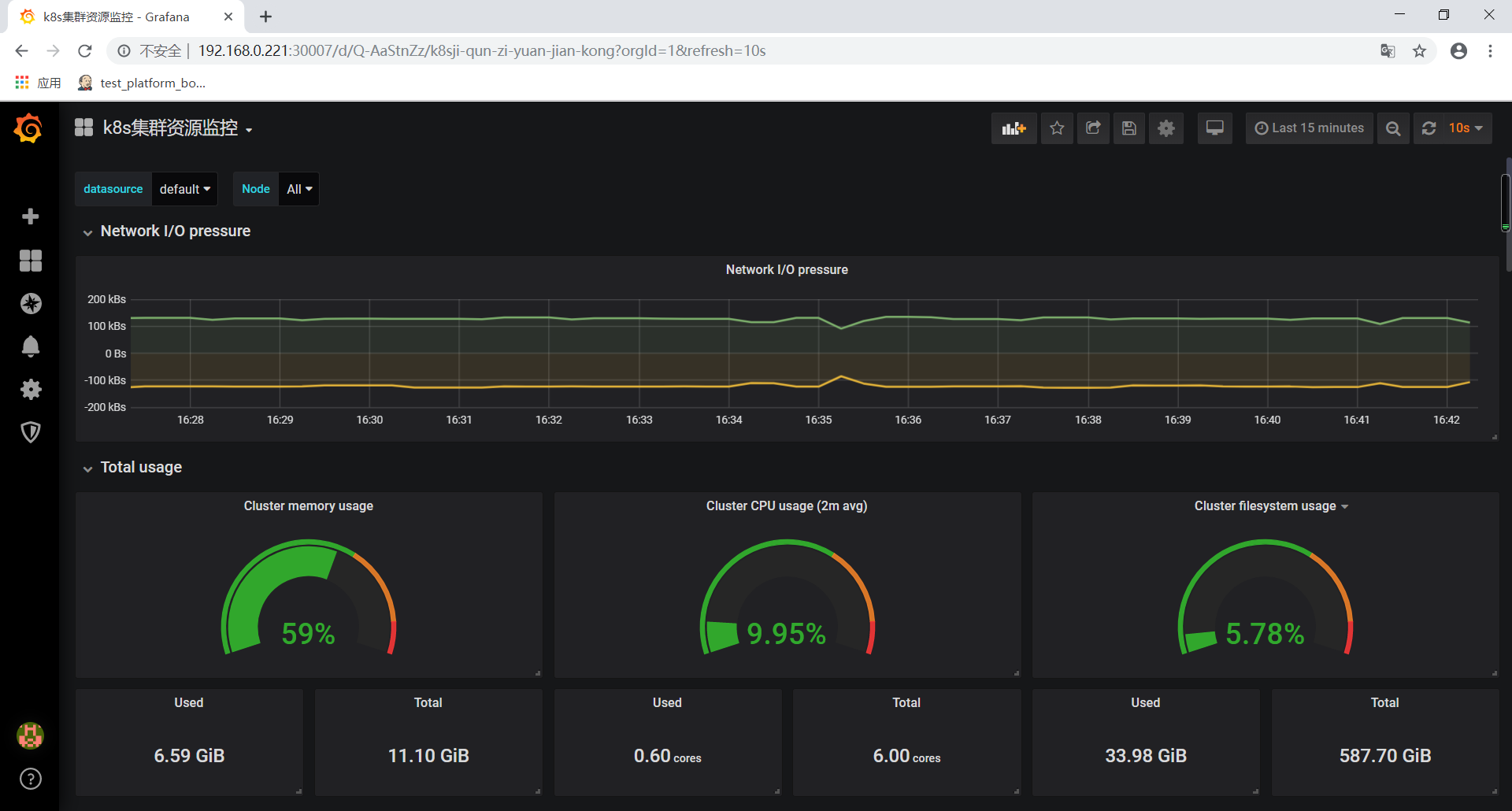
导入grafana模板
https://grafana.com/grafana/download
集群资源监控:3119
监控k8s集群中的node
使用文档:https://prometheus.io/docs/guides/node-exporter/
GitHub:https://github.com/prometheus/node_exporter
exporter列表:https://prometheus.io/docs/instrumenting/exporters/
所有node节点部署node_exporter
wget https://github.com/prometheus/node_exporter/releases/download/v0.17.0/node_exporter-0.17.0.linux-amd64.tar.gz

tar zxf node_exporter-0.17..linux-amd64.tar.gz

mv node_exporter-0.17..linux-amd64 /usr/local/node_exporter

cat <<EOF >/usr/lib/systemd/system/node_exporter.service

[Unit]

Description=https://prometheus.io

[Service]

Restart=on-failure

ExecStart=/usr/local/node_exporter/node_exporter --collector.systemd --collector.systemd.unit-whitelist=(docker|kubelet|kube-proxy|flanneld).service

[Install]

WantedBy=multi-user.target

EOF

systemctl daemon-reload

systemctl enable node_exporter

systemctl restart node_exporter
修改prometheus-configmap.yaml,并重新部署

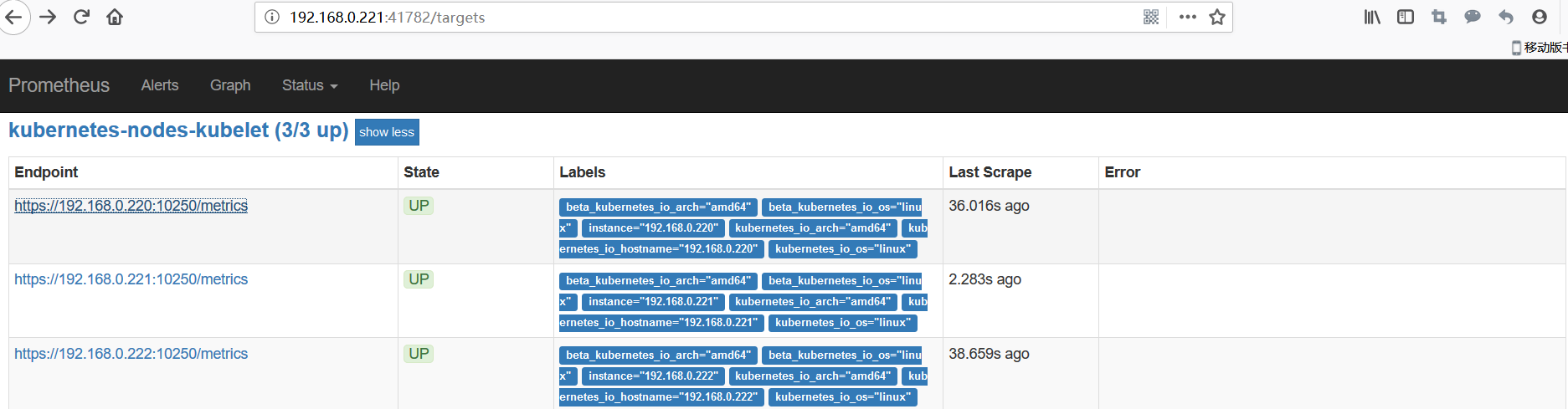
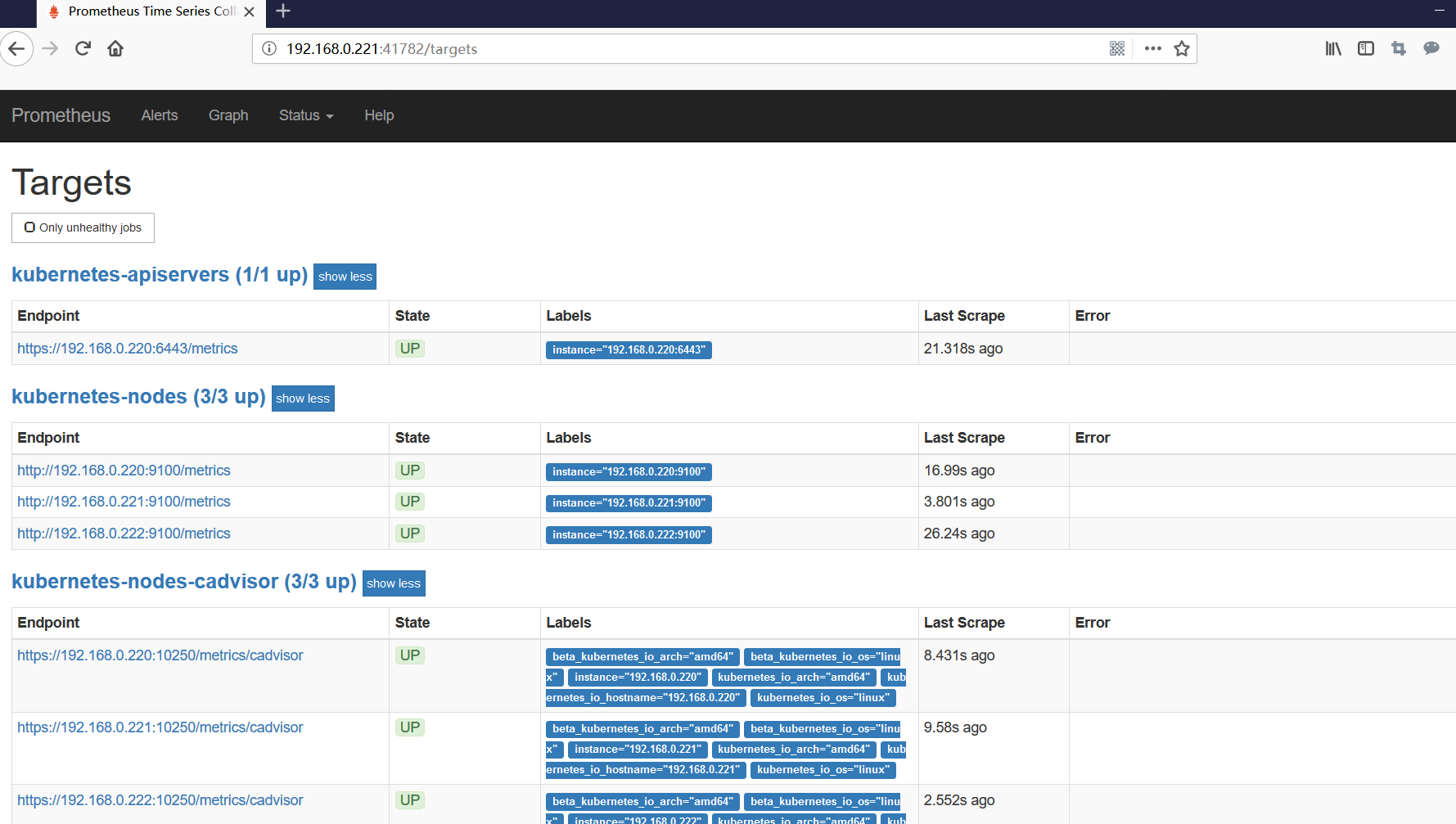
查看prometheus是否收集到kubernetes-nodes
导入grafana模板
集群资源监控:9276

监控k8s资源对象
https://github.com/kubernetes/kube-state-metrics
kube-state-metrics是一个简单的服务,它监听Kubernetes API服务器并生成有关对象状态的指标。它不关注单个Kubernetes组件的运行状况,而是关注内部各种对象的运行状况,例如部署,节点和容器。
[root@localhost prometheus]# kubectl apply -f kube-state-metrics-rbac.yaml

serviceaccount/kube-state-metrics created

clusterrole.rbac.authorization.k8s.io/kube-state-metrics created

role.rbac.authorization.k8s.io/kube-state-metrics-resizer created

clusterrolebinding.rbac.authorization.k8s.io/kube-state-metrics created

rolebinding.rbac.authorization.k8s.io/kube-state-metrics created

[root@localhost prometheus]# vim kube-state-metrics-deployment.yaml

[root@localhost prometheus]# kubectl apply -f kube-state-metrics-deployment.yaml

deployment.apps/kube-state-metrics created

configmap/kube-state-metrics-config created

[root@localhost prometheus]# kubectl apply -f kube-state-metrics-service.yaml

service/kube-state-metrics created
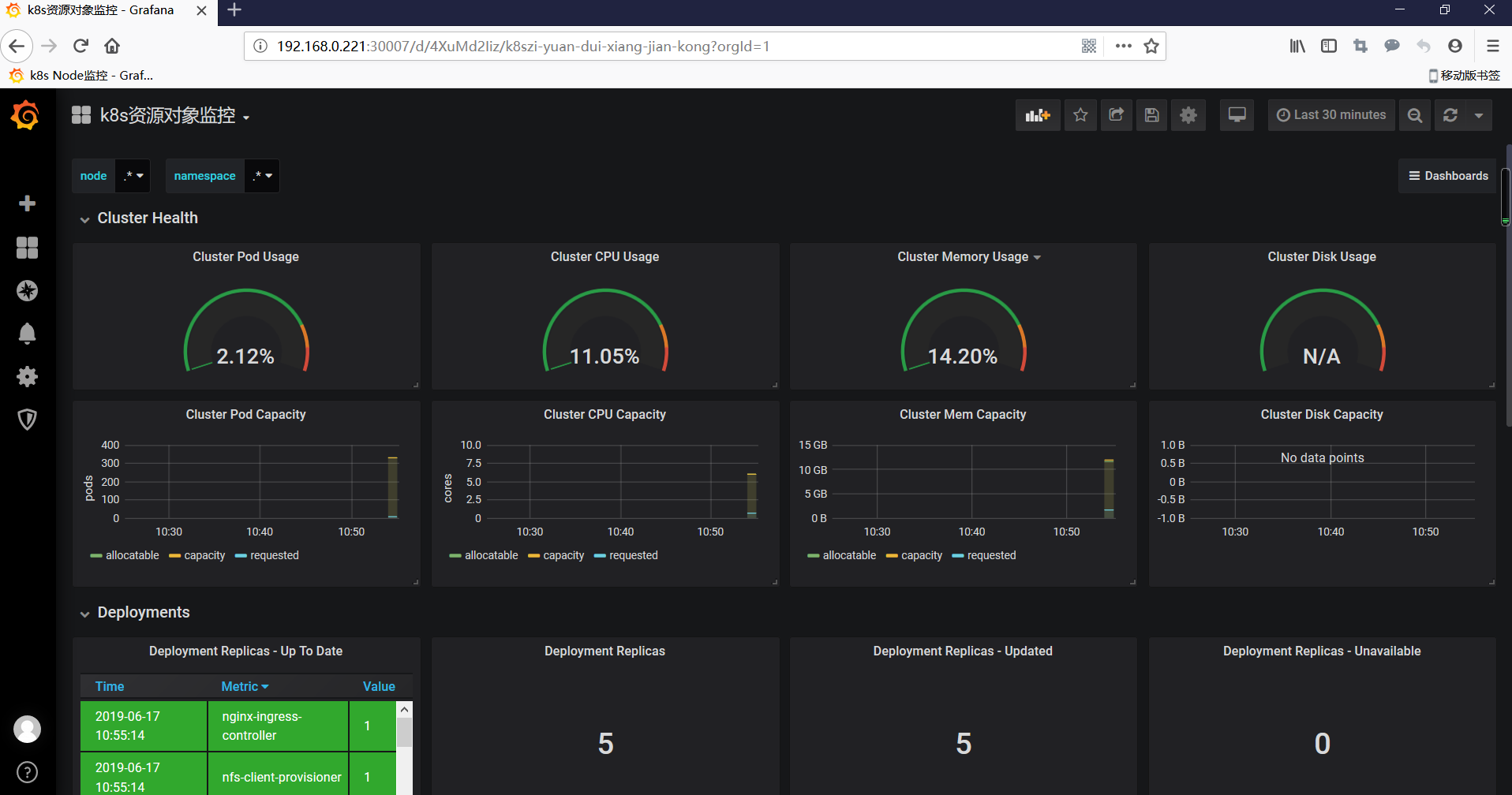
导入grafana模板
集群资源监控:6417
在K8S中部署Alertmanager
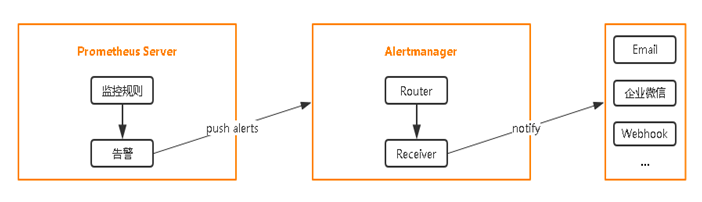
部署Alertmanager
[root@localhost prometheus]# sed -i s/standard/managed-nfs-storage/ alertmanager-pvc.yaml

[root@localhost prometheus]# kubectl apply -f  alertmanager-configmap.yaml

configmap/alertmanager-config created

[root@localhost prometheus]# kubectl apply -f  alertmanager-pvc.yaml

persistentvolumeclaim/alertmanager created

[root@localhost prometheus]# kubectl apply -f  alertmanager-deployment.yaml

deployment.apps/alertmanager created

[root@localhost prometheus]# kubectl apply -f  alertmanager-service.yaml

service/alertmanager created

[root@localhost prometheus]# kubectl get pod -n kube-system

NAME                                    READY   STATUS    RESTARTS   AGE

alertmanager-6b5bbd5bd4-lgjn8           /     Running             95s

coredns-5b8c57999b-z9jh8                /     Running             20d

grafana-                               /     Running             2d22h

kube-state-metrics-f86fd9f4f-j4rdc      /     Running             3h2m

kubernetes-dashboard-644c96f9c6-bvw8w   /     Running             20d

prometheus-                            /     Running             4d
配置Prometheus与Alertmanager通信
[root@localhost prometheus]# vim prometheus-configmap.yaml

。。。。

    alerting:

      alertmanagers:

      - static_configs:

          - targets: ["alertmanager:80"]
[root@localhost prometheus]# kubectl apply -f prometheus-configmap.yaml
configmap/prometheus-config configured
配置告警
prometheus指定rules目录
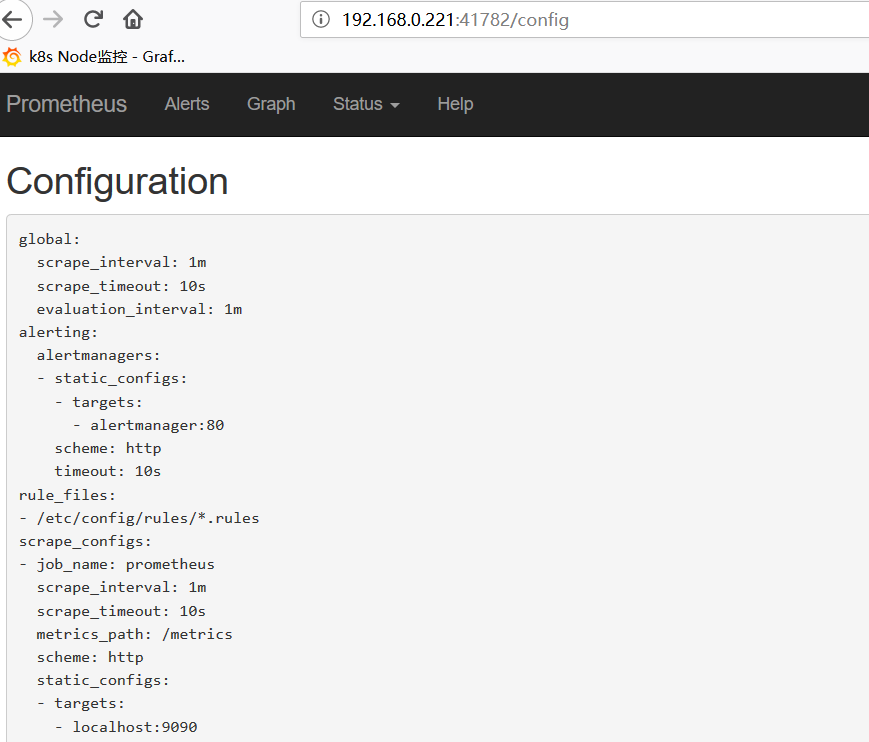
configmap存储告警规则
[root@localhost prometheus]# cat prometheus-rules.yaml

apiVersion: v1

kind: ConfigMap

metadata:

  name: prometheus-rules

  namespace: kube-system

data:

  general.rules: |

    groups:

    - name: general.rules

      rules:

      - alert: InstanceDown

        expr: up ==

        for: 1m

        labels:

          severity: error

        annotations:

          summary: "Instance {{ $labels.instance }} 停止工作"

          description: "{{ $labels.instance }} job {{ $labels.job }} 已经停止5分钟以上."

  node.rules: |

    groups:

    - name: node.rules

      rules:

      - alert: NodeFilesystemUsage

        expr:  - (node_filesystem_free_bytes{fstype=~"ext4|xfs"} / node_filesystem_size_bytes{fstype=~"ext4|xfs"} * ) >

        for: 1m

        labels:

          severity: warning

        annotations:

          summary: "Instance {{ $labels.instance }} : {{ $labels.mountpoint }} 分区使用率过高"

          description: "{{ $labels.instance }}: {{ $labels.mountpoint }} 分区使用大于80% (当前值: {{ $value }})"

      - alert: NodeMemoryUsage

        expr:  - (node_memory_MemFree_bytes+node_memory_Cached_bytes+node_memory_Buffers_bytes) / node_memory_MemTotal_bytes *  >

        for: 1m

        labels:

          severity: warning

        annotations:

          summary: "Instance {{ $labels.instance }} 内存使用率过高"

          description: "{{ $labels.instance }}内存使用大于80% (当前值: {{ $value }})"

      - alert: NodeCPUUsage

        expr:  - (avg(irate(node_cpu_seconds_total{mode="idle"}[5m])) by (instance) * ) >

        for: 1m

        labels:

          severity: warning

        annotations:

          summary: "Instance {{ $labels.instance }} CPU使用率过高"

          description: "{{ $labels.instance }}CPU使用大于60% (当前值: {{ $value }})"

[root@localhost prometheus]# kubectl apply -f prometheus-rules.yaml

configmap/prometheus-rules created
configmap挂载到容器rules目录
[root@localhost prometheus]# vim prometheus-statefulset.yaml

......

          volumeMounts:

            - name: config-volume

              mountPath: /etc/config

            - name: prometheus-data

              mountPath: /data

              subPath: ""

            - name: prometheus-rules

              mountPath: /etc/config/rules

      terminationGracePeriodSeconds:

      volumes:

        - name: config-volume

          configMap:

            name: prometheus-config

        - name: prometheus-rules

          configMap:

            name: prometheus-rules

......
怎加alertmanager的告警配置
[root@localhost prometheus]# cat alertmanager-configmap.yaml

apiVersion: v1

kind: ConfigMap

metadata:

  name: alertmanager-config

  namespace: kube-system

  labels:

    kubernetes.io/cluster-service: "true"

    addonmanager.kubernetes.io/mode: EnsureExists

data:

  alertmanager.yml: |

    global:

      resolve_timeout: 5m

      smtp_smarthost: 'smtp.163.com:25'

      smtp_from: 'xxxxx@163.com'

      smtp_auth_username: 'xxxxx@163.com'

      smtp_auth_password: 'xxxxx'

    receivers:

    - name: default-receiver

      email_configs:

      - to: "xxxxx@qq.com"

    route:

      group_interval: 1m

      group_wait: 10s

      receiver: default-receiver

      repeat_interval: 1m

[root@localhost prometheus]# kubectl apply -f alertmanager-configmap.yaml

configmap/alertmanager-config configured
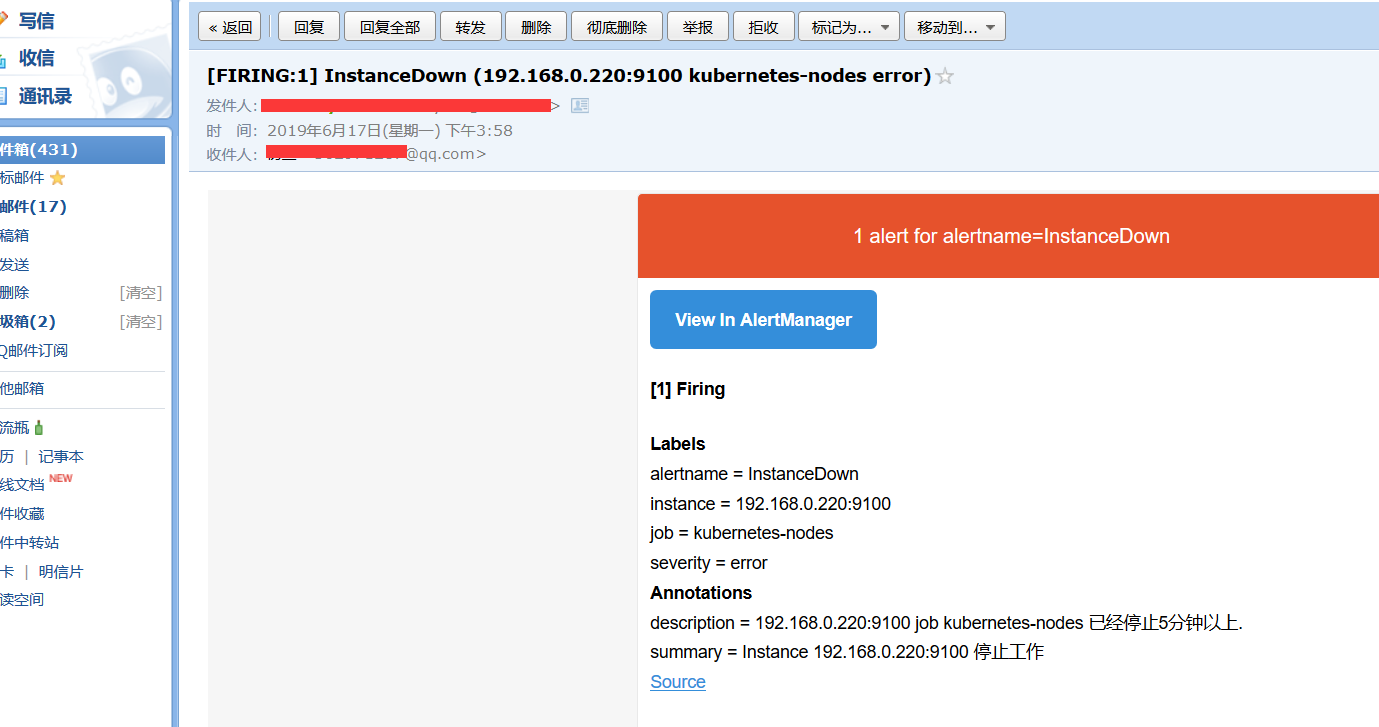
邮件告警
kubernetes监控-prometheus(十六)的更多相关文章
- kubernetes监控prometheus配置项解读
前言 文中解决两个问题: 1. kubernetes官方推荐的监控 prometheus 的配置文件, 各项是什么含义 2. 配置好面板之后, 如换去配置 grafana 面板 当然这两个问题网上都有 ...
- kubernetes监控--Prometheus
本文基于kubernetes 1.5.2版本编写 kube-state-metrics kubectl create ns monitoring kubectl create sa -n monito ...
- Kubernetes 监控--Prometheus 高可用: Thanos
前面我们已经学习了 Prometheus 的使用,了解了基本的 PromQL 语句以及结合 Grafana 来进行监控图表展示,通过 AlertManager 来进行报警,这些工具结合起来已经可以帮助 ...
- Kubernetes 监控--Prometheus
在早期的版本中 Kubernetes 提供了 heapster.influxDB.grafana 的组合来监控系统,在现在的版本中已经移除掉了 heapster,现在更加流行的监控工具是 Promet ...
- kubernetes实战(二十六):kubeadm 安装 高可用 k8s v1.16.x dashboard 2.x
1.基本配置 基本配置.内核升级.基本服务安装参考https://www.cnblogs.com/dukuan/p/10278637.html,或者参考<再也不踩坑的Kubernetes实战指南 ...
- kubernetes实战(二十八):Kubernetes一键式资源管理平台Ratel安装及使用
1. Ratel是什么? Ratel是一个Kubernetes资源平台,基于管理Kubernetes的资源开发,可以管理Kubernetes的Deployment.DaemonSet.Stateful ...
- Kubernetes 监控方案之 Prometheus Operator(十九)
目录 一.Prometheus 介绍 1.1.Prometheus 架构 1.2.Prometheus Operator 架构 二.Helm 安装部署 2.1.Helm 客户端安装 2.2.Tille ...
- Spring Boot 2.X(十六):应用监控之 Spring Boot Actuator 使用及配置
Actuator 简介 Actuator 是 Spring Boot 提供的对应用系统的自省和监控功能.通过 Actuator,可以使用数据化的指标去度量应用的运行情况,比如查看服务器的磁盘.内存.C ...
- kubernetes(k8s) Prometheus+grafana监控告警安装部署
主机数据收集 主机数据的采集是集群监控的基础:外部模块收集各个主机采集到的数据分析就能对整个集群完成监控和告警等功能.一般主机数据采集和对外提供数据使用cAdvisor 和node-exporter等 ...
随机推荐
- 杭电1003_Max Sum
这是原题的链接http://acm.hdu.edu.cn/showproblem.php?pid=1003 起初我是利用暴力的方法,求出所有序列的和的情况,每取一个序列就和以知道的最大和作对比,取大者 ...
- 938. Range Sum of BST
Given the root node of a binary search tree, return the sum of values of all nodes with value betwee ...
- SQL 截取字段空格之前的数据
MYSQL group by left(city,LOCATE(' ',city)) SQL select a,left(a,charindex( ' ',a)) FROM test SELECT g ...
- springboot 之 controller
添加一个testController的java 类,部分代码 注解标记这是一个controller,配置路径,自动加载配置. 注入的方式有@Autowired 和@Resource 二者的区别是 @A ...
- MySQL下载与安装配置
一.Windows 上安装 MySQL Windows 上安装 MySQL 相对简单,最新版本下载地址: 官网:https://dev.mysql.com/downloads/mysql/ 下载步骤: ...
- jQuery EasyUI/TopJUI创建文本验证框(不写js,纯HTML实现!!!)
jQuery EasyUI/TopJUI创建文本验证框(不写js,纯HTML实现!!!) validatebox(验证框)的设计目的是为了验证输入的表单字段是否有效.如果用户输入了无效的值,它将会更改 ...
- .Net WebApi接口Swagger集成简单使用
Swagger介绍 Swagger 是一款RESTFUL接口的.基于YAML.JSON语言的文档在线自动生成.代码自动生成的工具.而我最近做的项目用的是WebAPI,前后端完全分离,这时后端使用Swa ...
- thinkphp5.1静态文件存放问题
5.1的版本不能将静态文件放在application目录下,只能放在public目录下,否则会拒绝访问
- SQL Server权限设置
常用的几个系统表:(其实是View) sysdatabases,主数据库,服务器上的数据库 sysobjects,每个数据库,所有数据库对象 syscolumns,每个数据库,列 sysprocess ...
- CC18:二叉树平衡检查
题目 实现一个函数,检查二叉树是否平衡,平衡的定义如下,对于树中的任意一个结点,其两颗子树的高度差不超过1. 给定指向树根结点的指针TreeNode* root,请返回一个bool,代表这棵树是否平衡 ...