
HUE配置文件hue.ini 的hbase模块详解(图文详解)(分HA集群和非HA集群)
不多说,直接上干货!
我的集群机器情况是 bigdatamaster(192.168.80.10)、bigdataslave1(192.168.80.11)和bigdataslave2(192.168.80.12)
然后,安装目录是在/home/hadoop/app下。
官方建议在master机器上安装Hue,我这里也不例外。安装在bigdatamaster机器上。
Hue版本:hue-3.9.0-cdh5.5.4
 需要编译才能使用(联网)

 说给大家的话:大家电脑的配置好的话,一定要安装cloudera manager。毕竟是一家人的。
同时,我也亲身经历过,会有部分组件版本出现问题安装起来要个大半天时间去排除,做好心里准备。废话不多说,因为我目前读研,自己笔记本电脑最大8G,只能玩手动来练手。
纯粹是为了给身边没高配且条件有限的学生党看的! 但我已经在实验室机器群里搭建好cloudera manager 以及 ambari都有。
大数据领域两大最主流集群管理工具Ambari和Cloudera Manger
Cloudera安装搭建部署大数据集群(图文分五大步详解)(博主强烈推荐)
Ambari安装搭建部署大数据集群(图文分五大步详解)(博主强烈推荐)
https://www.cloudera.com/documentation/enterprise/latest/topics/cdh_ig_hue_config.html#concept_ezg_b2s_hl
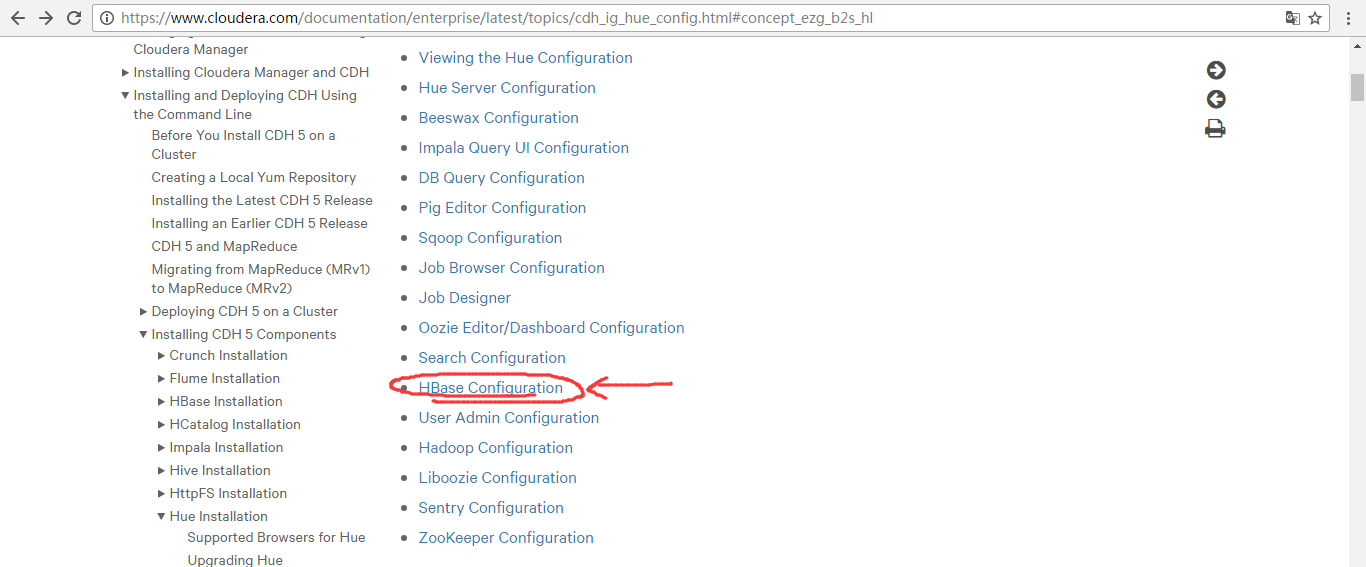
在hbase模块里,一定要重视这三步:

首先,来看看官网的参考步骤
一、以下是默认的配置文件
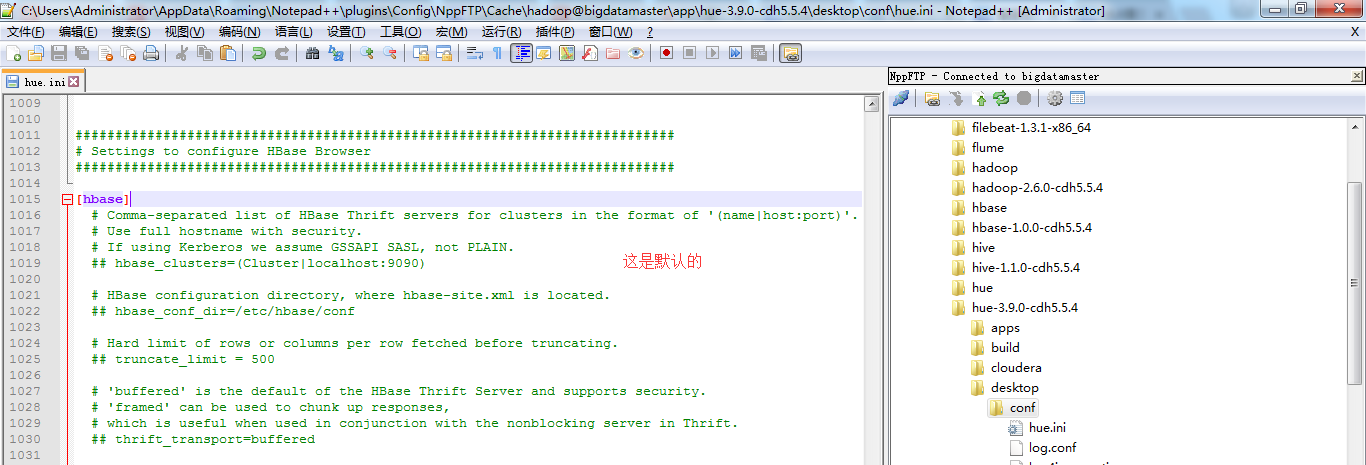
###########################################################################

# Settings to configure HBase Browser

###########################################################################

[hbase]

  # Comma-separated list of HBase Thrift servers for clusters in the format of '(name|host:port)'.

  # Use full hostname with security.

  # If using Kerberos we assume GSSAPI SASL, not PLAIN.

  ## hbase_clusters=(Cluster|localhost:)

  # HBase configuration directory, where hbase-site.xml is located.

  ## hbase_conf_dir=/etc/hbase/conf

  # Hard limit of rows or columns per row fetched before truncating.

  ## truncate_limit =

  # 'buffered' is the default of the HBase Thrift Server and supports security.

  # 'framed' can be used to chunk up responses,

  # which is useful when used in conjunction with the nonblocking server in Thrift.

  ## thrift_transport=buffered
二、以下是跟我机器集群匹配的配置文件(非HA集群下怎么配置Hue的hbase模块)
HBase配置文件修改,需要在hbase-site.xml中增加如下东西。
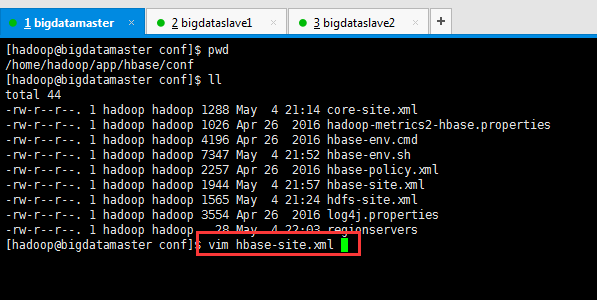
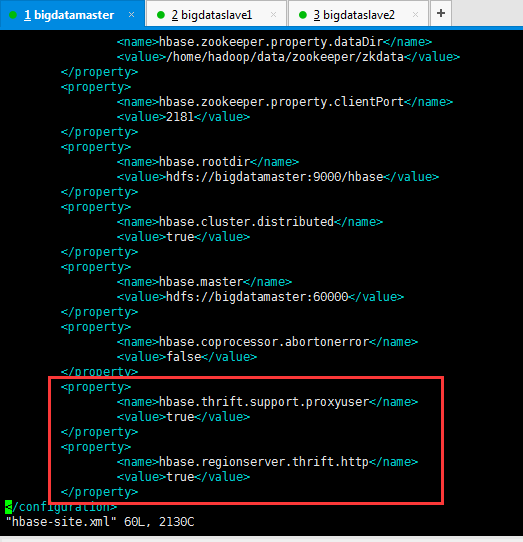
        <property>

                <name>hbase.thrift.support.proxyuser</name>

                <value>true</value>

        </property>

        <property>

                <name>hbase.regionserver.thrift.http</name>

                <value>true</value>

        </property>
这里bigdatamaster、bigdataslave1和bigdataslave2都操作。
同时,前提是这些机器,都要已经安装过hbase-thrift。
yum install hbase-thrift -y

这里bigdatamaster、bigdataslave1和bigdataslave2都操作。(有些资料说,是这样安装。其实,现在HBase里都可以自带集成好了,没必要这么安装了)
大家,学东西时,一定不要似懂非懂,明白个之所以然。
为什么要添加这些东西,因为HUE要访问HBase的thrift服务。
参见:http://gethue.com/hbase-browsing-with-doas-impersonation-and-kerberos/
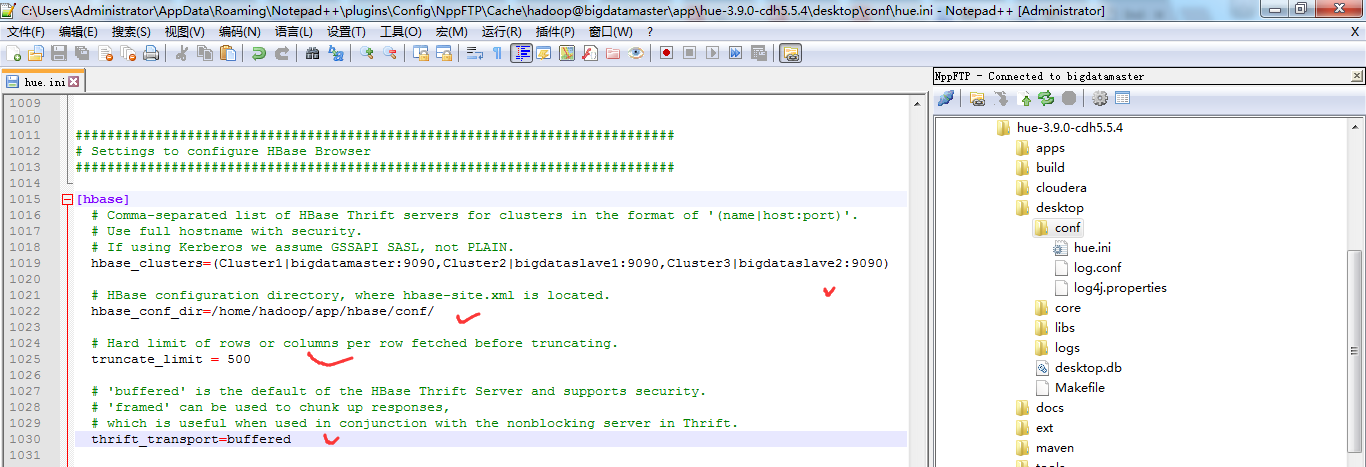
这边的 (Cluster|bigdatamaster:9090) 里面的 Cluster并不是你的HDFS集群名字,只是一个显示在HUE界面上的文字,所以可以随便写,我这边保留 Cluster字样,后面的bigdatamaster:9090是thrift的访问地址,如果有多个用逗号分隔。如下:
###########################################################################

# Settings to configure HBase Browser

###########################################################################

[hbase]

  # Comma-separated list of HBase Thrift servers for clusters in the format of '(name|host:port)'.

  # Use full hostname with security.

  # If using Kerberos we assume GSSAPI SASL, not PLAIN.

  hbase_clusters=(Cluster1|bigdatamaster:9090,Cluster2|bigdataslave1:9090,Cluster3|bigdataslave2:9090)

  # HBase configuration directory, where hbase-site.xml is located.

  hbase_conf_dir=/home/hadoop/app/hbase/conf/

  # Hard limit of rows or columns per row fetched before truncating.

  truncate_limit = 500

  # 'buffered' is the default of the HBase Thrift Server and supports security.

  # 'framed' can be used to chunk up responses,

  # which is useful when used in conjunction with the nonblocking server in Thrift.

  thrift_transport=buffered
或者
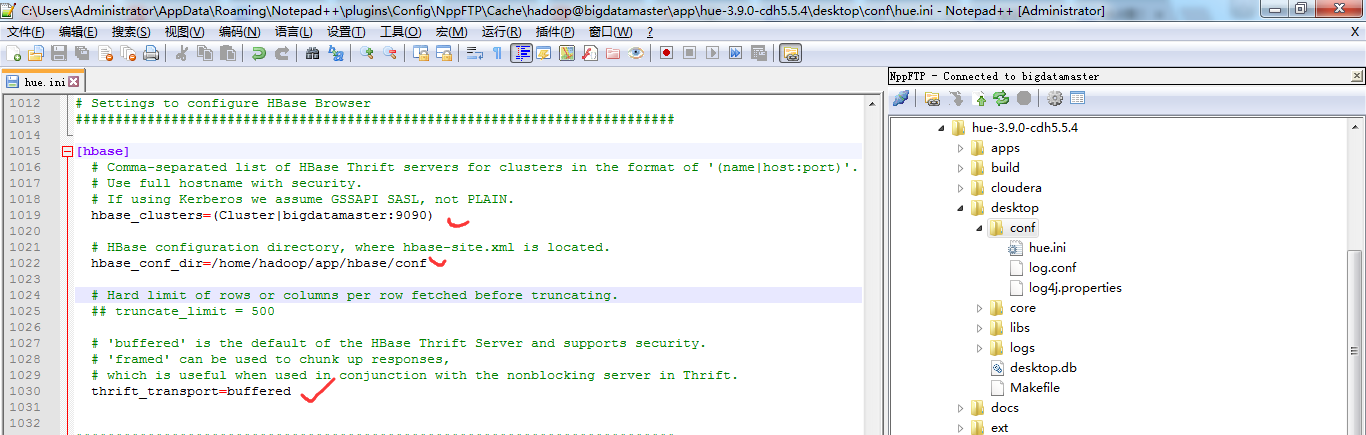
当然咯,大家也可以仅仅只在bigdatamaster上安装hbase-thrift,然后在Hue里配置时,如下即可。
HBase配置文件修改,需要在hbase-site.xml中增加如下东西。
        <property>

                <name>hbase.thrift.support.proxyuser</name>

                <value>true</value>

        </property>

        <property>

                <name>hbase.regionserver.thrift.http</name>

                <value>true</value>

        </property>
这里只在bigdatamaster操作。
同时,前提是只要这台机器,已经安装过hbase-thrift。
yum install hbase-thrift -y

这里仅仅bigdatamaster操作。(有些资料说,是这样安装。其实,现在HBase里都可以自带集成好了,没必要这么安装了)
修改【HUE_HOME/desktop/conf/】目录下的hue.ini文件中[hbase]中的配置
HUE 配置文件设置,找到hbase标签,配置如下
###########################################################################

# Settings to configure HBase Browser

###########################################################################

[hbase]

  # Comma-separated list of HBase Thrift servers for clusters in the format of '(name|host:port)'.

  # Use full hostname with security.

  # If using Kerberos we assume GSSAPI SASL, not PLAIN.

  hbase_clusters=(Cluster|bigdatamaster:)

  # HBase configuration directory, where hbase-site.xml is located.

  hbase_conf_dir=/home/hadoop/app/hbase/conf

  # Hard limit of rows or columns per row fetched before truncating.

  ## truncate_limit =

  # 'buffered' is the default of the HBase Thrift Server and supports security.

  # 'framed' can be used to chunk up responses,

  # which is useful when used in conjunction with the nonblocking server in Thrift.

  thrift_transport=buffered
注意:hbase_clusters参数值中的Cluster只是在Hue的界面中显示的集群名称而已,可以修改成自己需要的。
也就是说,一般保持默认Cluster。即我这里是,Cluster包括bigdatamaster、bigdataslave1和bigdataslave2。
而,我的hbase是安装在bigdatamaster、bigdataslave1和bigdataslave2上。
需要启动HBase的进程服务

[hadoop@bigdatamaster hbase]$ pwd

/home/hadoop/app/hbase

[hadoop@bigdatamaster hbase]$ bin/start-hbase.sh

starting master, logging to /home/hadoop/app/hbase/logs/hbase-hadoop-master-bigdatamaster.out

bigdataslave1: starting regionserver, logging to /home/hadoop/app/hbase/bin/../logs/hbase-hadoop-regionserver-bigdataslave1.out

bigdataslave2: starting regionserver, logging to /home/hadoop/app/hbase/bin/../logs/hbase-hadoop-regionserver-bigdataslave2.out

[hadoop@bigdatamaster hbase]$
只需bigdatamaster操作就好。
因为,是需要在hbase集群已经启动的基础上,再启动thrift,默认端口为9090。
还需要启动HBase的thrift服务
$HBASE_HOME/bin/hbase-daemon.sh start thrift

[hadoop@bigdatamaster hbase]$ pwd

/home/hadoop/app/hbase

[hadoop@bigdatamaster hbase]$ $HBASE_HOME/bin/hbase-daemon.sh start thrift

starting thrift, logging to /home/hadoop/app/hbase/logs/hbase-hadoop-thrift-bigdatamaster.out

[hadoop@bigdatamaster hbase]$
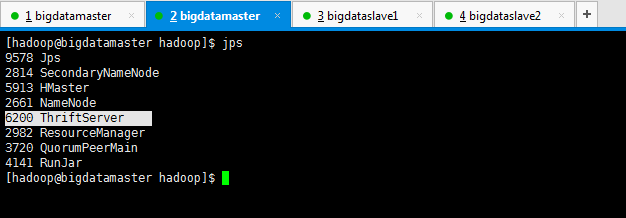
这个操作,bigdatamaster、bigdataslave1和bigdataslave2都操作。(如果只安装在bigdatamaster的话,就只需要启动这台即可。)
对于上述做个总结
一般在Hue里配置hbase模块,无论是我这篇博客,还是网上其他相当的博客都是只配置到此为止,可以把HBase配置成功了。
但是呢,我这里,带大家进一步从官网深入来配置。
https://www.cloudera.com/documentation/enterprise/latest/topics/cdh_ig_hue_config.html#concept_ezg_b2s_hl
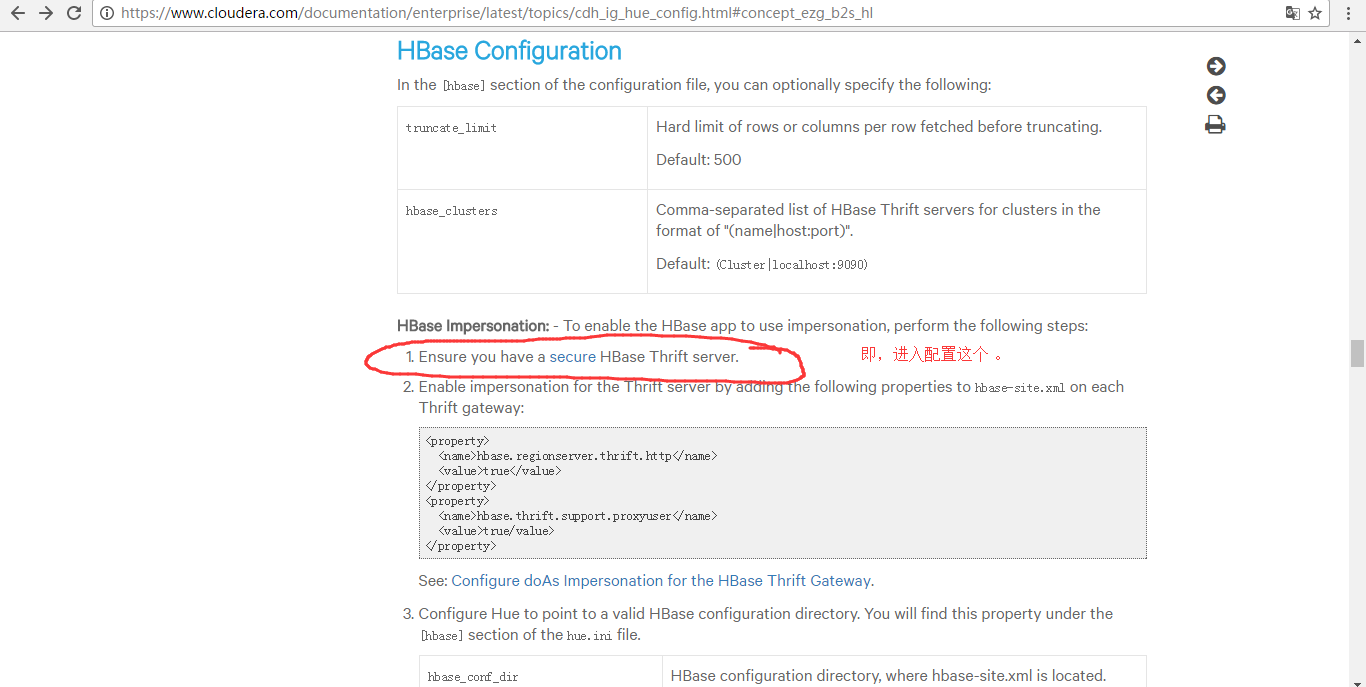
配置到hbase-site.xml里
<property>

    <name>hbase.security.authentication</name>

    <value>kerberos</value>

</property>

<property>

    <name>hbase.regionserver.kerberos.principal</name>

    <value>hbase/_HOST@HADOOP.COM</value>

</property>

<property>

    <name>hbase.regionserver.keytab.file</name>

    <value>/home/hadoop/app/hbase/conf/hbase.keytab</value>

</property>

<property>

    <name>hbase.master.kerberos.principal</name>

    <value>hbase/_HOST@HADOOP.COM</value>

</property>

<property>

    <name>hbase.master.keytab.file</name>

    <value>/home/hadoop/app/hbase/conf/hbase.keytab</value>

</property>
这一步,是有点难度,要开启kerberos。我这里暂时还没搞定这点。
http://www.tuicool.com/articles/YVbmIzm
因为,要牵扯到,Kerberos server的安装等,
https://yq.aliyun.com/articles/25542
三、以下是跟我机器集群匹配的配置文件(HA集群下怎么配置Hue的hbase模块)
跟非HA配置是一样的。
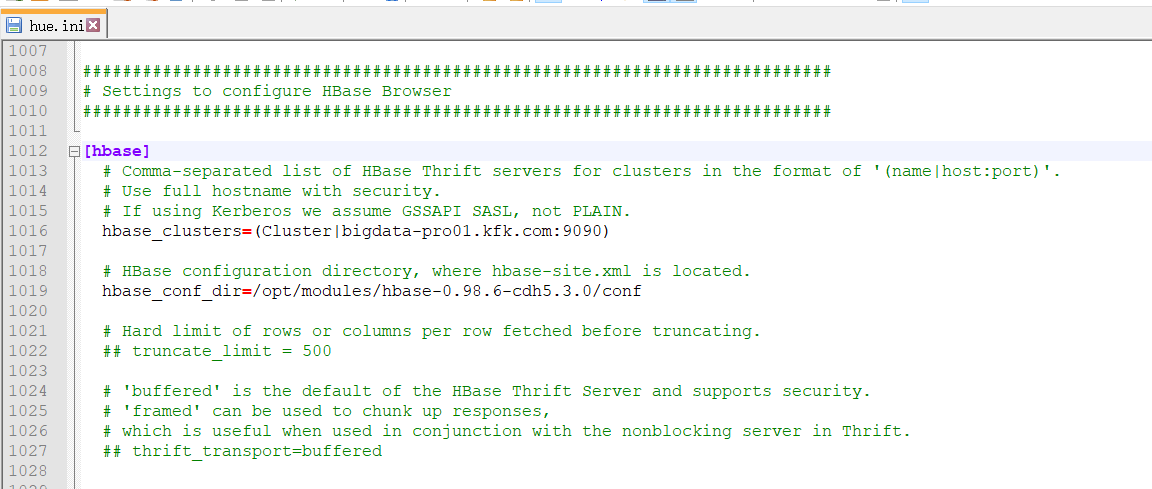
###########################################################################

# Settings to configure HBase Browser

###########################################################################

[hbase]

  # Comma-separated list of HBase Thrift servers for clusters in the format of '(name|host:port)'.

  # Use full hostname with security.

  # If using Kerberos we assume GSSAPI SASL, not PLAIN.

  hbase_clusters=(Cluster|bigdata-pro01.kfk.com:)

  # HBase configuration directory, where hbase-site.xml is located.

  hbase_conf_dir=/opt/modules/hbase-0.98.-cdh5.3.0/conf

  # Hard limit of rows or columns per row fetched before truncating.

  ## truncate_limit =

  # 'buffered' is the default of the HBase Thrift Server and supports security.

  # 'framed' can be used to chunk up responses,

  # which is useful when used in conjunction with the nonblocking server in Thrift.

  ## thrift_transport=buffered
然后,停掉hbase进程,再开启hbase进程。
因为,我的HBase是HA集群。
所以先在主节点1上,启动hbase

然后,再在主节点2上启动hbase
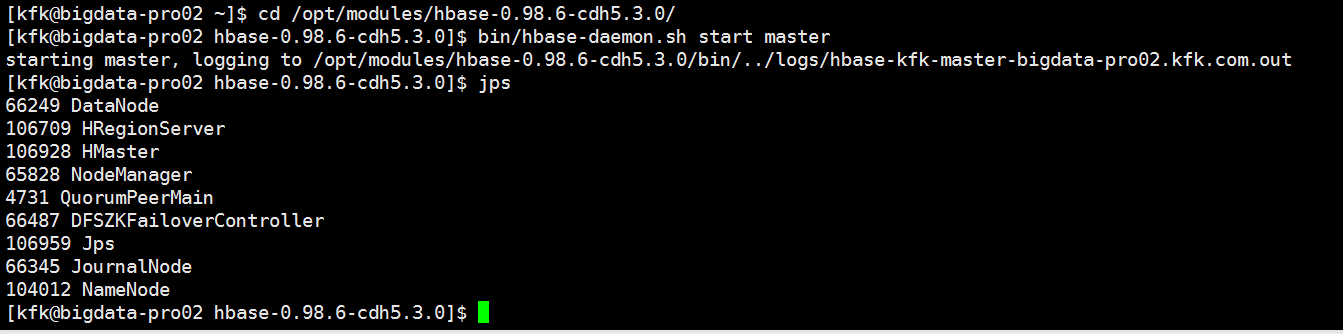
具体,启动,见
Apache版本的Hadoop HA集群启动详细步骤【包括Zookeeper、HDFS HA、YARN HA、HBase HA】(图文详解)
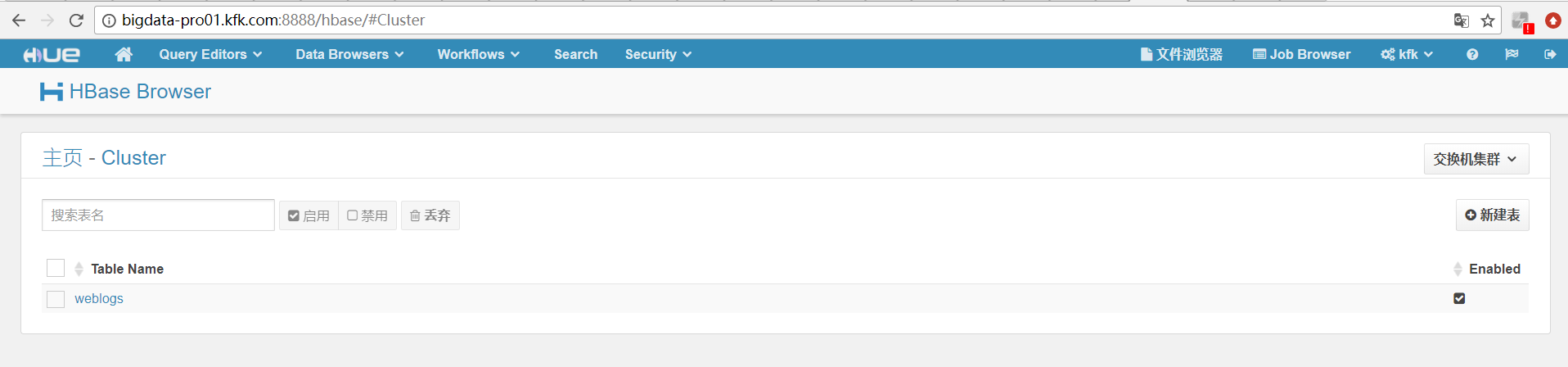
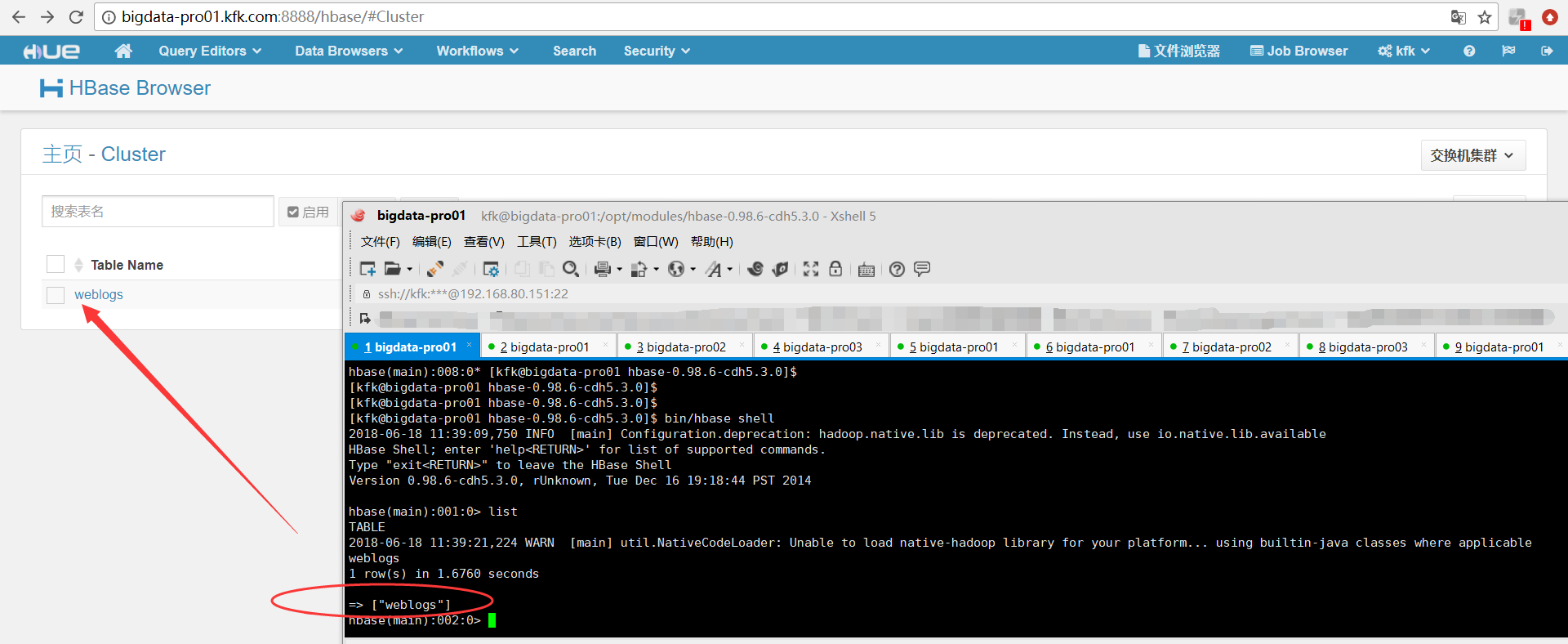
再开启hbase的thrift服务
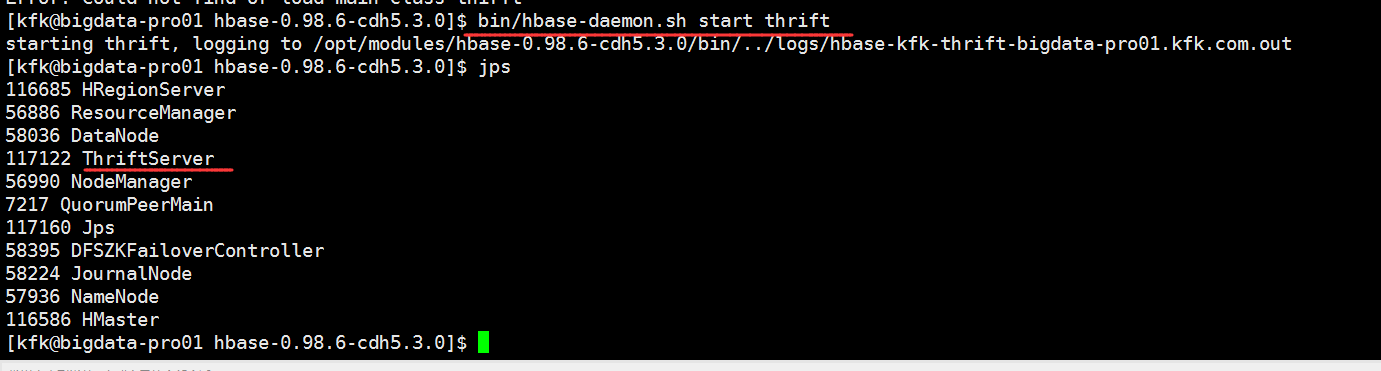
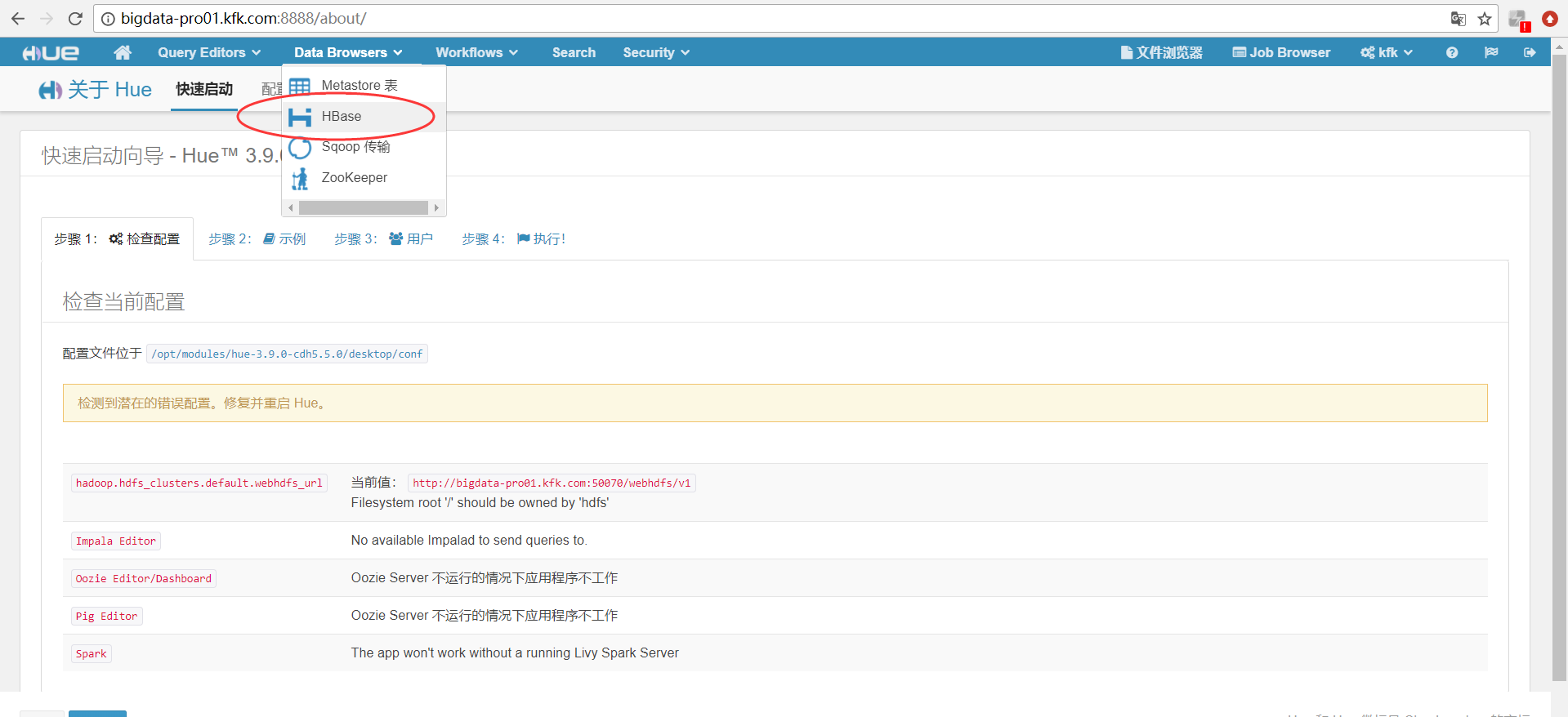
同时,大家可以关注我的个人博客:
http://www.cnblogs.com/zlslch/ 和 http://www.cnblogs.com/lchzls/ http://www.cnblogs.com/sunnyDream/
详情请见:http://www.cnblogs.com/zlslch/p/7473861.html
人生苦短,我愿分享。本公众号将秉持活到老学到老学习无休止的交流分享开源精神,汇聚于互联网和个人学习工作的精华干货知识,一切来于互联网,反馈回互联网。
目前研究领域:大数据、机器学习、深度学习、人工智能、数据挖掘、数据分析。 语言涉及:Java、Scala、Python、Shell、Linux等 。同时还涉及平常所使用的手机、电脑和互联网上的使用技巧、问题和实用软件。 只要你一直关注和呆在群里,每天必须有收获
对应本平台的讨论和答疑QQ群:大数据和人工智能躺过的坑(总群)(161156071)



HUE配置文件hue.ini 的hbase模块详解(图文详解)(分HA集群和非HA集群)的更多相关文章
- HUE配置文件hue.ini 的hdfs_clusters模块详解(图文详解)(分HA集群和非HA集群)
不多说,直接上干货! 我的集群机器情况是 bigdatamaster(192.168.80.10).bigdataslave1(192.168.80.11)和bigdataslave2(192.168 ...
- HUE配置文件hue.ini 的yarn_clusters模块详解(图文详解)(分HA集群和非HA集群)
不多说,直接上干货! 我的集群机器情况是 bigdatamaster(192.168.80.10).bigdataslave1(192.168.80.11)和bigdataslave2(192.168 ...
- HUE配置文件hue.ini 的Spark模块详解(图文详解)(分HA集群和HA集群)
不多说,直接上干货! 我的集群机器情况是 bigdatamaster(192.168.80.10).bigdataslave1(192.168.80.11)和bigdataslave2(192.168 ...
- HUE配置文件hue.ini 的impala模块详解(图文详解)(分HA集群)
不多说,直接上干货! 我的集群机器情况是 bigdatamaster(192.168.80.10).bigdataslave1(192.168.80.11)和bigdataslave2(192.168 ...
- HUE配置文件hue.ini 的filebrowser模块详解(图文详解)(分HA集群和非HA集群)
不多说,直接上干货! 我的集群机器情况是 bigdatamaster(192.168.80.10).bigdataslave1(192.168.80.11)和bigdataslave2(192.168 ...
- HUE配置文件hue.ini 的hive和beeswax模块详解(图文详解)(分HA集群和非HA集群)
不多说,直接上干货! 我的集群机器情况是 bigdatamaster(192.168.80.10).bigdataslave1(192.168.80.11)和bigdataslave2(192.168 ...
- HUE配置文件hue.ini 的database模块详解(包含qlite、mysql、 psql、和oracle)(图文详解)(分HA集群和非HA集群)
不多说,直接上干货! Hue配置文件里,提及到,提供有postgresql_psycopg2, mysql, sqlite3 or oracle. 注意:Hue本身用到的是sqlite3. 在哪里呢, ...
- HUE配置文件hue.ini 的zookeeper模块详解(图文详解)(分HA集群)
不多说,直接上干货! 我的集群机器情况是 bigdatamaster(192.168.80.10).bigdataslave1(192.168.80.11)和bigdataslave2(192.168 ...
- HUE配置文件hue.ini 的pig模块详解(图文详解)(分HA集群和非HA集群)
不多说,直接上干货! 一.默认的pig配置文件 ########################################################################### ...
随机推荐
- Word图片上传控件(WordPaster)更新-2.0.15版本
更新说明: 1. 增加对webp图片的支持,支持微信公众号图片的下载. 效果参考:http://www.ncmem.com/doc/view.aspx?id=9761f8ce4fe04d0ab0f ...
- MFC框架仿真<三>R T T I
RTTI,简单的说,就是判定A类是否为B类的基类.将书本的内容最大程度的简化,如下图的类层次,现在解决的问题就是:判定“梨”是否是“红富士”的基类.
- autolayout之后获取uiview的frame
这个只要一行代码就搞定了.详细请看: In order to get the right frame/bounds of your UIImageView after resizing, you ne ...
- ZOJ2478 Encoding 2017-04-18 23:02 43人阅读 评论(0) 收藏
Encoding Time Limit: 2 Seconds Memory Limit: 65536 KB Given a string containing only 'A' - 'Z', ...
- java web 项目启动的根目录,以及项目启动后使用的端口具体是哪一个
1.今天启动项目发现一直找不到网页,原来是自己浏览器地址的根目录出现了问题,那么系统中的根目录(也就是项目名)到底是哪个,究竟以哪个为基准? 这里有一地方不能忽视:见图片 在普通的java web项目 ...
- 解决Redis/Codis Connection with master lost(复制超时)问题
今天在线上环境中遇到了codis-server报警,按照常规处理流程进行处理,报错步骤如下: 首先将codis-slave的rdb文件移除,并重启codis-slave 在codis-dashbord ...
- Backup--查看备份还原需要的空间
--====================================================== --使用于SQL SERVER 2008 和SQL SERVER 2008 R2 ) ...
- .Net Core 自定义配置源从配置中心读取配置
配置,几乎所有的应用程序都离不开它..Net Framework时代我们使用App.config.Web.config,到了.Net Core的时代我们使用appsettings.json,这些我们再 ...
- WPF点滴(2) 创建单实例应用程序
最近有同事问道在应用程序启动之后,再次双击应用程序,如何保证不再启动新的应用程序,而是弹出之前已经启动的进程,本质上这就是创建一个单实例的WPF应用程序.在VS的工程树中有一个App.xaml和App ...
- Wpf中显示Unicode字符
1. 引言 今天在写一个小工具,里面有些字符用Unicode字符表示更合适.但是一时之间却不知道怎么写了.经过一番查找,终于找到了办法.记到这里,一是加深印象,二则以备查询. 2. C#中使用Unic ...