
Vue2.5开发去哪儿网App 首页开发
主页划 5 个组件,即 header icon swiper recommend weekend
一. header区域开发
1. 安装 stylus
npm install stylus --save
cnpm install stylus-loader --save
2. 编写样式
<template>

  <div class="header">

    <div class="header-left">返回</div>

    <div class="header-input">

      输入城市/景点/游玩主题

    </div>

    <div class="header-right">城市</div>

  </div>

</template>

<script>

export default {

  name: 'HomeHeader'

}

</script>

<!--组件样式,不影响其他组件-->

<!--1rem = html front-size = 50px-->

<style lang="stylus" scoped>

.header

  display flex

  line-height:.86rem

  background: #00bcd4

  color: #fff

  .header-left

    float:left

    width :.64rem

  .header-input

    flex: 1

    height: .64rem

    line-height: .64rem

    margin-top: .12rem

    margin-left: .2rem

    padding-left: .2rem

    color: #ccc

    background: #fff

    border-radius: .1rem

  .header-right

    min-width: 1.04rem

    padding: 0 .1rem

    float: right

    text-align: center

    color: #ffffff

</style>
3. 添加icon
进入https://www.iconfont.cn 添加返回,搜索,下箭头的icon,添加至项目,并且下载到本地
新建iconfront 目录,将一下4个文件移动到该目录
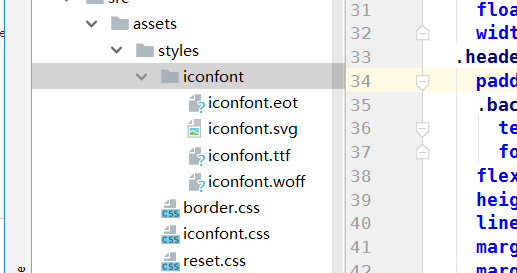
将iconfront.css移动到styles目录
进入 Build 下的 webpack.base.conf.js 第38行,添加目录搜索路径
  resolve: {

    extensions: ['.js', '.vue', '.json'],

    alias: {

      'vue$': 'vue/dist/vue.esm.js',

      '@': resolve('src'),

      'styles':resolve('src/assets/styles')

    }

  }
main.js 引入 iconfront文件
import 'styles/iconfont.css'
页面使用:
<div class="header">
<div class="header-left">
<div class="iconfont back-icon"></div>
</div>
<div class="header-input">
<span class="iconfont"></span>输入城市/景点/游玩主题
</div>
<div class="header-right">
城市<span class="iconfont arrow-right"></span>
</div>
</div>
定义css 变量:styles文件夹新建 varibles.styl
定义变量:$bgColor = #00bcd4
<style lang="stylus" scoped>

 @import "~styles/varibles.styl"

 .header

  display flex

  line-height:.86rem

  background: $bgColor
<template>
<div class="header">
<div class="header-left">
<div class="iconfont back-icon"></div>
</div>
<div class="header-input">
<span class="iconfont"></span>输入城市/景点/游玩主题
</div>
<div class="header-right">
城市<span class="iconfont arrow-right"></span>
</div>
</div>
</template> <script>
export default {
name: 'HomeHeader'
}
</script>
<!--组件样式,不影响其他组件-->
<!--1rem = html front-size = 50px-->
<style lang="stylus" scoped>
@import "~styles/varibles.styl"
.header
display flex
line-height:.86rem
background: $bgColor
color: #fff
.header-left
margin-left: 0.1rem
float:left
width :.64rem
.header-input
padding-left:.2rem
.back-icon
text-align center
font-size .4rem
flex: 1
height: .64rem
line-height: .64rem
margin-top: .12rem
margin-left: .2rem
padding-left: .2rem
color: #ccc
background: #fff
border-radius: .1rem
.header-right
.arrow-right
font-size .3rem
margin-left -.05rem
min-width: 1.04rem
padding: 0 .1rem
float: right
text-align: center
color: #ffffff
</style>
Header.vue
效果:

二. 首页轮播图
在GIthub 上新建 index-swiper分支
拉到本地: git pull
git checkout index-swiper (Your branch is up to date with 'origin/index-swiper'.)
使用
vue-awesome-swiper
使用地址:https://github.com/surmon-china/vue-awesome-swiper
安装:npm install vue-awesome-swiper@2.6.7 --save
导入使用:
import VueAwesomeSwiper from 'vue-awesome-swiper'

import 'swiper/dist/css/swiper.css'

Vue.use(VueAwesomeSwiper)
Swiper.vue:
  <div class="wrapper">

    <swiper :options="swiperOption">

      <!-- slides -->

      <swiper-slide v-for ='item of swiperList' :key="item.id">

        <img class="swiper-img" :src="item.imgUrl" alt="">

      </swiper-slide>

      <!-- Optional controls -->

      <div class="swiper-pagination"  slot="pagination"></div>

    </swiper>

  </div>

swiper配置项:
swiperOption: {
  loop: true, 循环
  pagination: '.swiper-pagination'  小圆圈
}
数据:
swiperList: [
  {
    id: '001',
    imgUrl: 'http://mp-piao-admincp.qunarzz.com/mp_piao_admin_mp_piao_admin/admin/20191/f0e1f1fedae3e7da7eeda416d08c0911.jpg_750x200_19683e97.jpg'
  },
  {
    id: '001',
    imgUrl: 'http://mp-piao-admincp.qunarzz.com/mp_piao_admin_mp_piao_admin/admin/20191/61e0c45bd6f46af63f03fc19af63fd57.jpg_750x200_21f214c6.jpg'
  }
]

小圆点样式修改:
.wrapper >>> .swiper-pagination-bullet-active  对swiper组件样式的穿透
  background: #ffffff
Swiper中文官网: https://www.swiper.com.cn/api/pagination/bulletElement.html
代码提交:
git add .
git commit -m 'change'
git push
git checkout master
git merge origin/index-swiper
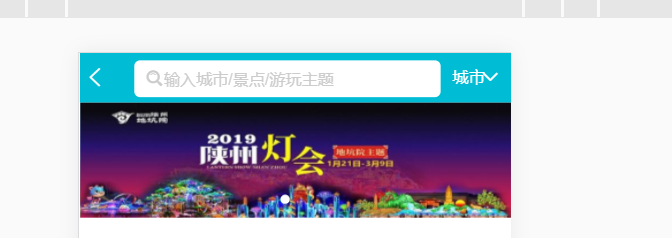
效果:
<template>

  <div class="wrapper">

    <swiper :options="swiperOption">

      <!-- slides -->

      <swiper-slide v-for ='item of swiperList' :key="item.id">

        <img class="swiper-img" :src="item.imgUrl" alt="">

      </swiper-slide>

      <!-- Optional controls -->

      <div class="swiper-pagination"  slot="pagination"></div>

    </swiper>

  </div>

</template>

<script>

export default {

  name: 'HomeSwiper',

  data () {

    return {

      swiperOption: {

        loop: true,

        pagination: '.swiper-pagination'

      },

      swiperList: [

        {

          id: '001',

          imgUrl: 'http://mp-piao-admincp.qunarzz.com/mp_piao_admin_mp_piao_admin/admin/20191/f0e1f1fedae3e7da7eeda416d08c0911.jpg_750x200_19683e97.jpg'

        },

        {

          id: '001',

          imgUrl: 'http://mp-piao-admincp.qunarzz.com/mp_piao_admin_mp_piao_admin/admin/20191/61e0c45bd6f46af63f03fc19af63fd57.jpg_750x200_21f214c6.jpg'

        }

      ]

    }

  }

}

</script>

<style lang="stylus" scoped>

  .wrapper >>> .swiper-pagination-bullet-active

    background: #ffffff

  .wrapper

  overflow hidden

    width 100%

    height 0

    padding-bottom 31.25%

    .swiper-img

      width 100%

</style>
Swiper.vue
三,图标区域页面布局
新建index-iocns分支
git pull
git checkout index-icons
新建Icon.vue
代码:
<template>

  <div class="icons">

    <div class="icon">

      <div class="icon-img">

        <img class="icon-img-content" src="http://img1.qunarzz.com/piao/fusion/1803/95/f3dd6c383aeb3b02.png" alt="">

      </div>

      <p class="icon-desc">热门景点</p>

    </div>

    <div class="icon">

      <div class="icon-img">

        <img class="icon-img-content" src="http://img1.qunarzz.com/piao/fusion/1803/95/f3dd6c383aeb3b02.png" alt="">

      </div>

      <p class="icon-desc">热门景点</p>

    </div>

    <div class="icon">

      <div class="icon-img">

        <img class="icon-img-content" src="http://img1.qunarzz.com/piao/fusion/1803/95/f3dd6c383aeb3b02.png" alt="">

      </div>

      <p class="icon-desc">热门景点</p>

    </div>

    <div class="icon">

      <div class="icon-img">

        <img class="icon-img-content" src="http://img1.qunarzz.com/piao/fusion/1803/95/f3dd6c383aeb3b02.png" alt="">

      </div>

      <p class="icon-desc">热门景点</p>

    </div>

    <div class="icon">

      <div class="icon-img">

        <img class="icon-img-content" src="http://img1.qunarzz.com/piao/fusion/1803/95/f3dd6c383aeb3b02.png" alt="">

      </div>

      <p class="icon-desc">热门景点</p>

    </div>

    <div class="icon">

      <div class="icon-img">

        <img class="icon-img-content" src="http://img1.qunarzz.com/piao/fusion/1803/95/f3dd6c383aeb3b02.png" alt="">

      </div>

      <p class="icon-desc">热门景点</p>

    </div>

    <div class="icon">

      <div class="icon-img">

        <img class="icon-img-content" src="http://img1.qunarzz.com/piao/fusion/1803/95/f3dd6c383aeb3b02.png" alt="">

      </div>

      <p class="icon-desc">热门景点</p>

    </div><div class="icon">

    <div class="icon-img">

      <img class="icon-img-content" src="http://img1.qunarzz.com/piao/fusion/1803/95/f3dd6c383aeb3b02.png" alt="">

    </div>

    <p class="icon-desc">热门景点</p>

  </div>

  </div>

</template>

<script>

export default {

  name: 'HomeIcons'

}

</script>

<style scoped lang="stylus">

  @import "~styles/varibles.styl"

  .icons

    height:0

    width 100%

    padding-bottom 50%

    overflow hidden

    .icon

      position relative

      overflow hidden

      float left

      height 0

      width 25%

      padding-bottom 25%

      .icon-img

        position absolute

        top 0

        box-sizing border-box

        padding .1rem

        left 0

        right 0

        bottom .44rem

        .icon-img-content

          display block

          margin 0 auto

          height 100%

    .icon-desc

      position absolute

      bottom 0

      line-height .44rem

      height .44rem

      left 0

      right 0

      color $darkTextColor

      text-align center

</style>
Icon.vue
// The Vue build version to load with the `import` command

// (runtime-only or standalone) has been set in webpack.base.conf with an alias.

import Vue from 'vue'

import App from './App'

import router from './router'

import fastClick from 'fastclick'

import 'styles/reset.css'

import 'styles/border.css'

import 'styles/iconfont.css'

import VueAwesomeSwiper from 'vue-awesome-swiper'

import 'swiper/dist/css/swiper.css'

Vue.config.productionTip = false

fastClick.attach(document.body)

Vue.use(VueAwesomeSwiper)

/* eslint-disable no-new */

new Vue({

  el: '#app',

  router,

  components: { App },

  template: '<App/>'

})
main.js
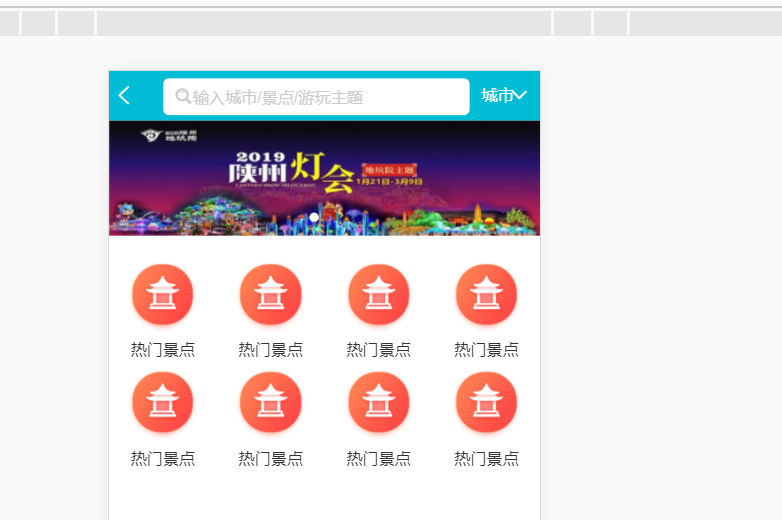
效果:
四,图标区域逻辑实现
添加swiper 组件
每页展示8个,超过时进行分页,可以滚动
<swiper :options="swiperOption">

    <swiper-slide v-for="( page,index) of Mypages" :key="index">

      <div class="icons">

        <div class="icon" v-for="item in page" :key="item.id">

          <div class="icon-img">

            <img class="icon-img-content" :src="item.imgUrl" alt="">

          </div>

          <p class="icon-desc">{{item.desc}}</p>

        </div>

      </div>

    </swiper-slide>

  </swiper>
添加计算属性:
    Mypages: function () {

      const pages = []

      this.iconList.forEach((item, index) => {

        const page = Math.floor(index / 8)

        if (!pages[page]) {

          pages[page] = []

        }

        console.log(pages)

        pages[page].push(item)

      })

      return pages

    }
<template>

  <swiper :options="swiperOption">

    <swiper-slide v-for="( page,index) of Mypages" :key="index">

      <div class="icons">

        <div class="icon" v-for="item in page" :key="item.id">

          <div class="icon-img">

            <img class="icon-img-content" :src="item.imgUrl" alt="">

          </div>

          <p class="icon-desc">{{item.desc}}</p>

        </div>

      </div>

    </swiper-slide>

  </swiper>

</template>

<script>

export default {

  name: 'HomeIcons',

  data () {

    return {

      swiperOption: {

      },

      iconList: [

        {

          id: '0001',

          imgUrl: 'http://img1.qunarzz.com/piao/fusion/1803/95/f3dd6c383aeb3b02.png',

          desc: '景点门票'

        }, {

          id: '0002',

          imgUrl: 'http://img1.qunarzz.com/piao/fusion/1804/5a/13ceb38dcf262f02.png',

          desc: '一日游'

        }, {

          id: '0003',

          imgUrl: 'http://img1.qunarzz.com/piao/fusion/1804/ff/fdf170ee89594b02.png',

          desc: '北京必游'

        }, {

          id: '0004',

          imgUrl: 'http://img1.qunarzz.com/piao/fusion/1803/47/c2b659e048b11602.png',

          desc: '溜娃儿'

        }, {

          id: '0005',

          imgUrl: 'http://mp-piao-admincp.qunarzz.com/mp_piao_admin_mp_piao_admin/admin/20191/0334cf5430b9b5505fd79e2b8d7e8670.png',

          desc: '爬长城'

        }, {

          id: '0006',

          imgUrl: 'http://img1.qunarzz.com/piao/fusion/1803/6c/9e54a8540fee0102.png',

          desc: '故宫'

        }, {

          id: '0007',

          imgUrl: 'http://img1.qunarzz.com/piao/fusion/1803/e3/67df61427c8e1302.png',

          desc: '茶馆相声'

        }, {

          id: '0008',

          imgUrl: 'http://img1.qunarzz.com/piao/fusion/1803/fc/b10a6b2e4f0fe102.png',

          desc: '北京滑雪'

        }, {

          id: '0009',

          imgUrl: 'http://img1.qunarzz.com/piao/fusion/1803/76/eb88861d78fb9902.png',

          desc: '动植物园'

        }

      ]

    }

  },

  computed: {

    Mypages: function () {

      const pages = []

      this.iconList.forEach((item, index) => {

        const page = Math.floor(index / 8)

        if (!pages[page]) {

          pages[page] = []

        }

        console.log(pages)

        pages[page].push(item)

      })

      return pages

    }

  }

}

</script>

<style scoped lang="stylus">

  @import "~styles/varibles.styl"

  @import "~styles/mixins.styl"

  .icons

    height:0

    width 100%

    padding-bottom 50%

    overflow hidden

    .icon

      position relative

      overflow hidden

      float left

      height 0

      width 25%

      padding-bottom 25%

      .icon-img

        position absolute

        top 0

        box-sizing border-box

        padding .1rem

        left 0

        right 0

        bottom .44rem

        .icon-img-content

          display block

          margin 0 auto

          height 100%

    .icon-desc

      position absolute

      bottom 0

      line-height .44rem

      height .44rem

      left 0

      right 0

      color $darkTextColor

      text-align center

      ellipsis()

</style>
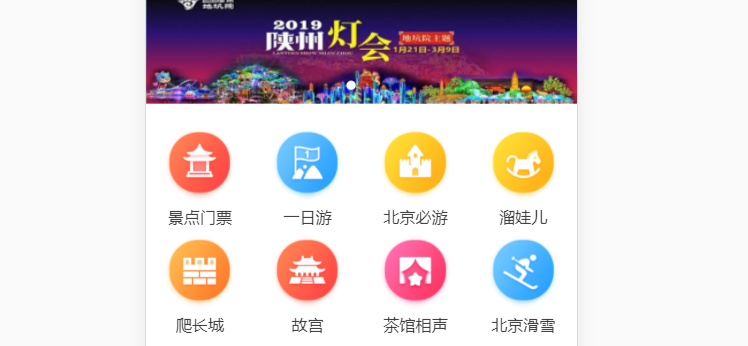
效果:
第一页:
第二页:

代码提交:
git add .
git commit -m 'add icons'
git push
git checkout master
git merge origin/index-icons
git push
五,推荐组件开发
github上 新建index-recommend分支
git pull
git checkout index-recommend
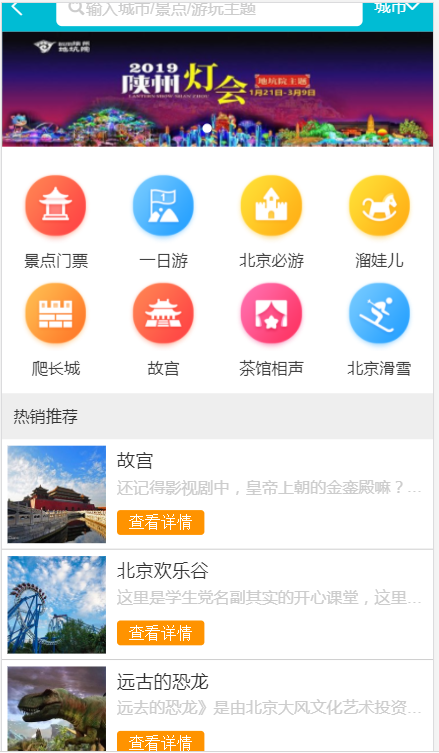
热门推荐组件:
在 pages/home/components/下 新建Recommend.vue
<template>

  <div>

    <div class="title">

      热销推荐

    </div>

    <ul>

      <li class="item" v-for="item in imgList" :key="item.id">

        <div class="item-img-wrapper">

          <img class="item-img" :src="item.imgUrl" alt="">

        </div>

        <div class="item-info">

          <p class="item-title">{{item.title}}</p>

          <p class="item-desc">{{item.desc}}</p>

          <button class="item-button">查看详情</button>

        </div>

      </li>

    </ul>

  </div>

</template>
<template>

  <div>

    <div class="title">

      热销推荐

    </div>

    <ul>

      <li class="item" v-for="item in imgList" :key="item.id">

        <div class="item-img-wrapper">

          <img class="item-img" :src="item.imgUrl" alt="">

        </div>

        <div class="item-info">

          <p class="item-title">{{item.title}}</p>

          <p class="item-desc">{{item.desc}}</p>

          <button class="item-button">查看详情</button>

        </div>

      </li>

    </ul>

  </div>

</template>

<script>

export default {

  name: 'HomeRecommend',

  data () {

    return {

      imgList: [

        {

          id: '001',

          title: '故宫',

          desc: '还记得影视剧中,皇帝上朝的金銮殿嘛?金銮殿名为太和殿,是皇帝登基和举行大典的地方。',

          imgUrl: 'http://img1.qunarzz.com/sight/p0/1409/19/adca619faaab0898245dc4ec482b5722.jpg_200x200_1bc99086.jpg'

        },

        {

          id: '002',

          title: '北京欢乐谷',

          desc: '这里是学生党名副其实的开心课堂,这里同样是青年情侣的浪漫圣地!时尚、动感、欢乐、梦幻的北京欢乐谷欢迎你!',

          imgUrl: 'http://img1.qunarzz.com/sight/p0/1508/89/895a1b7add84f23faca053ce9e3153db.water.jpg_200x200_99ae30ee.jpg'

        },

        {

          id: '003',

          title: '远古的恐龙',

          desc: '远去的恐龙》是由北京大风文化艺术投资有限公司创意、编剧、策划并组织中外杰出艺术家、工程师团队制作,南宁八菱科技股份有限公司、北京演艺集团联合出品的一部不可思议的巨制演艺作品',

          imgUrl: 'http://img1.qunarzz.com/sight/p0/1709/e4/e48857f2ce5e53a7a3.img.jpg_200x200_8ee069fe.jpg'

        }

      ]

    }

  }

}

</script>

<style lang="stylus" scoped>

  @import "~styles/mixins.styl"

  .title

    line-height .8rem

    background #eee

    margin-top .2rem

    text-indent .2rem

  .item

    border-bottom 1px solid #cacaca

    display flex

    height 1.9rem

    overflow hidden

    .item-img

      width 1.7rem

      height 1.7rem

      padding .1rem

  .item-info

    min-width 0

    flex 1

    padding .1rem

    .item-title

      line-height .54rem

      font-size .32rem

      ellipsis()

    .item-desc

      line-height .4rem

      color #ccc

      ellipsis()

    .item-button

      background #ff9300

      line-height .44rem

      color #ffffff

      padding 0 .2rem

      border-radius .06rem

      margin-top .2rem

</style>
Recommend.vue
使用该组件:
效果:
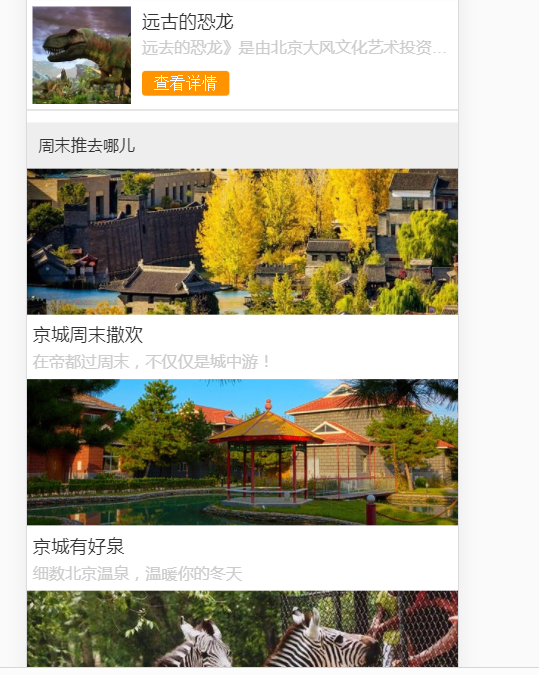
周末游组件:
原理类似
    <ul>

      <li class="item" v-for="item in imgList" :key="item.id">

          <div class="item-img-wrapper">

            <img class="item-img" :src="item.imgUrl" alt="">

          </div>

        <div class="item-info">

          <p class="item-title">{{item.title}}</p>

          <p class="item-desc">{{item.desc}}</p>

        </div>

      </li>

    </ul>
<template>

  <div>

    <div class="title">

      周末推去哪儿

    </div>

    <ul>

      <li class="item" v-for="item in imgList" :key="item.id">

          <div class="item-img-wrapper">

            <img class="item-img" :src="item.imgUrl" alt="">

          </div>

        <div class="item-info">

          <p class="item-title">{{item.title}}</p>

          <p class="item-desc">{{item.desc}}</p>

        </div>

      </li>

    </ul>

  </div>

</template>

<script>

export default {

  name: 'HomeWeekend',

  data () {

    return {

      imgList: [

        {

          id: '001',

          title: '京城周末撒欢',

          desc: '在帝都过周末,不仅仅是城中游!',

          imgUrl: 'http://img1.qunarzz.com/sight/source/1811/f3/86173f863bef61.jpg_r_640x214_52b003ac.jpg'

        },

        {

          id: '002',

          title: '京城有好泉',

          desc: '细数北京温泉,温暖你的冬天',

          imgUrl: 'http://img1.qunarzz.com/sight/source/1510/6e/1ea71e2f04e.jpg_r_640x214_aa6f091d.jpg'

        },

        {

          id: '003',

          title: '京城溜娃必去',

          desc: '德智体美劳全面发展的亲子日,这些地方该去看看…',

          imgUrl: 'http://img1.qunarzz.com/sight/source/1811/7e/476589267ebb41.jpg_r_640x214_bf599709.jpg'

        }

      ]

    }

  }

}

</script>

<style lang="stylus" scoped>

  @import "~styles/mixins.styl"

  .title

    line-height .8rem

    background #eee

    margin-top .2rem

    text-indent .2rem

  .item-img-wrapper

    overflow hidden

    height 0

    padding-bottom 33.9%

  .item-img

    width 100%

  .item-info

    padding .1rem

    .item-title

      line-height .54rem

      font-size .32rem

      ellipsis()

    .item-desc

      line-height .4rem

      color #ccc

      ellipsis()

</style>
Weekend.vue
效果:
代码提交:
git add .
git commit -m 'add recommend'
git push
git checkout master
git merge origin/index-recommend
git push
项目地址:https://github.com/1417766861/Vue2.5-App
Vue2.5开发去哪儿网App 首页开发的更多相关文章
- Vue2.5 开发去哪儿网App
Vue2.5开发去哪儿网App 技术栈和主要框架
- Vue2.5开发去哪儿网App 从零基础入门到实战项目
第1章 课程介绍本章主要介绍课程的知识大纲,学习前提,讲授方式及预期收获. 1-1 课程简介 试看第2章 Vue 起步本章将快速讲解部分 Vue 基础语法,通过 TodoList 功能的编写,在熟悉基 ...
- Vue2.5开发去哪儿网App 城市列表开发之 Vuex实现数据共享及高级使用
一,数据共享 1. 安装: npm install vuex --save 2. 在src目录下 新建state文件夹,新建index.js文件 3. 创建一个 store import Vue f ...
- Vue2.5开发去哪儿网App 城市列表开发
一,城市选择页面路由配置 ...
- Vue2.5开发去哪儿网App 第五章笔记 上
1.css动画原理 .fade-enter{ opacity: 0; } .fade-enter-active{ transition: opacity 2s; } .fade-leave-to{ o ...
- Vue2.5开发去哪儿网App 搜索功能完成
效果展示: Search.vue: <div class="search-content" ref="search" v-show="keywo ...
- Vue2.5开发去哪儿网App 城市列表开发之 兄弟组件间联动及列表性能优化
一, 兄弟组件间联动 1. 点击城市字母,左侧对应显示 给遍历的 字母 添加一个点击事件: Alphabet.vue @click="handleLetterClick" ha ...
- Vue2.5开发去哪儿网App 第五章笔记 下
1. 多个元素或组件的过渡 多个元素的过渡: <style> .v-enter,.v-leace-to{ opacity: 0; } .v-enter-active,.v-leave-ac ...
- Vue2.5开发去哪儿网App 第四章笔记 下
1.解决非父子组件之间的传值问题 非父子组件传值(Bus/总线/发布订阅模式/观察者模式) 给 Vue类上挂在一个属性,然后创建vue实例时,实例就拥有了这个属性 Vue.prototype.bus ...
随机推荐
- CHAPITRE III
Il me fallut longtemps pour comprendre d'où il venait. Le petit prince, qui me posait beaucoup de qu ...
- 常用API接口
引用 常用API接口汇总
- 使用vue,react,angular等框架和不使用框架使用jquery的优缺点
jquery和vue react等框架有着本质上的区别,从jquery到vue.react 或者说是到mvvm的转变,是一个思想的转变,是将原有的直接操作dom的思想转变到操作数据上去. vue更关注 ...
- i2c总线驱动,总线设备(适配器),从设备,从设备驱动的注册以及匹配
常用链接 我的随笔 我的评论 我的参与 最新评论 我的标签 随笔分类 ARM裸机(13) C(8) C++(8) GNU-ARM汇编 Linux驱动(24) Linux应用编程(5) Makefile ...
- php 获取当前在线用户数量
<?php //在线人数统计 $filename='online.txt';//数据文件 $cookiename='VGOTCN_OnLineCount';//cookie名称 $onlinet ...
- Jquery中的事件命名机制
来源:aitangyong的专栏 JQuery中的bind()和unbind(),提供了事件的绑定和取消机制,既可以绑定html默认支持的事件,也能够绑定自定义的事件.JQuery支持自定义事件,这显 ...
- 如何通过Openssl实现私有CA,并为HTTP服务提供TLS/SLL安全机制
原文链接:http://guodayong.blog.51cto.com/263451/1181059 Openssl是SSL的开源实现(可以免费下载应用程序),是一种安全机密程序,主要用于提高远程登 ...
- 12-简单认识下margin
margin margin:外边距的意思.表示边框到最近盒子的距离. /*表示四个方向的外边距离为20px*/ margin: 20px; /*表示盒子向下移动了30px*/ margin-top: ...
- XCode中安装cocoapods步骤
Ruby是一种功能强大的面向对象的脚本语言 Gem是一个管理Ruby库和程序的标准包,它通过Ruby Gem(如 http://rubygems.org/ )源来查找.安装.升级和卸载软件包,非常的便 ...
- Flink的入门
Apache Flink(下简称Flink)项目是大数据处理领域最近冉冉升起的一颗新星,其不同于其他大数据项目的诸多特性吸引了越来越多人的关注.本文将深入分析Flink的一些关键技术与特性,希望能够帮 ...