
初识ActionScript
<?xml version="1.0" encoding="utf-8"?>

<mx:Application xmlns:fx="http://ns.adobe.com/mxml/2009"

               xmlns:s="library://ns.adobe.com/flex/spark"

               xmlns:mx="library://ns.adobe.com/flex/mx" minWidth="955" minHeight="600" creationComplete="initApp()">

    <fx:Declarations>

        <!-- 将非可视元素(例如服务、值对象)放在此处 -->

    </fx:Declarations>

    <fx:Script>

        <![CDATA[

            //初始化

            internal function initApp():void{

            var arr:Array = new Array();

            //给数组添加元素

        for(var i:Number =0 ;i<6;i++){

            arr.push("元素"+i);

        }

        //list控件指定数据

        list_1.dataProvider = arr;

        list_2.dataProvider = arr;

        //设置拖拽属性

        list_1.dragEnabled = true;

        list_1.dropEnabled = true;

        list_1.allowMultipleSelection = true;

        list_2.dropEnabled = true;

        list_2.dragEnabled = true;

        }

        ]]>

    </fx:Script>

    <mx:Canvas styleName="box" x="45" y="65" width="420" height="360">

        <mx:List id="list_1" x="26.5" y="40" height="284" width="160"></mx:List>

        <mx:List id="list_2" x="229" y="40" height="284" width="160"></mx:List>

    </mx:Canvas>

</mx:Application>
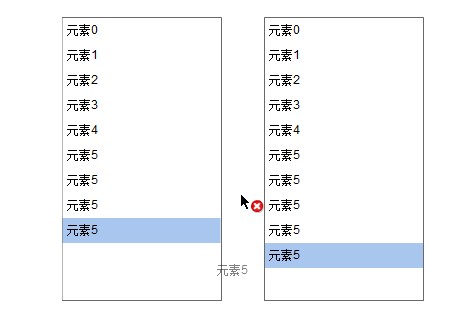 650) this.width=650;" src="http://img1.51cto.com/attachment/201308/155801525.jpg" title="QQ截图20130819155740.jpg" />
ActionScript循环控制
<?xml version="1.0" encoding="utf-8"?>

<s:Application xmlns:fx="http://ns.adobe.com/mxml/2009"

               xmlns:s="library://ns.adobe.com/flex/spark"

               xmlns:mx="library://ns.adobe.com/flex/mx" minWidth="955" minHeight="600" creationComplete="init()">

    <s:layout>

        <s:BasicLayout/>

    </s:layout>

    <fx:Declarations>

        <!-- 将非可视元素(例如服务、值对象)放在此处 -->

    </fx:Declarations>

    <fx:Script>

        <![CDATA[

            internal function init():void{

                var num:int = 0;

                var i:int = 0;

                do{

                    num = num + i;

                    i++;

                }while(i<100);

                txt.text = txt.text+"\n"+num.toString();

                var student:Object = new Object();

                student.name = "umgsai";

                student.age = 22;

                student.type = "本科";

                txt.text = txt.text+"\n"+student.name+"\n"+student.age+"\n"+student.type;

                for(var prop:String in student){

                    txt.text = txt.text+"\n"+prop+":"+student[prop].toString();

                }

                for each(var value:* in student){

                    txt.text=txt.text+"\n"+value.toString();

                }

            }

        ]]>

    </fx:Script>

    <mx:TextArea x="67" y="25" width="514" height="299" id="txt" fontSize="12" editable="true" enabled="true"/>

</s:Application>
continue、break以及函数的用法都与C语言类似
<?xml version="1.0" encoding="utf-8"?>

<s:Application xmlns:fx="http://ns.adobe.com/mxml/2009"

               xmlns:s="library://ns.adobe.com/flex/spark"

               xmlns:mx="library://ns.adobe.com/flex/mx" minWidth="955" minHeight="600" creationComplete="init()">

    <s:layout>

        <s:BasicLayout/>

    </s:layout>

    <fx:Declarations>

        <!-- 将非可视元素(例如服务、值对象)放在此处 -->

    </fx:Declarations>

    <fx:Script>

        <![CDATA[

            internal function init():void{

                var num:int = 0;

                for(var i:int = 0;i<100;i++){

                    if(i==50){

                        txt.text=txt.text+"continue"+"\n";

                        continue;

                    }

                    num=num+i;

                }

                txt.text=txt.text+num.toString()+"\n";

                count();

            }

            private function count():int{

                for(var i:int =0;i<5;i++){

                    for(var m:int =0;m<5;m++){

                        if(m>=3){

                            //return m;

                        }

                        txt.text=txt.text+i.toString()+":"+m.toString()+"\n";

                    }

                }

                return 1;

            }

        ]]>

    </fx:Script>

    <mx:TextArea x="97" y="52" width="469" height="253" id="txt" fontSize="12" fontFamily="微软雅黑" editable="true"/>

</s:Application>
本文出自 “阿凡达” 博客,请务必保留此出处http://shamrock.blog.51cto.com/2079212/1276922
初识ActionScript的更多相关文章
- (旧)子数涵数·Flash——初识ActionScript
一.什么是AS(ActionScript) ActionScript,简称AS,中译为"动作脚本语言". 用于在Flash上实现一些光用Flash无法实现的功能. 在Flash界面 ...
- RabbitMQ入门-初识RabbitMQ
初识RabbitMQ 要说RabbitMQ,我们不得不先说下AMQP.AMQP,即Advanced Message Queuing Protocol,高级消息队列协议,是应用层协议的一个开放标准,为面 ...
- Java入门——初识Java
Java入门——初识Java 摘要:本文主要对Java这门编程语言进行简单的介绍. Java简介 说明 Java语言历时十多年,已发展成为人类计算机史上影响深远的编程语言,从某种程度上来看,它甚至超出 ...
- Android动画效果之初识Property Animation(属性动画)
前言: 前面两篇介绍了Android的Tween Animation(补间动画) Android动画效果之Tween Animation(补间动画).Frame Animation(逐帧动画)Andr ...
- 初识Hadoop
第一部分: 初识Hadoop 一. 谁说大象不能跳舞 业务数据越来越多,用关系型数据库来存储和处理数据越来越感觉吃力,一个查询或者一个导出,要执行很长 ...
- python学习笔记(基础四:模块初识、pyc和PyCodeObject是什么)
一.模块初识(一) 模块,也叫库.库有标准库第三方库. 注意事项:文件名不能和导入的模块名相同 1. sys模块 import sys print(sys.path) #打印环境变量 print(sy ...
- 初识IOS,Label控件的应用。
初识IOS,Label控件的应用. // // ViewController.m // Gua.test // // Created by 郭美男 on 16/5/31. // Copyright © ...
- UI篇(初识君面)
我们的APP要想吸引用户,就要把UI(脸蛋)搞漂亮一点.毕竟好的外貌是增进人际关系的第一步,我们程序员看到一个APP时,第一眼就是看这个软件的功能,不去关心界面是否漂亮,看到好的程序会说"我 ...
- Python导出Excel为Lua/Json/Xml实例教程(一):初识Python
Python导出Excel为Lua/Json/Xml实例教程(一):初识Python 相关链接: Python导出Excel为Lua/Json/Xml实例教程(一):初识Python Python导出 ...
随机推荐
- js的并行加载与顺序执行
javaScript文件(下面简称脚本文件)需要被HTML文件引用才能在浏览器中运行.在HTML文件中可以通过不同的方式来引用脚本文件,我们需要关注的是,这些方式的具体实现和这些方式可能会带来的性能问 ...
- jQuery中data()方法用法实例
语法结构一: 复制代码代码如下: $(selector).data(name,value) 参数列表: 参数 描述 name 存储的数据名称. value 将要存储的任意数据. 实例代码: 复制代码代 ...
- java多线程synchronized底层实现
一直想把这个特别重要的关键词的底层实现搞明白.(当然现在也没有完全明白,如果有错误以后修改这篇文章) 首先,这个关键词synchronize可以说是个语法糖,它的具体用法网上很多博客都讲的比较明了了. ...
- C语言与套接字
我们已经知道如何使用I/O与文件通信,还知道了如何让同一计算机上的两个进程进行通信,这篇文章将创建具有服务器和客户端功能的程序 互联网中大部分的底层网络代码都是用C语言写的. 网络程序通常有两部分组成 ...
- nhibernate 配置nvarchar(max)
若你真的需要一个nvarchar(max)的sql存储空间时,记得增加 .CustomType("StringClob") Demo:Map(x => x.ContentM ...
- bzoj3514Codechef MARCH14 GERALD07加强版
#include <iostream> #include <cstdio> #include <cstring> #include <cmath> #i ...
- linux 中php以及nginx的重启命令
关闭php killall php-fpm 注意:php关闭之前,使用ps aux|grep 'php' 查看一下php的服务及进程 php重启 /usr/local/php/sbin/php-fpm ...
- CodeForces 209C Trails and Glades
C. Trails and Glades time limit per test 4 seconds memory limit per test 256 megabytes input standar ...
- [NOIP2012] 普及组
寻宝 大模拟 #include<iostream> #include<cmath> #include<algorithm> using namespace std; ...
- app基本信息
1.获取设备信息 NSLog(@"设备名称:%@",[[UIDevice currentDevice] systemName]); NSLog(@"版本号:%@" ...