
(四十三)c#Winform自定义控件-Listview-HZHControls
官网
前提
入行已经7,8年了,一直想做一套漂亮点的自定义控件,于是就有了本系列文章。
GitHub:https://github.com/kwwwvagaa/NetWinformControl
码云:https://gitee.com/kwwwvagaa/net_winform_custom_control.git
如果觉得写的还行,请点个 star 支持一下吧
欢迎前来交流探讨: 企鹅群568015492 
麻烦博客下方点个【推荐】,谢谢
NuGet
Install-Package HZH_Controls
目录
https://www.cnblogs.com/bfyx/p/11364884.html
用处及效果
使用分页控件效果
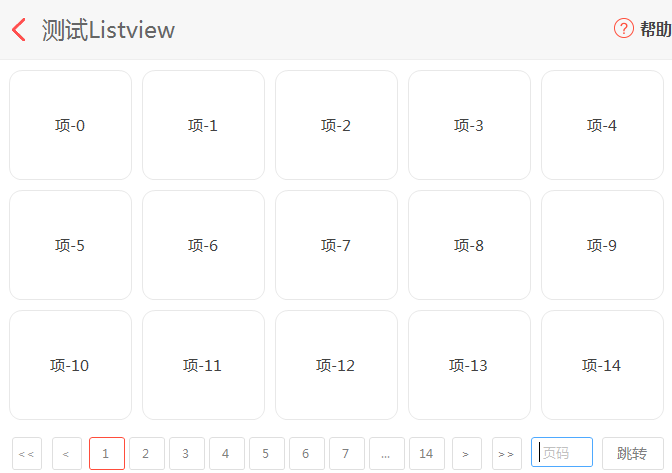
不使用分页控件效果

准备工作
我们需要元素控件,需要列表控件,另外为了具有更好的扩展性,元素控件实现接口,方便进行扩展
我们用到了分页控件,如果你还不了解,请移步查看
我们这里的元素控件用到圆角,故继承基类控件UCControlBase,如果不了解,请移步查看
开始
添加一个接口,用来约束元素控件
  public interface IListViewItem

     {

         /// <summary>

         /// 数据源

         /// </summary>

         object DataSource { get; set; }

         /// <summary>

         /// 选中项事件

         /// </summary>

         event EventHandler SelectedItemEvent;

         /// <summary>

         /// 选中处理,一般用以更改选中效果

         /// </summary>

         /// <param name="blnSelected">是否选中</param>

         void SetSelected(bool blnSelected);

     }
添加一个元素控件,命名UCListViewItem,我们这里继承基类控件UCControlBase,实现接口IListViewItem
 using System;

 using System.Collections.Generic;

 using System.ComponentModel;

 using System.Drawing;

 using System.Data;

 using System.Linq;

 using System.Text;

 using System.Windows.Forms;

 namespace HZH_Controls.Controls

 {

     [ToolboxItem(false)]

     public partial class UCListViewItem : UCControlBase, IListViewItem

     {

         private object m_dataSource;

         public object DataSource

         {

             get

             {

                 return m_dataSource;

             }

             set

             {

                 m_dataSource = value;

                 lblTitle.Text = value.ToString();

             }

         }

         public event EventHandler SelectedItemEvent;

         public UCListViewItem()

         {

             InitializeComponent();

             lblTitle.MouseDown += lblTitle_MouseDown;

         }

         void lblTitle_MouseDown(object sender, MouseEventArgs e)

         {

             if (SelectedItemEvent != null)

             {

                 SelectedItemEvent(this, e);

             }

         }

         public void SetSelected(bool blnSelected)

         {

             if (blnSelected)

                 this.FillColor = Color.FromArgb(, , );

             else

                 this.FillColor = Color.White;

             this.Refresh();

         }

     }

 }
 namespace HZH_Controls.Controls

 {

     partial class UCListViewItem

     {

         /// <summary>

         /// 必需的设计器变量。

         /// </summary>

         private System.ComponentModel.IContainer components = null;

         /// <summary>

         /// 清理所有正在使用的资源。

         /// </summary>

         /// <param name="disposing">如果应释放托管资源,为 true;否则为 false。</param>

         protected override void Dispose(bool disposing)

         {

             if (disposing && (components != null))

             {

                 components.Dispose();

             }

             base.Dispose(disposing);

         }

         #region 组件设计器生成的代码

         /// <summary>

         /// 设计器支持所需的方法 - 不要

         /// 使用代码编辑器修改此方法的内容。

         /// </summary>

         private void InitializeComponent()

         {

             this.lblTitle = new System.Windows.Forms.Label();

             this.SuspendLayout();

             //

             // lblTitle

             //

             this.lblTitle.Dock = System.Windows.Forms.DockStyle.Fill;

             this.lblTitle.Location = new System.Drawing.Point(, );

             this.lblTitle.Name = "lblTitle";

             this.lblTitle.Size = new System.Drawing.Size(, );

             this.lblTitle.TabIndex = ;

             this.lblTitle.TextAlign = System.Drawing.ContentAlignment.MiddleCenter;

             //

             // UCListViewItem

             //

             this.AutoScaleMode = System.Windows.Forms.AutoScaleMode.None;

             this.BackColor = System.Drawing.Color.Transparent;

             this.Controls.Add(this.lblTitle);

             this.FillColor = System.Drawing.Color.White;

             this.IsRadius = true;

             this.IsShowRect = true;

             this.Name = "UCListViewItem";

             this.RectColor = System.Drawing.Color.FromArgb(((int)(((byte)()))), ((int)(((byte)()))), ((int)(((byte)()))));

             this.Size = new System.Drawing.Size(, );

             this.ResumeLayout(false);

         }

         #endregion

         private System.Windows.Forms.Label lblTitle;

     }

 }
然后需要一个列表来显示元素控件
添加一个用户控件,命名UCListView
一些属性
 int m_intCellWidth = ;//单元格宽度

         int m_intCellHeight = ;//单元格高度

         private Type m_itemType = typeof(UCListViewItem);

         [Description("单元格类型,如果无法满足您的需求,你可以自定义单元格控件,并实现接口IListViewItem"), Category("自定义")]

         public Type ItemType

         {

             get { return m_itemType; }

             set

             {

                 if (!typeof(IListViewItem).IsAssignableFrom(value) || !value.IsSubclassOf(typeof(Control)))

                     throw new Exception("单元格控件没有继承实现接口IListViewItem");

                 m_itemType = value;

             }

         }

         private UCPagerControlBase m_page = null;

         /// <summary>

         /// 翻页控件

         /// </summary>

         [Description("翻页控件,如果UCPagerControl不满足你的需求,请自定义翻页控件并继承UCPagerControlBase"), Category("自定义")]

         public UCPagerControlBase Page

         {

             get { return m_page; }

             set

             {

                 m_page = value;

                 if (value != null)

                 {

                     if (!typeof(IPageControl).IsAssignableFrom(value.GetType()) || !value.GetType().IsSubclassOf(typeof(UCPagerControlBase)))

                         throw new Exception("翻页控件没有继承UCPagerControlBase");

                     this.panMain.AutoScroll = false;

                     panPage.Visible = true;

                     this.Controls.SetChildIndex(panMain, );

                     m_page.ShowSourceChanged += m_page_ShowSourceChanged;

                     m_page.Dock = DockStyle.Fill;

                     this.panPage.Controls.Clear();

                     this.panPage.Controls.Add(m_page);

                     GetCellCount();

                     this.DataSource = m_page.GetCurrentSource();

                 }

                 else

                 {

                     this.panMain.AutoScroll = true;

                     m_page = null;

                     panPage.Visible = false;

                 }

             }

         }

         private object m_dataSource = null;

         [Description("数据源,如果使用翻页控件,请使用翻页控件的DataSource"), Category("自定义")]

         public object DataSource

         {

             get { return m_dataSource; }

             set

             {

                 if (value == null)

                     return;

                 if (!typeof(IList).IsAssignableFrom(value.GetType()))

                 {

                     throw new Exception("数据源不是有效的数据类型,列表");

                 }

                 m_dataSource = value;

                 ReloadSource();

             }

         }

         int m_intCellCount = ;//单元格总数

         [Description("单元格总数"), Category("自定义")]

         public int CellCount

         {

             get { return m_intCellCount; }

             private set

             {

                 m_intCellCount = value;

                 if (value >  && m_page != null)

                 {

                     m_page.PageSize = m_intCellCount;

                     m_page.Reload();

                 }

             }

         }

         private List<object> m_selectedSource = new List<object>();

         [Description("选中的数据"), Category("自定义")]

         public List<object> SelectedSource

         {

             get { return m_selectedSource; }

             set

             {

                 m_selectedSource = value;

                 ReloadSource();

             }

         }

         private bool m_isMultiple = true;

         [Description("是否多选"), Category("自定义")]

         public bool IsMultiple

         {

             get { return m_isMultiple; }

             set { m_isMultiple = value; }

         }

         [Description("选中项事件"), Category("自定义")]

         public event EventHandler SelectedItemEvent;

         public delegate void ReloadGridStyleEventHandle(int intCellCount);

         /// <summary>

         /// 样式改变事件

         /// </summary>

         [Description("样式改变事件"), Category("自定义")]

         public event ReloadGridStyleEventHandle ReloadGridStyleEvent;
一下辅助函数
 #region 重新加载数据源

         /// <summary>

         /// 功能描述:重新加载数据源

         /// 作  者:HZH

         /// 创建日期:2019-06-27 16:47:32

         /// 任务编号:POS

         /// </summary>

         public void ReloadSource()

         {

             ControlHelper.FreezeControl(this, true);

             if (this.panMain.Controls.Count <= )

             {

                 ReloadGridStyle();

             }

             if (m_dataSource == null || ((IList)m_dataSource).Count <= )

             {

                 for (int i = this.panMain.Controls.Count - ; i >= ; i--)

                 {

                     this.panMain.Controls[i].Visible = false;

                 }

                 return;

             }

             int intCount = Math.Min(((IList)m_dataSource).Count, this.panMain.Controls.Count);

             for (int i = ; i < intCount; i++)

             {

                 ((IListViewItem)this.panMain.Controls[i]).DataSource = ((IList)m_dataSource)[i];

                 if (m_selectedSource.Contains(((IList)m_dataSource)[i]))

                 {

                     ((IListViewItem)this.panMain.Controls[i]).SetSelected(true);

                 }

                 else

                 {

                     ((IListViewItem)this.panMain.Controls[i]).SetSelected(false);

                 }

                 this.panMain.Controls[i].Visible = true;

             }

             for (int i = this.panMain.Controls.Count - ; i >= intCount; i--)

             {

                 if (this.panMain.Controls[i].Visible)

                     this.panMain.Controls[i].Visible = false;

             }

             ControlHelper.FreezeControl(this, false);

         }

         #endregion

         #region 刷新表格

         /// <summary>

         /// 功能描述:刷新表格样式

         /// 作  者:HZH

         /// 创建日期:2019-06-27 16:35:25

         /// 任务编号:POS

         /// </summary>

         public void ReloadGridStyle()

         {

             Form frmMain = this.FindForm();

             if (frmMain != null && !frmMain.IsDisposed && frmMain.Visible && this.Visible)

             {

                 GetCellCount();

                 try

                 {

                     ControlHelper.FreezeControl(this, true);

                     if (this.panMain.Controls.Count < m_intCellCount)

                     {

                         int intControlsCount = this.panMain.Controls.Count;

                         for (int i = ; i < m_intCellCount - intControlsCount; i++)

                         {

                             Control uc = (Control)Activator.CreateInstance(m_itemType);

                             uc.Margin = new System.Windows.Forms.Padding(, , , );

                             (uc as IListViewItem).SelectedItemEvent += UCListView_SelectedItemEvent;

                             uc.Visible = false;

                             this.panMain.Controls.Add(uc);

                         }

                     }

                     else if (this.panMain.Controls.Count > m_intCellCount)

                     {

                         int intControlsCount = this.panMain.Controls.Count;

                         for (int i = intControlsCount - ; i > m_intCellCount - ; i--)

                         {

                             this.panMain.Controls.RemoveAt(i);

                         }

                     }

                     foreach (Control item in this.panMain.Controls)

                     {

                         item.Size = new Size(m_intCellWidth, m_intCellHeight);

                     }

                 }

                 finally

                 {

                     ControlHelper.FreezeControl(this, false);

                 }

                 if (ReloadGridStyleEvent != null)

                 {

                     ReloadGridStyleEvent(m_intCellCount);

                 }

             }

         }

         void UCListView_SelectedItemEvent(object sender, EventArgs e)

         {

             var selectedItem = sender as IListViewItem;

             if (m_selectedSource.Contains(selectedItem.DataSource))

             {

                 m_selectedSource.Remove(selectedItem.DataSource);

                 selectedItem.SetSelected(false);

             }

             else

             {

                 if (m_isMultiple)

                 {

                     m_selectedSource.Add(selectedItem.DataSource);

                     selectedItem.SetSelected(true);

                 }

                 else

                 {

                     if (m_selectedSource.Count > )

                     {

                         int intCount = Math.Min(((IList)m_dataSource).Count, this.panMain.Controls.Count);

                         for (int i = ; i < intCount; i++)

                         {

                             var item = ((IListViewItem)this.panMain.Controls[i]);

                             if (m_selectedSource.Contains(item.DataSource))

                             {

                                 item.SetSelected(false);

                                 break;

                             }

                         }

                     }

                     m_selectedSource = new List<object>() { selectedItem.DataSource };

                     selectedItem.SetSelected(true);

                 }

             }

             if (SelectedItemEvent != null)

             {

                 SelectedItemEvent(sender, e);

             }

         }

         #endregion

         #region 获取cell总数

         /// <summary>

         /// 功能描述:获取cell总数

         /// 作  者:HZH

         /// 创建日期:2019-06-27 16:28:58

         /// 任务编号:POS

         /// </summary>

         private void GetCellCount()

         {

             if (this.panMain.Width == )

                 return;

             Control item = (Control)Activator.CreateInstance(m_itemType);

             int intXCount = (this.panMain.Width - ) / (item.Width + );

             m_intCellWidth = item.Width + ((this.panMain.Width - ) % (item.Width + )) / intXCount;

             int intYCount = (this.panMain.Height - ) / (item.Height + );

             m_intCellHeight = item.Height + ((this.panMain.Height - ) % (item.Height + )) / intYCount;

             int intCount = intXCount * intYCount;

             if (Page == null)

             {

                 if (((IList)m_dataSource).Count > intCount)

                 {

                     intXCount = (this.panMain.Width -  - ) / (item.Width + );

                     m_intCellWidth = item.Width + ((this.panMain.Width -  - ) % (item.Width + )) / intXCount;

                 }

                 intCount = Math.Max(intCount, ((IList)m_dataSource).Count);

             }

             CellCount = intCount;

         }

         #endregion
一些事件
    private void panMain_Resize(object sender, EventArgs e)

        {

            ReloadGridStyle();

        }

void m_page_ShowSourceChanged(object currentSource)

        {

            this.DataSource = currentSource;

        }
你会发现,有个ItemType属性,这个用来定义列表呈现那种子元素,这么用的好处就是,当你觉得我写的这个元素控件UCListViewItem并不能满足你需求的时候,你可以添加一个自定义控件,并实现接口IListViewItem,然后将你自定义的控件指定给这个属性,列表就会呈现出来了,是不是很方便,列表会自动根据你的元素控件的大小来适量调整来填充到列表中的。
还有一个Page属性,这个是用来表示用哪个分页控件,当然你也可以不用,我已经提供了2种分页控件,如果你觉得还是不满足你的话,去参考分页控件那个文章,自己添加一个分页控件吧。
最后的话
如果你喜欢的话,请到 https://gitee.com/kwwwvagaa/net_winform_custom_control 点个星星吧
(四十三)c#Winform自定义控件-Listview-HZHControls的更多相关文章
- (四十四)c#Winform自定义控件-水波-HZHControls
官网 http://www.hzhcontrols.com 前提 入行已经7,8年了,一直想做一套漂亮点的自定义控件,于是就有了本系列文章. GitHub:https://github.com/kww ...
- (四)c#Winform自定义控件-选择按钮组
前提 入行已经7,8年了,一直想做一套漂亮点的自定义控件,于是就有了本系列文章. 开源地址:https://gitee.com/kwwwvagaa/net_winform_custom_control ...
- (二十四)c#Winform自定义控件-单标题窗体
前提 入行已经7,8年了,一直想做一套漂亮点的自定义控件,于是就有了本系列文章. 开源地址:https://gitee.com/kwwwvagaa/net_winform_custom_control ...
- (四十)c#Winform自定义控件-开关-HZHControls
官网 http://www.hzhcontrols.com 前提 入行已经7,8年了,一直想做一套漂亮点的自定义控件,于是就有了本系列文章. GitHub:https://github.com/kww ...
- (十四)c#Winform自定义控件-键盘(一)
前提 入行已经7,8年了,一直想做一套漂亮点的自定义控件,于是就有了本系列文章. 开源地址:https://gitee.com/kwwwvagaa/net_winform_custom_control ...
- (五十四)c#Winform自定义控件-仪表盘
前提 入行已经7,8年了,一直想做一套漂亮点的自定义控件,于是就有了本系列文章. GitHub:https://github.com/kwwwvagaa/NetWinformControl 码云:ht ...
- (六十四)c#Winform自定义控件-温度计(工业)
前提 入行已经7,8年了,一直想做一套漂亮点的自定义控件,于是就有了本系列文章. GitHub:https://github.com/kwwwvagaa/NetWinformControl 码云:ht ...
- (七十四)c#Winform自定义控件-金字塔图表
前提 入行已经7,8年了,一直想做一套漂亮点的自定义控件,于是就有了本系列文章. GitHub:https://github.com/kwwwvagaa/NetWinformControl 码云:ht ...
- (八十四)c#Winform自定义控件-导航菜单(类Office菜单)
前提 入行已经7,8年了,一直想做一套漂亮点的自定义控件,于是就有了本系列文章. GitHub:https://github.com/kwwwvagaa/NetWinformControl 码云:ht ...
- (四十六)c#Winform自定义控件-水波进度条-HZHControls
官网 http://www.hzhcontrols.com 前提 入行已经7,8年了,一直想做一套漂亮点的自定义控件,于是就有了本系列文章. GitHub:https://github.com/kww ...
随机推荐
- dev gridcontrol绘制页脚
gridView.OptionsView.ShowFooter = true;//启用显示页脚 //索引为1的列 gridView.Columns[1].SummaryItem.DisplayForm ...
- 深入理解Kafka必知必会(3)
Kafka中的事务是怎么实现的? Kafka中的事务可以使应用程序将消费消息.生产消息.提交消费位移当作原子操作来处理,同时成功或失败,即使该生产或消费会跨多个分区. 生产者必须提供唯一的transa ...
- array、list和set相互转化的方法
这里总结一下Array.List和Set相互转化的方法. Array转化为List 将Array转化为List是使用Arrays.asList()方法. String[] arr= new Strin ...
- android studio学习----目录结构
项目结构:一个窗口只有一个项目,项目 叫 Project 代表一个workspace 一个项目的结构跟eclipse区别还是蛮大的: 首先看APP结构:app放的其实就是 java文件和资源文件 ...
- Android动态添加碎片
我们编写一个能够用过按钮动态更替碎片的APP,首先在主页上显示第一个碎片,点击按钮后可以替换到第二个碎片,或者删除已经替换掉的第二个碎片. 一.MainActivity.java import and ...
- Stm32使用串口空闲中断,基于队列来接收不定长、不定时数据
串口持续地接收不定长.不定时的数据,把每一帧数据缓存下来且灵活地利用内存空间,下面提供一种方式供参考.原理是利用串口空闲中断和DMA,每当对方发来一帧完整的数据后,串口接收开始空闲,触发中断,在中断处 ...
- docker alphine 安装vim 等软件
alphine 不带 yum,所以只能用apt-get 安装 apt-get update apt-get install vim apt-get install net-tools
- linux中关于权限的一些事
权限这个东西对于初学者来说可能会有点陌生,不过不要紧,看完下面的讲解应该会对你有一定的帮助 权限rwx rwxrwxrwx u g o a r:可读 4 w: ...
- React-Native三种断点调试方式的流程和优缺点比较
RN的调试和web端的调试虽然相似,但是也有一些不同,下面就来比较一下三种断点调试方法的差异 总结: 感觉还是第一种好一些 1.React-Native-Debugger工具调试法 1.1 首先我们得 ...
- django找不到模板的错误处理django.template.exceptions.TemplateDoesNotExist: blog/list.html
错误提示如下图: 程序出错对于程序员而言是最常见的,一般解决的要点是看清错误提示(读懂英文很重要) 根据错误提示 blog\list.html这个文件不存在,也就是没找到资源 这个时候需要去检查有没有 ...