
SpringCloud的学习记录(4)
本篇基于上一篇写的, 在git上更改配置后, eureka-client如何更新.
我们只需要在配置文件中配置 spring-cloud-starter-bus-amqp;
这就是说我们需要装rabbitMq;
一定要先安装erlang, 成功后再安装rabbitmq. 切记
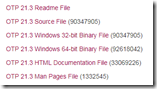
1. 先去下载erlang, 我的电脑是64位的,下载的是OTP 21.3 Windows 64-bit Binary File.
2. 点击rabbitmq下载. 至于怎么使用 rabbitmq, 搜索引擎下.
安装成功后, 启动rabbitmq, 如下
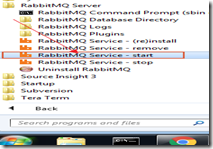

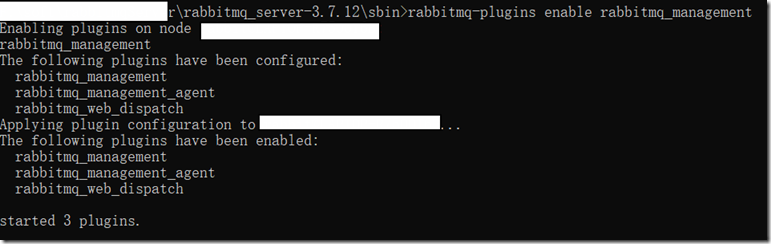
或则cmd到安装你的rebbitmq目录, 到sbin的目录, 然后输入rabbitmq-plugins enable rabbitmq_management
看到如下的打印,可以说明rabbitmq运行成功了.
然后浏览器打开http://localhost:15672, 用户名和密码都是guest, 界面如下
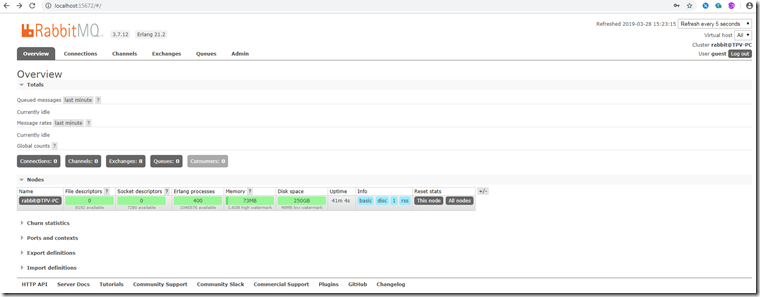
说明启动成功. 下面开始改造config-server和eureka-client项目.
分别在config-server和eureka-client项目里的pom.xml添加如下配置
<dependency>

    <groupId>org.springframework.cloud</groupId>

    <artifactId>spring-cloud-starter-bus-amqp</artifactId>

</dependency>

<dependency>

    <groupId>org.springframework.boot</groupId>

    <artifactId>spring-boot-starter-actuator</artifactId>

</dependency>
然后在config-server的application.yml文件内容如下:
eureka:

  client:

    serviceUrl:

      defaultZone: http://localhost:8761/eureka/

server:

  port: 8765

spring:

  application:

    name: config-server

  cloud:

    config:

      server:

        git:
          uri: https://github.com/xxx 你的git仓库地址

          searchPaths: repos

          username: 你的git用户名

          password: 你的git密码

      label: master

  rabbitmq:

    host: 127.0.0.1

    port: 5672  // 注意这里的端口是5672,而我们刚才浏览器打开的http://localhost:15672端口是15672

    username: guest

    password: guest

management:

  endpoint:

    health:

      show-details: always

  endpoints:

    web:

      exposure:

        include: '*'
然后在eureka-client的application.yml文件内容如下:
eureka:

  client:

    serviceUrl:

      defaultZone: http://localhost:8761/eureka/

server:

  port: 8762

spring:

  application:

    name: eureka-client

  rabbitmq:

    host: 127.0.0.1

    port: 5672

    username: guest

    password: guest

management:

  endpoint:

    health:

      show-details: always

  endpoints:

    web:

      exposure:

        include: '*'
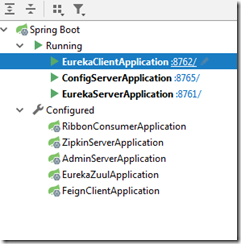
用Run DashBoard启动如下项目:
1. 先启动eureka-server项目
2. 再启动config-server项目, Event log里能看到类似如下内容:
o.s.a.r.c.CachingConnectionFactory: Attempting to connect to: [127.0.0.1:5672]

o.s.a.r.c.CachingConnectionFactory: Created new connection: rabbitConnectionFactory#40195a:0/SimpleConnection@5d73bd [delegate=amqp://guest@127.0.0.1:5672/, localPort= 4586]
3. 最后启动eureka-client项目, Event log里能看到类似如下内容(git仓库地址配置好):
c.c.c.ConfigServicePropertySourceLocator: Fetching config from server at : http://localhost:8765/

c.c.c.ConfigServicePropertySourceLocator: Located environment: name=eureka-client, profiles=[dev], label=master, version=addadb9ed2392ae7f6dddc63a5be60361e2ad8d6, state=null

b.c.PropertySourceBootstrapConfiguration: Located property source: CompositePropertySource {name='configService', propertySources=[MapPropertySource {name='configClient'},
MapPropertySource {name='https://github.com/xxx 你的git仓库地址/repos/eureka-client-dev.properties'}]}
启动完成上面三个项目后, 在浏览器打开eureka-client里的api: http://localhost:8762/testone/config

这里从git仓库取出来的message内容是hello spring io –111111, foo的内容是foo version 111111.
现在我们改变git仓里里的message内容.
如何安装curl,请戳这里.
打开cmd, 输入 curl -X POST http://localhost:8765/actuator/bus-refresh

或则用post man发送:

在config-server和eureka-client这两个项目的Event log里看到类似如下的内容:
o.s.cloud.bus.event.RefreshListener : Received remote refresh request. Keys refreshed []
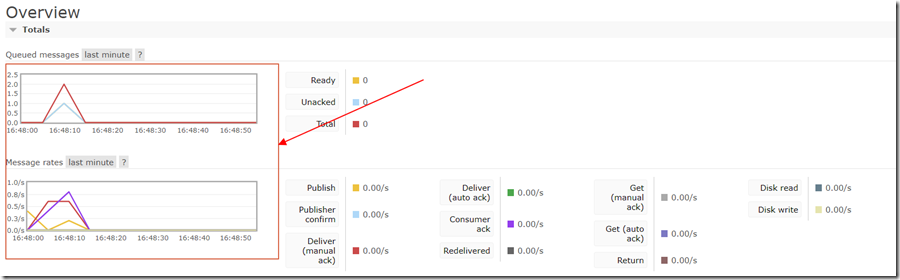
再看rabbitmq页面内容变化, 刷新页面http://localhost:15672, 显示如下:
最后页面刷新http://localhost:8762/testone/config, 就可以看到改的内容了.
我把message改成hello spring io -111111 add message(多了add message内容).

SpringCloud的学习记录(4)的更多相关文章
- SpringCloud的学习记录(1)
最近一段时间重新学习一边SpringCloud(有半年不用了),这里简单记录一下. 我用的是IntelliJ IDEA开发工具, SpringBoot的版本是2.1.3.RELEASE. 1. 构建M ...
- SPRINGCLOUD 开发学习记录
一个简单的微服务系统:服务注册和发现,服务消费,负载均衡,断路器,智能路由,配置管理 服务注册中心: eureka是一个高可用组件,没有后端缓存,每一个实例注册后向注册中心发送心跳,默认情况下,eru ...
- SpringCloud的学习记录(8)
这一章节讲zipkin-server. 在我们生成的Demo项目上右键点击New->Module->spring Initializr, 然后next, 填写Group和Artifact等 ...
- SpringCloud的学习记录(7)
这一章节讲zuul的使用. 在我们生成的Demo项目上右键点击New->Module->spring Initializr, 然后next, 填写Group和Artifact等信息, 这里 ...
- SpringCloud的学习记录(6)
这一章节讲fegin的使用. 在我们生成的Demo项目上右键点击New->Module->spring Initializr, 然后next, 填写Group和Artifact等信息, 这 ...
- SpringCloud的学习记录(5)
这一章节讲如何使用ribbon和hystrix. 在我们生成的Demo项目上右键点击New->Module->spring Initializr, 然后next, 填写Group和Arti ...
- SpringCloud的学习记录(3)
这一章节讲搭建config-server的项目. 在我们生成的Demo项目上右键点击New->Module->spring Initializr, 然后next, 填写Group和Arti ...
- SpringCloud的学习记录(2)
这一章节主要讲如何搭建eureka-client项目. 在我们生成的Demo项目上右键点击New->Module->spring Initializr, 然后next, 填写Group和A ...
- SpringCloud基础教程学习记录
这个学习记录是学习自翟永超前辈的SpringCloud的基础教程. 自己写这个教程的目的主要是在于,想要更凝练总结一些其中的一些实用点,顺便做个汇总,这样自己在复习查看的时候更加方便,也能顺着自己的思 ...
随机推荐
- 14.链表中倒数第k个节点
题目描述: 输入一个链表,输出该链表中倒数第k个结点. 思路分析: 设置两个指针,一个fast一个slow,都从链表头开始,让fast先走k步,然后两个指针一起走,当fast走到尾部,那么sl ...
- Qt 学习之路 2(13):对话框简介
Qt 学习之路 2(13):对话框简介 豆子 2012年9月14日 Qt 学习之路 2 53条评论 对话框是 GUI 程序中不可或缺的组成部分.很多不能或者不适合放入主窗口的功能组件都必须放在 ...
- svg path 路径
许多字母命令(例如:M m)(但不是全部)成对.有一个大写和一个小写版本.大写版本是绝对版本,小写是相对版本.让我们继续以M为例: M 100,100 意思是“拿起笔并将其移动到确切的坐标100,10 ...
- C语言概述之介绍各种基本概念
第2章 C语言概述 2.1 C语言示例解释 #include #include<stdio.h> 这一条指令的作用相当于把stdio.h文件的所有内容都输入该行所在的位置. #includ ...
- P1029 最大公约数和最小公倍数问题(思维题)
题目描述 输入22个正整数x_0,y_0(2 \le x_0<100000,2 \le y_0<=1000000)x0,y0(2≤x0<100000,2≤y0<=100 ...
- 关于c++中const的基本用法
c++中的const 有点类似于c里的宏定义#define,但是似乎是在宏定义基础上的代码优化,具体我解释不清,下面主要提到的是 const 在c++中的3中基本用法: 1.指向常量的指针 例如:co ...
- 如何将微信上传AMR格式语音转化为MP3格式
1. 服务器安装ffmpeg 2. 执行命令 ffmpeg -i {amr_file_path} -f mp3 -acodec libmp3lame -y {mp3_file_path} public ...
- 多数据源 + Configuration中bean依赖注入顺序问题
为什么要调用方法,而不是直接autowire? 官方文档 https://docs.spring.io/spring-boot/docs/current/reference/html/howto-da ...
- 基础 —— ip地址与子网掩码的认识
目录: 1.IP地址的作用 2.IP地址如何表示 3.IP地址的结构 4.子网掩码 5.IP地址的分类 6.私有IP地址 7.二进制与十进制的转换 8.练习题 IP地址的作用: 在一定范围内,唯一的标 ...
- appium连接夜神模拟器方法总结
使用appium连接模拟器前提条件:appium环境已经搭建完毕,搭建步骤请参考我的博客:appium手机自动化环境搭建 1.下载并安装夜神模拟器:https://www.yeshen.com/ 2. ...