
SpringCloud的学习记录(1)
最近一段时间重新学习一边SpringCloud,这里简单记录一下。
我用的是IntelliJ IDEA开发工具, SpringBoot的版本是2.1.3.RELEASE。
1. 构建Maven项目
整个的SpringCloud的项目是在Maven项目中的,这个Maven只做容纳其他项目使用, 比如后面Fegin/Config/Zipkin等项目。
用IntelliJ IDEA工具, File->Project->spring Initializr, 然后点击next, 填写Group和Artifact等信息.
比如我填写的GroupId是com.xum, ArtifactId是demo, 然后next, 在这里我们什么也不选择,再次点击next,
最后选择存放位置,然后Finshed.
把生成pom.xml改成如下(因为这个只是做存放项目使用, 还要把这个src文件也删除了)
<?xml version="1.0" encoding="UTF-8"?>

<project xmlns="http://maven.apache.org/POM/4.0.0"

         xmlns:xsi="http://www.w3.org/2001/XMLSchema-instance"

         xsi:schemaLocation="http://maven.apache.org/POM/4.0.0 http://maven.apache.org/xsd/maven-4.0.0.xsd">

    <modelVersion>4.0.0</modelVersion>

    <groupId>com.xum</groupId>

    <artifactId>demo</artifactId>

    <version>1.0-SNAPSHOT</version>

</project>
2. 构建Eureka-Server项目
在我们生成的Demo项目上右键点击New->Module->spring Initializr, 然后next, 填写Group和Artifact等信息,
这里Artifact填写eurekaserver, 再次next, 如下图,
选择Web下的web和Cloud Discovery下的Eureka Server.
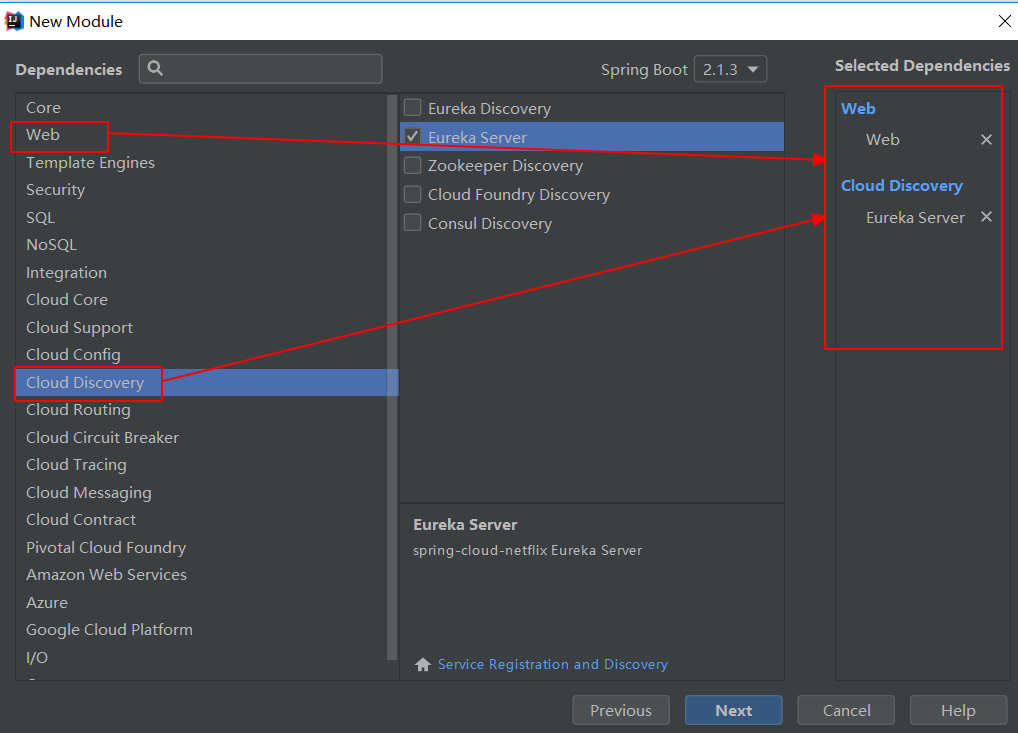
最后在Module Name中填写eureka-server.
生成的pom.xml文件如下
<?xml version="1.0" encoding="UTF-8"?>

<project xmlns="http://maven.apache.org/POM/4.0.0" xmlns:xsi="http://www.w3.org/2001/XMLSchema-instance"

         xsi:schemaLocation="http://maven.apache.org/POM/4.0.0 http://maven.apache.org/xsd/maven-4.0.0.xsd">

    <modelVersion>4.0.0</modelVersion>

    <parent>

        <groupId>org.springframework.boot</groupId>

        <artifactId>spring-boot-starter-parent</artifactId>

        <version>2.1.3.RELEASE</version>

        <relativePath/> <!-- lookup parent from repository -->

    </parent>

    <groupId>com.xum</groupId>

    <artifactId>eureka-server</artifactId>

    <version>0.0.1-SNAPSHOT</version>

    <name>eureka-server</name>

    <description>Demo project for Spring Boot</description>

    <properties>

        <project.build.sourceEncoding>UTF-8</project.build.sourceEncoding>

        <project.reporting.outputEncoding>UTF-8</project.reporting.outputEncoding>

        <java.version>1.8</java.version>

        <spring-cloud.version>Greenwich.RELEASE</spring-cloud.version>

    </properties>

    <dependencies>

        <dependency>

            <groupId>org.springframework.cloud</groupId>

            <artifactId>spring-cloud-starter-netflix-eureka-server</artifactId>

        </dependency>

        <dependency>

            <groupId>org.springframework.boot</groupId>

            <artifactId>spring-boot-starter-actuator</artifactId>

        </dependency>

        <dependency>

            <groupId>org.springframework.boot</groupId>

            <artifactId>spring-boot-starter-test</artifactId>

            <scope>test</scope>

        </dependency>

    </dependencies>

    <dependencyManagement>

        <dependencies>

            <dependency>

                <groupId>org.springframework.cloud</groupId>

                <artifactId>spring-cloud-dependencies</artifactId>

                <version>${spring-cloud.version}</version>

                <type>pom</type>

                <scope>import</scope>

            </dependency>

        </dependencies>

    </dependencyManagement>

    <build>

        <plugins>

            <plugin>

                <groupId>org.springframework.boot</groupId>

                <artifactId>spring-boot-maven-plugin</artifactId>

            </plugin>

        </plugins>

    </build>

    <repositories>

        <repository>

            <id>spring-milestones</id>

            <name>Spring Milestones</name>

            <url>https://repo.spring.io/milestone</url>

        </repository>

    </repositories>

</project>
然后在src->main->resources下新建application.yml文件,把其他的都删除, 内容如下
server:

  port: 8761

eureka:

  instance:

    hostname: localhost

  client:

    registerWithEureka: false

    fetchRegistry: false

    serviceUrl:

      defaultZone: http://${eureka.instance.hostname}:${server.port}/eureka/
最后在EurekaServerApplication 上面添加@EnableEurekaServer这个注解
package com.xum.eurekaserver;

import org.springframework.boot.SpringApplication;

import org.springframework.boot.autoconfigure.SpringBootApplication;

import org.springframework.cloud.netflix.eureka.server.EnableEurekaServer;

@EnableEurekaServer

@SpringBootApplication

public class EurekaServerApplication {

    public static void main(String[] args) {

        SpringApplication.run(EurekaServerApplication.class, args);

    }

}
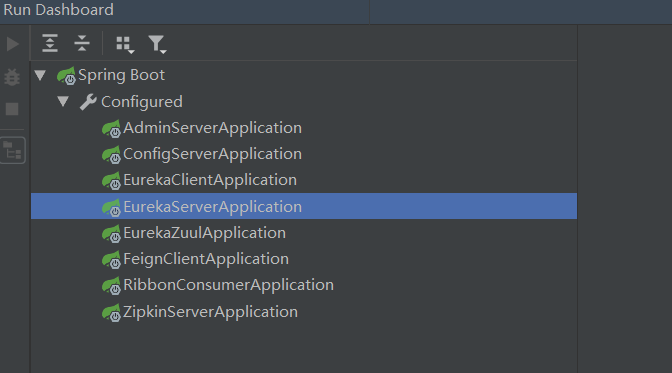
通过Run DashBoard运行eureka-server
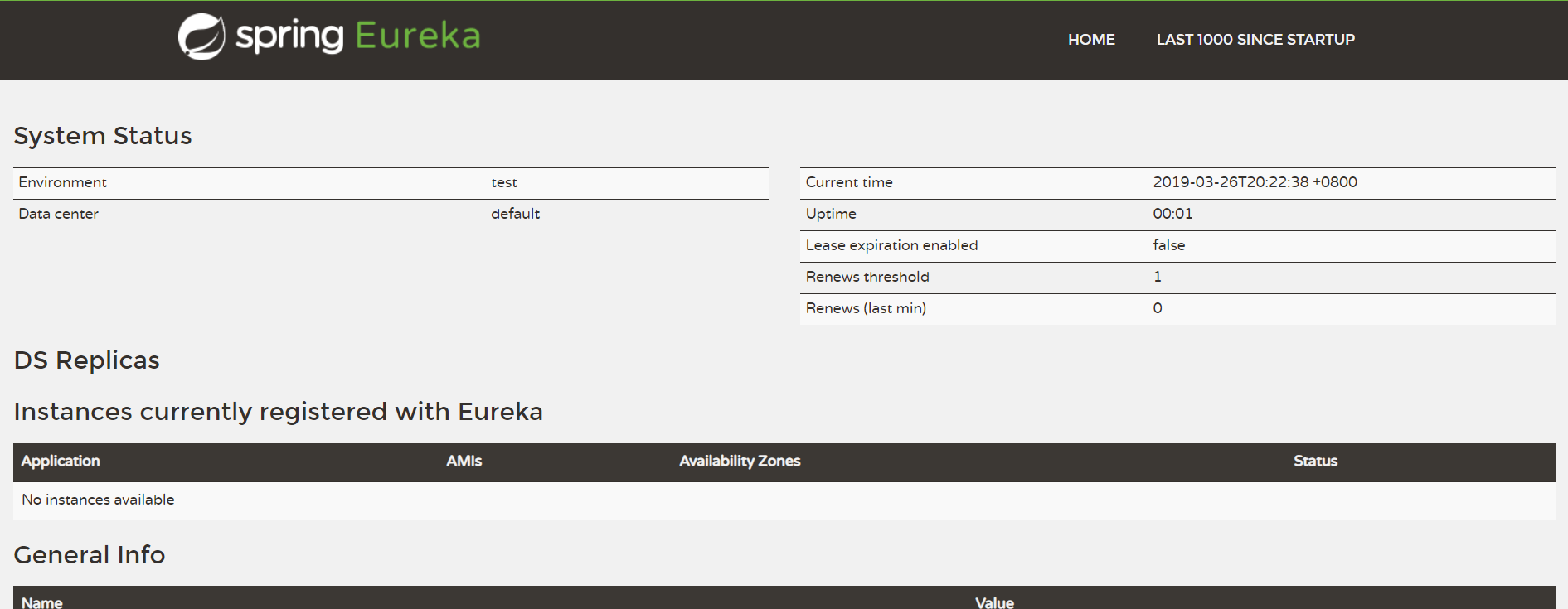
运行成功以后,用浏览器打开http://localhost:8761, 显示如下,说明eureka-server搭建成功.
下一节将如何构建eureka-client.
SpringCloud的学习记录(1)的更多相关文章
- SPRINGCLOUD 开发学习记录
一个简单的微服务系统:服务注册和发现,服务消费,负载均衡,断路器,智能路由,配置管理 服务注册中心: eureka是一个高可用组件,没有后端缓存,每一个实例注册后向注册中心发送心跳,默认情况下,eru ...
- SpringCloud的学习记录(8)
这一章节讲zipkin-server. 在我们生成的Demo项目上右键点击New->Module->spring Initializr, 然后next, 填写Group和Artifact等 ...
- SpringCloud的学习记录(7)
这一章节讲zuul的使用. 在我们生成的Demo项目上右键点击New->Module->spring Initializr, 然后next, 填写Group和Artifact等信息, 这里 ...
- SpringCloud的学习记录(6)
这一章节讲fegin的使用. 在我们生成的Demo项目上右键点击New->Module->spring Initializr, 然后next, 填写Group和Artifact等信息, 这 ...
- SpringCloud的学习记录(5)
这一章节讲如何使用ribbon和hystrix. 在我们生成的Demo项目上右键点击New->Module->spring Initializr, 然后next, 填写Group和Arti ...
- SpringCloud的学习记录(3)
这一章节讲搭建config-server的项目. 在我们生成的Demo项目上右键点击New->Module->spring Initializr, 然后next, 填写Group和Arti ...
- SpringCloud的学习记录(2)
这一章节主要讲如何搭建eureka-client项目. 在我们生成的Demo项目上右键点击New->Module->spring Initializr, 然后next, 填写Group和A ...
- SpringCloud的学习记录(4)
本篇基于上一篇写的, 在git上更改配置后, eureka-client如何更新. 我们只需要在配置文件中配置 spring-cloud-starter-bus-amqp; 这就是说我们需要装rabb ...
- SpringCloud基础教程学习记录
这个学习记录是学习自翟永超前辈的SpringCloud的基础教程. 自己写这个教程的目的主要是在于,想要更凝练总结一些其中的一些实用点,顺便做个汇总,这样自己在复习查看的时候更加方便,也能顺着自己的思 ...
随机推荐
- sublime侧边栏管理sidebarEnhancements浏览器设置
sidebarEnhancements是为了增强sublime Text侧边栏功能的一个插件,但是同时也可以实现设置浏览器浏览当前文件的功能. Ctrl+Shift+p 输入package contr ...
- sqlmap用法
用法 Usage: python sqlmap.py [options] Options: -h, --help Show basic help message and exit -hh Show a ...
- react todolist代码优化
Todolist.js import React, { Component,Fragment } from 'react'; import TodoItem from './TodoItem'; im ...
- 批量mvn 打包 bat文件命令
@echo off cd /d "E:\project\Branches\Source\" svn up mvn clean install -Dmaven.test.skip=t ...
- freemarker macro 使用
转载... macro, nested, return语法 <#macro name param1 param2 ... paramN>...<#nested loopvar1, l ...
- 读经典——《CLR via C#》(Jeffrey Richter著) 笔记_引用类型和值类型(二)
[引用类型和值类型的区别] //引用类型(由于使用了‘class’) class SomeRef { public Int32 x; } //值类型(由于使用了‘struct’) struct Som ...
- Codeforces ~ 1009B ~ Minimum Ternary String (思维)
题意 给你一个只含有0,1,2的字符串,你可以将"01"变为"10","10"变为"01","12" ...
- hdu3746 KMP-next数组的应用
Cyclic Nacklace Time Limit: 2000/1000 MS (Java/Others) Memory Limit: 32768/32768 K (Java/Others)T ...
- javascript里label语句的简单示例
在javascript中,我们可能很少会去用到 Label 语句,但是熟练的应用 Label 语句,尤其是在嵌套循环中熟练应用 break, continue 与 Label 可以精确的返回到你想要的 ...
- 转 OGG-01224 TCP/IP error 111 (Connection refused); retries exceeded.
https://blog.csdn.net/yabingshi_tech/article/details/40620351 在源端启动goldengate pump进程,状态起初是running,后来 ...