
SpringCloud的学习记录(8)
这一章节讲zipkin-server.
在我们生成的Demo项目上右键点击New->Module->spring Initializr, 然后next, 填写Group和Artifact等信息,
这里Artifact填写zipkinserver, 再次next, 选择内容如下的pom.xml:
<?xml version="1.0" encoding="UTF-8"?>

<project xmlns="http://maven.apache.org/POM/4.0.0" xmlns:xsi="http://www.w3.org/2001/XMLSchema-instance"

         xsi:schemaLocation="http://maven.apache.org/POM/4.0.0 http://maven.apache.org/xsd/maven-4.0.0.xsd">

    <modelVersion>4.0.0</modelVersion>

    <parent>

        <groupId>org.springframework.boot</groupId>

        <artifactId>spring-boot-starter-parent</artifactId>

        <version>2.1.3.RELEASE</version>

        <relativePath/> <!-- lookup parent from repository -->

    </parent>

    <groupId>com.xum</groupId>

    <artifactId>zipkin-server</artifactId>

    <version>0.0.1-SNAPSHOT</version>

    <name>zipkin-server</name>

    <description>Demo project for Spring Boot</description>

    <properties>

        <java.version>1.8</java.version>

        <spring-cloud.version>Greenwich.SR1</spring-cloud.version>

    </properties>

    <dependencies>

        <dependency>

            <groupId>org.springframework.boot</groupId>

            <artifactId>spring-boot-starter-web</artifactId>

        </dependency>

        <dependency>

            <groupId>org.springframework.cloud</groupId>

            <artifactId>spring-cloud-starter-netflix-eureka-client</artifactId>

        </dependency>

        <dependency>

            <groupId>org.springframework.cloud</groupId>

            <artifactId>spring-cloud-starter-sleuth</artifactId>

        </dependency>

        <!--<dependency>-->

            <!--<groupId>org.springframework.cloud</groupId>-->

            <!--<artifactId>spring-cloud-starter-zipkin</artifactId>-->

        <!--</dependency>-->

        <!-- https://mvnrepository.com/artifact/io.zipkin.java/zipkin-server -->

        <dependency>

            <groupId>io.zipkin.java</groupId>

            <artifactId>zipkin-server</artifactId>

            <version>2.12.3</version>

        </dependency>

        <!-- https://mvnrepository.com/artifact/org.springframework.cloud/spring-cloud-sleuth-zipkin-stream -->

        <dependency>

            <groupId>org.springframework.cloud</groupId>

            <artifactId>spring-cloud-sleuth-zipkin-stream</artifactId>

            <version>1.3.5.RELEASE</version>

        </dependency>

        <dependency>

            <groupId>org.springframework.cloud</groupId>

            <artifactId>spring-cloud-starter-stream-rabbit</artifactId>

        </dependency>

        <!-- https://mvnrepository.com/artifact/io.zipkin.java/zipkin-autoconfigure-ui -->

        <dependency>

            <groupId>io.zipkin.java</groupId>

            <artifactId>zipkin-autoconfigure-ui</artifactId>

            <version>2.12.3</version>

        </dependency>

        <!--<dependency>-->

            <!--<groupId>org.springframework.cloud</groupId>-->

            <!--<artifactId>spring-cloud-starter-eureka</artifactId>-->

        <!--</dependency>-->

        <dependency>

            <groupId>mysql</groupId>

            <artifactId>mysql-connector-java</artifactId>

        </dependency>

        <dependency>

            <groupId>org.springframework.boot</groupId>

            <artifactId>spring-boot-starter-jdbc</artifactId>

        </dependency>

        <!-- https://mvnrepository.com/artifact/io.zipkin.java/zipkin-autoconfigure-storage-mysql -->

        <dependency>

            <groupId>io.zipkin.java</groupId>

            <artifactId>zipkin-autoconfigure-storage-mysql</artifactId>

            <version>2.12.5</version>

        </dependency>

        <dependency>

            <groupId>org.springframework.boot</groupId>

            <artifactId>spring-boot-starter-actuator</artifactId>

        </dependency>

        <dependency>

            <groupId>org.springframework.boot</groupId>

            <artifactId>spring-boot-starter-test</artifactId>

            <scope>test</scope>

        </dependency>

    </dependencies>

    <dependencyManagement>

        <dependencies>

            <dependency>

                <groupId>org.springframework.cloud</groupId>

                <artifactId>spring-cloud-dependencies</artifactId>

                <version>${spring-cloud.version}</version>

                <type>pom</type>

                <scope>import</scope>

            </dependency>

        </dependencies>

    </dependencyManagement>

    <build>

        <plugins>

            <plugin>

                <groupId>org.springframework.boot</groupId>

                <artifactId>spring-boot-maven-plugin</artifactId>

            </plugin>

        </plugins>

    </build>

    <repositories>

        <repository>

            <id>spring-milestones</id>

            <name>Spring Milestones</name>

            <url>https://repo.spring.io/milestone</url>

        </repository>

    </repositories>

</project>
在application.yml内容如下:
eureka:

  client:

    serviceUrl:

      defaultZone: http://localhost:8761/eureka/

server:

  port: 8766

spring:

  application:

    name: zipkin-server

  sleuth:

    enabled: false

  datasource:

    #schema[0]: classpath:/zipkin.sql

    url: jdbc:mysql://localhost:3306/zipkin?useUnicode=true&characterEncoding=utf-8&serverTimezone=GMT%2B8

    username: root

    password: 你的数据库密码

    driver-class-name: com.mysql.cj.jdbc.Driver

    continue-on-error: true

  #rabbitmq:

   # host: 127.0.0.1

   # port: 5672

   # username: guest

   # password: guest

zipkin:

  storage:

    type: mysql

management:

  endpoint:

    health:

      show-details: always

  endpoints:

    web:

      exposure:

        include: '*'

  metrics:

    web:

      server:

        auto-time-requests: false
其中zipkin数据库的sql如下:
CREATE SCHEMA IF NOT EXISTS `zipkin` DEFAULT CHARACTER SET utf8 ;

USE `zipkin` ;

CREATE TABLE IF NOT EXISTS zipkin_spans (

  `trace_id_high` BIGINT NOT NULL DEFAULT 0 COMMENT 'If non zero, this means the trace uses 128 bit traceIds instead of 64 bit',

  `trace_id` BIGINT NOT NULL,

  `id` BIGINT NOT NULL,

  `name` VARCHAR(255) NOT NULL,

  `parent_id` BIGINT,

  `debug` BIT(1),

  `start_ts` BIGINT COMMENT 'Span.timestamp(): epoch micros used for endTs query and to implement TTL',

  `duration` BIGINT COMMENT 'Span.duration(): micros used for minDuration and maxDuration query'

) ENGINE=InnoDB ROW_FORMAT=COMPRESSED CHARACTER SET=utf8 COLLATE utf8_general_ci;

ALTER TABLE zipkin_spans ADD UNIQUE KEY(`trace_id_high`, `trace_id`, `id`) COMMENT 'ignore insert on duplicate';

ALTER TABLE zipkin_spans ADD INDEX(`trace_id_high`, `trace_id`, `id`) COMMENT 'for joining with zipkin_annotations';

ALTER TABLE zipkin_spans ADD INDEX(`trace_id_high`, `trace_id`) COMMENT 'for getTracesByIds';

ALTER TABLE zipkin_spans ADD INDEX(`name`) COMMENT 'for getTraces and getSpanNames';

ALTER TABLE zipkin_spans ADD INDEX(`start_ts`) COMMENT 'for getTraces ordering and range';

CREATE TABLE IF NOT EXISTS zipkin_annotations (

  `trace_id_high` BIGINT NOT NULL DEFAULT 0 COMMENT 'If non zero, this means the trace uses 128 bit traceIds instead of 64 bit',

  `trace_id` BIGINT NOT NULL COMMENT 'coincides with zipkin_spans.trace_id',

  `span_id` BIGINT NOT NULL COMMENT 'coincides with zipkin_spans.id',

  `a_key` VARCHAR(255) NOT NULL COMMENT 'BinaryAnnotation.key or Annotation.value if type == -1',

  `a_value` BLOB COMMENT 'BinaryAnnotation.value(), which must be smaller than 64KB',

  `a_type` INT NOT NULL COMMENT 'BinaryAnnotation.type() or -1 if Annotation',

  `a_timestamp` BIGINT COMMENT 'Used to implement TTL; Annotation.timestamp or zipkin_spans.timestamp',

  `endpoint_ipv4` INT COMMENT 'Null when Binary/Annotation.endpoint is null',

  `endpoint_ipv6` BINARY(16) COMMENT 'Null when Binary/Annotation.endpoint is null, or no IPv6 address',

  `endpoint_port` SMALLINT COMMENT 'Null when Binary/Annotation.endpoint is null',

  `endpoint_service_name` VARCHAR(255) COMMENT 'Null when Binary/Annotation.endpoint is null'

) ENGINE=InnoDB ROW_FORMAT=COMPRESSED CHARACTER SET=utf8 COLLATE utf8_general_ci;

ALTER TABLE zipkin_annotations ADD UNIQUE KEY(`trace_id_high`, `trace_id`, `span_id`, `a_key`, `a_timestamp`) COMMENT 'Ignore insert on duplicate';

ALTER TABLE zipkin_annotations ADD INDEX(`trace_id_high`, `trace_id`, `span_id`) COMMENT 'for joining with zipkin_spans';

ALTER TABLE zipkin_annotations ADD INDEX(`trace_id_high`, `trace_id`) COMMENT 'for getTraces/ByIds';

ALTER TABLE zipkin_annotations ADD INDEX(`endpoint_service_name`) COMMENT 'for getTraces and getServiceNames';

ALTER TABLE zipkin_annotations ADD INDEX(`a_type`) COMMENT 'for getTraces';

ALTER TABLE zipkin_annotations ADD INDEX(`a_key`) COMMENT 'for getTraces';

CREATE TABLE IF NOT EXISTS zipkin_dependencies (

  `day` DATE NOT NULL,

  `parent` VARCHAR(255) NOT NULL,

  `child` VARCHAR(255) NOT NULL,

  `call_count` BIGINT

) ENGINE=InnoDB ROW_FORMAT=COMPRESSED CHARACTER SET=utf8 COLLATE utf8_general_ci;

ALTER TABLE zipkin_dependencies ADD UNIQUE KEY(`day`, `parent`, `child`);
最后ZipkinServerApplication.java内容如下:
package com.xum.zipkinserver;

import org.springframework.boot.SpringApplication;

import org.springframework.boot.autoconfigure.SpringBootApplication;

import org.springframework.cloud.netflix.eureka.EnableEurekaClient;

//import org.springframework.cloud.sleuth.zipkin.stream.EnableZipkinStreamServer;

import org.springframework.context.annotation.Bean;

import org.springframework.context.annotation.Primary;

import zipkin2.storage.mysql.v1.MySQLStorage;

import zipkin2.server.internal.EnableZipkinServer;

import javax.sql.DataSource;

@SpringBootApplication

@EnableEurekaClient

@EnableZipkinServer

//@EnableZipkinStreamServer

public class ZipkinServerApplication {

    public static void main(String[] args) {

        SpringApplication.run(ZipkinServerApplication.class, args);

    }

    @Bean

    @Primary // 把数据存储到数据库中.

    public MySQLStorage mySQLStorage(DataSource datasource) {

        return MySQLStorage.newBuilder().datasource(datasource).executor(Runnable::run).build();

    }

}
在fegin-client和ribbon-consumer的pom.xml中加入如下内容:
<dependency>

    <groupId>org.springframework.cloud</groupId>

    <artifactId>spring-cloud-starter-zipkin</artifactId>

</dependency>
然后再各自的aplication.yml中加入如下红色内容:
spring:

  application:

    name: 这里是ribbon-consumer或则是fegin-client

  zipkin:

    base-url: http://localhost:8766

    sleuth:

      sampler:

        probability: 1.0
顺序启动如下项目:
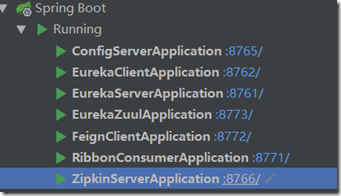
1. eureka-server
2. config-server
3. eureka-client
4. fegin-client
5. ribbon-consumer
6. zuul-client
7. zipkin-server
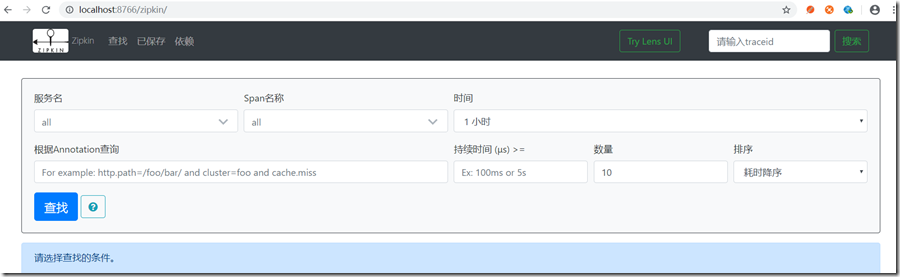
浏览器打开地址:http://localhost:8766/zipkin/, 显示如下,
现在用浏览器或则post man 发送一条api: http://localhost:8773/api-b/feign/feignconsumer?name=xum,
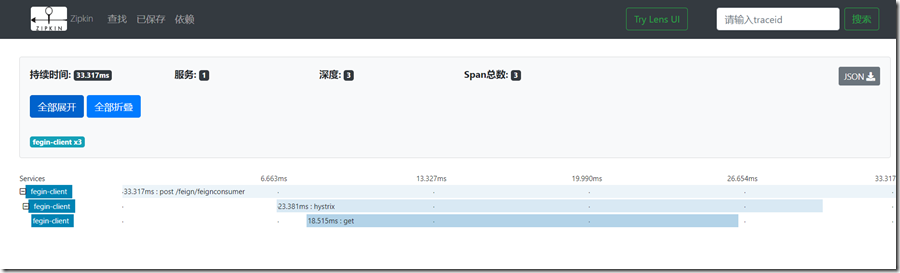
然后再zipkin页面中点击查找按钮(可以过滤), 最后根据时间找到刚才发的那条api, 如下图:

点击进去, 全部展开, 可以看到这条api经历的详细信息.
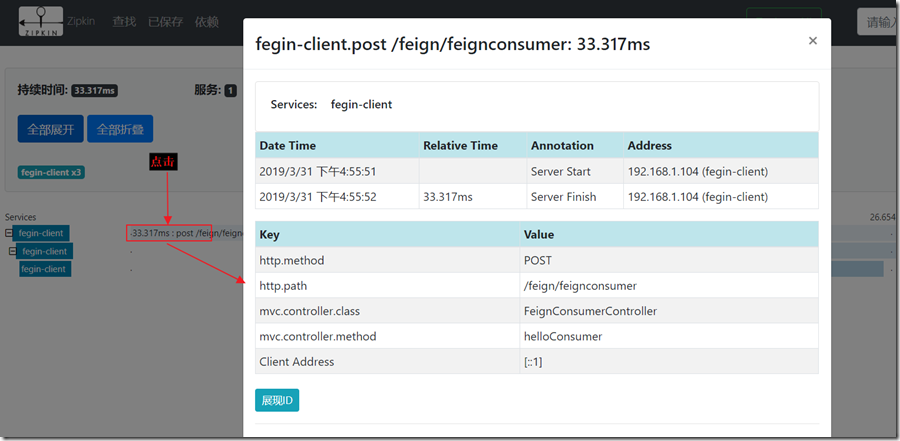
再次点击内容可以看到更详细的信息:
你也可以打开数据库zipkin, 里面保存了刚才发送那条api的信息.
SpringCloud的学习记录(8)的更多相关文章
- SpringCloud的学习记录(1)
最近一段时间重新学习一边SpringCloud(有半年不用了),这里简单记录一下. 我用的是IntelliJ IDEA开发工具, SpringBoot的版本是2.1.3.RELEASE. 1. 构建M ...
- SPRINGCLOUD 开发学习记录
一个简单的微服务系统:服务注册和发现,服务消费,负载均衡,断路器,智能路由,配置管理 服务注册中心: eureka是一个高可用组件,没有后端缓存,每一个实例注册后向注册中心发送心跳,默认情况下,eru ...
- SpringCloud的学习记录(7)
这一章节讲zuul的使用. 在我们生成的Demo项目上右键点击New->Module->spring Initializr, 然后next, 填写Group和Artifact等信息, 这里 ...
- SpringCloud的学习记录(6)
这一章节讲fegin的使用. 在我们生成的Demo项目上右键点击New->Module->spring Initializr, 然后next, 填写Group和Artifact等信息, 这 ...
- SpringCloud的学习记录(5)
这一章节讲如何使用ribbon和hystrix. 在我们生成的Demo项目上右键点击New->Module->spring Initializr, 然后next, 填写Group和Arti ...
- SpringCloud的学习记录(3)
这一章节讲搭建config-server的项目. 在我们生成的Demo项目上右键点击New->Module->spring Initializr, 然后next, 填写Group和Arti ...
- SpringCloud的学习记录(2)
这一章节主要讲如何搭建eureka-client项目. 在我们生成的Demo项目上右键点击New->Module->spring Initializr, 然后next, 填写Group和A ...
- SpringCloud的学习记录(4)
本篇基于上一篇写的, 在git上更改配置后, eureka-client如何更新. 我们只需要在配置文件中配置 spring-cloud-starter-bus-amqp; 这就是说我们需要装rabb ...
- SpringCloud基础教程学习记录
这个学习记录是学习自翟永超前辈的SpringCloud的基础教程. 自己写这个教程的目的主要是在于,想要更凝练总结一些其中的一些实用点,顺便做个汇总,这样自己在复习查看的时候更加方便,也能顺着自己的思 ...
随机推荐
- linux下的小命令
(1) 查看服务器的IP信息 ip add show ifconfig (2) 操作网卡命令(重启网络和启用网卡) cleasystemctl restart network systemctl st ...
- 老男孩python作业4-ATM程序开发
实现一个ATM + 购物商城程序: 额度 15000或自定义 实现购物商城,买东西加入 购物车,调用信用卡接口结账 可以提现,手续费5% 支持多账户登录 支持账户间转账 记录每月日常消费流水 提供还款 ...
- 109th LeetCode Weekly Contest Number of Recent Calls
Write a class RecentCounter to count recent requests. It has only one method: ping(int t), where t r ...
- C语言实现排序
//C语言版排序#include<stdio.h> #include<stdlib.h> //冒泡排序 void bubleSort(int data[], int n); / ...
- CAPL编程实现诊断刷写,车联网FOTA流程自动化测试(方案篇)
原创内容,转载请注明出处 本文围绕车联网的ECU,TBOX的FOTA升级业务展开描述.主要讲如何通过CANoe编程实现自动化测试, 验证TBOX在FOTA业务过程中作为一个诊断仪刷写整车其它ECU的流 ...
- vue2.0 在main.js引入scss文件报错
在vue2.0的main.js中引入scss文件报错 原因是在 在build文件夹下的webpack.base.conf.js的rules里面添加配置 { test: /\.scss$/, loade ...
- 使用 PuTTY 时遇到错误:“expected key exchange group packet from server”
情况 使用 PuTTY 通过 SSH 访问 ProxySG 或 Advanced Secure Gateway (ASG) 时,您会看到如下错误:"expected key exchange ...
- python 计数器Counter
from collections import Counter colours=( ('Yasoob','Yellow',1), ('Ali','Blue',2), ('Arham','Green', ...
- rewrite 功能
一, rewrite 地址重写与地址转发 区别: 1,地址转发后客户端浏览器地址栏中的地址时不会改变的;而地址重写的话客户端浏览器地址栏会改变为服务器确定的地址 2, 在一次地址转发过程中,只产生一次 ...
- php编译常见错误
php PHP编译安装时常见错误解决办法[转] This article is post on https://coderwall.com/p/ggmpfa configure: error: xsl ...