
SpringCloud的学习记录(6)
这一章节讲fegin的使用.
在我们生成的Demo项目上右键点击New->Module->spring Initializr, 然后next, 填写Group和Artifact等信息,
这里Artifact填写feginclient, 再次next, 选择内容如下的pom.xml:
<?xml version="1.0" encoding="UTF-8"?>

<project xmlns="http://maven.apache.org/POM/4.0.0" xmlns:xsi="http://www.w3.org/2001/XMLSchema-instance"

         xsi:schemaLocation="http://maven.apache.org/POM/4.0.0 http://maven.apache.org/xsd/maven-4.0.0.xsd">

    <modelVersion>4.0.0</modelVersion>

    <parent>

        <groupId>org.springframework.boot</groupId>

        <artifactId>spring-boot-starter-parent</artifactId>

        <version>2.1.3.RELEASE</version>

        <relativePath/> <!-- lookup parent from repository -->

    </parent>

    <groupId>com.xum</groupId>

    <artifactId>feign-client</artifactId>

    <version>0.0.1-SNAPSHOT</version>

    <name>feign-client</name>

    <description>Demo project for Spring Boot</description>

    <properties>

        <java.version>1.8</java.version>

        <spring-cloud.version>Greenwich.RELEASE</spring-cloud.version>

    </properties>

    <dependencies>

        <dependency>

            <groupId>org.springframework.boot</groupId>

            <artifactId>spring-boot-starter-web</artifactId>

        </dependency>

        <dependency>

            <groupId>org.springframework.cloud</groupId>

            <artifactId>spring-cloud-starter-netflix-eureka-client</artifactId>

        </dependency>

        <dependency>

            <groupId>org.springframework.cloud</groupId>

            <artifactId>spring-cloud-starter-openfeign</artifactId>

        </dependency>

        <dependency>

            <groupId>org.springframework.cloud</groupId>

            <artifactId>spring-cloud-starter-netflix-hystrix</artifactId>

        </dependency>

        <dependency>

            <groupId>org.springframework.cloud</groupId>

            <artifactId>spring-cloud-starter-netflix-hystrix-dashboard</artifactId>

        </dependency>

        <dependency>

            <groupId>org.springframework.boot</groupId>

            <artifactId>spring-boot-starter-actuator</artifactId>

        </dependency>

        <dependency>

            <groupId>org.springframework.boot</groupId>

            <artifactId>spring-boot-starter-test</artifactId>

            <scope>test</scope>

        </dependency>

    </dependencies>

    <dependencyManagement>

        <dependencies>

            <dependency>

                <groupId>org.springframework.cloud</groupId>

                <artifactId>spring-cloud-dependencies</artifactId>

                <version>${spring-cloud.version}</version>

                <type>pom</type>

                <scope>import</scope>

            </dependency>

        </dependencies>

    </dependencyManagement>

    <build>

        <plugins>

            <plugin>

                <groupId>org.springframework.boot</groupId>

                <artifactId>spring-boot-maven-plugin</artifactId>

            </plugin>

        </plugins>

    </build>

    <repositories>

        <repository>

            <id>spring-milestones</id>

            <name>Spring Milestones</name>

            <url>https://repo.spring.io/milestone</url>

        </repository>

    </repositories>

</project>
fegin-client项目结构如下:

1. 首先FeginClientApplication.java里的内容如下:
package com.xum.feignclient;

import org.springframework.boot.SpringApplication;

import org.springframework.boot.autoconfigure.SpringBootApplication;

import org.springframework.cloud.client.discovery.EnableDiscoveryClient;

import org.springframework.cloud.netflix.eureka.EnableEurekaClient;

import org.springframework.cloud.openfeign.EnableFeignClients;

import org.springframework.context.annotation.ComponentScan;

@SpringBootApplication

@EnableEurekaClient

@EnableFeignClients

@ComponentScan(basePackages = { "com.xum.feignclient.controller", "com.xum.feignclient.server" })

public class FeignClientApplication {

    public static void main(String[] args) {

        SpringApplication.run(FeignClientApplication.class, args);

    }

}
2. application.yml内容如下:
eureka:

  client:

    serviceUrl:

      defaultZone: http://localhost:8761/eureka/

server:

  port: 8772

spring:

  application:

    name: fegin-client

feign:

  hystrix:

    enabled: true

management:

  endpoint:

    health:

      show-details: always

  endpoints:

    web:

      exposure:

        include: '*'
3. 然后FeignConsumerController.java内容如下:
package com.xum.feignclient.controller;

import com.xum.feignclient.server.HelloService;

import org.slf4j.Logger;

import org.slf4j.LoggerFactory;

import org.springframework.beans.factory.annotation.Autowired;

import org.springframework.web.bind.annotation.RequestMapping;

import org.springframework.web.bind.annotation.RestController;

@RestController

@RequestMapping(value = "/feign")

public class FeignConsumerController {

    private static final Logger LOG = LoggerFactory.getLogger(FeignConsumerController.class);

    @Autowired

    HelloService helloService;

    @RequestMapping(value = "/feignconsumer")

    public String helloConsumer(){

        LOG.info("FeginConsumerController=>helloConsumer");

        return helloService.hello();

    }

    @RequestMapping(value = "/test")

    public String test() {

        return "test";

    }

}
4. 其次就是HelloService.java接口内容如下:
package com.xum.feignclient.server;

import org.springframework.cloud.openfeign.FeignClient;

import org.springframework.web.bind.annotation.RequestMapping;
// 这里的FeginClient注解, value是说明调用的那个项目,就是spring.application.name对应的名字;
// fallback是调用value项目api失败后, 处理的方法类, 这也是自定义的.

@FeignClient(value = "eureka-client", fallback = HystrixService.class)

public interface HelloService {

    @RequestMapping(value = "/testone/test")

    String hello();

}
5. 然后是HystrixService.java内容如下:
package com.xum.feignclient.server;

import org.springframework.stereotype.Service;

@Service

public class HystrixService implements HelloService {

    // 这里就是当调用api失败后, 对应的处理方法.

    @Override

    public String hello() {

        return " HelloService=>HystrixService=>eureka-client is unable ...";

    }

}
现在启动如下的项目:
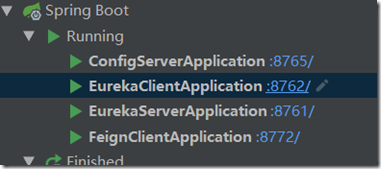
1. eureka-server
2. config-server
3. feign-client
4. eureka-client
在浏览器或则post man中输入api:http://localhost:8772/feign/feignconsumer, 显示内容如下:
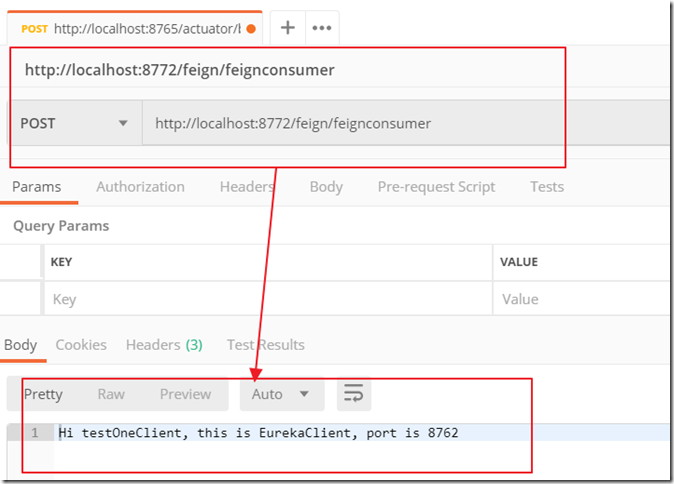
说明成功调用eureka-client项目里的testone/test这条api.
现在把eureka-client项目停止, 然后再输入这条api: http://localhost:8772/feign/feignconsumer, 内容如下:

现在这里输出的是HystrixService.java里的内容里, 自我保护的机制.
SpringCloud的学习记录(6)的更多相关文章
- SpringCloud的学习记录(1)
最近一段时间重新学习一边SpringCloud(有半年不用了),这里简单记录一下. 我用的是IntelliJ IDEA开发工具, SpringBoot的版本是2.1.3.RELEASE. 1. 构建M ...
- SPRINGCLOUD 开发学习记录
一个简单的微服务系统:服务注册和发现,服务消费,负载均衡,断路器,智能路由,配置管理 服务注册中心: eureka是一个高可用组件,没有后端缓存,每一个实例注册后向注册中心发送心跳,默认情况下,eru ...
- SpringCloud的学习记录(8)
这一章节讲zipkin-server. 在我们生成的Demo项目上右键点击New->Module->spring Initializr, 然后next, 填写Group和Artifact等 ...
- SpringCloud的学习记录(7)
这一章节讲zuul的使用. 在我们生成的Demo项目上右键点击New->Module->spring Initializr, 然后next, 填写Group和Artifact等信息, 这里 ...
- SpringCloud的学习记录(5)
这一章节讲如何使用ribbon和hystrix. 在我们生成的Demo项目上右键点击New->Module->spring Initializr, 然后next, 填写Group和Arti ...
- SpringCloud的学习记录(3)
这一章节讲搭建config-server的项目. 在我们生成的Demo项目上右键点击New->Module->spring Initializr, 然后next, 填写Group和Arti ...
- SpringCloud的学习记录(2)
这一章节主要讲如何搭建eureka-client项目. 在我们生成的Demo项目上右键点击New->Module->spring Initializr, 然后next, 填写Group和A ...
- SpringCloud的学习记录(4)
本篇基于上一篇写的, 在git上更改配置后, eureka-client如何更新. 我们只需要在配置文件中配置 spring-cloud-starter-bus-amqp; 这就是说我们需要装rabb ...
- SpringCloud基础教程学习记录
这个学习记录是学习自翟永超前辈的SpringCloud的基础教程. 自己写这个教程的目的主要是在于,想要更凝练总结一些其中的一些实用点,顺便做个汇总,这样自己在复习查看的时候更加方便,也能顺着自己的思 ...
随机推荐
- Leetcode 746. Min Cost Climbing Stairs 最小成本爬楼梯 (动态规划)
题目翻译 有一个楼梯,第i阶用cost[i](非负)表示成本.现在你需要支付这些成本,可以一次走两阶也可以走一阶. 问从地面或者第一阶出发,怎么走成本最小. 测试样例 Input: cost = [1 ...
- git 打tag
查看已有tag git tag 创建新的tag git tag <version or tagname> -m <tag description> 例如创建一个版本1.0.0的 ...
- 8.Move Zeroes(移动零)
Level: Easy 题目描述: Given an array nums, write a function to move all 0's to the end of it while mai ...
- The requested profile "account" could not be activated because it does not exist 无法maven install的 解决办法,勾选红框选择的选项即可
- maven 发布 到 远程 tomcat
需要修改3个地方 首先 maven setting.xml 在 servers 节点 中 添加 一个 server <server> <id>devTomcat</id& ...
- shell入门基础必备
作者:KornLee 2005-02-03 15:32:57 来自:Linux先生 1.建立和运行shell程序 什么是shell程序呢? 简单的说shell程序就是一个包含若干行 shel ...
- Checkstyle的配置详解
Checkstyle是一款检查java程序代码样式的工具,可以有效的帮助我们检视代码以便更好的遵循代码编写标准,特别适用于小组开发时彼此间的样式规范和统一.Checkstyle提供了高可配置性,以便适 ...
- Python 15 I/O编程
读写文件是最常见的IO操作.Python内置了读写文件的函数,用法和C是兼容的. 读写文件前,我们先必须了解一下,在磁盘上读写文件的功能都是由操作系统提供的,现代操作系统不允许普通的程序直接操作磁盘, ...
- HAL库延时、SYCCNT与SYSTICK
HAL库驱动中,由于某些外设的驱动需要使用超时判断(比如I2C.SPI.SDIO等),需要精确延时(精度为1ms),使用的是SysTick,但是在操作系统里面,我们需要使用SysTick来提供系统时基 ...
- [转]ASP.NET中JSON的序列化和反序列化
本文转自:http://www.cnblogs.com/zhaozhan/archive/2011/01/09/1931340.html JSON是专门为浏览器中的网页上运行的JavaScript代码 ...