
SpringCloud的学习记录(3)
这一章节讲搭建config-server的项目.
在我们生成的Demo项目上右键点击New->Module->spring Initializr, 然后next, 填写Group和Artifact等信息,
这里Artifact填写configserver, 再次next,
这里选择的Web下的web和Cloud Discovery下的Eureka Discovery, 同时选择Cloud Config下的Config Server.
最后在Module Name中填写config-server.
生成的pom.xml文件如下:
在src->main->resources下建立application.yml文件, 内容如下
eureka:

  client:

    serviceUrl:

      defaultZone: http://localhost:8761/eureka/    // 这里依然是注册到eureka-server中

server:

  port: 8765

spring:

  application:

    name: config-server

  cloud:

    config:

      server:

        git:

          uri: https://github.com/xxx 你的git仓库地址

          searchPaths: repos

          username: 你的git用户名

          password: 你的git密码

      label: master
在ConfigServerApplication.java里的内容如下, 要加上@EnableConfigServer这个注解
package com.xum.configserver;

import org.springframework.boot.SpringApplication;

import org.springframework.boot.autoconfigure.SpringBootApplication;

import org.springframework.cloud.netflix.eureka.EnableEurekaClient;

import org.springframework.cloud.config.server.EnableConfigServer;

@EnableEurekaClient

@EnableConfigServer

@SpringBootApplication

public class ConfigServerApplication {

    public static void main(String[] args) {

        SpringApplication.run(ConfigServerApplication.class, args);

    }

}
这样Config-server项目搭建完成,
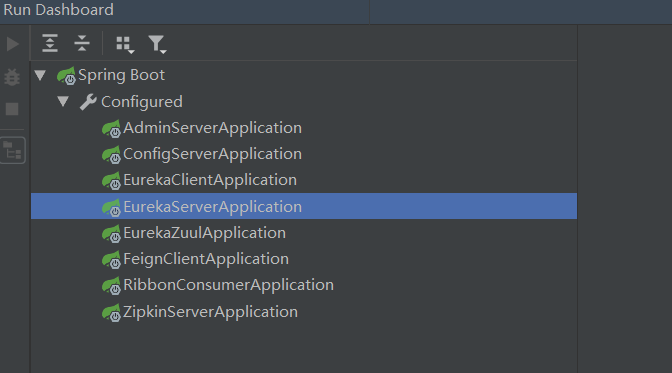
用Run DashBoard顺序启动如下项目:
1. eureka-server
2. config-server
3. eureka-client
然后再次运行上一章节的几条api就可以看到效果了
先在浏览器中输入http://localhost:8762/testone/test, 显示如下
port是eureka-client的端口

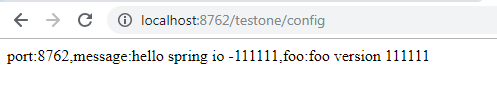
然后在浏览器中输入http://localhost:8762/testone/config, 显示如下
port是eureka-client的端口, message和foo是从git仓库中获取的, 是通过config-server项目获取的.
下一章节讲如何在改变git上的值后, eureka-client能及时的更新.
SpringCloud的学习记录(3)的更多相关文章
- SpringCloud的学习记录(1)
最近一段时间重新学习一边SpringCloud(有半年不用了),这里简单记录一下. 我用的是IntelliJ IDEA开发工具, SpringBoot的版本是2.1.3.RELEASE. 1. 构建M ...
- SPRINGCLOUD 开发学习记录
一个简单的微服务系统:服务注册和发现,服务消费,负载均衡,断路器,智能路由,配置管理 服务注册中心: eureka是一个高可用组件,没有后端缓存,每一个实例注册后向注册中心发送心跳,默认情况下,eru ...
- SpringCloud的学习记录(8)
这一章节讲zipkin-server. 在我们生成的Demo项目上右键点击New->Module->spring Initializr, 然后next, 填写Group和Artifact等 ...
- SpringCloud的学习记录(7)
这一章节讲zuul的使用. 在我们生成的Demo项目上右键点击New->Module->spring Initializr, 然后next, 填写Group和Artifact等信息, 这里 ...
- SpringCloud的学习记录(6)
这一章节讲fegin的使用. 在我们生成的Demo项目上右键点击New->Module->spring Initializr, 然后next, 填写Group和Artifact等信息, 这 ...
- SpringCloud的学习记录(5)
这一章节讲如何使用ribbon和hystrix. 在我们生成的Demo项目上右键点击New->Module->spring Initializr, 然后next, 填写Group和Arti ...
- SpringCloud的学习记录(2)
这一章节主要讲如何搭建eureka-client项目. 在我们生成的Demo项目上右键点击New->Module->spring Initializr, 然后next, 填写Group和A ...
- SpringCloud的学习记录(4)
本篇基于上一篇写的, 在git上更改配置后, eureka-client如何更新. 我们只需要在配置文件中配置 spring-cloud-starter-bus-amqp; 这就是说我们需要装rabb ...
- SpringCloud基础教程学习记录
这个学习记录是学习自翟永超前辈的SpringCloud的基础教程. 自己写这个教程的目的主要是在于,想要更凝练总结一些其中的一些实用点,顺便做个汇总,这样自己在复习查看的时候更加方便,也能顺着自己的思 ...
随机推荐
- pf4j实例 插件框架
实现整个过程需要三个部分,第一就是根接口,第二是插件,第三是应用程序.这是3个java项目. 首先要下载jar包,百度搜索maven repository,然后搜索pf4j,如下图,下载第一个的相应版 ...
- 改变iOS app的icon(iOS10.3)
原文 改变iOS app的icon官方iOS10.3新增了可以让开发者去更改app的icon,接下来看看怎么更改.官方API给的东西很少,只是介绍了一个实例方法: 1 open func setAlt ...
- WebForm与MVC混用 (转)
http://blog.csdn.net/leftfist/article/details/11591231
- js 遍历tree的一个例子
小例子蕴含着到力量,我希望自己有改变自己生活的能力,自己有主宰自己命运的能力... 备注:这个例子有问题. <!DOCTYPE html> <html lang="en&q ...
- Java Applet 素数小程序
en... 1. Applet 这个远古的东西,今天我同学让我帮他看看代码,说applet运行出错.额,反正闲着也是闲着,看看呗 ,结果看到代码...4 2.就是实现这破玩意 package calc ...
- Mybatis学习笔记(九) —— Mybatis逆向工程
一.什么是Mybatis逆向工程? 简单的解释就是通过数据库中的单表,自动生成java代码. 我们平时在使用Mabatis框架进行Web应用开发的过程中,需要根据数据库表编写对应的Pojo类和Mapp ...
- EXCEL 导入SQL SERVER 方法
1.注意:确认是否已安装 AccessDatabaseEngine.exe 2.可视化按提示操作.
- servlet3
亿级流量架构 http://www.iteye.com/blogs/subjects/as-core servlet3.1对比 http://jinnianshilongnian.iteye.com/ ...
- delphi 与 java 兼容的 MD5
function GetMd5(AValue : string) : string; var md5 : TIdHashMessageDigest5; bytes,byte1 : TBytes; be ...
- No bean named 'xxxxxxx' available--springboot 上线打war包
springboot项目发布上线后,报错:No bean named 'xxxxxxx' available 因为我开发时pom用的jar,但上线发布war.解决方法: 1.pom.xml <p ...