
why happen "WaitHandles must be less than or equal to 64"
一、背景:
在一个项目中碰到大数据插入的问题,一次性插入20万条数据(SQL Server),并用200个线程去执行,计算需要花费多少时间,因此需要等200个线程处理完成后,记录花费的时间,需要考虑的一个问题是:如何判断判断多个线程是否全部执行完成。在执行数据库的插入过程中,当每个线程需要处理的数据量大时,是个耗时的过程,故对通过配置开启多个线程。
二、问题:
问题出来了,那么如何知道所有的线程操作都全部完成了,答案是利用C#中的的ManualResetEvent来处理;于是有下面的写法。
//针对每个线程 绑定初始化一个ManualResetEvent实例

ManualResetEvent doneEvent = new ManualResetEvent(false);

//通过ThreadPool.QueueUserWorkItem(网络请求方法HttpRequest,doneEvent ) 来开启多线程

//将等待事件一一加入事件列表

 List<ManualResetEvent> listEvent = new List<ManualResetEvent>();

for(int i=0;i<线程数;i++){

        listEvent.Add(doneEvent);

}

//主线程等待每个线程全部完成

WaitHandle.WaitAll(listEvent.ToArray());

//....接下去的时间计算

//在保存数据的的每个线程中调用

doneEvent.Set();//通知主线程 本线程保存数据方法已经调用完成
运行好像没有问题,但是当线程数大于64个之后抛出异常 WaitHandles must be less than or equal to 64
通过网上查询,得知原来WaitHandle.WaitAll(listEvent.ToArray()); 这里listEvent线程数不能超过64个
三、解决方案:
原理:封装一个ManualResetEvent对象,一个计数器current,提供SetOne和WaitAll方法;
主线程调用WaitAll方法使ManualResetEvent对象等待唤醒信号;
各个子线程调用setOne方法 ,setOne每执行一次current减1,直到current等于0时表示所有子线程执行完毕 ,调用ManualResetEvent的set方法,这时主线程可以执行WaitAll之后的步骤。
目标:减少ManualResetEvent对象的大量产生和使用的简单性。
四、例子:
 public class MutipleThreadResetEvent : IDisposable

    {

        private readonly ManualResetEvent done;

        private readonly int total;

        private long current;

        /// <summary>

        /// 构造函数

        /// </summary>

        /// <param name="total">需要等待执行的线程总数</param>

        public MutipleThreadResetEvent(int total)

        {

            this.total = total;

            current = total;

            done = new ManualResetEvent(false);

        }

        /// <summary>

        /// 唤醒一个等待的线程

        /// </summary>

        public void SetOne()

        {

            // Interlocked 原子操作类 ,此处将计数器减1

            if (Interlocked.Decrement(ref current) == )

            {

                //当所以等待线程执行完毕时,唤醒等待的线程

                done.Set();

            }

        }

        /// <summary>

        /// 等待所以线程执行完毕

        /// </summary>

        public void WaitAll()

        {

            done.WaitOne();

        }

        /// <summary>

        /// 释放对象占用的空间

        /// </summary>

        public void Dispose()

        {

            ((IDisposable)done).Dispose();

        }

    }
本质就是只通过1个ManualResetEvent 对象就可以实现同步N(N可以大于64)个线程
    public class Process

    {

       public static int workItemCount = ;

        Process() { }

        public static void ProcessDataThread(object state)

        {

            State stateinfo = state as State;

            int count = Int32.Parse(stateinfo.perthreadtotal.ToString());

            if (count == )

            {

                ProcessManage.InputLog("输入的数据不正确,请重新输入");

                return;

            }

            int workItemNumber = workItemCount;

            Interlocked.Increment(ref workItemCount);

            ProcessManage.InputLog(string.Format("线程{0}开始工作", workItemNumber.ToString()));

            string sql = @"insert into gpsposition (PlateType,CarNo,Latitude,Longitude,Altitude,Heading,Speed,Timestamp)

values";

            string insertvalue = string.Empty;

            string va = @"('02','渝B12345',10,10,10,20,10,'2016/11/1 12:00'),";

            for (int i = ; i < count; i++)

            {

                insertvalue = (insertvalue + va);

            }

            insertvalue = insertvalue.TrimEnd(',');

            //执行sql语句

            try

            {

                ProcessManage.ProcessData(string.Concat(sql, insertvalue));

            }

            catch (Exception ex)

            {

                ProcessManage.InputLog(string.Format("线程{0},SQL执行错误:{1}", workItemNumber.ToString(), ex.Message));

            }

            finally

            {

                ProcessManage.InputLog(string.Format("线程{0}执行完成", workItemNumber.ToString()));

                stateinfo.manualEvent.SetOne();

            }

        }

    }
页面调用代码如下:
 private void button1_Click(object sender, EventArgs e)

        {

            Process.workItemCount = ;

            int threadcount = ;

            int totalcount = ;

            Int32.TryParse(this.txtThreadCount.Text, out threadcount);

            Int32.TryParse(this.txtTotalCount.Text, out totalcount);

            if (threadcount ==  || totalcount == )

            {

                MessageBox.Show("文本中输入的数字不正确,请输入大于0的整数");

                return;

            }

            int perthreadtotal = totalcount / threadcount;

            ProcessManage.InputLog(string.Format("总记录数-{0}条", totalcount));

            ProcessManage.InputLog(string.Format("线程执行数量-{0}个", threadcount));

            ProcessManage.InputLog(string.Format("每个线程执行记录数-{0}条", perthreadtotal));

            ProcessManage.InputLog("=================================================");

            ProcessManage.InputLog("开始启动线程执行");

            State stateInfo;

            Stopwatch watch = new Stopwatch();

            watch.Start();

            using (var manualEvents = new MutipleThreadResetEvent(threadcount))

            {

                for (int i = ; i < threadcount; i++)

                {

                    stateInfo = new State(manualEvents, perthreadtotal);

                    ThreadPool.QueueUserWorkItem(new WaitCallback(Process.ProcessDataThread), stateInfo);

                }

                manualEvents.WaitAll();

            }

            watch.Stop();

            ProcessManage.InputLog(string.Format("全部线程执行完成,耗时{0}秒",watch.Elapsed));

        }
五、UI效果:
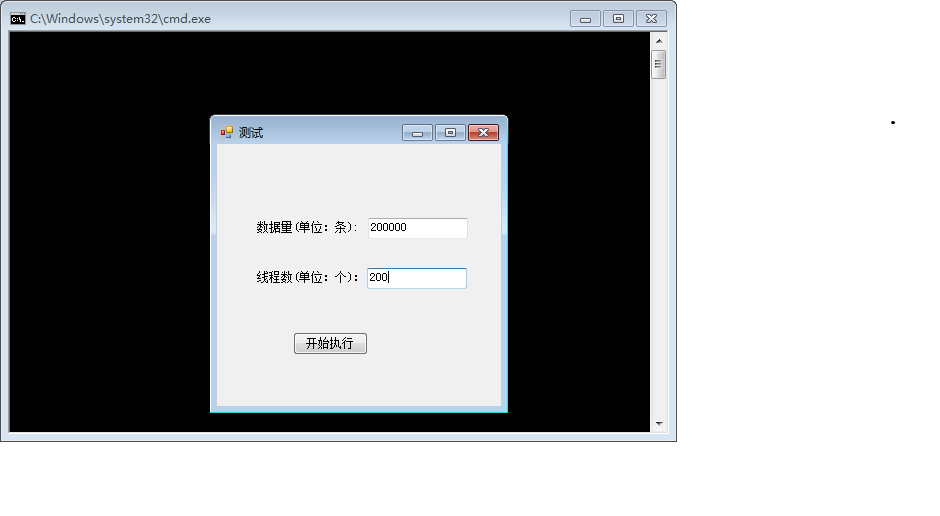
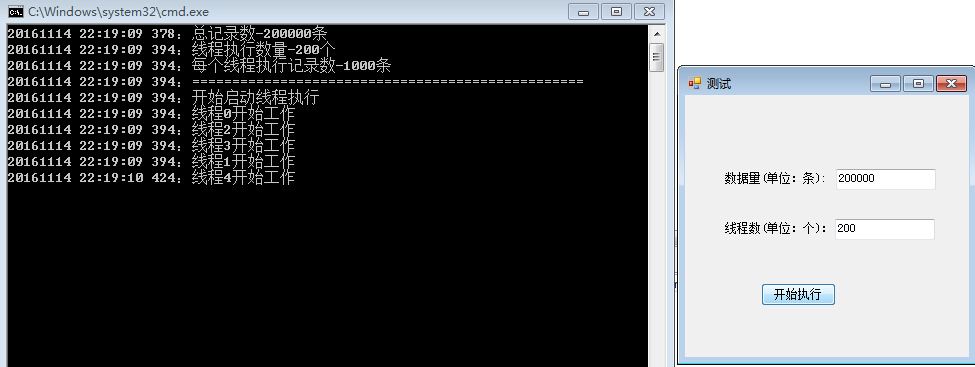
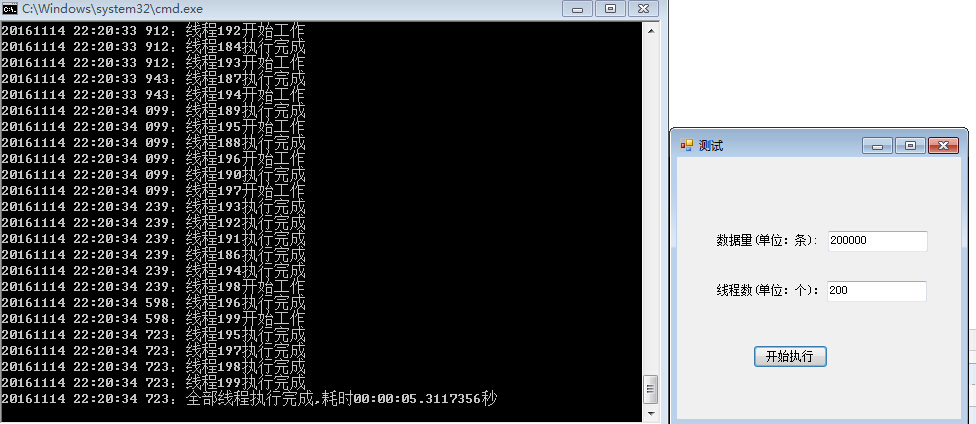
总结:20万数据一次性用200个线程执行,只花费了5秒多的时间即完成。
why happen "WaitHandles must be less than or equal to 64"的更多相关文章
- Reloading Java Classes 201: How do ClassLoader leaks happen? Translation
The original link : http://zeroturnaround.com/rebellabs/rjc201/ From ClassLoaders to Classes 从ClassL ...
- English trip V1 - 6.Accidents Happen! 发生意外! Teacher:Corrine Key: 过去进行时 was or were + Ving
In this lesson you will learn to talk about past occurences. 过去进行时 课上内容(Lesson) C: Hi, Loki! L: Hi, ...
- 【MyEcplise】导入项目后,会定时弹出一下错误MyEcplise tern was unable to complete your request in time.This couble happen if your project contains several large javaScript libraies.
Myecplise弹出错误如下: 错误代码: MyEcplise tern was unable to complete your request in time.This couble happen ...
- happen before 原则
并发一直都是程序开发者绕不开的难题,在上一篇文章中我们知道了导致并发问题的源头是 : 多核 CPU 缓存导致程序的可见性问题.多线程间切换带来的原子性问题以及编译优化带来的顺序性问题. 原子性问题我们 ...
- jvm(三)指令重排 & 内存屏障 & 可见性 & volatile & happen before
参考文档: https://tech.meituan.com/java-memory-reordering.html http://0xffffff.org/2017/02/21/40-atomic- ...
- 【JS】Beginner1:Making Stuff Happen
1.JS(JavaScript) is for interactivity 2.How does JS relate to HTML&CSS? script tag script elemen ...
- In ZeroDB, the client is responsible for the database logic. Data encryption, decryption, and compression also happen client side. Therefore, the server never has any knowledge about the data, its str
zerodb/index.rst at master · zerodb/zerodb https://github.com/zerodb/zerodb/blob/master/docs/source/ ...
- 进程间IPC通信-stop waiting for thing to happen,go out and make them happen!!!
进程间通信: System V IPC对象: ipcs -q:查看消息队列 ipcs -m:查看共享内存 ipcs -s:查看信号灯集 ipcrm -q:删除消息队列 ipcrm -m:删除共 ...
- 从netty-example分析Netty组件续
上文我们从netty-example的Discard服务器端示例分析了netty的组件,今天我们从另一个简单的示例Echo客户端分析一下上个示例中没有出现的netty组件. 1. 服务端的连接处理,读 ...
随机推荐
- GnuRadio Hacking①:使用GnuRadio+SDR破解固定码无线遥控
0×01 信号捕获 在这篇文章中,我们将使用GnuRadio+SDR硬件对某品牌型号的无线跳蛋进行无线重放攻击的演示. 市面上常见的无线遥控工作的频段,通常工作在315Mhz.433Mhz,也有少数的 ...
- LayaAir引擎——(十一)
var c = new Array(); var d = new Array(); var e = new Array(); var f = new Array(); var g = new Arra ...
- win32记事本程序(一)
我不会取标题,大体上我想用win32,模仿windows的记事本,写个记事本程序,最后让我的程序和微软的程序在外观和功能上都差不多.这样一来我可以学到一些新知识,巩固旧的知识. 一.首先做个菜单栏吧. ...
- ArcGIS图层介绍
什么是图层 图层是用来在 ArcGIS 产品套件中显示地理数据集的机制.每个图层代表一种数据集(可以是地图服务.图形或是矢量数据),并指定该数据集是如何描绘使用一组属性的. 包含一个地图控件的每个应用 ...
- Unity3D-坐标转换笔记
Transform.TransformPoint 作用 : 将一个点从以自身为坐标系的本地坐标转换成世界坐标 Transform.InverseTransformPoint 作用 : 将一个点从世界坐 ...
- CentOS 7 安装 MySQL Database
CentOS 7 安装 MySQL Database 1. 现在安装包,MySQL的安装包被分成了社区版和企业版,而本文将记录社区版本MySQL安装过程,下载MySQL版本如下: mysql-5.7. ...
- 小夜灯V2.0成本
物料清单: Arduino Nano *1 17.98 HC-05主从机一体蓝牙模块 *1 15.9 RGB灯珠1W大功率带铝基板 *1 3.3 奶白灯罩 *1 32.5 锐澳9cm发光底座 *1 ...
- windows下Bullet 2.82编译安装(Bullet Physics开发环境配置)
平台:Win7,VS2010 1. Bullet库的组织 下图是Bullet_User_Manual中的截图: 从中可见,Bullet的LinearMath(线性数学模块),其上是BulletColl ...
- CLR via C# 3rd - 07 - Constants and Fields
1. Constants A constant is a symbol that has a never-changing value. When defining a constant ...
- 最短路径问题——floyd算法
floyd算法和之前讲的bellman算法.dijkstra算法最大的不同在于它所处理的终于不再是单源问题了,floyd可以解决任何点到点之间的最短路径问题,个人觉得floyd是最简单最好用的一种算法 ...