
abp(net core)+easyui+efcore实现仓储管理系统——供应商管理升级之上(六十三)
abp(net core)+easyui+efcore实现仓储管理系统目录
1.在Visual Studio 2022的解决方案资源管理器中,选中“ABP.TPLMS.Web.Mvc”项目,然后单击鼠标右键,在弹出菜单中选中“设为启动项目”。按F5运行应用程序。
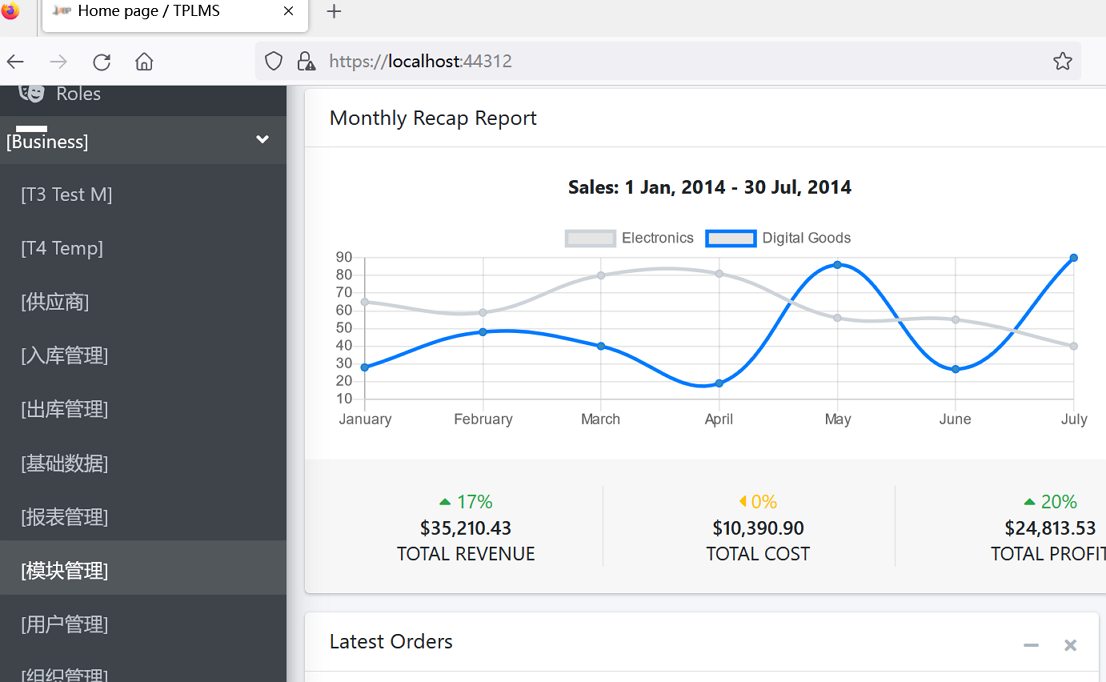
2.在浏览器将呈现登录页面,然后输入管理员用户名进行登录。浏览器跳转到首页面。如下图。
3.在主界面的菜单中,选择“Business->供应商管理”菜单项,浏览器立即报了一个错误。如下图。
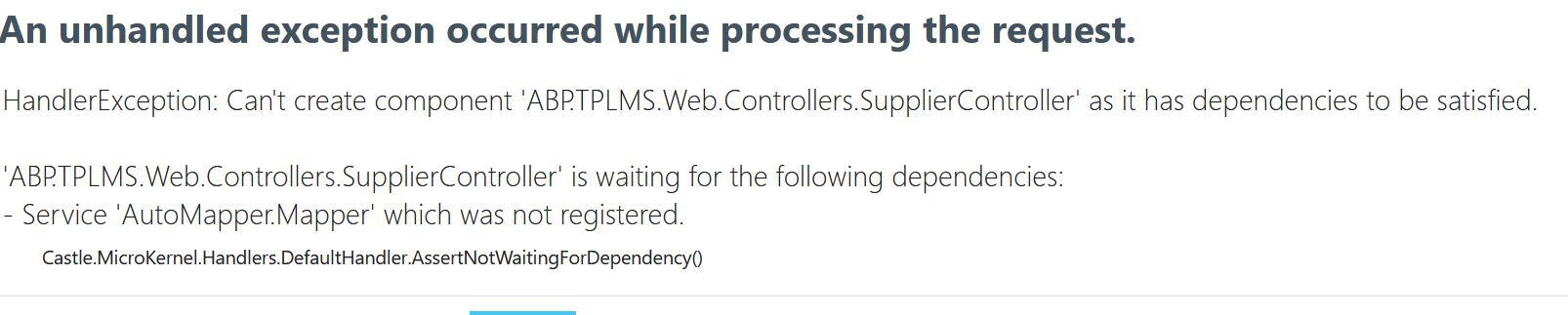
4.这是AutoMapper.Mapper方法造成的。这是由于在升级的时候,AutoMapper也升级了。由于NET模型映射器AutoMapper 9.0之后,官方宣称不再支持静态方法调用,之前直接升级编译报错无法使用。我简单的在代码的构造函数中使用注入方式,注入Mapper。现在实际运行时,发现这种方式,如果没有在startup.cs代码中预先注册,是无法使用的。原先的代码如下:
using System;

using System.Collections.Generic;

using System.Linq;

using System.Threading.Tasks;

using Abp.Application.Services.Dto;

using Abp.AspNetCore.Mvc.Authorization;

using Abp.Auditing;

using Abp.Runtime.Validation;

using ABP.TPLMS.Controllers;

using ABP.TPLMS.Suppliers;

using ABP.TPLMS.Suppliers.Dto;

using ABP.TPLMS.Web.Models.Supplier;

using Microsoft.AspNetCore.Mvc;

using Microsoft.EntityFrameworkCore;

// For more information on enabling MVC for empty projects, visit https://go.microsoft.com/fwlink/?LinkID=397860

namespace ABP.TPLMS.Web.Controllers

{

    [AbpMvcAuthorize]

    [Audited]

    public class SupplierController : TPLMSControllerBase

    {

        const int MaxNum= 10;

        // GET: /<controller>/

        [DisableAuditing]

        public async Task<IActionResult> Index()

        {

            SupplierDto cuModule=null;

            var module = (await _supplierAppService.GetAllAsync(new PagedSupplierResultRequestDto { MaxResultCount = MaxNum })).Items; // Paging not implemented yet

            if (module.Count>0)

            {

                cuModule = module.First();

            }

            var model = new SupplierListViewModel

            {

                Supplier = cuModule,

                Suppliers=module

            };

            return View(model);

        }

        private readonly ISupplierAppService _supplierAppService;

        AutoMapper.Mapper m_map;

        public SupplierController(ISupplierAppService supplierAppService,AutoMapper.Mapper map)

        {

            _supplierAppService = supplierAppService;

            m_map = map;

        }

        public async Task<ActionResult> EditSupplierModal(int supplierId)

        {

            var module = await _supplierAppService.GetAsync(new EntityDto<int>(supplierId));

            CreateUpdateSupplierDto cuSupplier = m_map.Map<CreateUpdateSupplierDto>(module);

            var model = new EditSupplierModalViewModel

            {

                Supplier = cuSupplier

            };

            return View("_EditSupplierModal", model);

        }

    }

}
5.幸好发现有一个ABP.ObjectMapper.Map方法可以使用,我们将代码修改为:
using System;

using System.Collections.Generic;

using System.Linq;

using System.Threading.Tasks;

using Abp.Application.Services.Dto;

using Abp.AspNetCore.Mvc.Authorization;

using Abp.Auditing;

using Abp.Runtime.Validation;

using ABP.TPLMS.Controllers;

using ABP.TPLMS.Suppliers;

using ABP.TPLMS.Suppliers.Dto;

using ABP.TPLMS.Web.Models.Supplier;

using Microsoft.AspNetCore.Mvc;

using Microsoft.EntityFrameworkCore;

// For more information on enabling MVC for empty projects, visit https://go.microsoft.com/fwlink/?LinkID=397860

namespace ABP.TPLMS.Web.Controllers

{

    [AbpMvcAuthorize]

    [Audited]

    public class SupplierController : TPLMSControllerBase

    {

        const int MaxNum= 10;

        // GET: /<controller>/

        [DisableAuditing]

        public async Task<IActionResult> Index()

        {

            SupplierDto cuModule=null;

            var module = (await _supplierAppService.GetAllAsync(new PagedSupplierResultRequestDto { MaxResultCount = MaxNum })).Items; // Paging not implemented yet

            if (module.Count>0)

            {

                cuModule = module.First();

            }

            var model = new SupplierListViewModel

            {

                Supplier = cuModule,

                Suppliers=module

            };

            return View(model);

        }

        private readonly ISupplierAppService _supplierAppService;

        public SupplierController(ISupplierAppService supplierAppService)

        {

            _supplierAppService = supplierAppService;

        }

        public async Task<ActionResult> EditSupplierModal(int supplierId)

        {

            var module = await _supplierAppService.GetAsync(new EntityDto<int>(supplierId));

            CreateUpdateSupplierDto cuSupplier = ObjectMapper.Map<CreateUpdateSupplierDto>(module);

            var model = new EditSupplierModalViewModel

            {

                Supplier = cuSupplier

            };

           return View("_EditSupplierModal", model);

        }

}

}
6.在Visual Studio 2022的解决方案资源管理器,按F5运行应用程序。
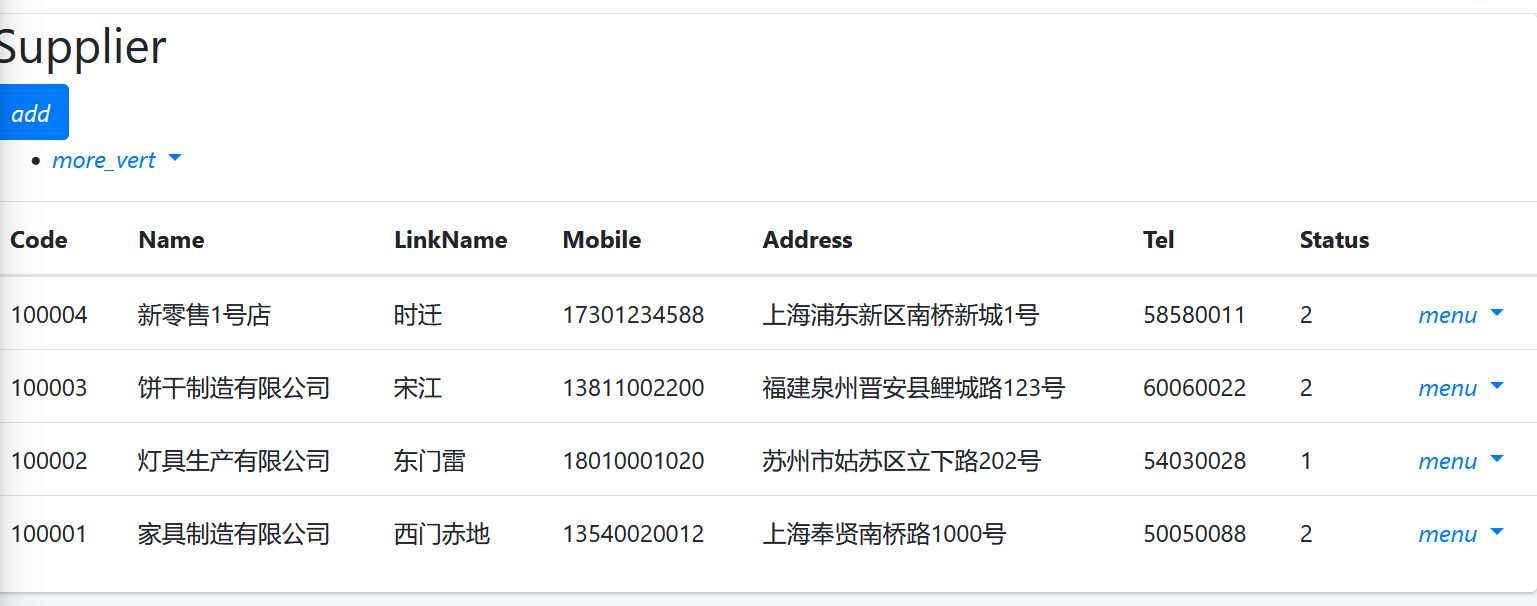
7.在浏览器将呈现登录页面,然后输入管理员用户名进行登录。浏览器跳转到首页面,在主界面的菜单中,选择“Business->供应商管理”菜单项,浏览器中呈现一个供应商信息列表页面,我们发现此页面的顶部与右边的菜单部分缺失css,样式不好看。如下图。
8. 在Visual Studio 2017的“解决方案资源管理器”中,右键单击在领域层“ABP.TPLMS.Web.Mvc”项目中的Views\Supplier目录。 找到Index.cshmtl文件,修改顶部的代码与按钮的代码。具体代码如下:
@using ABP.TPLMS.Web.Startup
@model ABP.TPLMS.Web.Models.Supplier.SupplierListViewModel @{
ViewData["Title"] = PageNames.Supplier;
} @section scripts
{
<script src="~/view-resources/Views/Supplier/Index.js" asp-append-version="true"></script> }
<section class="content-header">
<div class="container-fluid">
<div class="row">
<div class="col-sm-6">
<h1>@L("Supplier")</h1>
</div>
<div class="col-sm-4 text-sm-right">
<a id="RefreshButton" href="javascript:void(0);"><i class="fas fa-redo-alt"></i></a>
</div>
<div class="col-sm-2">
<button type="button" class="btn btn-primary btn-circle waves-effect waves-circle waves-float pull-right"
data-toggle="modal" data-target="#SupplierCreateModal">
<i class="fa fa-plus-square">Add</i>
</button> </div>
</div>
</div>
</section>
<div class="row clearfix">
<div class="col-lg-12 col-md-12 col-sm-12 col-xs-12">
<div class="card">
<div class="body table-responsive">
<table class="table">
<thead>
<tr>
<th>
@Html.DisplayNameFor(model => model.Supplier.Code)
</th>
<th>
@Html.DisplayNameFor(model => model.Supplier.Name)
</th>
<th>
@Html.DisplayNameFor(model => model.Supplier.LinkName)
</th>
<th>
@Html.DisplayNameFor(model => model.Supplier.Mobile)
</th>
<th>
@Html.DisplayNameFor(model => model.Supplier.Address)
</th>
<th>
@Html.DisplayNameFor(model => model.Supplier.Tel)
</th>
<th>
@Html.DisplayNameFor(model => model.Supplier.Status)
</th>
<th></th>
</tr>
</thead>
<tbody>
@foreach (var item in Model.Suppliers)
{
<tr>
<td>
@Html.DisplayFor(modelItem => item.Code)
</td>
<td>
@Html.DisplayFor(modelItem => item.Name)
</td>
<td>
@Html.DisplayFor(modelItem => item.LinkName)
</td>
<td>
@Html.DisplayFor(modelItem => item.Mobile)
</td>
<td>
@Html.DisplayFor(modelItem => item.Address)
</td>
<td>
@Html.DisplayFor(modelItem => item.Tel)
</td>
<td>
@Html.DisplayFor(modelItem => item.Status)
</td>
<td > <a href="#" class="btn btn-sm bg-secondary edit-supplier" data-supplier-id="@item.Id"
data-toggle="modal" data-target="#SupplierEditModal"><i class="fas fa-pencil-alt"></i>@L("Edit")</a>
<a href="#" class="btn btn-sm bg-danger delete-supplier" data-supplier-id="@item.Id"
data-supplier-name="@item.Name"><i class="fas fa-trash"></i>@L("Delete")</a> </td>
</tr>
}
</tbody>
</table> </div>
</div>
</div>
</div> <div class="modal fade" id="SupplierCreateModal" tabindex="-1" role="dialog" aria-labelledby="SupplierCreateModalLabel"
data-backdrop="static">
<div class="modal-dialog" role="document">
<div class="modal-content">
<div class="modal-header">
<h4 class="modal-title">
<span>@L("CreateNewSupplier")</span>
</h4>
</div>
<div class="modal-body">
<form name="SupplierCreateForm" role="form" class="form-validation">
<div> <div class="row clearfix">
<div class="col-sm-6">
<div class="form-group form-float">
<div class="form-line">
<label asp-for="@Model.Supplier.Code" class="form-label"></label>
<input type="text" name="Code" class="form-control" required maxlength="50" /> </div>
</div>
</div>
<div class="col-sm-6">
<div class="form-group form-float">
<div class="form-line">
<label asp-for="@Model.Supplier.Name" class="form-label"></label>
<input type="text" name="Name" class="form-control" required maxlength="50" /> </div>
</div>
</div>
</div>
<div class="row clearfix">
<div class="col-sm-12">
<div class="form-group form-float">
<div class="form-line">
<label asp-for="@Model.Supplier.Address" class="form-label"></label>
<input type="text" name="Address" class="form-control" required maxlength="255" /> </div>
</div>
</div>
</div>
<div class="row clearfix">
<div class="col-sm-6">
<div class="form-group form-float">
<div class="form-line">
<label asp-for="@Model.Supplier.LinkName" class="form-label"></label>
<input type="text" name="LinkName" class="form-control" /> </div>
</div>
</div>
<div class="col-sm-6">
<div class="form-group form-float">
<div class="form-line">
<label asp-for="@Model.Supplier.Mobile" class="form-label"></label>
<input type="text" name="Mobile" class="form-control" /> </div>
</div>
</div>
</div>
<div class="row clearfix">
<div class="col-sm-6">
<div class="form-group form-float">
<div class="form-line">
<label asp-for="@Model.Supplier.Tel" class="form-label"></label>
<input type="text" name="Tel" class="form-control" required maxlength="255" /> </div>
</div>
</div>
<div class="col-sm-6">
<div class="form-group form-float">
<div class="form-line">
<label asp-for="@Model.Supplier.Status" class="form-label"></label>
<input type="text" name="Status" class="form-control" /> </div>
</div>
</div>
</div>
<div class="row clearfix">
<div class="col-sm-6">
<div class="form-line">
<label asp-for="@Model.Supplier.Sex"></label> <input name="Sex" type="text" class="form-control" /> </div>
</div>
<div class="col-sm-6">
<div class="form-line">
<label asp-for="@Model.Supplier.Email"></label>
<input name="Email" type="text" class="form-control" /> </div>
</div>
</div> </div>
<div class="modal-footer">
<button type="button" class="btn btn-default waves-effect" data-dismiss="modal">@L("Cancel")</button>
<button type="submit" class="btn btn-primary waves-effect">@L("Save")</button>
</div>
</form>
</div>
</div>
</div>
</div> <div class="modal fade" id="SupplierEditModal" tabindex="-1" role="dialog" aria-labelledby="SupplierEditModalLabel"
data-backdrop="static">
<div class="modal-dialog" role="document">
<div class="modal-content">
</div>
</div>
</div>
abp(net core)+easyui+efcore实现仓储管理系统——供应商管理升级之上(六十三)的更多相关文章
- abp(net core)+easyui+efcore实现仓储管理系统——入库管理之七(四十三)
abp(net core)+easyui+efcore实现仓储管理系统目录 abp(net core)+easyui+efcore实现仓储管理系统——ABP总体介绍(一) abp(net core)+ ...
- abp(net core)+easyui+efcore实现仓储管理系统——使用 WEBAPI实现CURD (十三)
abp(net core)+easyui+efcore实现仓储管理系统目录 abp(net core)+easyui+efcore实现仓储管理系统——ABP总体介绍(一) abp(net core)+ ...
- abp(net core)+easyui+efcore实现仓储管理系统——出库管理之四(五十三)
abp(net core)+easyui+efcore实现仓储管理系统目录 abp(net core)+easyui+efcore实现仓储管理系统--ABP总体介绍(一) abp(net core)+ ...
- abp(net core)+easyui+efcore实现仓储管理系统——使用 WEBAPI实现CURD (十四)
abp(net core)+easyui+efcore实现仓储管理系统目录 abp(net core)+easyui+efcore实现仓储管理系统——ABP总体介绍(一) abp(net core)+ ...
- abp(net core)+easyui+efcore实现仓储管理系统——使用 WEBAPI实现CURD (十五)
core)+easyui+efcore实现仓储管理系统目录 abp(net core)+easyui+efcore实现仓储管理系统——ABP总体介绍(一) abp(net core)+easyui+e ...
- abp(net core)+easyui+efcore实现仓储管理系统——菜单 (十六)
系统目录 abp(net core)+easyui+efcore实现仓储管理系统——ABP总体介绍(一) abp(net core)+easyui+efcore实现仓储管理系统——解决方案介绍(二) ...
- abp(net core)+easyui+efcore实现仓储管理系统——菜单-下(十七)
实现仓储管理系统目录 abp(net core)+easyui+efcore实现仓储管理系统——ABP总体介绍(一) abp(net core)+easyui+efcore实现仓储管理系统——解决方案 ...
- abp(net core)+easyui+efcore实现仓储管理系统——EasyUI前端页面框架 (十八)
目录 abp(net core)+easyui+efcore实现仓储管理系统——ABP总体介绍(一) abp(net core)+easyui+efcore实现仓储管理系统——解决方案介绍(二) ab ...
- abp(net core)+easyui+efcore实现仓储管理系统——EasyUI之货物管理一 (十九)
abp(net core)+easyui+efcore实现仓储管理系统目录 abp(net core)+easyui+efcore实现仓储管理系统——ABP总体介绍(一) abp(net core)+ ...
- abp(net core)+easyui+efcore实现仓储管理系统——EasyUI之货物管理二 (二十)
abp(net core)+easyui+efcore实现仓储管理系统目录 abp(net core)+easyui+efcore实现仓储管理系统——ABP总体介绍(一) abp(net core)+ ...
随机推荐
- 微信公众号授权登录,整合spring security
公司的业务需求,对接了微信公众号授权,通过微信公众号的接口拿到用户信息进行业务系统的登录,话不多说上代码,我的实现方式是整合了spingSecurity 首先是接口 @PostMapping(&quo ...
- 虚拟机文件丢失,虚拟机无法启动,通过xx-flat.vmdk和xx-delta.vmdk恢复虚拟机
突然掉电,导致虚拟机文件夹里面的文件丢失,只剩余-flat.vmdk和-delta.vmdk文件,其他文件全部丢失,文件格式原本为"文件"格式.新建虚拟机无法直接使用此文件夹里面的 ...
- 做bad apple第一步:超级好用的you-get下载各大网站音频!!!!
1 安装在cmd中输入pip3 install you-get 就行了 2 简单用法下载视频: 超级暴力,直接 you-get + "网站" 就没了,会下载到当前路径.我想下载到哪 ...
- Masa Framework源码解读-02缓存模块(分布式缓存进阶之多级缓存)
序言 今天这篇文章来看看Masa Framework的缓存设计,上一篇文章中说到的MasaFactory的应用也会在这章节出现.文章中如有错误之处还请指点,咱们话不多说,直入主题. Masa Fr ...
- Windows xp 64 bit
Windows XP Professional x64 Edition with SP2 - VL (English) 详细信息 文件名 en_win_xp_pro_x64_with_sp2_vl_X ...
- WPF监听快捷键的几种方式
调用Win32 API(优先级最高,全局监听, 支持最小化失焦等情况) 那么,假如我要在一个WPF程序监听CTRL+5按键,首先在主窗口程序添加以下代码: /// <summary> // ...
- java 环境变量配置详细教程(2023 年全网最详细)
前言: 在上一篇文章中,壹哥给大家重点讲解了 Java 实现跨平台的原理,不知道你现在有没有弄清楚呢?如果你还有疑问,可以在评论区留言- 之前的三篇文章,主要是理论性的内容,其实你暂时跳过不看也是可以 ...
- Synchronized和Volatile的对比
Synchronized和Volatile是并发中的两大关键字,有相似性和不同点. Synchronized更详细介绍参考https://www.cnblogs.com/spark-cc/p/1706 ...
- NEFU-NSILAB2021选拔赛WriteUp
Web signin 打开看到源码: <?php highlight_file(__FILE__); $file = $_GET['file']; if ($file) { include $f ...
- [nefu]算法设计与分析-锐格实验
谈点个人感想:锐格这个题目和数据要是再不维护,估计直接就裂开了,跪求学校升级改进一下OJ系统和题目Orz 实验一 递归与分治 6104 #include<bits/stdc++.h> us ...