
abp(net core)+easyui+efcore实现仓储管理系统——使用 WEBAPI实现CURD (十四)
abp(net core)+easyui+efcore实现仓储管理系统目录
abp(net core)+easyui+efcore实现仓储管理系统——ABP总体介绍(一)
abp(net core)+easyui+efcore实现仓储管理系统——解决方案介绍(二)
abp(net core)+easyui+efcore实现仓储管理系统——领域层创建实体(三)
abp(net core)+easyui+efcore实现仓储管理系统——定义仓储并实现 (四)
abp(net core)+easyui+efcore实现仓储管理系统——创建应用服务(五)
abp(net core)+easyui+efcore实现仓储管理系统——展现层实现增删改查之控制器(六)
abp(net core)+easyui+efcore实现仓储管理系统——展现层实现增删改查之列表视图(七)
abp(net core)+easyui+efcore实现仓储管理系统——展现层实现增删改查之增删改视图(八)
abp(net core)+easyui+efcore实现仓储管理系统——展现层实现增删改查之菜单与测试(九)
abp(net core)+easyui+efcore实现仓储管理系统——多语言(十)
abp(net core)+easyui+efcore实现仓储管理系统——使用 WEBAPI实现CURD (十一)
abp(net core)+easyui+efcore实现仓储管理系统——使用 WEBAPI实现CURD (十二)
abp(net core)+easyui+efcore实现仓储管理系统——使用 WEBAPI实现CURD (十三)
上接(abp(net core)+easyui+efcore实现仓储管理系统——使用 WEBAPI实现CURD (十三)),在这一篇文章中我们实现新增供应商的相关功能。
九、新增供应商
(一) 创建js文件
我们先来看一下 “ABP.TPLMS.Web.Mvc”项目中的wwwroot目录下的view-resources\Users目录中的Index.js文件,然后参照此文件来写新增供应商的脚本文件。
1. 在Visual Studio 2017的“解决方案资源管理器”中,找到展现层“ABP.TPLMS.Web.Mvc”项目中的wwwroot目录下的view-resources目录。使用鼠标右键单击此目录,在弹出菜单中选择“添加” > “新建文件夹”。并重命名为“Supplier”。
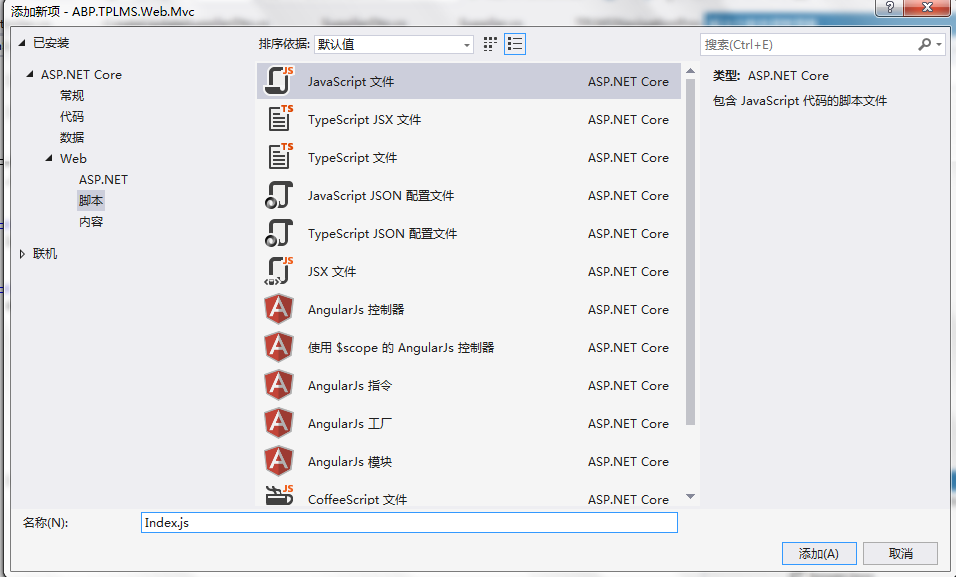
2. 在Visual Studio 2017的“解决方案资源管理器”中,鼠标右键单击“Supplier”文件夹,然后选择“添加” > “新建项…”。 在“添加新项-ABP.TPLMS.Web.Mvc”对话框中,选择“javascript文件”,并将名称命名为Index.js。如下图。
3. 在Index.js文件中,我们写入如下代码。
(function() {

    $(function() {

        var _supplierService = abp.services.app.supplier;

        var _$modal = $('#SupplierCreateModal');

        var _$form = _$modal.find('form');

        _$form.validate({

        });

        $('#RefreshButton').click(function () {

            refreshModuleList();

        });

        $('.delete-supplier').click(function () {

            var userId = $(this).attr("data-supplier-id");

            var userName = $(this).attr('data-supplier-name');

            deleteSupplier(userId, userName);

        });

        $('.edit-supplier').click(function (e) {

            var supplierId = $(this).attr("data-supplier-id");

            e.preventDefault();

            $.ajax({

                url: abp.appPath + 'Supplier/EditSupplierModal?supplierId=' + supplierId,

                type: 'POST',

                contentType: 'application/html',

                success: function (content) {

                    $('#SupplierEditModal div.modal-content').html(content);

                },

                error: function (e) { }

            });

        });

        _$form.find('button[type="submit"]').click(function (e) {

            e.preventDefault();

            if (!_$form.valid()) {

                return;

            }

            var supplier = _$form.serializeFormToObject(); //serializeFormToObject is defined in main.js

            abp.ui.setBusy(_$modal);

            _supplierService.create(supplier).done(function () {

                _$modal.modal('hide');

                location.reload(true); //reload page to see new user!

            }).always(function () {

                abp.ui.clearBusy(_$modal);

            });

        });

        _$modal.on('shown.bs.modal', function () {

            _$modal.find('input:not([type=hidden]):first').focus();

        });

        function refreshSupplierList() {

            location.reload(true); //reload page to see new user!

        }

        function deleteSupplier(supplierId, supplierName) {

            abp.message.confirm(

                abp.utils.formatString(abp.localization.localize('AreYouSureWantToDelete', 'TPLMS'), supplierName),

                function (isConfirmed) {

                    if (isConfirmed) {

                        _supplierService.delete({

                            id: supplierId

                        }).done(function () {

                            refreshSupplierList();

                        });

                    }

                }

            );

        }

    });

})();
4. 在Visual Studio 2017的“解决方案资源管理器”中,找到“ABP.TPLMS.Web.Mvc”项目中的Views目录下的Supplier目录中的Index.cshtml文件。双击打开此文件,并写入以下代码,引用脚本。
@section scripts    {

        <script src="~/view-resources/Views/Supplier/Index.js" asp-append-version="true"></script>   }
(二)创建新增供应商视图
1. 在Visual Studio 2017的“解决方案资源管理器”中,找到“ABP.TPLMS.Web.Mvc”项目中的Views目录下的Supplier目录中的Index.cshtml文件。双击打开此文件,并写入以下代码。
<div class="modal fade" id="SupplierCreateModal" tabindex="-1" role="dialog"
aria-labelledby="SupplierCreateModalLabel" data-backdrop="static">

    <div class="modal-dialog" role="document">

        <div class="modal-content">

            <div class="modal-header">

                <h4 class="modal-title">

                    <span>@L("CreateNewSupplier")</span>

                </h4>

            </div>

            <div class="modal-body">

                <form name="SupplierCreateForm" role="form"  class="form-validation">

                    <div>

                        <div class="row clearfix">

                            <div class="col-sm-6">

                                <div class="form-group form-float">

                                    <div class="form-line">

                                        <label asp-for="@Model.Supplier.Code" class="form-label"></label>

                                        <input type="text" name="Code" class="form-control" required maxlength="50" />

                                    </div>

                                </div>

                            </div>

                            <div class="col-sm-6">

                                <div class="form-group form-float">

                                    <div class="form-line">

                                        <label asp-for="@Model.Supplier.Name" class="form-label"></label>

                                        <input type="text" name="Name" class="form-control" required maxlength="50" />

                                    </div>

                                </div>

                            </div>

                        </div>

                        <div class="row clearfix">

                            <div class="col-sm-12">

                                <div class="form-group form-float">

                                    <div class="form-line">

                                        <label asp-for="@Model.Supplier.Address" class="form-label"></label>

                                        <input type="text" name="Address" class="form-control" required maxlength="255" />

                                    </div>

                                </div>

                            </div>

                        </div>

                        <div class="row clearfix">

                            <div class="col-sm-6">

                                <div class="form-group form-float">

                                    <div class="form-line">

                                        <label asp-for="@Model.Supplier.LinkName" class="form-label"></label>

                                        <input type="text" name="LinkName" class="form-control" />

                                    </div>

                                </div>

                            </div>

                            <div class="col-sm-6">

                                <div class="form-group form-float">

                                    <div class="form-line">

                                        <label asp-for="@Model.Supplier.Mobile" class="form-label"></label>

                                        <input type="text" name="Mobile" class="form-control" />

                                    </div>

                                </div>

                            </div>

                        </div>

                        <div class="row clearfix">

                            <div class="col-sm-6">

                                <div class="form-group form-float">

                                    <div class="form-line">

                                        <label asp-for="@Model.Supplier.Tel" class="form-label"></label>

                                        <input type="text" name="Tel" class="form-control" required maxlength="255" />

                                    </div>

                                </div>

                            </div>

                            <div class="col-sm-6">

                                <div class="form-group form-float">

                                    <div class="form-line">

                                         <label asp-for="@Model.Supplier.Status" class="form-label"></label>

                                        <input type="text" name="Status" class="form-control" />

                                    </div>

                                </div>

                            </div>

                        </div>

                        <div class="row clearfix">

                            <div class="col-sm-6">

                                <div class="form-line">

                                    <label asp-for="@Model.Supplier.Sex"></label>

                                    <input name="Sex" type="text" class="form-control" />

                                </div>

                            </div>

                            <div class="col-sm-6">

                                <div class="form-line">

                                    <label asp-for="@Model.Supplier.Email"></label>

                                    <input name="Email" type="text" class="form-control" />

                                </div>

                            </div>

                        </div>

                    </div>

                    <div class="modal-footer">

                        <button type="button" class="btn btn-default waves-effect" data-dismiss="modal">@L("Cancel")</button>

                        <button type="submit" class="btn btn-primary waves-effect">@L("Save")</button>

                    </div>

                </form>

            </div>

        </div>

    </div>

</div>
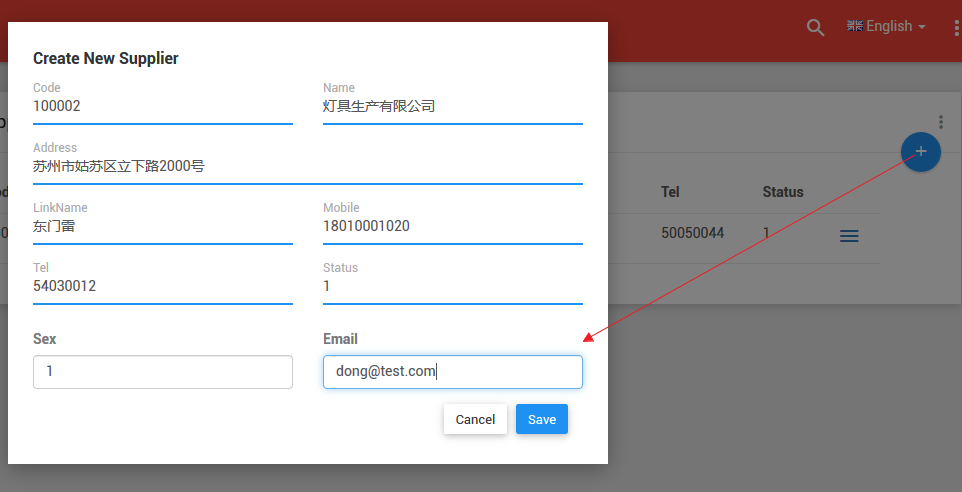
2. 在Visual Studio 2017中按F5运行应用程序。登录之后,点击“Supplier”目录,我们可以看到供应商列表页面。然后点击供应商列表页面中的新增按钮。如下图。
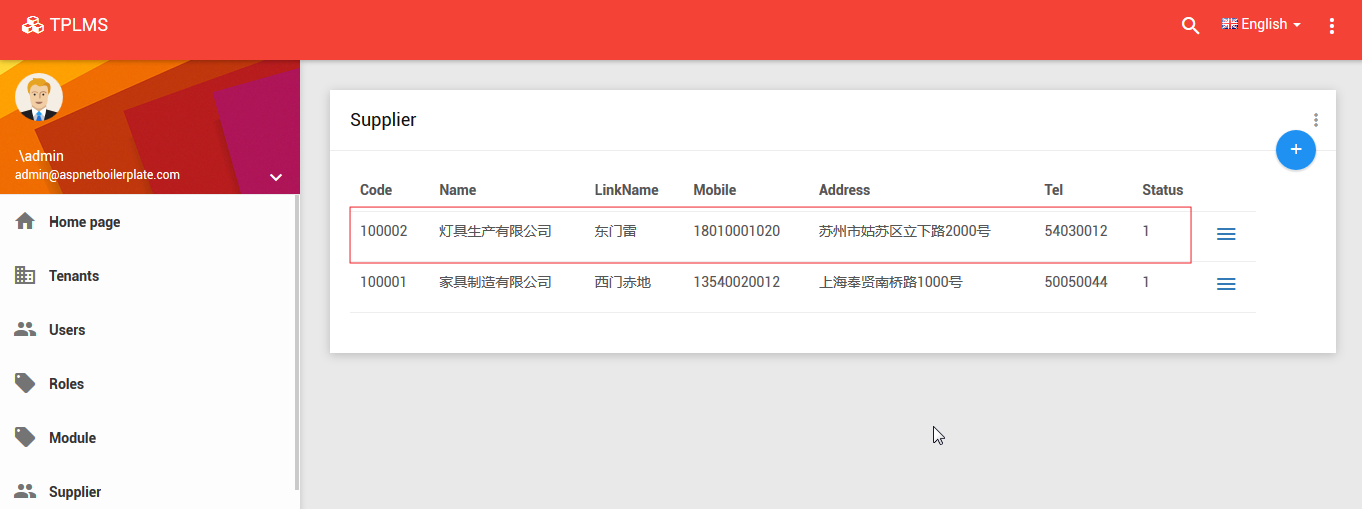
3. 在“Create New Supplier”页面中我们输入完信息之后,点击“Save”按钮。数据保存到数据库,应用会刷新供应商列表页面。如下图。
abp(net core)+easyui+efcore实现仓储管理系统——使用 WEBAPI实现CURD (十四)的更多相关文章
- abp(net core)+easyui+efcore实现仓储管理系统——使用 WEBAPI实现CURD (十五)
core)+easyui+efcore实现仓储管理系统目录 abp(net core)+easyui+efcore实现仓储管理系统——ABP总体介绍(一) abp(net core)+easyui+e ...
- abp(net core)+easyui+efcore实现仓储管理系统——使用 WEBAPI实现CURD (十二)
abp(net core)+easyui+efcore实现仓储管理系统目录 abp(net core)+easyui+efcore实现仓储管理系统——ABP总体介绍(一) abp(net core)+ ...
- abp(net core)+easyui+efcore实现仓储管理系统——使用 WEBAPI实现CURD (十三)
abp(net core)+easyui+efcore实现仓储管理系统目录 abp(net core)+easyui+efcore实现仓储管理系统——ABP总体介绍(一) abp(net core)+ ...
- abp(net core)+easyui+efcore实现仓储管理系统——出库管理之五(五十四)
abp(net core)+easyui+efcore实现仓储管理系统目录 abp(net core)+easyui+efcore实现仓储管理系统--ABP总体介绍(一) abp(net core)+ ...
- abp(net core)+easyui+efcore实现仓储管理系统——使用 WEBAPI实现CURD (十一)
abp(net core)+easyui+efcore实现仓储管理系统目录 abp(net core)+easyui+efcore实现仓储管理系统——ABP总体介绍(一) abp(net core)+ ...
- abp(net core)+easyui+efcore实现仓储管理系统——出库管理之三(五十二)
abp(net core)+easyui+efcore实现仓储管理系统目录 abp(net core)+easyui+efcore实现仓储管理系统--ABP总体介绍(一) abp(net core)+ ...
- abp(net core)+easyui+efcore实现仓储管理系统——出库管理之六(五十五)
abp(net core)+easyui+efcore实现仓储管理系统目录 abp(net core)+easyui+efcore实现仓储管理系统--ABP总体介绍(一) abp(net core)+ ...
- Abp(net core)+easyui+efcore实现仓储管理系统——出库管理之七(五十六)
abp(net core)+easyui+efcore实现仓储管理系统目录 abp(net core)+easyui+efcore实现仓储管理系统--ABP总体介绍(一) abp(net core)+ ...
- abp(net core)+easyui+efcore实现仓储管理系统——菜单 (十六)
系统目录 abp(net core)+easyui+efcore实现仓储管理系统——ABP总体介绍(一) abp(net core)+easyui+efcore实现仓储管理系统——解决方案介绍(二) ...
随机推荐
- Redis主从复制实现原理
一.Redis2.8之前的版本, 首先redis复制功能分为同步操作和命令传播两个操作 同步操作作于将从服务器的数据库状态更新至主服务器当前所处的数据库状态 命令传播操作则用于在主服务器的数据库状态 ...
- HTML&CSS构建和设计网站
1.a链接:两个特性,href.target,href里添加mailto:邮箱可以直接链接到其它人的邮箱,添加#id,可以把窗口位置直接定位到该id的元素位置, target:_black可以在新的窗 ...
- Java 读取PDF中的文本和图片
本文将介绍通过Java程序来读取PDF文档中的文本和图片的方法.分别调用方法extractText()和extractImages()来读取. 使用工具:Free Spire.PDF for Ja ...
- WinForm控件之【ComboBox】
基本介绍 下拉文本框应用较为广泛,在winfrom控件当中使用设置也是相对的简单,主要用于存在多种选择的单选操作场景. 常设置属性.事件 DataSource:绑定加载项的数据源,设置属性Displa ...
- Java编程思想:内存映射文件
import java.io.*; import java.nio.IntBuffer; import java.nio.MappedByteBuffer; import java.nio.chann ...
- 【基本数据结构】并查集-C++
并查集,在一些有N个元素的集合应用问题中,我们通常是在开始时让每个元素构成一个单元素的集合,然后按一定顺序将属于同一组的元素所在的集合合并,其间要反复查找一个元素在哪个集合中.这一类问题近几年来反复出 ...
- 跨站脚本攻击(反射型xss)笔记(一)
环境:一个微信端(所以用浏览器演示UI有点变形) 下图是未插任何脚本时的原页面. 按惯例,上一波["><script>alert(1)</script>] 无弹 ...
- c++小游戏——五子棋
#include<iostream> #include<iomanip> #include<cstring> using namespace std; const ...
- Hyperledger Fabric 之 Channel ,创建channel链接几项注意点
好长时间没有更新博客,网上也有很多fabric的部署资料,而且也都很不错,也比较全面.我就再想重复的工作暂时就不用做了,后面抽时间在做细化和分类:就将学习和工作中遇到和解决的问题经验,做一些分享. 而 ...
- dll附加依赖项查看——dumpbin 命令
VS自带工具 查看程序或动态链接库需要的动态链接库 dumpbin /dependents d:\test.exe 查看动态链接库的输出函数 dumpbin /exports d:\libmysql. ...