
Entity Framework Tutorial Basics(16):Linq-to-Entities Projection Queries
Linq-to-Entities Projection Queries:
Here, you will learn how to write LINQ-to-Entities queries and get the result entities. Visit LINQ Tutorials to learn LINQ step by step.
Projection is a process of selecting data in a different shape rather than a specific entity being queried. There are many ways of projection. We will now see some projection styling:
First/FirstOrDefault:
If you want to get a single student object, when there are many students, whose name is "Student1" in the database, then use First or FirstOrDefault, as shown below:
using (var ctx = new SchoolDBEntities())

{

    var student = (from s in ctx.Students

                where s.StudentName == "Student1"

                select s).FirstOrDefault<Student>();

}
The above query will result in the following database query:
SELECT TOP (1)

[Extent1].[StudentID] AS [StudentID],

[Extent1].[StudentName] AS [StudentName],

[Extent1].[StandardId] AS [StandardId]

FROM [dbo].[Student] AS [Extent1]

WHERE 'Student1' = [Extent1].[StudentName]
The difference between First and FirstOrDefault is that First() will throw an exception if there is no result data for the supplied criteria whereas FirstOrDefault() returns default value (null) if there is no result data.
Single/SingleOrDefault:
You can also use Single or SingleOrDefault to get a single student object as shown below:
using (var ctx = new SchoolDBEntities())

{

    var student = (from s in context.Students

                    where s.StudentID ==

                    select s).SingleOrDefault<Student>();

}
The above query would execute the following database query:
SELECT TOP (2)

[Extent1].[StudentID] AS [StudentID],

[Extent1].[StudentName] AS [StudentName],

[Extent1].[StandardId] AS [StandardId]

FROM [dbo].[Student] AS [Extent1]

WHERE 1 = [Extent1].[StudentID]

go
Single or SingleOrDefault will throw an exception, if the result contains more than one element. Use Single or SingleOrDefault where you are sure that the result would contain only one element. If the result has multiple elements then there must be some problem.
ToList:
If you want to list all the students whose name is 'Student1' (provided there are many students has same name) then use ToList():
using (var ctx = new SchoolDBEntities())

{

    var studentList = (from s in ctx.Students

    where s.StudentName == "Student1"

    select s).ToList<Student>();

}
The above query would result in the following database query:
SELECT

[Extent1].[StudentID] AS [StudentID],

[Extent1].[StudentName] AS [StudentName],

[Extent1].[StandardId] AS [StandardId]

FROM [dbo].[Student] AS [Extent1]

WHERE 'Student1' = [Extent1].[StudentName]

go
GroupBy:
If you want to group students by standardId, then use groupby:
using (var ctx = new SchoolDBEntities())

{

    var students = from s in ctx.Students

                   group s by  s.StandardId into studentsByStandard

                   select studentsByStandard;

}
The above query would execute the following database query:
SELECT

[Project2].[C1] AS [C1],

[Project2].[StandardId] AS [StandardId],

[Project2].[C2] AS [C2],

[Project2].[StudentID] AS [StudentID],

[Project2].[StudentName] AS [StudentName],

[Project2].[StandardId1] AS [StandardId1]

FROM ( SELECT

    [Distinct1].[StandardId] AS [StandardId],

    1 AS [C1],

    [Extent2].[StudentID] AS [StudentID],

    [Extent2].[StudentName] AS [StudentName],

    [Extent2].[StandardId] AS [StandardId1],

    CASE WHEN ([Extent2].[StudentID] IS NULL) THEN CAST(NULL AS int) ELSE 1 END AS [C2]

    FROM   (SELECT DISTINCT

        [Extent1].[StandardId] AS [StandardId]

        FROM [dbo].[Student] AS [Extent1] ) AS [Distinct1]

    LEFT OUTER JOIN [dbo].[Student] AS [Extent2] ON ([Distinct1].[StandardId] = [Extent2].[StandardId]) OR (([Distinct1].[StandardId] IS NULL) AND ([Extent2].[StandardId] IS NULL))

)  AS [Project2]

ORDER BY [Project2].[StandardId] ASC, [Project2].[C2] ASC

go
OrderBy:
If you want to get the list of students sorted by StudentName, then use OrderBy:
using (var ctx = new SchoolDBEntities())

{

        var student1 = from s in ctx.Students

                    orderby s.StudentName ascending

                    select s;

}
The above query would execute the following database query:
SELECT

[Extent1].[StudentID] AS [StudentID],

[Extent1].[StudentName] AS [StudentName],

[Extent1].[StandardId] AS [StandardId]

FROM [dbo].[Student] AS [Extent1]

ORDER BY [Extent1].[StudentName] ASC

go
Anonymous Class result:
If you want to get only StudentName, StandardName and list of Courses for that student in a single object, then write the following projection:
using (var ctx = new SchoolDBEntities())

{

    var projectionResult = from s in ctx.Students

                        where s.StudentName == "Student1"

                        select new {

                        s.StudentName, s.Standard.StandardName, s.Courses

                        };

}
The above query would execute the following database query:
SELECT

[Extent1].[StudentID] AS [StudentID],

[Extent1].[StudentName] AS [StudentName],

[Extent2].[City] AS [City]

FROM  [dbo].[Student] AS [Extent1]

LEFT OUTER JOIN [dbo].[StudentAddress] AS [Extent2] ON [Extent1].[StudentID] = [Extent2].[StudentID]

WHERE 1 = [Extent1].[StandardId]

go
The projectionResult in the above query will be the anonymous type, because there is no class/entity which has these properties. So, the compiler will mark it as anonymous.
Nested queries:
You can also execute nested LINQ to entity queries as shown below:
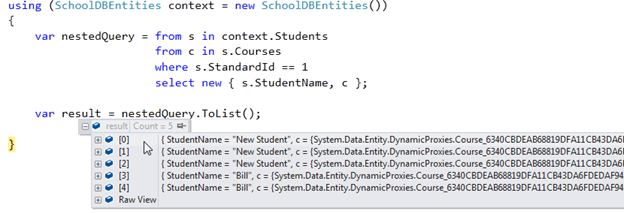
The nested query shown above will result in an anonymous list with a StudentName and Course object.
SELECT

[Extent1].[StudentID] AS [StudentID],

[Extent1].[StudentName] AS [StudentName],

[Join1].[CourseId1] AS [CourseId],

[Join1].[CourseName] AS [CourseName],

[Join1].[Location] AS [Location],

[Join1].[TeacherId] AS [TeacherId]

FROM  [dbo].[Student] AS [Extent1]

INNER JOIN  (SELECT [Extent2].[StudentId] AS [StudentId], [Extent3].[CourseId] AS [CourseId1], [Extent3].[CourseName] AS [CourseName], [Extent3].[Location] AS [Location], [Extent3].[TeacherId] AS [TeacherId]

    FROM  [dbo].[StudentCourse] AS [Extent2]

    INNER JOIN [dbo].[Course] AS [Extent3] ON [Extent3].[CourseId] = [Extent2].[CourseId] ) AS [Join1] ON [Extent1].[StudentID] = [Join1].[StudentId]

WHERE 1 = [Extent1].[StandardId]

go
In this way, you can do a projection of the result, in the way that you would like the data to be.
Entity Framework Tutorial Basics(16):Linq-to-Entities Projection Queries的更多相关文章
- Entity Framework Tutorial Basics(1):Introduction
以下系列文章为Entity Framework Turial Basics系列 http://www.entityframeworktutorial.net/EntityFramework5/enti ...
- Entity Framework Tutorial Basics(22):Disconnected Entities
Disconnected Entities: Before we see how to perform CRUD operation on disconnected entity graph, let ...
- Entity Framework Tutorial Basics(15):Querying with EDM
Querying with EDM: We have created EDM, DbContext, and entity classes in the previous sections. Here ...
- Entity Framework Tutorial Basics(3):Entity Framework Architecture
Entity Framework Architecture The following figure shows the overall architecture of the Entity Fram ...
- Entity Framework Tutorial Basics(4):Setup Entity Framework Environment
Setup Entity Framework Environment: Entity Framework 5.0 API was distributed in two places, in NuGet ...
- Entity Framework Tutorial Basics(43):Download Sample Project
Download Sample Project: Download sample project for basic Entity Framework tutorials. Sample projec ...
- Entity Framework Tutorial Basics(42):Colored Entity
Colored Entity in Entity Framework 5.0 You can change the color of an entity in the designer so that ...
- Entity Framework Tutorial Basics(41):Multiple Diagrams
Multiple Diagrams in Entity Framework 5.0 Visual Studio 2012 provides a facility to split the design ...
- Entity Framework Tutorial Basics(37):Lazy Loading
Lazy Loading: One of the important functions of Entity Framework is lazy loading. Lazy loading means ...
随机推荐
- opencv中VideoCapture和cvCapture有什么区别?
VideoCapture和cvCapture其实是一样的,你可以去看看源码,VideoCapture其实在内部调用了cvCapture.这是不同 版本的opencv导致的.我接触到的opencv有过一 ...
- 转载:maven依赖范围
其中依赖范围scope 用来控制依赖和编译,测试,运行的classpath(注意是与classpath)的关系. 主要的是三种依赖关系如下:1.compile: 默认编译依赖范围.对于编译,测试,运行 ...
- HttpServletRequest获取请求得URL信息
request对象中包含的是请求信息,当我们在浏览器地址栏上输入:http://localhost:8080/Example/AServlet?username=zhangsan,这段地址也会作为请求 ...
- RabbitMQ用户角色及权限控制(不错)
########################用户角色####################### RabbitMQ的用户角色分类:none.management.policymaker.moni ...
- 开始写博客,与ITer们互相学习
学习计算机也6年了,一直待在学校里.这些年来很多学习资料都来自网络上的技术博客,非常感谢各位 ITer 的分享精神,鄙人从中受益匪浅.从今天起也挤出时间开始写技术博客.主要是把自己这些年的一些技术文档 ...
- angular input=file ng-change事件
首先 ng-change事件要与ng-model绑定 但是 当input 的 type=file时 ngchange事件是失效的 我们可以用图中的onchange事件去代替 其次 如果想在这 ...
- python导入csv文件时,出现SyntaxError
背景 np.loadtxt()用于从文本加载数据. 文本文件中的每一行必须含有相同的数据. *** loadtxt(fname, dtype=<class 'float'>, commen ...
- POJ2236(并查集入门)
Wireless Network Time Limit: 10000MS Memory Limit: 65536K Total Submissions: 22977 Accepted: 961 ...
- NHibernate使用总结(2)
首先,映射文件的名称一定要是XXX.hbm.xml且生成方式一定要是嵌入的资源+不复制. hibernate.cfg.xml这个文件要放在根目录下,且生成方式必须是内容+始终复制. private v ...
- c#在sql中存取图片image示例
这篇文章主要介绍了c#在sql中存取图片image示例,需要的朋友可以参考下 (1)控制台应用程序下演示插入图片 复制代码 代码如下: public void InsertIMG() { //将需要存 ...