
Entity Framework Tutorial Basics(22):Disconnected Entities
Disconnected Entities:
Before we see how to perform CRUD operation on disconnected entity graph, let's see how to associate disconnected entity graph with the new context instance.
There are two things we need to do when we get a disconnected entity graph or even a single disconnected entity. First, we need to attach entities with the new context instance and make context aware about these entities. Second, set appropriate EntityStates to these entities manually because the new context instance doesn't know anything about the operations performed on the disconnected entities, so the new context cannot apply the appropriate EntityState.
The following figure illustrates this process.
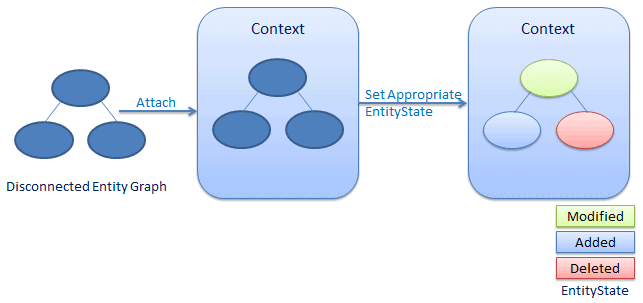
Entity Framework API provides some important methods that attaches disconnected entities to the new context and also set EntityStates to all the entities of an entity graph.
DbSet.Add():
DbSet.Add() method attaches the entire entity graph to the new context and automatically applies Added entity state to all the entities.
Consider the following example code.
//disconnected entity graph

    Student disconnectedStudent = new Student() { StudentName = "New Student" };

    disconnectedStudent.StudentAddress = new StudentAddress() { Address1 = "Address", City = "City1" };

    using (var ctx = new SchoolDBEntities())

    {

        //add disconnected Student entity graph to new context instance - ctx

        ctx.Students.Add(disconnectedStudent);

        // get DbEntityEntry instance to check the EntityState of specified entity

        var studentEntry = ctx.Entry(disconnectedStudent);

        var addressEntry = ctx.Entry(disconnectedStudent.StudentAddress);

        Console.WriteLine("Student EntityState: {0}",studentEntry.State);

        Console.WriteLine("StudentAddress EntityState: {0}",addressEntry.State);

    }
Student EntityState: Added
StudentAddress EntityState: Added
As per the above example code, we add disconnectedStudent entity graph using ctx.Students.Add method. Here, parent entity is Student, so we have added a whole entity graph in Students DbSet. We then get the DbEntityEntry instance for Student and StudentAddress entities to check the state of each entity. As you can see in the output, both entities have Added state.
Thus, use Add method of parent DbSet entity to attach the entire entity graph to the new context instance with Added state to each entity. This will execute insert command for all the entities, which will insert new rows in the appropriate database table.
DbSet.Attach():
DbSet.Attach method attaches a whole entity graph to the new context with Unchanged entity state.
Consider the following example code.
//disconnected entity graph

    Student disconnectedStudent = new Student() { StudentName = "New Student" };

    disconnectedStudent.StudentAddress = new StudentAddress() { Address1 = "Address", City = "City1" };

    using (var ctx = new SchoolDBEntities())

    {

        //attach disconnected Student entity graph to new context instance - ctx

        ctx.Students.Attach(disconnectedStudent);

        // get DbEntityEntry instance to check the EntityState of specified entity

        var studentEntry = ctx.Entry(disconnectedStudent);

        var addressEntry = ctx.Entry(disconnectedStudent.StudentAddress);

        Console.WriteLine("Student EntityState: {0}",studentEntry.State);

        Console.WriteLine("StudentAddress EntityState: {0}",addressEntry.State);

    }
Student EntityState: Unchanged
StudentAddress EntityState: Unchanged
As per the above code, we can attach disconnected entity graph using DbSet.Attach method. This will attach the entire entity graph to the new context with Unchanged entity state to all entities.
Thus, Attach method will only attach entity graph to the context, so we need to find the appropriate entity state for each entity and apply it manually.
DbContext.Entry():
Entry method of DbContext returns DbEntityEntry instance for a specified entity. DbEntityEntry can be used to change the state of an entity.
DbContext.Entry(disconnectedEntity).state = EntityState.Added/Modified/Deleted/Unchanged
This method attaches a whole entity graph to the context with specified state to the parent entity and set the state of other entities, as shown in the following table.
| Parent Entity State | Entity State of child entities |
|---|---|
| Added | Added |
| Modified | Unchanged |
| Deleted | All child entities will be null |
Entity Framework Tutorial Basics(22):Disconnected Entities的更多相关文章
- Entity Framework Tutorial Basics(1):Introduction
以下系列文章为Entity Framework Turial Basics系列 http://www.entityframeworktutorial.net/EntityFramework5/enti ...
- Entity Framework Tutorial Basics(19):Change Tracking
Change Tracking in Entity Framework: Here, you will learn how entity framework tracks changes on ent ...
- Entity Framework Tutorial Basics(12):Model First
Model First development with Entity Framework: In the Model First approach, you create Entities, rel ...
- Entity Framework Tutorial Basics(4):Setup Entity Framework Environment
Setup Entity Framework Environment: Entity Framework 5.0 API was distributed in two places, in NuGet ...
- Entity Framework Tutorial Basics(43):Download Sample Project
Download Sample Project: Download sample project for basic Entity Framework tutorials. Sample projec ...
- Entity Framework Tutorial Basics(42):Colored Entity
Colored Entity in Entity Framework 5.0 You can change the color of an entity in the designer so that ...
- Entity Framework Tutorial Basics(41):Multiple Diagrams
Multiple Diagrams in Entity Framework 5.0 Visual Studio 2012 provides a facility to split the design ...
- Entity Framework Tutorial Basics(37):Lazy Loading
Lazy Loading: One of the important functions of Entity Framework is lazy loading. Lazy loading means ...
- Entity Framework Tutorial Basics(36):Eager Loading
Eager Loading: Eager loading is the process whereby a query for one type of entity also loads relate ...
随机推荐
- 类和对象(9)—— new和delete
对象动态建立和释放 new 和delete 在软件开发过程中,常常需要动态地分配和撤销内存空间,例如对动态链表中结点的插入与删除.在C语言中是利用库函数malloc和free来分配和撤销内存空间的.C ...
- Weblogic-unable to get file lock, will retry …问题解决
weblogic部署应用出现如下报错: <2017-8-15 下午05时08分44秒 CST> <Info> <Management> <BEA-141281 ...
- javascript switch continue break 执行语句
1:switch 关键字段:switch(n).case.break.default switch(n) :n是一个表达式 或者是一变量,用来与其下的各种case进行匹配,比如:此时的day输出的是 ...
- PKU campus 2018 A Wife——差分约束?/dp
题目:http://poj.openjudge.cn/campus2018/A 有正规的差分约束做法,用到矩阵转置等等. 但也有简单(?)的dp做法. 有一个结论(?):一定要么在一天一点也不选,要么 ...
- GWT 中实现“CSS Sprite”
近段时间在弄GWT这一块,开发中遇到的一些不错的方法或者技巧,在此做个分享和记录,有不同见解可发表意见 互相切磋. 在web开发中,必然涉及到网页中的图片,本地浏览网页,要下载在服务器端的图片,然后 ...
- request_mem_region,ioremap 和phys_to_virt()
转载: request_mem_region,ioremap 和phys_to_virt() Linux在头文件include/linux/ioport.h中定义了三个对I/O内存资源进行操作的宏 ...
- Disconf —— 来自百度的分布式配置管理平台
摘要 为了更好的解决分布式环境下多台服务实例的配置统一管理问题,本文提出了一套完整的分布式配置管理解决方案(简称为disconf[4],下同).首先,实现了同构系统的配置发布统一化,提供了配置服务se ...
- 本地测试html文件时CSS效果显示, 但是当django的服务器上运行时效果不显示
本地测试时各种效果都显示, 但是当在django服务器上测试时, 效果却不显示, 原因是我将css文件放在一个static文件夹里, 没有在settings中设置static_dir选项.将stati ...
- javascript——事件处理模型(DOM 和 IE)
javascript的事件处理模型分为 DOM事件处理模型和 IE事件处理模型. 一.DOM事件流模型 DOM事件流分为三个阶段:捕获阶段.目标阶段.冒泡阶段. 捕获阶段:自上而下,由document ...
- 12-18Windows窗体应用小程序之记事本(1)
一.记事本制作(1) C#结合窗体制作小程序,相比较之前的控制台应用程序可能要改善了好多,最起码界面看起来可以高仿一下了,但是最重要的还是要看其里面的功能是否实现.所以,要以实现其实用功能为主.今天利 ...