
《DSP using MATLAB》Problem 7.30
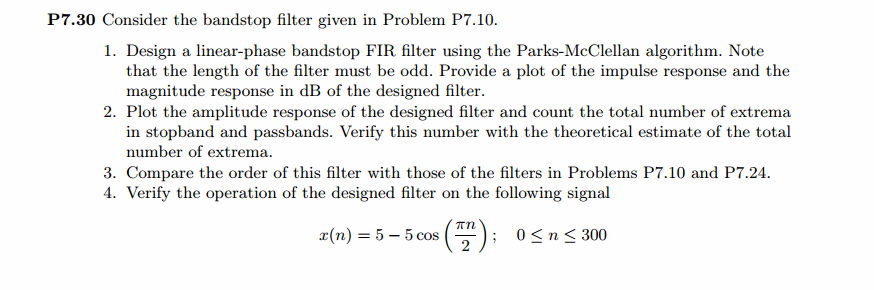
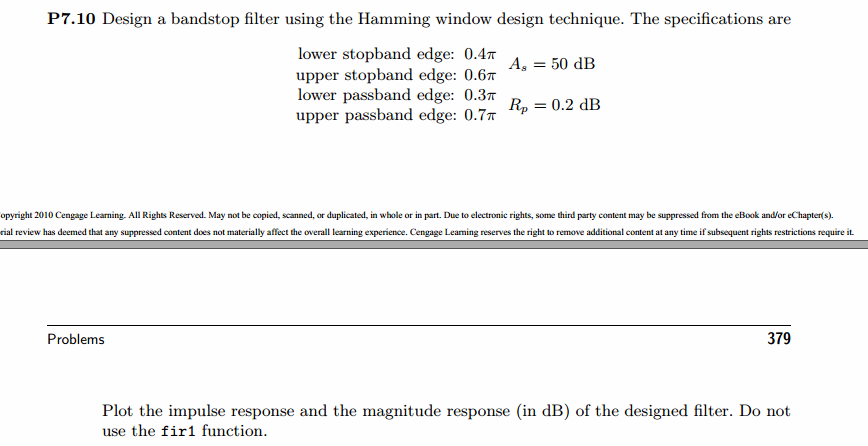
代码:
%% ++++++++++++++++++++++++++++++++++++++++++++++++++++++++++++++++++++++++++++++++

%%            Output Info about this m-file

fprintf('\n***********************************************************\n');

fprintf('        <DSP using MATLAB> Problem 7.30 \n\n');

banner();

%% ++++++++++++++++++++++++++++++++++++++++++++++++++++++++++++++++++++++++++++++++

% bandstop, Length MUST be odd number.

wp1 = 0.3*pi; ws1 = 0.4*pi; ws2 = 0.6*pi; wp2 = 0.7*pi;

As = 50; Rp = 0.2;

[delta1, delta2] = db2delta(Rp, As);

deltaH = max(delta1,delta2); deltaL = min(delta1,delta2);

f = [wp1, ws1, ws2, wp2]/pi; m = [1, 0, 1]; delta = [delta1, delta2, delta1];

[N, f, m, weights] = firpmord(f, m, delta);

N

h = firpm(N, f, m, weights);

[db, mag, pha, grd, w] = freqz_m(h, [1]);

delta_w = 2*pi/1000;

wp1i = floor(wp1/delta_w)+1; ws1i = floor(ws1/delta_w)+1;

ws2i = floor(ws2/delta_w)+1; wp2i = floor(wp2/delta_w)+1;

Asd = -max(db(ws1i : 1 : ws2i))

M = N + 1

l = 0:M-1;

%% --------------------------------------------------

%%                   Type-1 BPF

%% --------------------------------------------------

[Hr, ww, a, L] = Hr_Type1(h);

Rp = -(min(db(1:1: wp1i)));                   % Actual Passband Ripple

fprintf('\nActual Passband Ripple is %.4f dB.\n', Rp);

As = -round(max(db(ws1i : 1 : ws2i)));        % Min Stopband attenuation

fprintf('\nMin Stopband attenuation is %.4f dB.\n', As);

[delta1_db, delta2_db] = db2delta(Rp, As)

% Plot

figure('NumberTitle', 'off', 'Name', 'Problem 7.30 h(n), Parks-McClellan Method')

set(gcf,'Color','white');

subplot(2,2,1); stem([0:M-1], h); axis([0 M-1 -0.3 0.7]); grid on;

xlabel('n'); ylabel('h(n)'); title('Actual Impulse Response, M=47');

subplot(2,2,2); plot(w/pi, db); axis([0 1 -90 10]); grid on;

set(gca,'YTickMode','manual','YTick',[-51,-9,0])

set(gca,'YTickLabelMode','manual','YTickLabel',['51';' 9';' 0']);

set(gca,'XTickMode','manual','XTick',[0,0.3,0.4,0.6,0.7,1]);

xlabel('frequency in \pi units'); ylabel('Decibels'); title('Magnitude Response in dB');

subplot(2,2,3); plot(ww/pi, Hr); axis([0, 1, -0.2, 1.2]); grid on;

xlabel('frequency in \pi nuits'); ylabel('Hr(w)'); title('Amplitude Response');

set(gca,'XTickMode','manual','XTick',[0,0.3,0.4,0.6,0.7,1])

set(gca,'YTickMode','manual','YTick',[0,1]);

subplot(2,2,4);

pb1w = ww(1:1:wp1i)/pi; pb1e = Hr(1:1:wp1i)-1;

sbw = ww(ws1i:ws2i)/pi; sbe = Hr(ws1i:ws2i);

pb2w = ww(wp2i:501)/pi; pb2e = Hr(wp2i:501)-1;

plot(pb1w,pb1e*(delta2/delta1), sbw,sbe, pb2w,pb2e*(delta2/delta1));   % weighted error

% plot(pb1w,pb1e, sbw,sbe, pb2w,pb2e);  % error

axis([0, 1, -deltaL, deltaL]); grid on;

xlabel('frequency in \pi units'); ylabel('Hr(w)');

title('Weighted Error');

%title('Error Response');

set(gca,'XTickMode','manual','XTick',f)

set(gca,'YTickMode','manual','YTick',[-deltaL, 0,deltaL]);

set(gca,'XGrid','on','YGrid','on')

figure('NumberTitle', 'off', 'Name', 'Problem 7.30 Parks-McClellan Method')

set(gcf,'Color','white');

subplot(2,2,1); plot(w/pi, db); grid on; axis([0 2 -90 10]);

set(gca,'YTickMode','manual','YTick',[-51,-9,0])

set(gca,'YTickLabelMode','manual','YTickLabel',['51';' 9';' 0']);

set(gca,'XTickMode','manual','XTick',[0,0.3,0.4,0.6,0.7,1,1.3,1.4,1.6,1.7,2]);

xlabel('frequency in \pi units'); ylabel('Decibels'); title('Magnitude Response in dB');

subplot(2,2,3); plot(w/pi, mag); grid on; %axis([0 1 -100 10]);

xlabel('frequency in \pi units'); ylabel('Absolute'); title('Magnitude Response in absolute');

set(gca,'XTickMode','manual','XTick',[0,0.3,0.4,0.6,0.7,1,1.3,1.4,1.6,1.7,2]);

set(gca,'YTickMode','manual','YTick',[0,1.0]);

subplot(2,2,2); plot(w/pi, pha); grid on; %axis([0 1 -100 10]);

xlabel('frequency in \pi units'); ylabel('Rad'); title('Phase Response in Radians');

subplot(2,2,4); plot(w/pi, grd*pi/180);  grid on; %axis([0 1 -100 10]);

xlabel('frequency in \pi units'); ylabel('Rad'); title('Group Delay');

figure('NumberTitle', 'off', 'Name', 'Problem 7.30 AmpRes of h(n), Parks-McClellan Method')

set(gcf,'Color','white');

plot(ww/pi, Hr); grid on; %axis([0 1 -100 10]);

xlabel('frequency in \pi units'); ylabel('Hr'); title('Amplitude Response');

set(gca,'YTickMode','manual','YTick',[-delta2_db ,0,delta2_db , 1-delta1_db, 1, 1+delta1_db]);

set(gca,'XTickMode','manual','XTick',[0,0.3,0.4,0.6,0.7,1]);

n = [0:1:300];

x = 5-5*cos(pi*n/2);

y = filter(h,1,x);

figure('NumberTitle', 'off', 'Name', 'Problem 7.30 x(n) and y(n)')

set(gcf,'Color','white');

subplot(3,1,1); stem([0:M-1], h); axis([0 M-1 -0.3 0.7]); grid on;

xlabel('n'); ylabel('h(n)'); title('Actual Impulse Response, M=47');

subplot(3,1,2); stem(n, x); axis([0 300 0 10]); grid on;

xlabel('n'); ylabel('x(n)'); title('Input sequence');

subplot(3,1,3); stem(n, y); axis([0 100 -5 7]); grid on;

xlabel('n'); ylabel('y(n)'); title('Output sequence');

% ---------------------------

%    DTFT of x

% ---------------------------

MM = 500;

[X, w1] = dtft1(x, n, MM);

[Y, w1] = dtft1(y, n, MM);

magX = abs(X); angX = angle(X); realX = real(X); imagX = imag(X);

magY = abs(Y); angY = angle(Y); realY = real(Y); imagY = imag(Y);

figure('NumberTitle', 'off', 'Name', 'Problem 7.30 DTFT of x(n)')

set(gcf,'Color','white');

subplot(2,2,1); plot(w1/pi,magX); grid on; %axis([0,2,0,15]);

title('Magnitude Part');

xlabel('frequency in \pi units'); ylabel('Magnitude  |X|');

subplot(2,2,3); plot(w1/pi, angX/pi); grid on; axis([0,2,-1,1]);

title('Angle Part');

xlabel('frequency in \pi units'); ylabel('Radians/\pi');

subplot('2,2,2'); plot(w1/pi, realX); grid on;

title('Real Part');

xlabel('frequency in \pi units'); ylabel('Real');

subplot('2,2,4'); plot(w1/pi, imagX); grid on;

title('Imaginary Part');

xlabel('frequency in \pi units'); ylabel('Imaginary');

figure('NumberTitle', 'off', 'Name', 'Problem 7.30 DTFT of y(n)')

set(gcf,'Color','white');

subplot(2,2,1); plot(w1/pi,magY); grid on; %axis([0,2,0,15]);

title('Magnitude Part');

xlabel('frequency in \pi units'); ylabel('Magnitude  |Y|');

subplot(2,2,3); plot(w1/pi, angY/pi); grid on; axis([0,2,-1,1]);

title('Angle Part');

xlabel('frequency in \pi units'); ylabel('Radians/\pi');

subplot('2,2,2'); plot(w1/pi, realY); grid on;

title('Real Part');

xlabel('frequency in \pi units'); ylabel('Real');

subplot('2,2,4'); plot(w1/pi, imagY); grid on;

title('Imaginary Part');

xlabel('frequency in \pi units'); ylabel('Imaginary');

figure('NumberTitle', 'off', 'Name', 'Problem 7.30 Magnitude Response')

set(gcf,'Color','white');

subplot(1,2,1); plot(w1/pi,magX); grid on; %axis([0,2,0,15]);

title('Magnitude Part of Input');

xlabel('frequency in \pi units'); ylabel('Magnitude  |X|');

subplot(1,2,2); plot(w1/pi,magY); grid on; %axis([0,2,0,15]);

title('Magnitude Part of Output');

xlabel('frequency in \pi units'); ylabel('Magnitude  |Y|');
运行结果:
滤波器长度M=47,阻带衰减满足设计指标。

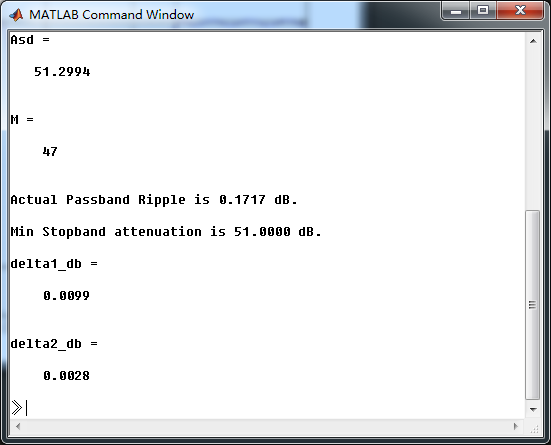
幅度谱和相位谱
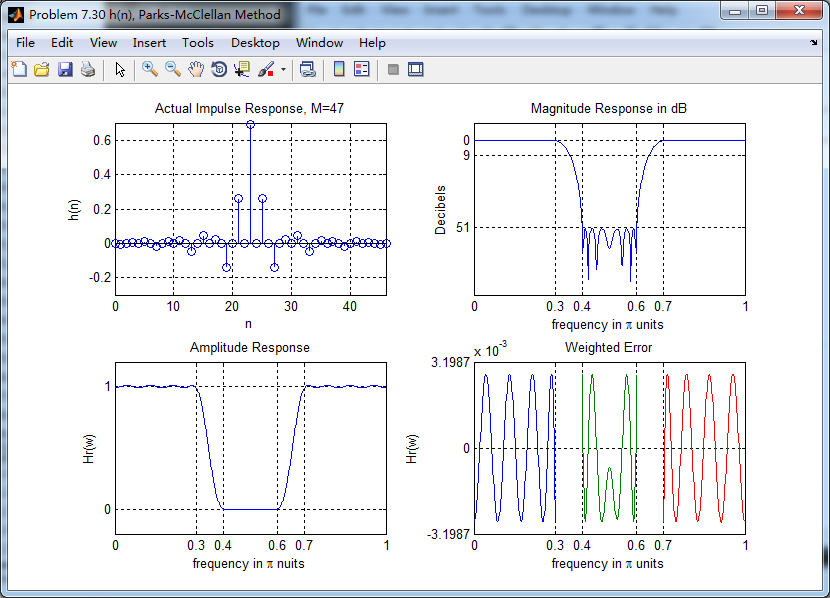
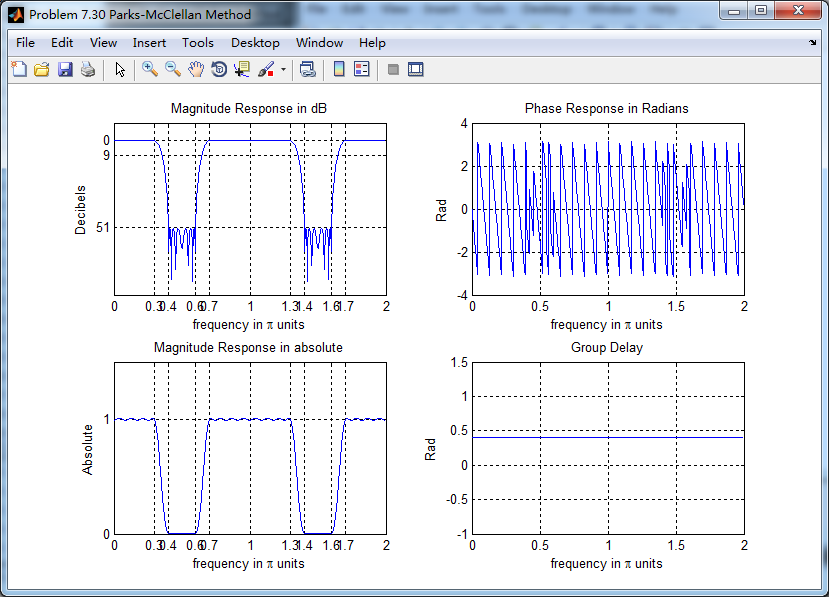
振幅谱,把阻带、通带放大,数数极值点的个数。
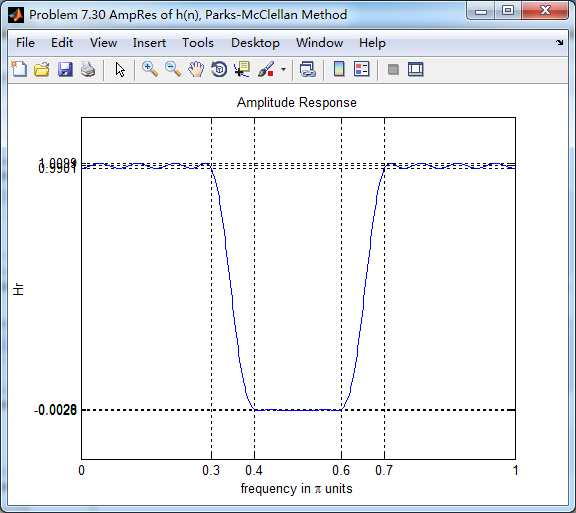
下图,9个极值点
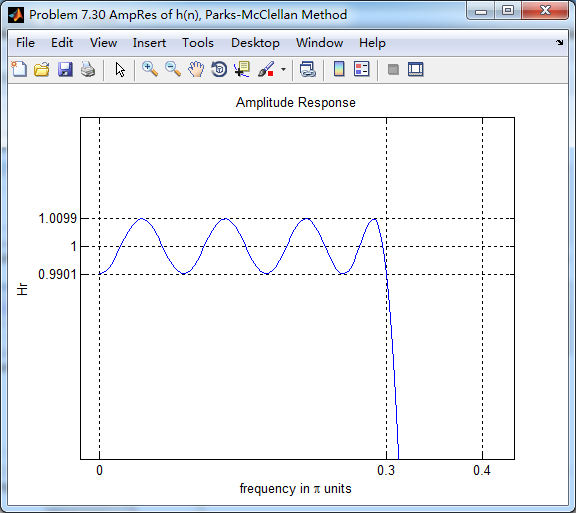
下图,8个极值点

下图,9个极值点

总共有9+8+9=26个极值点,M=47,L=(M-1)/2=23,0到π上,最多L+3=26个极值点。
输入输出序列

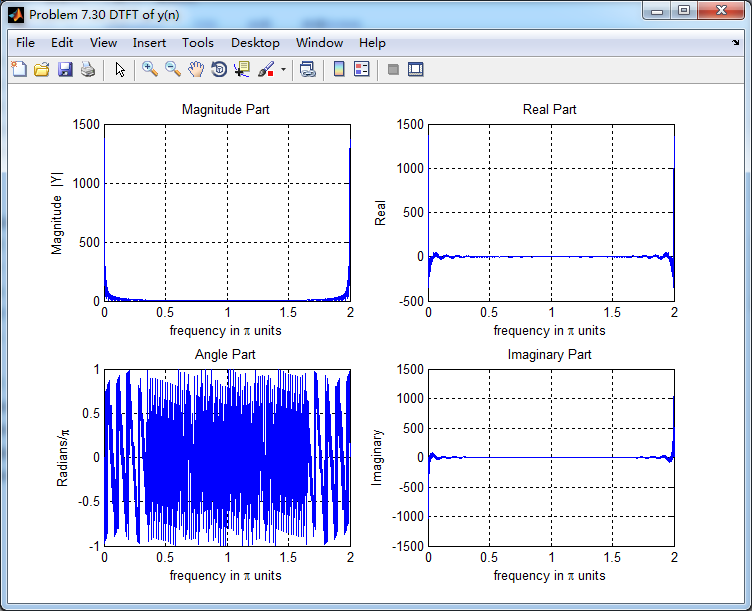
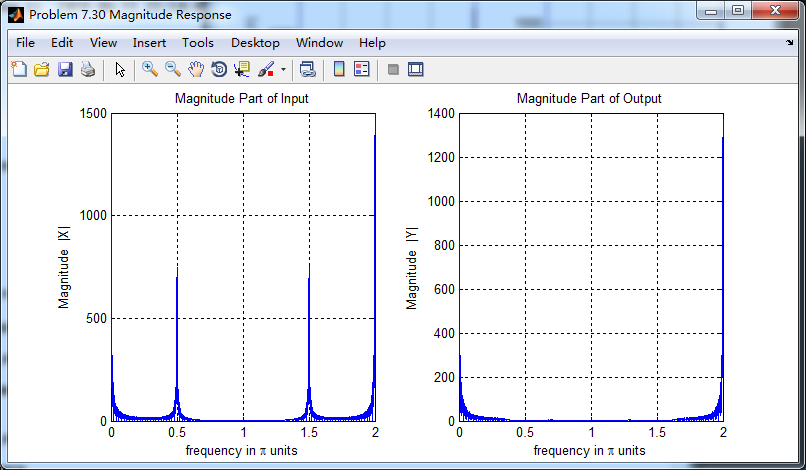
输入序列的谱,注意0.5π的频率分量,通过带阻滤波后消除了。
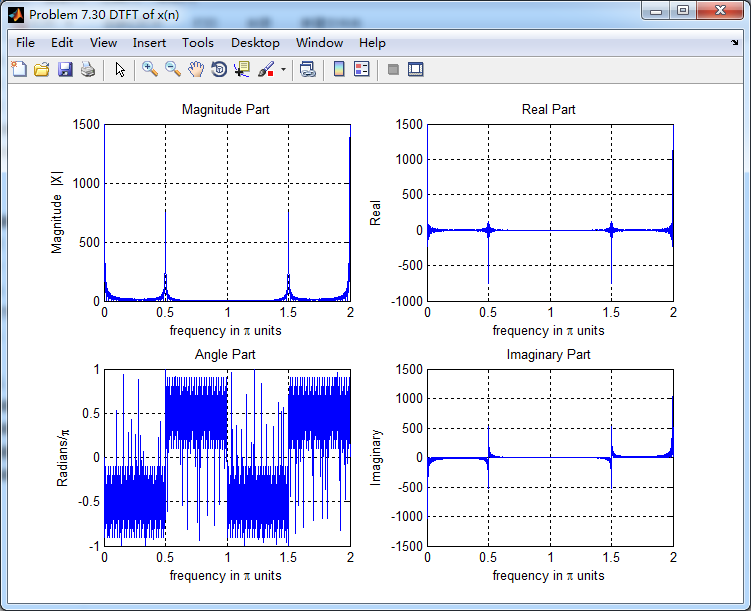
输出序列的谱,0.5π分量滤除了。
滤波前后幅度谱对比
《DSP using MATLAB》Problem 7.30的更多相关文章
- 《DSP using MATLAB》Problem 8.30
10月1日,新中国70周岁生日,上午观看了盛大的庆祝仪式,整齐的方阵,先进的武器,尊敬的先辈英雄,欢乐的人们,愿我们的 国家越来越好,人民生活越来越好. 接着做题. 代码: %% ---------- ...
- 《DSP using MATLAB》Problem 5.30
代码: %% ++++++++++++++++++++++++++++++++++++++++++++++++++++++++++++++++++++++++++++++++ %% Output In ...
- 《DSP using MATLAB》Problem 7.23
%% ++++++++++++++++++++++++++++++++++++++++++++++++++++++++++++++++++++++++++++++++ %% Output Info a ...
- 《DSP using MATLAB》Problem 5.22
代码: %% ++++++++++++++++++++++++++++++++++++++++++++++++++++++++++++++++++++++++++++++++++++++++ %% O ...
- 《DSP using MATLAB》Problem 5.20
窗外的知了叽叽喳喳叫个不停,屋里温度应该有30°,伏天的日子难过啊! 频率域的方法来计算圆周移位 代码: 子函数的 function y = cirshftf(x, m, N) %% -------- ...
- 《DSP using MATLAB》Problem 3.8
2018年元旦,他乡加班中,外面尽是些放炮的,别人的繁华与我无关. 代码: %% ----------------------------------------------------------- ...
- 《DSP using MATLAB》Problem 3.3
按照题目的意思需要利用DTFT的性质,得到序列的DTFT结果(公式表示),本人数学功底太差,就不写了,直接用 书中的方法计算并画图. 代码: %% -------------------------- ...
- 《DSP using MATLAB》Problem 2.20
代码: %% ------------------------------------------------------------------------ %% Output Info about ...
- 《DSP using MATLAB》Problem 2.14
代码: %% ------------------------------------------------------------------------ %% Output Info about ...
随机推荐
- SpringBoot-application:application.yml/配置文件详解
ylbtech-SpringBoot-application:application.yml/配置文件详解 springboot采纳了建立生产就绪spring应用程序的观点. Spring Boot优 ...
- day 60 Django基础七之Ajax
Django基础七之Ajax 本节目录 一 Ajax简介 二 Ajax使用 三 Ajax请求设置csrf_token 四 关于json 五 补充一个SweetAlert插件(了解) 六 同源策 ...
- 牛客暑期第六场G /// 树形DP 最大流最小割定理
题目大意: 输入t,t个测试用例 每个测试用例输入n 接下来n行 输入u,v,w,树的无向边u点到v点权重为w 求任意两点间的最大流的总和 1.最大流最小割定理 即最大流等于最小割 2.无向树上的任意 ...
- P1305 新二叉树 /// 二叉树的先序遍历
题目大意: https://www.luogu.org/problemnew/show/P1305 由题目可知,输入首位为 子树的根 其后为其左右儿子 则除各行首位后的位置中 没有出现的那个字母肯定为 ...
- mac下Spark的安装与使用
每次接触一个新的知识之前我都抱有恐惧之心,因为总认为自己没有接触到的知识都很高大上,比如上篇介绍到的Hadoop的安装与使用与本篇要介绍的Spark,其实在自己真正琢磨以后才发现本以为高大上的知识其实 ...
- minutia cylinder code MCC lSSR 匹配算法
图一 是LSS匹配算法, 图二是LSSR 匹配算法,数据采用MCC SDK自带的十个人的数据.LSS EER6.0%左右,LSSR EER 0%
- 踩坑记-java mysql 新增获取主键、DIY主键、UUID
java mysql 获取主键.DIY主键.UUID,简单粗暴,代码如下: mapper.xml insert id="add" parameterType="com.x ...
- springboot与任务(异步任务)
描述:在Java应用中,绝大多数情况下都是通过同步的方式来实现交互处理的:但是在处理与第三方系统交互的时候,容易造成响应迟缓的情况,之前大部分都是使用多线程来完成此类任务,其实,在Spring 3.x ...
- CDATA标签用法
今天在xml文件里看到有CDATA标签的使用, 答案如下: CDATA 术语 CDATA 指的是不应由 XML 解析器进行解析的文本数据(Unparsed Character Data). 在 X ...
- 浅谈response和request方法
一:概述 Web服务器收到客户端的http请求,会针对每一次请求,分别创建一个用于代表请求的request对象.和代表响应的response对象. 按这个理解的话一次请求生成一个request和res ...