
《DSP using MATLAB》Problem 8.30
10月1日,新中国70周岁生日,上午观看了盛大的庆祝仪式,整齐的方阵,先进的武器,尊敬的先辈英雄,欢乐的人们,愿我们的
国家越来越好,人民生活越来越好。
接着做题。

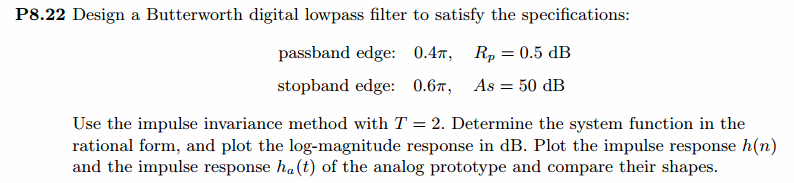
代码:
%% ------------------------------------------------------------------------

%%            Output Info about this m-file

fprintf('\n***********************************************************\n');

fprintf('        <DSP using MATLAB> Problem 8.30 \n\n');

banner();

%% ------------------------------------------------------------------------

% -----------------------------------

%          Ω=(2/T)tan(ω/2)

%          ω=2*[atan(ΩT/2)]

%    Digital Filter Specifications:

% -----------------------------------

wp = 0.4*pi;                     % digital passband freq in rad

ws = 0.6*pi;                     % digital stopband freq in rad

Rp = 0.5;                        % passband ripple in dB

As = 50;                         % stopband attenuation in dB

Ripple = 10 ^ (-Rp/20)           % passband ripple in absolute

Attn = 10 ^ (-As/20)             % stopband attenuation in absolute

% Analog prototype specifications: Inverse Mapping for frequencies

T = 2;                           % set T = 1

Fs = 1/T;

OmegaP = (2/T)*tan(wp/2);        % prototype passband freq

OmegaS = (2/T)*tan(ws/2);        % prototype stopband freq

% Analog Butterworth Prototype Filter Calculation:

[cs, ds] = afd_butt(OmegaP, OmegaS, Rp, As);

% Calculation of second-order sections:

fprintf('\n***** Cascade-form in s-plane: START *****\n');

[CS, BS, AS] = sdir2cas(cs, ds);

fprintf('\n***** Cascade-form in s-plane: END *****\n');

% Calculation of Frequency Response:

[db_s, mag_s, pha_s, ww_s] = freqs_m(cs, ds, 2*pi/T);

% --------------------------------------------------------------------

%   find exact band-edge frequencies for the given dB specifications

% --------------------------------------------------------------------

%ind = find( abs(ceil(db_s))-50 == 0 )

[diff_to_50dB, ind] = min(abs(db_s+50))

db_s(ind-3 : ind+3)                                     % magnitude response, dB

ww_s(ind)/(pi)          % analog frequency in kpi units

%ww_s(ind)/(2*pi)        % analog frequency in Hz units

[sA,index] = sort(abs(db_s+50));

AA_dB = db_s(index(1:8))

AB_rad = ww_s(index(1:8))/(pi)

AC_Hz = ww_s(index(1:8))/(2*pi)

% -------------------------------------------------------------------

% Calculation of Impulse Response:

[ha, x, t] = impulse(cs, ds);

% Impulse Invariance Transformation:

%[b, a] = imp_invr(cs, ds, T);

% Bilinear Transformation

[b, a] = bilinear(cs, ds, Fs);

[C, B, A] = dir2cas(b, a);

% Calculation of Frequency Response:

[db, mag, pha, grd, ww] = freqz_m(b, a);

% --------------------------------------------------------------------

%   find exact band-edge frequencies for the given dB specifications

% --------------------------------------------------------------------

%ind = find( abs(ceil(db))-50 == 0 )

[diff_to_80dB, ind] = min(abs(db+50))

db(ind-3 : ind+3)                                     % magnitude response, dB

ww(ind)/(pi)

%ww(ind)*Fs/(2*pi)

(2/T)*tan(ww(ind)/2)/pi

[sA,index] = sort(abs(db+50));

AA_dB = db(index(1:8))'

AB_rad = ww(index(1:8))'/pi

AC_Hz = (2/T)*tan(ww(index(1:8))'/2)/pi

% -------------------------------------------------------------------

%% -----------------------------------------------------------------

%%                             Plot

%% -----------------------------------------------------------------

figure('NumberTitle', 'off', 'Name', 'Problem 8.30 Analog Butterworth lowpass')

set(gcf,'Color','white');

M = 1;                          % Omega max

subplot(2,2,1); plot(ww_s/pi, mag_s);  grid on; axis([-M, M, 0, 1.2]);

xlabel(' Analog frequency in \pi units'); ylabel('|H|'); title('Magnitude in Absolute');

%set(gca, 'XTickMode', 'manual', 'XTick', [-0.876, -0.463, 0, 0.463, 0.876]);        % T=1

set(gca, 'XTickMode', 'manual', 'XTick', [-0.44, -0.23, 0, 0.23, 0.44]);     % T=2

set(gca, 'YTickMode', 'manual', 'YTick', [0, 0.0032, 0.5, 0.9441, 1]);

subplot(2,2,2); plot(ww_s/pi, db_s);  grid on; axis([-M, M, -100, 10]);

xlabel('Analog frequency in \pi units'); ylabel('Decibels'); title('Magnitude in dB ');

%set(gca, 'XTickMode', 'manual', 'XTick', [-0.876, -0.463, 0, 0.463, 0.8591, 0.876]);        % T=1

set(gca, 'XTickMode', 'manual', 'XTick', [-0.44, -0.23, 0, 0.23, 0.4295, 0.44]);     % T=2

set(gca, 'YTickMode', 'manual', 'YTick', [-90, -50, -1, 0]);

set(gca,'YTickLabelMode','manual','YTickLabel',['90';'50';' 1';' 0']);

subplot(2,2,3); plot(ww_s/pi, pha_s/pi);  grid on; axis([-M, M, -1.2, 1.2]);

xlabel('Analog frequency in \pi nuits'); ylabel('radians'); title('Phase Response');

set(gca, 'XTickMode', 'manual', 'XTick', [-OmegaS, -OmegaP, 0, OmegaP, OmegaS]/pi);

set(gca, 'YTickMode', 'manual', 'YTick', [-1:0.5:1]);

subplot(2,2,4); plot(t, ha); grid on; %axis([0, 30, -0.05, 0.25]);

xlabel('time in seconds'); ylabel('ha(t)'); title('Impulse Response');

figure('NumberTitle', 'off', 'Name', 'Problem 8.30 Digital Butterworth lowpass by afd_butt function')

set(gcf,'Color','white');

M = 2;                          % Omega max

subplot(2,2,1); plot(ww/(pi), mag); axis([0, M, 0, 1.2]); grid on;

xlabel('Digital frequency in \pi units'); ylabel('|H|'); title('Magnitude Response');

set(gca, 'XTickMode', 'manual', 'XTick', [0, 0.4, 0.6, 1.0, M]);

set(gca, 'YTickMode', 'manual', 'YTick', [0, 0.0032, 0.5, 0.9441, 1]);

subplot(2,2,2); plot(ww/(pi), pha/pi); axis([0, M, -1.1, 1.1]); grid on;

xlabel('Digital frequency in \pi nuits'); ylabel('radians in \pi units'); title('Phase Response');

set(gca, 'XTickMode', 'manual', 'XTick', [0, 0.4, 0.6, 1.0, M]);

set(gca, 'YTickMode', 'manual', 'YTick', [-1:1:1]);

subplot(2,2,3); plot(ww/pi, db); axis([0, M, -100, 10]); grid on;

xlabel('Digital frequency in \pi units'); ylabel('Decibels'); title('Magnitude in dB ');

%set(gca, 'XTickMode', 'manual', 'XTick', [0, 0.4, 0.594, 0.6, 1.0, M]);   % T=1

set(gca, 'XTickMode', 'manual', 'XTick', [0, 0.4, 0.594, 0.6, 1.0, M]);   % T=2

set(gca, 'YTickMode', 'manual', 'YTick', [-70, -50, -1, 0]);

set(gca,'YTickLabelMode','manual','YTickLabel',['70';'50';' 1';' 0']);

subplot(2,2,4); plot(ww/pi, grd); grid on; %axis([0, M, 0, 35]);

xlabel('Digital frequency in \pi units'); ylabel('Samples'); title('Group Delay');

set(gca, 'XTickMode', 'manual', 'XTick', [0, 0.4, 0.6, 1.0, M]);

%set(gca, 'YTickMode', 'manual', 'YTick', [0:5:35]);

figure('NumberTitle', 'off', 'Name', 'Problem 8.30 Pole-Zero Plot')

set(gcf,'Color','white');

zplane(b,a);

title(sprintf('Pole-Zero Plot'));

%pzplotz(b,a);

% ----------------------------------------------

%       Calculation of Impulse Response

% ----------------------------------------------

figure('NumberTitle', 'off', 'Name', 'Problem 8.30 Imp & Freq Response')

set(gcf,'Color','white');

t = [0:0.5:60]; subplot(2,1,1); impulse(cs,ds,t); grid on;   % Impulse response of the analog filter

axis([0,60,-0.3,0.5]);hold on

n = [0:1:60/T]; hn = filter(b,a,impseq(0,0,60/T));           % Impulse response of the digital filter

stem(n*T,hn); xlabel('time in sec'); title (sprintf('Impulse Responses, T=%f',T));

hold off

% Calculation of Frequency Response:

[dbs, mags, phas, wws] = freqs_m(cs, ds, 2*pi/T);             % Analog frequency   s-domain

[dbz, magz, phaz, grdz, wwz] = freqz_m(b, a);               % Digital  z-domain

%% -----------------------------------------------------------------

%%                             Plot

%% -----------------------------------------------------------------

subplot(2,1,2); plot(wws/(2*pi), mags*Fs,'b+', wwz/(2*pi)*Fs, magz,'r'); grid on;

xlabel('frequency in Hz'); title('Magnitude Responses'); ylabel('Magnitude');

text(-0.3,0.15,'Analog filter', 'Color', 'b'); text(0.4,0.55,'Digital filter', 'Color', 'r');

%% +++++++++++++++++++++++++++++++++++++++++++++++++++++++++++++++++++++

%%              MATLAB  butter function

%% +++++++++++++++++++++++++++++++++++++++++++++++++++++++++++++++++++++

% Analog Prototype Order Calculations:

N  = ceil((log10((10^(Rp/10)-1)/(10^(As/10)-1)))/(2*log10(OmegaP/OmegaS)));

fprintf('\n\n ********** Butterworth Filter Order = %3.0f  \n', N)

OmegaC = OmegaP/((10^(Rp/10)-1)^(1/(2*N)));       % Analog BW prototype cutoff freq

wn = 2*atan((OmegaC*T)/2);                        % Digital BW cutoff freq

% Digital Butterworth Filter Design:

wn = wn/pi;                            % Digital Butterworth cutoff freq in pi units

[b, a] = butter(N, wn); [C, B, A] = dir2cas(b, a)

% Calculation of Frequency Response:

[db, mag, pha, grd, ww] = freqz_m(b, a);

figure('NumberTitle', 'off', 'Name', 'Problem 8.30 Digital Butterworth lowpass by butter function')

set(gcf,'Color','white');

M = 2;                          % Omega max

subplot(2,2,1); plot(ww/pi, mag); axis([0, M, 0, 1.2]); grid on;

xlabel(' frequency in \pi units'); ylabel('|H|'); title('Magnitude Response');

set(gca, 'XTickMode', 'manual', 'XTick', [0, 0.4, 0.6, 1.0, M]);

set(gca, 'YTickMode', 'manual', 'YTick', [0, 0.0032, 0.5, 0.9441, 1]);

subplot(2,2,2); plot(ww/pi, pha/pi); axis([0, M, -1.1, 1.1]); grid on;

xlabel('frequency in \pi nuits'); ylabel('radians in \pi units'); title('Phase Response');

set(gca, 'XTickMode', 'manual', 'XTick', [0, 0.4, 0.6, 1.0, M]);

set(gca, 'YTickMode', 'manual', 'YTick', [-1:1:1]);

subplot(2,2,3); plot(ww/pi, db); axis([0, M, -100, 10]); grid on;

xlabel('frequency in \pi units'); ylabel('Decibels'); title('Magnitude in dB ');

set(gca, 'XTickMode', 'manual', 'XTick', [0, 0.4, 0.6, 1.0, M]);

set(gca, 'YTickMode', 'manual', 'YTick', [-70, -50, -1, 0]);

set(gca,'YTickLabelMode','manual','YTickLabel',['70';'50';' 1';' 0']);

subplot(2,2,4); plot(ww/pi, grd); grid on; %axis([0, M, 0, 35]);

xlabel('frequency in \pi units'); ylabel('Samples'); title('Group Delay');

set(gca, 'XTickMode', 'manual', 'XTick', [0, 0.4, 0.6, 1.0, M]);

%set(gca, 'YTickMode', 'manual', 'YTick', [0:5:35]);

figure('NumberTitle', 'off', 'Name', 'Problem 8.30 Pole-Zero Plot')

set(gcf,'Color','white');

zplane(b,a);

title(sprintf('Pole-Zero Plot'));

%pzplotz(b,a);

% ----------------------------------------------

%       Calculation of Impulse Response

% ----------------------------------------------

figure('NumberTitle', 'off', 'Name', 'Problem 8.30 Imp & Freq Response')

set(gcf,'Color','white');

t = [0:0.5:60]; subplot(2,1,1); impulse(cs,ds,t); grid on;   % Impulse response of the analog filter

axis([0,60,-0.3,0.5]);hold on

n = [0:1:60/T]; hn = filter(b,a,impseq(0,0,60/T));           % Impulse response of the digital filter

stem(n*T,hn); xlabel('time in sec'); title (sprintf('Impulse Responses, T=%f',T));

hold off

% Calculation of Frequency Response:

[dbs, mags, phas, wws] = freqs_m(cs, ds, 2*pi/T);             % Analog frequency   s-domain

[dbz, magz, phaz, grdz, wwz] = freqz_m(b, a);               % Digital  z-domain

%% -----------------------------------------------------------------

%%                             Plot

%% -----------------------------------------------------------------

subplot(2,1,2); plot(wws/(2*pi), mags*Fs,'b+', wwz/(2*pi)*Fs, magz,'r'); grid on;

xlabel('frequency in Hz'); title('Magnitude Responses'); ylabel('Magnitude');

text(-0.3,0.15,'Analog filter', 'Color', 'b'); text(0.4,0.55,'Digital filter', 'Color', 'r');
运行结果:
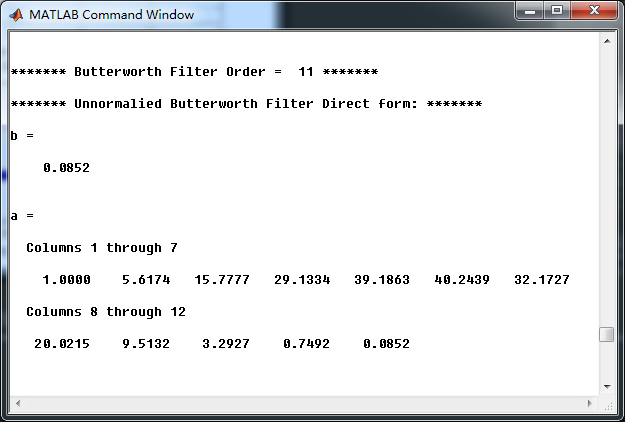
非归一化Butterworth模拟原型低通滤波器,直接形式的系数,
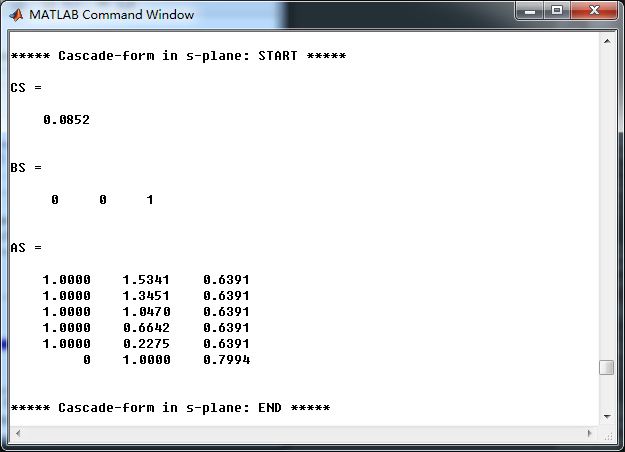
模拟低通串联形式的系数:
用双线性变换法,转换成数字Butterworth低通,直接形式的系数如下
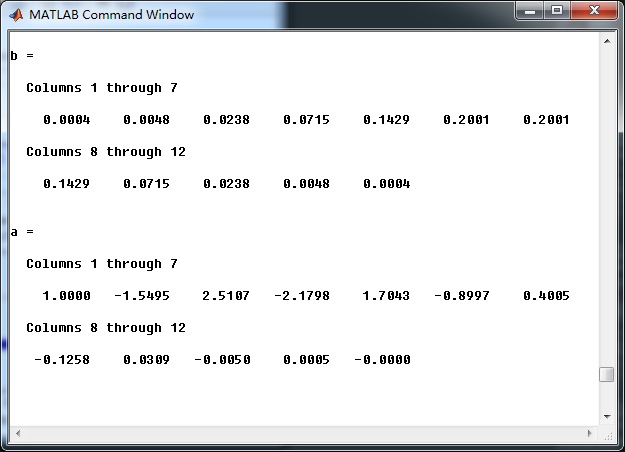
数字低通串联形式系数
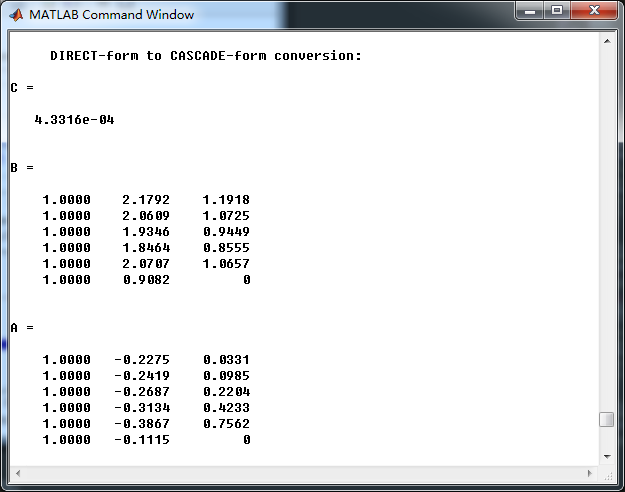
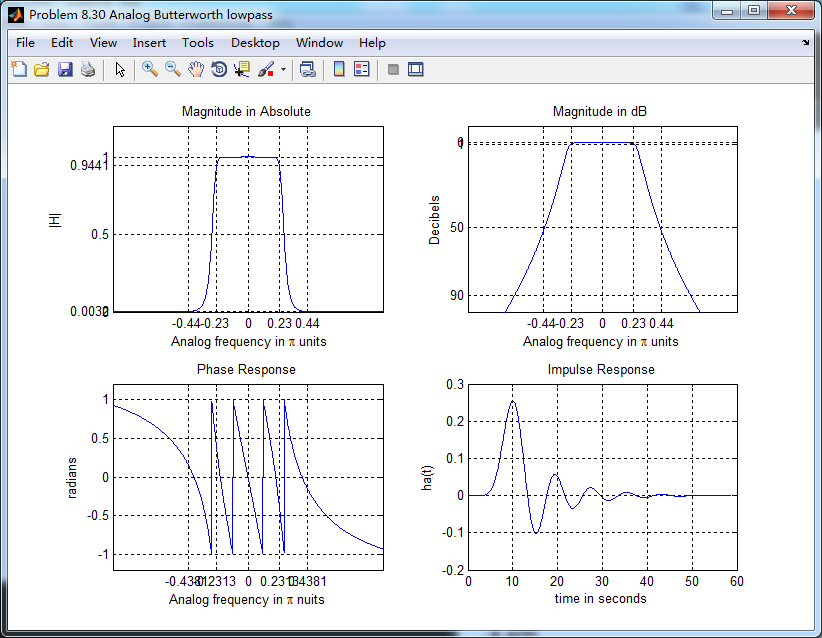
模拟Butterworth低通原型滤波器的幅度谱、相位谱和脉冲响应
双线性变换法,得到的数字Butterworth低通滤波器,起幅度谱、相位谱和群延迟响应

数字低通系统函数的零极点图

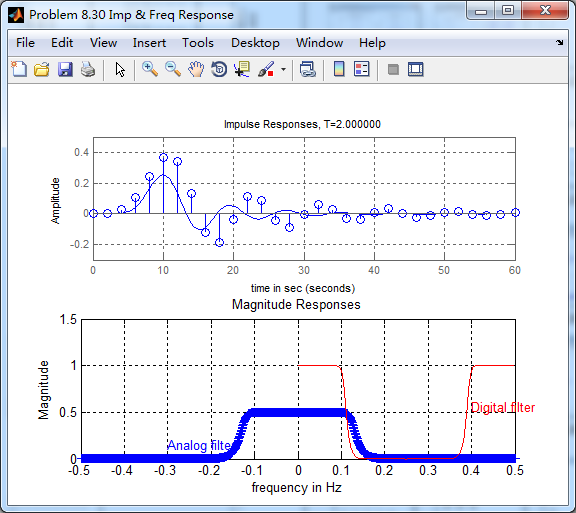
下图的上半部分,模拟低通和数字低通的脉冲响应对比,可以看出形态不一致。
采用MATLAB自带的butter函数求取数字低通,其幅度谱、相位谱和群延迟。
与上面afd_butt函数所得结果相比,相位谱和群延迟稍有不同。

零极点图,也稍有不同,零点部分靠的更紧密。

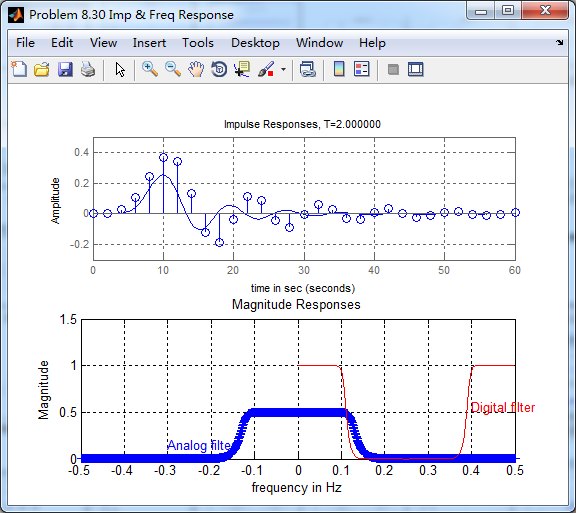
脉冲响应,与上一种方法对比,结果一样,看不出区别。
《DSP using MATLAB》Problem 8.30的更多相关文章
- 《DSP using MATLAB》Problem 7.30
代码: %% ++++++++++++++++++++++++++++++++++++++++++++++++++++++++++++++++++++++++++++++++ %% Output In ...
- 《DSP using MATLAB》Problem 5.30
代码: %% ++++++++++++++++++++++++++++++++++++++++++++++++++++++++++++++++++++++++++++++++ %% Output In ...
- 《DSP using MATLAB》Problem 7.23
%% ++++++++++++++++++++++++++++++++++++++++++++++++++++++++++++++++++++++++++++++++ %% Output Info a ...
- 《DSP using MATLAB》Problem 5.22
代码: %% ++++++++++++++++++++++++++++++++++++++++++++++++++++++++++++++++++++++++++++++++++++++++ %% O ...
- 《DSP using MATLAB》Problem 5.20
窗外的知了叽叽喳喳叫个不停,屋里温度应该有30°,伏天的日子难过啊! 频率域的方法来计算圆周移位 代码: 子函数的 function y = cirshftf(x, m, N) %% -------- ...
- 《DSP using MATLAB》Problem 3.8
2018年元旦,他乡加班中,外面尽是些放炮的,别人的繁华与我无关. 代码: %% ----------------------------------------------------------- ...
- 《DSP using MATLAB》Problem 3.3
按照题目的意思需要利用DTFT的性质,得到序列的DTFT结果(公式表示),本人数学功底太差,就不写了,直接用 书中的方法计算并画图. 代码: %% -------------------------- ...
- 《DSP using MATLAB》Problem 2.20
代码: %% ------------------------------------------------------------------------ %% Output Info about ...
- 《DSP using MATLAB》Problem 2.14
代码: %% ------------------------------------------------------------------------ %% Output Info about ...
随机推荐
- !important的用法及作用
定义及语法 !important,作用是提高指定样式规则的应用优先权(优先级).语法格式{ cssRule !important },即写在定义的最后面,例如:box{color:red !impor ...
- python ORM框架:SqlAlchemy
ORM,对象关系映射,即Object Relational Mapping的简称,通过ORM框架将编程语言中的对象模型与数据库的关系模型建立映射关系,这样做的目的:简化sql语言操作数据库的繁琐过程( ...
- cookie与token对比(转)
1.cookie(储存在用户本地终端上的数据( 为了辨别用户身份.进行 session 跟踪)) HTTP协议本身是无状态的,所以需要一个标志来对用户身份进行验证 用户登录成功后,会在服务器存一个se ...
- [Usaco2005 Dec]Cleaning Shifts
[Usaco2005 Dec]Cleaning Shifts 给出n段区间,左右端点分别为\(l_i,r_i\),以及选取这段区间的费用\(c_i\),现在要选出若干个区间,使其完全覆盖区间\([m, ...
- matplotlib 画图颜色参数值及对应色卡
matplotlib 色卡对应参数值 cnames = { 'aliceblue': '#F0F8FF', 'antiquewhite': '#FAEBD7', 'aqua': '#00FFFF', ...
- day16 python-04 字典
Python之路,Day3 = Python基础4 # is 比较id # == 比较数值 # type(1) is type(2) 比较两个变量的类型是否相同 a = 1 b = 1 c = ' p ...
- 字符串——cf1109B
/* 先判不可行的情况:n/2的是单一字符 判只切割一次能不能组成回文 枚举每个切割点,交换两个串的位置 剩下就是割两次 */ #include<bits/stdc++.h> #inclu ...
- (转)Android中RelativeLayout各个属性的含义
转:http://blog.csdn.net/softkexin/article/details/5933589 android:layout_above="@id/xxx" - ...
- HTTP协议请求篇
http协议的基本概念 超文本传输协议(HTTP,HyperText Transfer Protocol)是互联网上应用最为广泛的一种网络协议.是工作在tcp/ip协议基础上的,所有的WWW文件都必须 ...
- Java基础:基本类型
1.基本类型 Java中有8种基本类型,分为4类,分别为: 整型:包括 byte . short. int . long 泛型:float.double 字符型:char 布尔型:boolean 2 ...