
《DSP using MATLAB》Problem 7.30
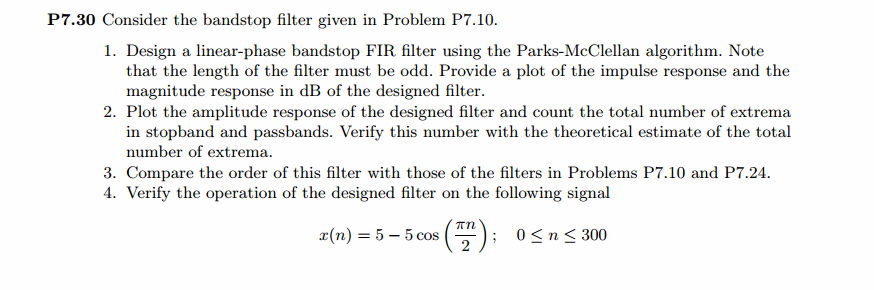
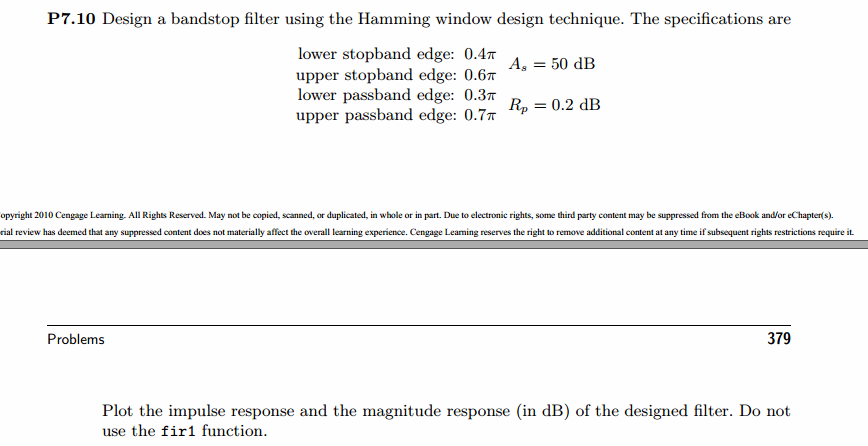
代码:
%% ++++++++++++++++++++++++++++++++++++++++++++++++++++++++++++++++++++++++++++++++

%%            Output Info about this m-file

fprintf('\n***********************************************************\n');

fprintf('        <DSP using MATLAB> Problem 7.30 \n\n');

banner();

%% ++++++++++++++++++++++++++++++++++++++++++++++++++++++++++++++++++++++++++++++++

% bandstop, Length MUST be odd number.

wp1 = 0.3*pi; ws1 = 0.4*pi; ws2 = 0.6*pi; wp2 = 0.7*pi;

As = 50; Rp = 0.2;

[delta1, delta2] = db2delta(Rp, As);

deltaH = max(delta1,delta2); deltaL = min(delta1,delta2);

f = [wp1, ws1, ws2, wp2]/pi; m = [1, 0, 1]; delta = [delta1, delta2, delta1];

[N, f, m, weights] = firpmord(f, m, delta);

N

h = firpm(N, f, m, weights);

[db, mag, pha, grd, w] = freqz_m(h, [1]);

delta_w = 2*pi/1000;

wp1i = floor(wp1/delta_w)+1; ws1i = floor(ws1/delta_w)+1;

ws2i = floor(ws2/delta_w)+1; wp2i = floor(wp2/delta_w)+1;

Asd = -max(db(ws1i : 1 : ws2i))

M = N + 1

l = 0:M-1;

%% --------------------------------------------------

%%                   Type-1 BPF

%% --------------------------------------------------

[Hr, ww, a, L] = Hr_Type1(h);

Rp = -(min(db(1:1: wp1i)));                   % Actual Passband Ripple

fprintf('\nActual Passband Ripple is %.4f dB.\n', Rp);

As = -round(max(db(ws1i : 1 : ws2i)));        % Min Stopband attenuation

fprintf('\nMin Stopband attenuation is %.4f dB.\n', As);

[delta1_db, delta2_db] = db2delta(Rp, As)

% Plot

figure('NumberTitle', 'off', 'Name', 'Problem 7.30 h(n), Parks-McClellan Method')

set(gcf,'Color','white');

subplot(2,2,1); stem([0:M-1], h); axis([0 M-1 -0.3 0.7]); grid on;

xlabel('n'); ylabel('h(n)'); title('Actual Impulse Response, M=47');

subplot(2,2,2); plot(w/pi, db); axis([0 1 -90 10]); grid on;

set(gca,'YTickMode','manual','YTick',[-51,-9,0])

set(gca,'YTickLabelMode','manual','YTickLabel',['51';' 9';' 0']);

set(gca,'XTickMode','manual','XTick',[0,0.3,0.4,0.6,0.7,1]);

xlabel('frequency in \pi units'); ylabel('Decibels'); title('Magnitude Response in dB');

subplot(2,2,3); plot(ww/pi, Hr); axis([0, 1, -0.2, 1.2]); grid on;

xlabel('frequency in \pi nuits'); ylabel('Hr(w)'); title('Amplitude Response');

set(gca,'XTickMode','manual','XTick',[0,0.3,0.4,0.6,0.7,1])

set(gca,'YTickMode','manual','YTick',[0,1]);

subplot(2,2,4);

pb1w = ww(1:1:wp1i)/pi; pb1e = Hr(1:1:wp1i)-1;

sbw = ww(ws1i:ws2i)/pi; sbe = Hr(ws1i:ws2i);

pb2w = ww(wp2i:501)/pi; pb2e = Hr(wp2i:501)-1;

plot(pb1w,pb1e*(delta2/delta1), sbw,sbe, pb2w,pb2e*(delta2/delta1));   % weighted error

% plot(pb1w,pb1e, sbw,sbe, pb2w,pb2e);  % error

axis([0, 1, -deltaL, deltaL]); grid on;

xlabel('frequency in \pi units'); ylabel('Hr(w)');

title('Weighted Error');

%title('Error Response');

set(gca,'XTickMode','manual','XTick',f)

set(gca,'YTickMode','manual','YTick',[-deltaL, 0,deltaL]);

set(gca,'XGrid','on','YGrid','on')

figure('NumberTitle', 'off', 'Name', 'Problem 7.30 Parks-McClellan Method')

set(gcf,'Color','white');

subplot(2,2,1); plot(w/pi, db); grid on; axis([0 2 -90 10]);

set(gca,'YTickMode','manual','YTick',[-51,-9,0])

set(gca,'YTickLabelMode','manual','YTickLabel',['51';' 9';' 0']);

set(gca,'XTickMode','manual','XTick',[0,0.3,0.4,0.6,0.7,1,1.3,1.4,1.6,1.7,2]);

xlabel('frequency in \pi units'); ylabel('Decibels'); title('Magnitude Response in dB');

subplot(2,2,3); plot(w/pi, mag); grid on; %axis([0 1 -100 10]);

xlabel('frequency in \pi units'); ylabel('Absolute'); title('Magnitude Response in absolute');

set(gca,'XTickMode','manual','XTick',[0,0.3,0.4,0.6,0.7,1,1.3,1.4,1.6,1.7,2]);

set(gca,'YTickMode','manual','YTick',[0,1.0]);

subplot(2,2,2); plot(w/pi, pha); grid on; %axis([0 1 -100 10]);

xlabel('frequency in \pi units'); ylabel('Rad'); title('Phase Response in Radians');

subplot(2,2,4); plot(w/pi, grd*pi/180);  grid on; %axis([0 1 -100 10]);

xlabel('frequency in \pi units'); ylabel('Rad'); title('Group Delay');

figure('NumberTitle', 'off', 'Name', 'Problem 7.30 AmpRes of h(n), Parks-McClellan Method')

set(gcf,'Color','white');

plot(ww/pi, Hr); grid on; %axis([0 1 -100 10]);

xlabel('frequency in \pi units'); ylabel('Hr'); title('Amplitude Response');

set(gca,'YTickMode','manual','YTick',[-delta2_db ,0,delta2_db , 1-delta1_db, 1, 1+delta1_db]);

set(gca,'XTickMode','manual','XTick',[0,0.3,0.4,0.6,0.7,1]);

n = [0:1:300];

x = 5-5*cos(pi*n/2);

y = filter(h,1,x);

figure('NumberTitle', 'off', 'Name', 'Problem 7.30 x(n) and y(n)')

set(gcf,'Color','white');

subplot(3,1,1); stem([0:M-1], h); axis([0 M-1 -0.3 0.7]); grid on;

xlabel('n'); ylabel('h(n)'); title('Actual Impulse Response, M=47');

subplot(3,1,2); stem(n, x); axis([0 300 0 10]); grid on;

xlabel('n'); ylabel('x(n)'); title('Input sequence');

subplot(3,1,3); stem(n, y); axis([0 100 -5 7]); grid on;

xlabel('n'); ylabel('y(n)'); title('Output sequence');

% ---------------------------

%    DTFT of x

% ---------------------------

MM = 500;

[X, w1] = dtft1(x, n, MM);

[Y, w1] = dtft1(y, n, MM);

magX = abs(X); angX = angle(X); realX = real(X); imagX = imag(X);

magY = abs(Y); angY = angle(Y); realY = real(Y); imagY = imag(Y);

figure('NumberTitle', 'off', 'Name', 'Problem 7.30 DTFT of x(n)')

set(gcf,'Color','white');

subplot(2,2,1); plot(w1/pi,magX); grid on; %axis([0,2,0,15]);

title('Magnitude Part');

xlabel('frequency in \pi units'); ylabel('Magnitude  |X|');

subplot(2,2,3); plot(w1/pi, angX/pi); grid on; axis([0,2,-1,1]);

title('Angle Part');

xlabel('frequency in \pi units'); ylabel('Radians/\pi');

subplot('2,2,2'); plot(w1/pi, realX); grid on;

title('Real Part');

xlabel('frequency in \pi units'); ylabel('Real');

subplot('2,2,4'); plot(w1/pi, imagX); grid on;

title('Imaginary Part');

xlabel('frequency in \pi units'); ylabel('Imaginary');

figure('NumberTitle', 'off', 'Name', 'Problem 7.30 DTFT of y(n)')

set(gcf,'Color','white');

subplot(2,2,1); plot(w1/pi,magY); grid on; %axis([0,2,0,15]);

title('Magnitude Part');

xlabel('frequency in \pi units'); ylabel('Magnitude  |Y|');

subplot(2,2,3); plot(w1/pi, angY/pi); grid on; axis([0,2,-1,1]);

title('Angle Part');

xlabel('frequency in \pi units'); ylabel('Radians/\pi');

subplot('2,2,2'); plot(w1/pi, realY); grid on;

title('Real Part');

xlabel('frequency in \pi units'); ylabel('Real');

subplot('2,2,4'); plot(w1/pi, imagY); grid on;

title('Imaginary Part');

xlabel('frequency in \pi units'); ylabel('Imaginary');

figure('NumberTitle', 'off', 'Name', 'Problem 7.30 Magnitude Response')

set(gcf,'Color','white');

subplot(1,2,1); plot(w1/pi,magX); grid on; %axis([0,2,0,15]);

title('Magnitude Part of Input');

xlabel('frequency in \pi units'); ylabel('Magnitude  |X|');

subplot(1,2,2); plot(w1/pi,magY); grid on; %axis([0,2,0,15]);

title('Magnitude Part of Output');

xlabel('frequency in \pi units'); ylabel('Magnitude  |Y|');
运行结果:
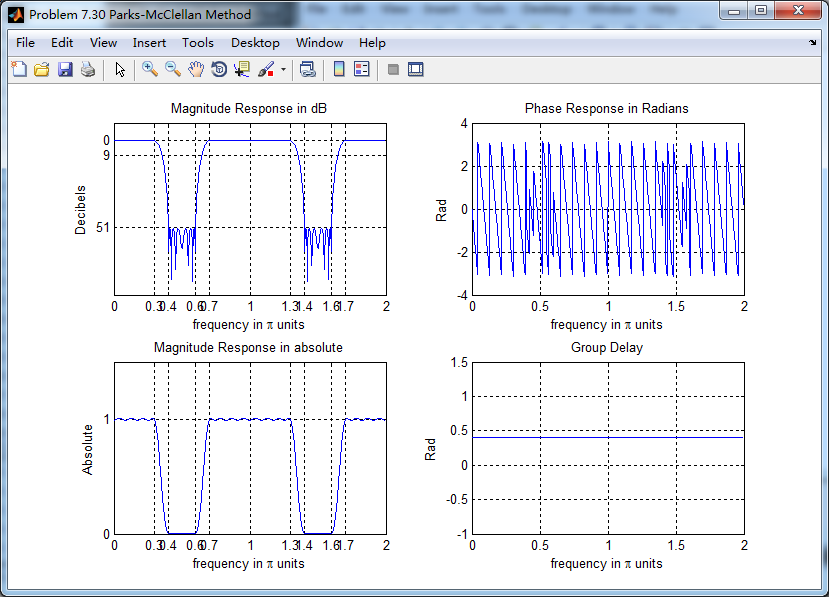
滤波器长度M=47,阻带衰减满足设计指标。

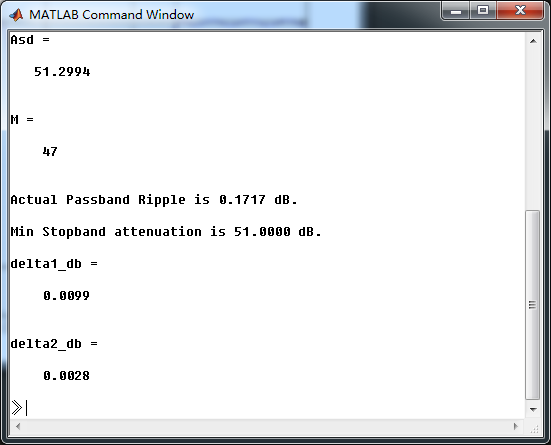
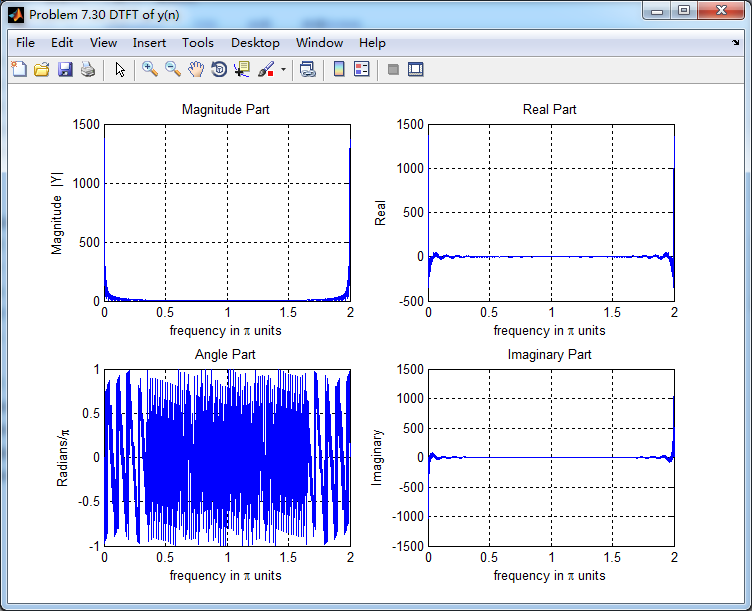
幅度谱和相位谱
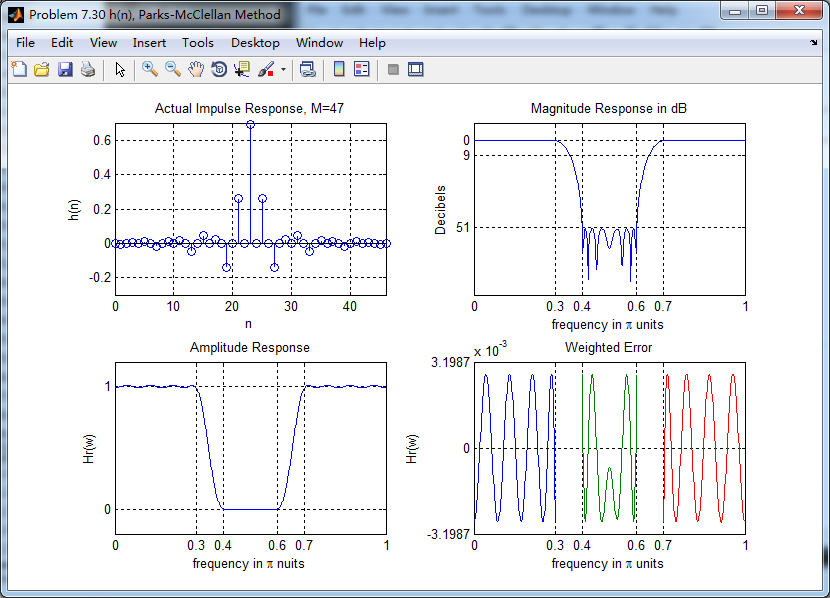
振幅谱,把阻带、通带放大,数数极值点的个数。
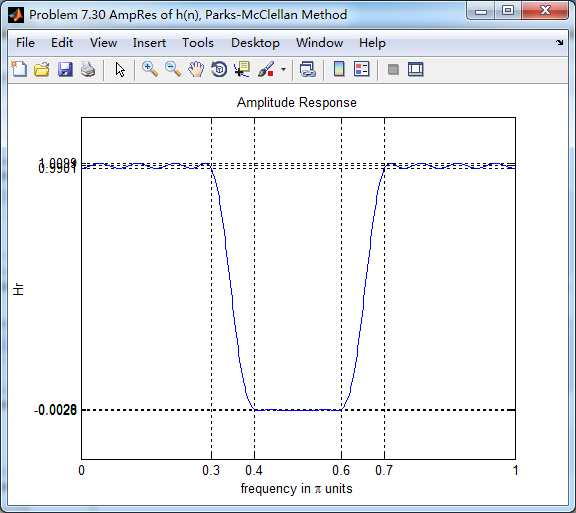
下图,9个极值点
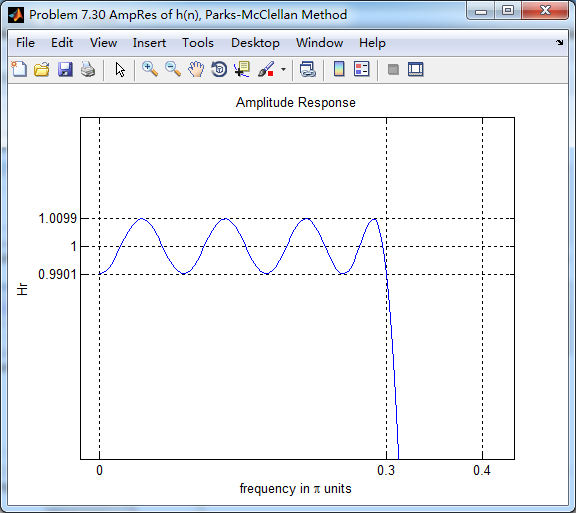
下图,8个极值点

下图,9个极值点

总共有9+8+9=26个极值点,M=47,L=(M-1)/2=23,0到π上,最多L+3=26个极值点。
输入输出序列

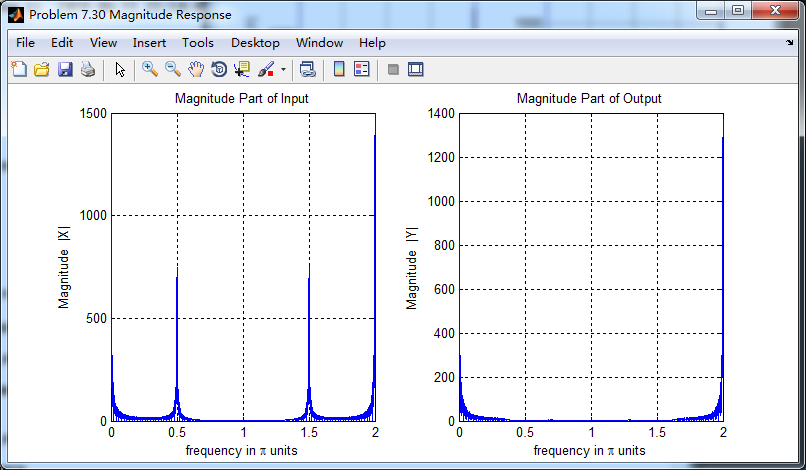
输入序列的谱,注意0.5π的频率分量,通过带阻滤波后消除了。
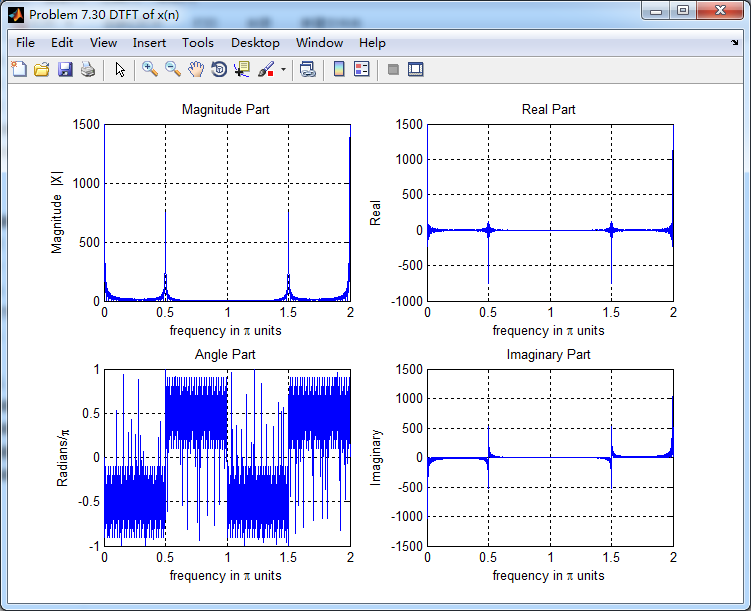
输出序列的谱,0.5π分量滤除了。
滤波前后幅度谱对比
《DSP using MATLAB》Problem 7.30的更多相关文章
- 《DSP using MATLAB》Problem 8.30
10月1日,新中国70周岁生日,上午观看了盛大的庆祝仪式,整齐的方阵,先进的武器,尊敬的先辈英雄,欢乐的人们,愿我们的 国家越来越好,人民生活越来越好. 接着做题. 代码: %% ---------- ...
- 《DSP using MATLAB》Problem 5.30
代码: %% ++++++++++++++++++++++++++++++++++++++++++++++++++++++++++++++++++++++++++++++++ %% Output In ...
- 《DSP using MATLAB》Problem 7.23
%% ++++++++++++++++++++++++++++++++++++++++++++++++++++++++++++++++++++++++++++++++ %% Output Info a ...
- 《DSP using MATLAB》Problem 5.22
代码: %% ++++++++++++++++++++++++++++++++++++++++++++++++++++++++++++++++++++++++++++++++++++++++ %% O ...
- 《DSP using MATLAB》Problem 5.20
窗外的知了叽叽喳喳叫个不停,屋里温度应该有30°,伏天的日子难过啊! 频率域的方法来计算圆周移位 代码: 子函数的 function y = cirshftf(x, m, N) %% -------- ...
- 《DSP using MATLAB》Problem 3.8
2018年元旦,他乡加班中,外面尽是些放炮的,别人的繁华与我无关. 代码: %% ----------------------------------------------------------- ...
- 《DSP using MATLAB》Problem 3.3
按照题目的意思需要利用DTFT的性质,得到序列的DTFT结果(公式表示),本人数学功底太差,就不写了,直接用 书中的方法计算并画图. 代码: %% -------------------------- ...
- 《DSP using MATLAB》Problem 2.20
代码: %% ------------------------------------------------------------------------ %% Output Info about ...
- 《DSP using MATLAB》Problem 2.14
代码: %% ------------------------------------------------------------------------ %% Output Info about ...
随机推荐
- Vue-Grid-Layout分享一款好用的可拖拽组件
在使用Grafana的过程中,发现Grafana关于视图页面中每一个面板都可拖拽,可随意放大放小,体验非常棒,F12看了Grafana的代码,看打包后的代码很像react,进一步css,看到有grid ...
- 4_7.springboot2.x嵌入式servlet容器自动配置原理
概述 Spring Boot对所支持的Servlet Web服务器实现做了建模抽象: Servlet容器类型 WebServer模型接口 WebServer工厂实现类 Tomcat Tomca ...
- shell脚本练习02--求字符串的长度
######################################################################### # File Name: -.sh # Author ...
- 13-7-return的高级使用
<!DOCTYPE html> <html lang="en"> <head> <meta charset="UTF-8&quo ...
- js 删除数组中指定值
var arr = ['1','2'];delete('1'); function delete(i){ var index = arr.indexOf(i); arr.splice(index, 1 ...
- 纵览轻量化卷积神经网络:SqueezeNet、MobileNet、ShuffleNet、Xception
近年提出的四个轻量化模型进行学习和对比,四个模型分别是:SqueezeNet.MobileNet.ShuffleNet.Xception. SqueezeNet https://arxiv.org/p ...
- Leetcode92. Reverse Linked List II反转链表
反转从位置 m 到 n 的链表.请使用一趟扫描完成反转. 说明: 1 ≤ m ≤ n ≤ 链表长度. 示例: 输入: 1->2->3->4->5->NULL, m = 2 ...
- 开机自动调用.bat文件且浏览器全屏展示
1,将 .bat文件放入到以下路径中 C:\ProgramData\Microsoft\Windows\Start Menu\Programs\Startup 或 C:\Users\Administr ...
- [笔记]180612 for DevOps
adb devices 识别不了安卓手机:我下的adb interface驱动下载链接:如果设备管理器中ADB Interface是黄色的,就需要先安装adb interface驱动(BD:adb i ...
- 【JZOJ3301】家族
description 阿狸和桃子养了n 个小阿狸, 小阿狸们每天都在一起玩的很开心. 作为工程师的阿狸在对小阿狸们之间的关系进行研究以后发现了小阿狸的人际关系由某种神奇的相互作用决定, 阿狸称之为& ...