
abp(net core)+easyui+efcore实现仓储管理系统——使用 WEBAPI实现CURD (十二)
abp(net core)+easyui+efcore实现仓储管理系统目录
abp(net core)+easyui+efcore实现仓储管理系统——ABP总体介绍(一)
abp(net core)+easyui+efcore实现仓储管理系统——解决方案介绍(二)
abp(net core)+easyui+efcore实现仓储管理系统——领域层创建实体(三)
abp(net core)+easyui+efcore实现仓储管理系统——定义仓储并实现 (四)
abp(net core)+easyui+efcore实现仓储管理系统——创建应用服务(五)
abp(net core)+easyui+efcore实现仓储管理系统——展现层实现增删改查之控制器(六)
abp(net core)+easyui+efcore实现仓储管理系统——展现层实现增删改查之列表视图(七)
abp(net core)+easyui+efcore实现仓储管理系统——展现层实现增删改查之增删改视图(八)
abp(net core)+easyui+efcore实现仓储管理系统——展现层实现增删改查之菜单与测试(九)
abp(net core)+easyui+efcore实现仓储管理系统——使用 WEBAPI实现CURD (十一)
上接(abp(net core)+easyui+efcore实现仓储管理系统——使用 WEBAPI实现CURD (十一)),在这一篇文章中我们创建服务接口与服务实现类,并创建控制器类。
二、定义应用服务接口需要用到的分页类
为了在进行查询时使用, PagedSupplierResultRequestDto被用来将模块数据传递到基础设施层.
1. 在Visual Studio 2017的“解决方案资源管理器”中,右键单击“ABP.TPLMS.Application”项目,在弹出菜单中选择“添加” > “新建文件夹”,并重命名为“Suppliers”
2. 使用鼠标右键单击我们刚才创建的“Suppliers”文件夹,在弹出菜单中选择“添加” > “新建文件夹”,并重命名为“Dto”。
3.右键单击“Dto”文件夹,然后选择“添加” > “类”。 将类命名为 PagedSupplierResultRequestDto,然后选择“添加”。代码如下。
using Abp.Application.Services.Dto;

using System;

using System.Collections.Generic;

using System.Text;

namespace ABP.TPLMS.Supplier.Dto

{

     public class PagedSupplierResultRequestDto : PagedResultRequestDto

    {

        public string Keyword { get; set; }

     }

}
4.右键单击“Dto”文件夹,然后选择“添加” > “类”。 将类命名为 SupplierDto,然后选择“添加”。代码如下。
using Abp.Application.Services.Dto;

using Abp.AutoMapper;

using ABP.TPLMS.Entitys;

using System;

using System.Collections.Generic;

using System.Text;

namespace ABP.TPLMS.Suppliers.Dto

{

    [AutoMapFrom(typeof(Supplier))]

    public class SupplierDto : EntityDto<int>

    {

        public string Address { get; set; }

        public string Name { get; set; }

        public string Email { get; set; }

        public string Code { get; set; }

        public int Sex { get; set; }

        public string LinkName { get; set; }

        public int Status { get; set; }

        public string Tel { get; set; }

        public string Mobile { get; set; }

        public DateTime CreationTime { get; set; }

    }

}
5.右键单击“Dto”文件夹,然后选择“添加” > “类”。 将类命名为 CreateUpdateSupplierDto,然后选择“添加”。代码如下。
using Abp.Application.Services.Dto;

using Abp.AutoMapper;

using ABP.TPLMS.Entitys;

using System;

using System.Collections.Generic;

using System.ComponentModel.DataAnnotations;

using System.Text;

namespace ABP.TPLMS.Suppliers.Dto

{

    [AutoMapTo(typeof(Supplier))]

    public  class CreateUpdateSupplierDto : EntityDto<int>

    {

        public const int MaxLength = ;

        [StringLength(MaxLength)]

        public string Address { get; set; }

        [Required]

        [StringLength(MaxLength)]

        public string Name { get; set; }

        [Required]

        [StringLength(MaxLength)]

        public string Email { get; set; }

        [Required]

        [StringLength()]

        public string Code { get; set; }

        public int Sex { get; set; }

        [StringLength(MaxLength)]

        public string LinkName { get; set; }

        public int Status { get; set; }

        [Required]

        [StringLength(MaxLength)]

        public string Tel { get; set; }

        [StringLength(MaxLength)]

        public string Mobile { get; set; }

    }

}
三、定义ISupplierAppService接口
6. 在Visual Studio 2017的“解决方案资源管理器”中,鼠标右键单击“Suppliers”文件夹,然后选择“添加” > “新建项”,在弹出对话框中选择“接口”。为应用服务定义一个名为 ISupplierAppService 的接口。代码如下。
using Abp.Application.Services;

using ABP.TPLMS.Suppliers.Dto;

using System;

using System.Collections.Generic;

using System.Text;

namespace ABP.TPLMS.Suppliers

{

    public interface ISupplierAppService : IAsyncCrudAppService<//定义了CRUD方法

             SupplierDto, //用来展示供应商

             int, //Supplier实体的主键

             PagedSupplierResultRequestDto, //获取供应商的时候用于分页

             CreateUpdateSupplierDto, //用于创建供应商

             CreateUpdateSupplierDto> //用于更新供应商

    {

    }

}
四、实现ISupplierAppService
7.在Visual Studio 2017的“解决方案资源管理器”中,右键单击“Suppliers”文件夹,然后选择“添加” > “新建项”,在弹出对话框中选择“类”。为应用服务定义一个名为 SupplierAppService 的服务类。代码如下。
using Abp.Application.Services;

using Abp.Domain.Repositories;

using ABP.TPLMS.Entitys;

using ABP.TPLMS.Suppliers.Dto;

using System;

using System.Collections.Generic;

using System.Text;

namespace ABP.TPLMS.Suppliers

{

   public class SupplierAppService :AsyncCrudAppService<Supplier, SupplierDto, int, PagedSupplierResultRequestDto,

                            CreateUpdateSupplierDto, CreateUpdateSupplierDto>,ISupplierAppService

    {

        public SupplierAppService(IRepository<Supplier, int> repository)

            : base(repository)

    {

    }

        public override Task<SupplierDto> Create(CreateUpdateSupplierDto input)

        {

            var sin = input;

            return base.Create(input);

        }

    }

}
五 创建SupplierController继承自TPLMSControllerBase
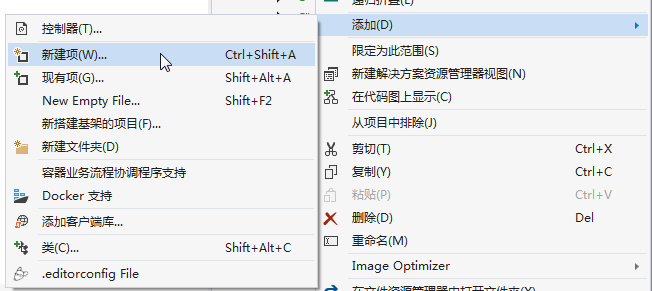
1. 在Visual Studio 2017的“解决方案资源管理器”中,右键单击在领域层“ABP.TPLMS.Web.Mvc”项目中的Controller目录。 选择“添加” > “新建项…”。如下图。
2. 在弹出对话框“添加新项-ABP.TPLMS.Web.Mvc”中选择“控制器类”,然后在名称输入框中输入“SupplierController”,然后点击“添加”按钮。如下图。

3.在SupplierController.cs文件中输入如下代码,通过构造函数注入对应用服务的依赖。
using System;

using System.Collections.Generic;

using System.Linq;

using System.Threading.Tasks;

using Abp.Application.Services.Dto;

using Abp.AspNetCore.Mvc.Authorization;

using Abp.Runtime.Validation;

using ABP.TPLMS.Controllers;

using ABP.TPLMS.Suppliers;

using ABP.TPLMS.Suppliers.Dto;

using ABP.TPLMS.Web.Models.Supplier;

using Microsoft.AspNetCore.Mvc;

using Microsoft.EntityFrameworkCore;

namespace ABP.TPLMS.Web.Controllers

{

    [AbpMvcAuthorize]

    public class SupplierController : TPLMSControllerBase

    {

        const int MaxNum= ;

        // GET: /<controller>/

        public async Task<IActionResult> Index()

        {

            var module = (await _supplierAppService.GetAll(new PagedSupplierResultRequestDto { MaxResultCount = MaxNum })).Items;
           // Paging not implemented yet

            SupplierDto cuModule = module.First();

            var model = new SupplierListViewModel

            {

                Supplier = cuModule,

                Suppliers=module

            };

            return View(model);

        }

        private readonly ISupplierAppService _supplierAppService;

        public SupplierController(ISupplierAppService supplierAppService)

        {

            _supplierAppService = supplierAppService;

        }

        public async Task<ActionResult> EditSupplierModal(int moduleId)

        {

            var module = await _supplierAppService.Get(new EntityDto<int>(moduleId));

            CreateUpdateSupplierDto cuSupplier = AutoMapper.Mapper.Map<CreateUpdateSupplierDto>(module);

            var model = new EditSupplierModalViewModel

            {

                Supplier = cuSupplier

            };

            return View("_EditSupplierModal", model);

        }

    }

}
abp(net core)+easyui+efcore实现仓储管理系统——使用 WEBAPI实现CURD (十二)的更多相关文章
- abp(net core)+easyui+efcore实现仓储管理系统——使用 WEBAPI实现CURD (十四)
abp(net core)+easyui+efcore实现仓储管理系统目录 abp(net core)+easyui+efcore实现仓储管理系统——ABP总体介绍(一) abp(net core)+ ...
- abp(net core)+easyui+efcore实现仓储管理系统——使用 WEBAPI实现CURD (十五)
core)+easyui+efcore实现仓储管理系统目录 abp(net core)+easyui+efcore实现仓储管理系统——ABP总体介绍(一) abp(net core)+easyui+e ...
- abp(net core)+easyui+efcore实现仓储管理系统——使用 WEBAPI实现CURD (十三)
abp(net core)+easyui+efcore实现仓储管理系统目录 abp(net core)+easyui+efcore实现仓储管理系统——ABP总体介绍(一) abp(net core)+ ...
- abp(net core)+easyui+efcore实现仓储管理系统——入库管理之六(四十二)
abp(net core)+easyui+efcore实现仓储管理系统目录 abp(net core)+easyui+efcore实现仓储管理系统——ABP总体介绍(一) abp(net core)+ ...
- abp(net core)+easyui+efcore实现仓储管理系统——出库管理之三(五十二)
abp(net core)+easyui+efcore实现仓储管理系统目录 abp(net core)+easyui+efcore实现仓储管理系统--ABP总体介绍(一) abp(net core)+ ...
- abp(net core)+easyui+efcore实现仓储管理系统——使用 WEBAPI实现CURD (十一)
abp(net core)+easyui+efcore实现仓储管理系统目录 abp(net core)+easyui+efcore实现仓储管理系统——ABP总体介绍(一) abp(net core)+ ...
- abp(net core)+easyui+efcore实现仓储管理系统——入库管理之四(四十)
abp(net core)+easyui+efcore实现仓储管理系统目录 abp(net core)+easyui+efcore实现仓储管理系统——ABP总体介绍(一) abp(net core)+ ...
- abp(net core)+easyui+efcore实现仓储管理系统——入库管理之八(四十四)
abp(net core)+easyui+efcore实现仓储管理系统目录 abp(net core)+easyui+efcore实现仓储管理系统——ABP总体介绍(一) abp(net core)+ ...
- abp(net core)+easyui+efcore实现仓储管理系统——出库管理之一(四十九)
abp(net core)+easyui+efcore实现仓储管理系统目录 abp(net core)+easyui+efcore实现仓储管理系统——ABP总体介绍(一) abp(net core)+ ...
随机推荐
- app兼容测试选择哪些机型才够全面呢?
- Codeforces Gym101503E:XOR-omania(构造+思维)
题目链接 题意 给出m个数b,这些数是由n个数a两两异或组成的,问初始的那n个数分别是多少. 思路 存在多组解的情况...原来是个构造题. 考虑这样一种情况:b1 = a1 ^ a2,b2 = a2 ...
- Python爬虫入门:爬取豆瓣电影TOP250
一个很简单的爬虫. 从这里学习的,解释的挺好的:https://xlzd.me/2015/12/16/python-crawler-03 分享写这个代码用到了的学习的链接: BeautifulSoup ...
- C++智能指针的几种用法
auto在c++11中已经弃用. 一.auto_ptr模板 auto_ptr与shared_ptr.unique_ptr都定义了类似指针的对象,可以将new到的地址赋给这一对象,当智能指针过期时,析构 ...
- Altium Designer设计PCB--如何增大电源地的线宽
笑话: 看见楼下老大爷在下棋,我看了一会儿,跟大爷说:大爷,你che没了. 大爷一脸不屑:小朋友,那叫ju. 然后我静静地在那看了两个小时. 对完棋,大爷起身要走. 我说:大爷,我刚才说的不是你的棋, ...
- kuangbin专题 专题一 简单搜索 非常可乐 HDU - 1495
题目链接:https://vjudge.net/problem/HDU-1495 题意:有两个空杯(分别是N升和M升)和一罐满的可乐S升,S = N + M,三个容器可以互相倾倒,如果A倒入B,只有两 ...
- Json串排序
最近遇到个很烦人的问题.我现在做的业务有一部分是把之前app服务端的.net接口转译java接口.但是有些之前的接口,一个接口干上十几件事情,返回的json串长达五六几百行.着实看的就让人头大.但是如 ...
- ElasticStack学习(九):深入ElasticSearch搜索之词项、全文本、结构化搜索及相关性算分
一.基于词项与全文的搜索 1.词项 Term(词项)是表达语意的最小单位,搜索和利用统计语言模型进行自然语言处理都需要处理Term. Term的使用说明: 1)Term Level Query:Ter ...
- 数据库系统概念:SQL的数据类型与模式、授权
public class DataBase { public static void main() { } } /* 4.5 SQL的数据类型与模式 4.5.1 SQL的日期与时间类型 SQL标准支持 ...
- android开发--使用webView加载tel协议不会打开拨号盘解决
在加载url之前进行判断,url是否是tel协议开头,然后进行加载,即可打开拨号盘 mWebView.setWebViewClient(new WebViewClient() { @Override ...