
一步一步学Silverlight 2系列(12):数据与通信之WebClient
概述
Silverlight 2 Beta 1版本发布了,无论从Runtime还是Tools都给我们带来了很多的惊喜,如支持框架语言Visual Basic, Visual C#, IronRuby, Ironpython,对JSON、Web Service、WCF以及Sockets的支持等一系列新的特性。《一步一步学Silverlight 2系列》文章带您快速进入Silverlight 2开发。
本文将介绍如何在Silverlight 2中使用Web Client进行通信。
简单示例
编写一个简单的示例,在该示例中,选择一本书籍之后,我们通过Web Client去查询书籍的价格,并显示出来,最终的效果如下:
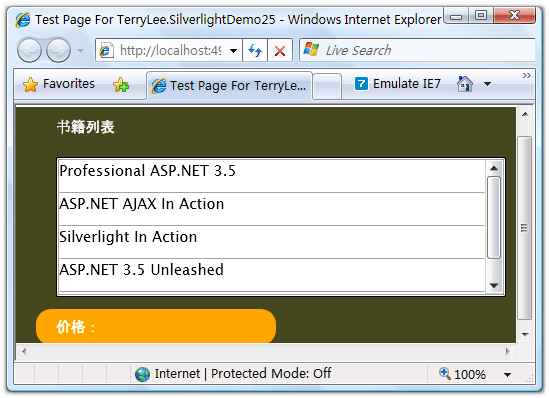
编写界面布局,XAML如下:
<Grid Background="#46461F">

    <Grid.RowDefinitions>

        <RowDefinition Height="40"></RowDefinition>

        <RowDefinition Height="*"></RowDefinition>

        <RowDefinition Height="40"></RowDefinition>

    </Grid.RowDefinitions>

    <Grid.ColumnDefinitions>

        <ColumnDefinition></ColumnDefinition>

    </Grid.ColumnDefinitions>

    <Border Grid.Row="0" Grid.Column="0" CornerRadius="15"

            Width="240" Height="36"

            Margin="20 0 0 0" HorizontalAlignment="Left">

        <TextBlock Text="书籍列表" Foreground="White"

                   HorizontalAlignment="Left" VerticalAlignment="Center"

                   Margin="20 0 0 0"></TextBlock>

    </Border>

    <ListBox x:Name="Books" Grid.Row="1" Margin="40 10 10 10"

             SelectionChanged="Books_SelectionChanged">

        <ListBox.ItemTemplate>

            <DataTemplate>

                <StackPanel>

                    <TextBlock Text="{Binding Name}" Height="32"></TextBlock>

                </StackPanel>

            </DataTemplate>

        </ListBox.ItemTemplate>

    </ListBox>

    <Border Grid.Row="2" Grid.Column="0" CornerRadius="15"

            Width="240" Height="36" Background="Orange"

            Margin="20 0 0 0" HorizontalAlignment="Left">

        <TextBlock x:Name="lblPrice" Text="价格:" Foreground="White"

                   HorizontalAlignment="Left" VerticalAlignment="Center"

                   Margin="20 0 0 0"></TextBlock>

    </Border>

</Grid>
为了模拟查询价格,我们编写一个HttpHandler,接收书籍的No,并返回价格:
public class BookHandler : IHttpHandler

{

    public static readonly string[] PriceList = new string[] {

        "66.00",

        "78.30",

        "56.50",

        "28.80",

        "77.00"

    };

    public void ProcessRequest(HttpContext context)

    {

        context.Response.ContentType = "text/plain";

        context.Response.Write(PriceList[Int32.Parse(context.Request.QueryString["No"])]);

    }

    public bool IsReusable

    {

        get

        {

            return false;

        }

    }

}
在界面加载时绑定书籍列表,关于数据绑定可以参考一步一步学Silverlight 2系列(11):数据绑定。
void UserControl_Loaded(object sender, RoutedEventArgs e)

{

    List<Book> books = new List<Book>() {

        new Book("Professional ASP.NET 3.5"),

        new Book("ASP.NET AJAX In Action"),

        new Book("Silverlight In Action"),

        new Book("ASP.NET 3.5 Unleashed"),

        new Book("Introducing Microsoft ASP.NET AJAX")

    };

    Books.ItemsSource = books;

}
接下来当用户选择一本书籍时,需要通过Web Client去获取书籍的价格,在Silverlight 2中,所有的网络通信API都设计为了异步模式。在声明一个Web Client实例后,我们需要为它注册DownloadStringCompleted事件处理方法,在下载完成后将会被回调,然后再调用DownloadStringAsync方法开始下载。
void Books_SelectionChanged(object sender, SelectionChangedEventArgs e)

{

    Uri endpoint = new Uri(String.Format("http://localhost:49955/BookHandler.ashx?No={0}",Books.SelectedIndex));

    WebClient client = new WebClient();

    client.DownloadStringCompleted += new DownloadStringCompletedEventHandler(client_DownloadStringCompleted);

    client.DownloadStringAsync(endpoint);

}

void client_DownloadStringCompleted(object sender, DownloadStringCompletedEventArgs e)

{

    if (e.Error == null)

    {

        lblPrice.Text = "价格:" + e.Result;

    }

    else

    {

        lblPrice.Text = e.Error.Message;

    }

}
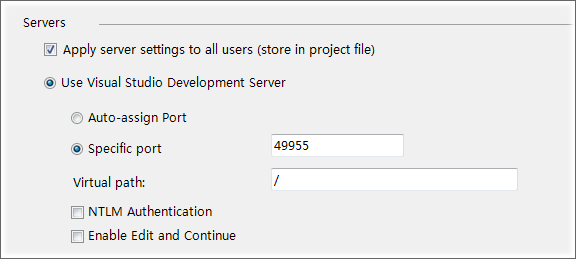
注意大家可以在Web Application Project的属性页中,把ASP.NET Development Server的端口号设置为一个固定的端口号:
最后完整的代码如下:
public partial class Page : UserControl

{

    public Page()

    {

        InitializeComponent();

    }

    void UserControl_Loaded(object sender, RoutedEventArgs e)

    {

        List<Book> books = new List<Book>() {

            new Book("Professional ASP.NET 3.5"),

            new Book("ASP.NET AJAX In Action"),

            new Book("Silverlight In Action"),

            new Book("ASP.NET 3.5 Unleashed"),

            new Book("Introducing Microsoft ASP.NET AJAX")

        };

        Books.ItemsSource = books;

    }

    void Books_SelectionChanged(object sender, SelectionChangedEventArgs e)

    {

        Uri endpoint = new Uri(String.Format("http://localhost:49955/BookHandler.ashx?No={0}",Books.SelectedIndex));

        WebClient client = new WebClient();

        client.DownloadStringCompleted += new DownloadStringCompletedEventHandler(client_DownloadStringCompleted);

        client.DownloadStringAsync(endpoint);

    }

    void client_DownloadStringCompleted(object sender, DownloadStringCompletedEventArgs e)

    {

        if (e.Error == null)

        {

            lblPrice.Text = "价格:" + e.Result;

        }

        else

        {

            lblPrice.Text = e.Error.Message;

        }

    }

}
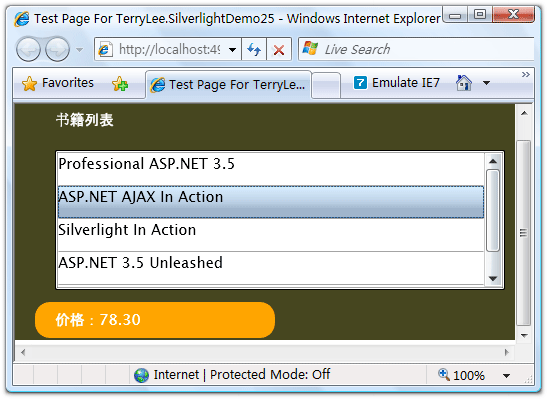
运行后效果如下:
当我们选择其中一本书籍时,将会显示出它的价格:
结束语
本文简单介绍了Silverlight 2中使用Web Client进行通信的知识,在Silverlight 2中,提供的通信API非常丰富,后面将会介绍其他的方式。你可以从这里下载本文示例代码。
出处:http://terrylee.cnblogs.com
本文版权归作者和博客园共有,欢迎转载,但未经作者同意必须保留此段声明,且在文章页面明显位置给出原文连接,否则保留追究法律责任的权利。
一步一步学Silverlight 2系列(12):数据与通信之WebClient的更多相关文章
- 一步一步学Silverlight 2系列文章
概述 由TerryLee编写的<Silverlight 2完美征程>一书,已经上市,在该系列文章的基础上补充了大量的内容,敬请关注.官方网站:http://www.dotneteye.cn ...
- 一步一步学Silverlight 2系列(32):图形图像综合实例—“功夫之王”剧照播放
概述 Silverlight 2 Beta 1版本发布了,无论从Runtime还是Tools都给我们带来了很多的惊喜,如支持框架语言Visual Basic, Visual C#, IronRuby, ...
- 一步一步学Silverlight 2系列(31):图形图像综合实例—实现水中倒影效果
概述 Silverlight 2 Beta 1版本发布了,无论从Runtime还是Tools都给我们带来了很多的惊喜,如支持框架语言Visual Basic, Visual C#, IronRuby, ...
- 一步一步学Silverlight 2系列(30):使用Transform实现更炫的效果(下)
概述 Silverlight 2 Beta 1版本发布了,无论从Runtime还是Tools都给我们带来了很多的惊喜,如支持框架语言Visual Basic, Visual C#, IronRuby, ...
- 一步一步学Silverlight 2系列(29):使用Transform实现更炫的效果(上)
概述 Silverlight 2 Beta 1版本发布了,无论从Runtime还是Tools都给我们带来了很多的惊喜,如支持框架语言Visual Basic, Visual C#, IronRuby, ...
- 一步一步学Silverlight 2系列(28):图片处理
概述 Silverlight 2 Beta 1版本发布了,无论从Runtime还是Tools都给我们带来了很多的惊喜,如支持框架语言Visual Basic, Visual C#, IronRuby, ...
- 一步一步学Silverlight 2系列(27):使用Brush进行填充
概述 Silverlight 2 Beta 1版本发布了,无论从Runtime还是Tools都给我们带来了很多的惊喜,如支持框架语言Visual Basic, Visual C#, IronRuby, ...
- 一步一步学Silverlight 2系列(26):基本图形
概述 Silverlight 2 Beta 1版本发布了,无论从Runtime还是Tools都给我们带来了很多的惊喜,如支持框架语言Visual Basic, Visual C#, IronRuby, ...
- 一步一步学Silverlight 2系列(25):综合实例之Live Search
概述 Silverlight 2 Beta 1版本发布了,无论从Runtime还是Tools都给我们带来了很多的惊喜,如支持框架语言Visual Basic, Visual C#, IronRuby, ...
- 一步一步学Silverlight 2系列(24):与浏览器交互相关辅助方法
概述 Silverlight 2 Beta 1版本发布了,无论从Runtime还是Tools都给我们带来了很多的惊喜,如支持框架语言Visual Basic, Visual C#, IronRuby, ...
随机推荐
- 降雨量 BZOJ 1067
降雨量 [问题描述] 我们常常会说这样的话:“X年是自Y年以来降雨量最多的”.它的含义是X年的降雨量不超过Y年,且对于任意Y<Z<X,Z年的降雨量严格小于X年.例如2002,2003,20 ...
- linux 抓取访问量排行
需求: 分析图片服务日志,把日志(每个图片访问次数*图片大小的总和)排行,取top10,也就是计算每个url的总访问大小 语句: awk '{a[$1]+=$10;}END{for(i in a){p ...
- css3 nth-child 与 nth-of-type 的区别
by zhangxinxu from http://www.zhangxinxu.com本文地址:http://www.zhangxinxu.com/wordpress/?p=1709 一.深呼吸,直 ...
- 树莓派LED指示灯说明
原文:http://shumeipai.nxez.com/2014/09/30/raspberry-pi-led-status-detail.html?variant=zh-cn LED亮灯状态 LE ...
- 某考试 T1 function
(数据范围 n<=10^9 ,T<=10 ) 首先,我来证明一下 Σμ(d) * σ(i/d)^2 = σ(i^2) 相信做过约数个数和的童鞋都可以完成从右式推到左式,那么我现在就说一下怎 ...
- Camtasia Studio录制屏幕字迹不清晰的原因
Camtasia Studio这是一个很优秀的屏幕录像软件,功能强大且录制效果出色,支持众多格式输出: 之前一直用它录制视频的都很正常,但这次换系统后再重新安装后录制视频时,发现输出的视频画质不佳,文 ...
- 【RESTful】1.理解REST和RESTful
简记:一套设计良好的RESTful可以帮助互联网产品支持[单个服务端+多个客户端]的场景!!!
- [React] Use React.memo with a Function Component to get PureComponent Behavior
A new Higher Order Component (HOC) was recently released in React v16.6.0 called React.memo. This be ...
- 【试水CAS-4.0.3】第06节_CAS服务端配置HTTPS
完整版见https://jadyer.github.io/2012/05/30/tomcat-https/ /** * @see CAS服务端配置HTTPS * @see -------------- ...
- 子结点childNodes
<!DOCTYPE HTML> <html> <head> <meta http-equiv="Content-Type" content ...