
Unity3d 协程
参考文章:
http://blog.csdn.net/onafioo/article/details/48979939
http://www.cnblogs.com/zhaoqingqing/p/3750522.html
http://blog.csdn.net/alexander_xfl/article/details/41577625
http://www.cnblogs.com/hammerc/p/4432969.html
表示感谢
线程(Thread)和协程(Coroutine)
D.S.Qiu觉得使用协程的作用一共有两点:1)延时(等待)一段时间执行代码;2)等某个操作完成之后再执行后面的代码。总结起来就是一句话:控制代码在特定的时机执行。
很多初学者,都会下意识地觉得协程是异步执行的,都会觉得协程是C# 线程的替代品,是Unity不使用线程的解决方案。
所以首先,请你牢记:协程不是线程,也不是异步执行的。协程和 MonoBehaviour 的 Update函数一样也是在MainThread中执行的。使用协程你不用考虑同步和锁的问题。
FixedUpdate()、Update()、LateUpdate()执行顺序
在了解协程之前,我们先了解一下MonoBehaviour三个update函数的执行顺序。
首先先看一下官方文档:https://docs.unity3d.com/Manual/ExecutionOrder.html
其中有一张流程图如图1所示:
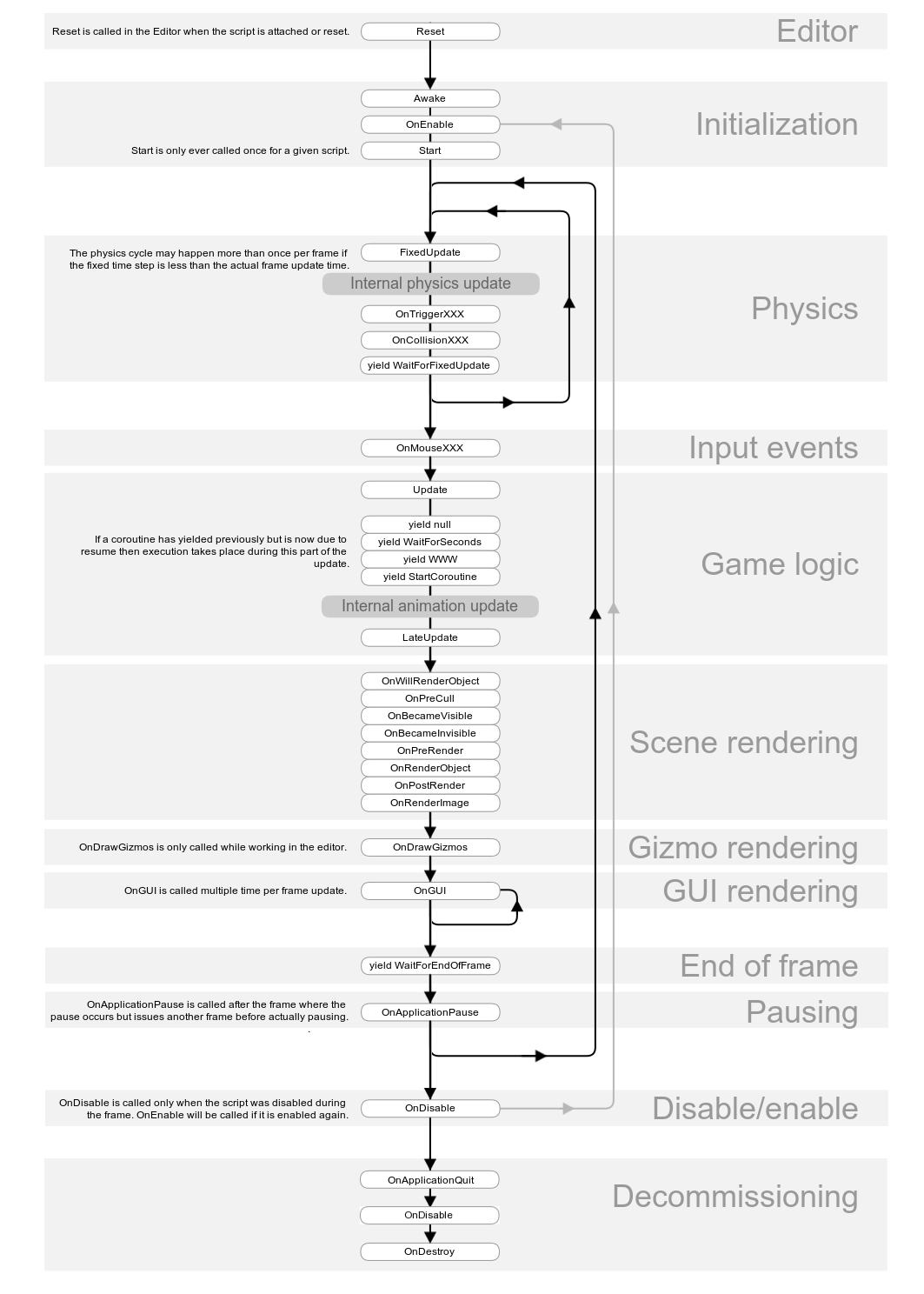
我们可以发现,三个update的执行顺序为:FixedUpdate()--->Update()--->LateUpdate()
这个顺序不用说,当然是对的,但是我还是专门用一个场景去测试。(因为我很闲啊,所以。。。。)
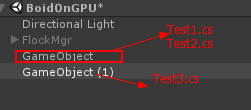
图2
首先场景中有两个空object,其中GameObject上挂载了两个脚本,挂载顺序是Test1.cs,Test2.cs。GameObject(1)上挂载了一个脚本,挂载顺序是Test3.cs,两个object的顺序如图2所示,脚本代码如下:
Test1.cs:
using System.Collections;

using System.Collections.Generic;

using UnityEngine;

public class Test1 : MonoBehaviour {

    // Use this for initialization

    void Start () {

        Debug.Log("test1 Start");

    }

    // Update is called once per frame

    void Update()

    {

        Debug.Log("test1 update");

    }

    void FixedUpdate()

    {

        Debug.Log("test1 FixedUpdate");

    }

    void LateUpdate()

    {

        Debug.Log("test1 LateUpdate");

    }

}
Test2.cs:
using System.Collections;

using System.Collections.Generic;

using UnityEngine;

public class Test2 : MonoBehaviour {

    // Use this for initialization

    void Start () {

        Debug.Log("test2 Start");

        this.StartCoroutine(NumCoutine());

        this.StartCoroutine(TimeCoutine());

        this.StartCoroutine(FixedCoutine());

        this.StartCoroutine(FuncCoutine());

    }

    IEnumerator NumCoutine()

    {

        Debug.Log("num xxxxxxxxxxxxxxxxxxxxx");

        yield return ;

        Debug.Log("num yyyyyyyyyyyyyyyyyyyyy");

    }

    IEnumerator TimeCoutine()

    {

        Debug.Log("time xxxxxxxxxxxxxxxxxxxxx " + System.DateTime.Now.TimeOfDay.ToString());

        yield return new WaitForSeconds(0.1f);

        Debug.Log("time yyyyyyyyyyyyyyyyyyyyy " + System.DateTime.Now.TimeOfDay.ToString());

    }

    IEnumerator FixedCoutine()

    {

        Debug.Log("fixed xxxxxxxxxxxxxxxxxxxxx");

        yield return new WaitForFixedUpdate();

        Debug.Log("fixed yyyyyyyyyyyyyyyyyyyyy");

    }

    IEnumerator FuncCoutine()

    {

        Debug.Log("func xxxxxxxxxxxxxxxxxxxxx");

        yield return StartCoroutine(Func2Coutine());

        Debug.Log("func yyyyyyyyyyyyyyyyyyyyy");

    }

    IEnumerator Func2Coutine()

    {

        Debug.Log("func222 xxxxxxxxxxxxxxxxxxxxx");

        yield return null;

        Debug.Log("func222 yyyyyyyyyyyyyyyyyyyyy");

    }

    // Update is called once per frame

    void Update ()

    {

        System.Threading.Thread.CurrentThread.Join();

        Debug.Log("test2 update");

    }

    void FixedUpdate()

    {

        Debug.Log("test2 FixedUpdate");

    }

    void LateUpdate()

    {

        Debug.Log("test2 LateUpdate");

    }

}
Test3.cs:
using System.Collections;

using System.Collections.Generic;

using UnityEngine;

public class Test3 : MonoBehaviour {

    // Use this for initialization

    void Start()

    {

        Debug.Log("test3 Start");

    }

    // Update is called once per frame

    void Update()

    {

        Debug.Log("test3 update");

    }

    void FixedUpdate()

    {

        Debug.Log("test3 FixedUpdate");

    }

    void LateUpdate()

    {

        Debug.Log("test3 LateUpdate");

    }

}
虽然上面说过了,执行顺序是Start()--->FixedUpdate()--->Update()--->LateUpdate(),但是两个不同的物体,其中一个物体上又有两个脚本,那么它又会是怎样的执行顺序呢?
先说结论:如图2中的子物体顺序,先执行第二个(最后一个)子物体GameObject(1)上脚本(Test3.cs)的Start(),接着执行第一个子物体GameObject下最后一个脚本(Test2.cs)的Start(),最后是第一个子物体GameObject下第一个脚本(Test1.cs)的Start(),其他如update函数顺序相同。即就是说Update()并不是说当前脚本的update,而是所有的当前运行的MonoBehaviour脚本的Update()依次都要执行。Unity是单线程的
Update():每帧只执行一次,跟时间无关,只跟帧数有关,好的机器上间隔时间短,差的机器上间隔时间长
FixedUpdate():按照固定的时间间隔执行,时间在Edit--->Project Settings--->Time中设置,但是由于FixedUpdate()之后还有其他比如Update()要执行,如果Updata()中花费了较长时间,那么FixedUpdate()也不能保证按照固定间隔执行,但是当轮到他执行时,他会进行多次补帧,将之前时间间隔应该要执行的次数都补偿执行完才开始下面其他函数比如Update()的执行
协程(Coroutine)
协程的五种返回值含义:
Normal coroutine updates are run after the Update function returns. A coroutine is a function that can suspend its execution (yield) until the given YieldInstruction finishes. Different uses of Coroutines:
yield 0; The coroutine will continue after all Update functions have been called on the next frame.(yield return 0,yield return 100,yield return null,yield return "hello",这几种是相同的意思,等同与yield return 0)
yield WaitForSeconds(2); Continue after a specified time delay, after all Update functions have been called for the frame
yield WaitForFixedUpdate(); Continue after all FixedUpdate has been called on all scripts
yield WWW Continue after a WWW download has completed.
yield StartCoroutine(MyFunc); Chains the coroutine, and will wait for the MyFunc coroutine to complete first.
代码如上面各Test.cs所列,依次来分析我测试的运行结果
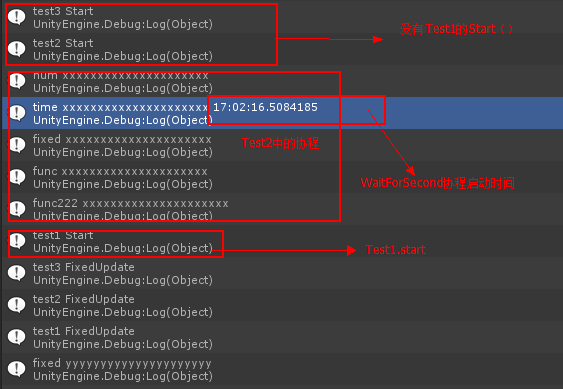
图3
首先,在图3中,我们可以得出之前关于调用顺序的结论。
其次,在Test2.cs中启动了五个不同返回类型的协程,调用顺序如上,可见协程是启动后马上执行的,第一次是不会等待各种Start,update等执行完成的
另外,我在其中启动了一个返回值为WaitForSeconds(0.1f)的协程,启动时间为16.50
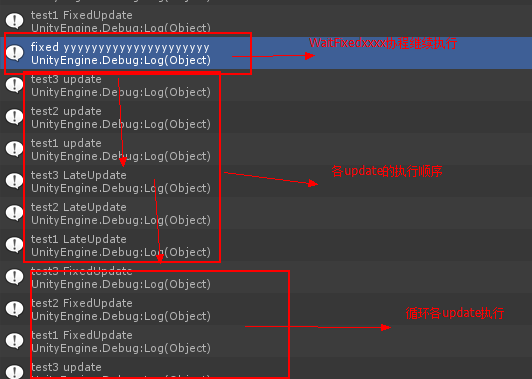
图4
首先,如图4所示,返回值为WaitForFixedUpdate()的协程会在当前帧3个脚本的FixedUpdate()都执行完成后再启动执行
其次,各update执行顺序如上所示
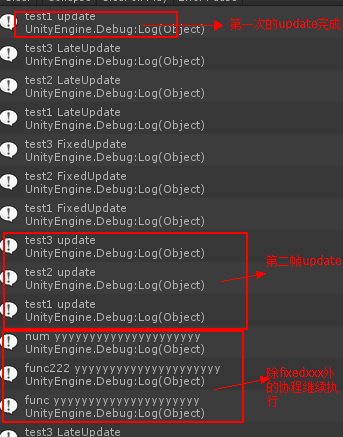
首先,返回值yield return 1;与yield return StartCoroutine(Func2Coutine());的协程都是会在下一帧(注意跟WaitForFixedUpdate()不同)的所有Update()执行完成后才开始启动执行
其次,。。。。。。写顺手了,没搂住
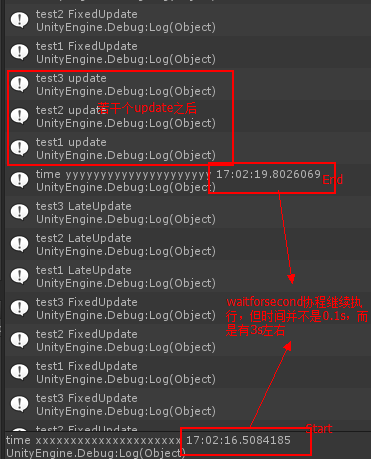
图5
现在我们要讨论的是WaitForSeconds(0.1f)这个协程
先看一个官方文档:https://docs.unity3d.com/ScriptReference/WaitForSeconds.html
其中有写到:
Suspends the coroutine execution for the given amount of seconds using scaled time.
The actual time suspended is equal to the given time multiplied by Time.timeScale.
See WaitForSecondsRealtime if you wish to wait using unscaled time.
WaitForSeconds can only be used with a yield statement in coroutines.
Note: There are some factors which can mean the actual amount of time waited does not precisely match the amount of time specified.
- WaitForSeconds starts waiting at the end of the current frame. So, if you start a WaitForSeconds with duration 't' in a very long frame (for example, one which has a long operation which blocks the main thread such as some synchronous loading), the coroutine will return 't' seconds after the end of the frame, not 't' seconds after it was called.
- WaitForSeconds will allow the coroutine to resume on the first frame after 't' seconds has passed, not exactly after 't' seconds has passed.
通过测试和上述内容可知:WaitForSeconds(0.1f)中的0.1s并不是说从协程开始时算0.1s,而是在该帧的所有Update()都执行完成后开始算0.1s,那么一定是0.1s吗,并不是,我在Test2.cs中有一个执行停止主线程1s的操作,可以发现如图5所示,重新启动的时间长达3s左右,所以这个0.1s只是一个估值,具体如果某个update中时间较长,他也会等待update执行完成,具体原因,我只是有测试结果,希望有人解惑,不胜感激,Orz。。。
另外:
通过设置MonoBehaviour脚本的enabled对协程是没有影响的,但如果 gameObject.SetActive(false) 则已经启动的协程则完全停止了,即使在Inspector把gameObject 激活还是没有继续执行。也就说协程虽然是在MonoBehvaviour启动的(StartCoroutine)但是协程函数的地位完全是跟MonoBehaviour是一个层次的,不受MonoBehaviour的状态影响,但跟MonoBehaviour脚本一样受gameObject 控制,也应该是和MonoBehaviour脚本一样每帧“轮询” yield 的条件是否满足。
我猜,协程启动后可能引擎会复制一份代码存储到某个“协程专用区”,即使将enabled设置为false也没用,因为代码已经拷贝好了,照样会执行,但是如果gameobject被隐藏,那么由于找不到协程所属的对象,将不会在被执行,这是我猜的,猜的不对你来打我呀。。。
Unity3d 协程的更多相关文章
- Unity3D协程yield的理解
Unity3D的协程概括地将就是:对于一段程序,你可以加上yield标明哪里需要暂停,然后在下一帧或者一段时间后,系统会继续执行这段代码.协程的作用:①延迟一段时间执行代码.②等某个操作完成之后再执行 ...
- Unity3d 协程的注意问题(新手须注意,老手须加勉)
关于unity3d的协程,非常的好用,比如等待几秒执行,等待下一帧执行等! 但是也有潜在的问题: 1.协程是单线程的,在主线程中完成 2.如果发现yield, 那么这一帧会结束,那么等下一帧调用此脚本 ...
- Unity3D 协程 浅谈
协程 理解:协程不是线程,也不是异步执行(知道就行). 1.协程和MonoBehaviour的Update函数一样,也是在MainThread中执行的(一定得明白这句话意思). void Start ...
- Unity3D 协程 Coroutine
协程(Coroutine)的概念存在于很多编程语言,例如Lua.ruby等.而由于Unity3D是单线程的,因此它同样实现了协程机制来实现一些类似于多线程的功能,但是要明确一点协程不是进程或线程,其执 ...
- Unity3D 协程的介绍和使用
我是快乐的搬运工 http://blog.csdn.net/u011397120/article/details/61236055 ---------------------------------- ...
- [转]Unity3D协程介绍 以及 使用
作者ChevyRay ,2013年9月28日,snaker7译 原文地址:http://unitypatterns.com/introduction-to-coroutines/ 在Unity中,协 ...
- Unity3d 协程、调用函数、委托
(一)协程 开启方法:StartCoroutine("函数名"): 结束方法StopCoroutine("函数名"),StopAllCoroutines(); ...
- Unity3D协程
协程介绍 Unity的协程系统是基于C#的一个简单而强大的接口 ,IEnumerator,它允许你为自己的集合类型编写枚举器.这一点你不必关注太多,我们直接进入一个简单的例子来看看协程到底能干什么.首 ...
- Unity3D协程介绍 以及 使用
作者ChevyRay ,2013年9月28日,snaker7译 原文地址:http://unitypatterns.com/introduction-to-coroutines/ 在Unity中,协 ...
随机推荐
- YII进行数据增删改查分析
关于模型部分參考http://blog.csdn.net/buyingfei8888/article/details/40208729 控制器部分: <?php class GoodsContr ...
- KMP算法具体解释
这几天学习kmp算法,解决字符串的匹配问题.開始的时候都是用到BF算法,(BF(Brute Force)算法是普通的模式匹配算法,BF算法的思想就是将目标串S的第一个字符与模式串T的第一个字符进行匹配 ...
- Android开发中有用工具之--Log工具类
在开发的过程中.我们常常会使用Log来输出日志,帮助我们来调试程序 可是有时候并不能全然满足我们的须要 ,比方我想知道这个日志信息是来自于哪一个包 哪一个类 所以我们封装一个这个Log类.方便我们的使 ...
- 关于Android中so解析那些事
1.Android系统目前支持的CPU架构:ARMv5.ARMv7.x86.MIPS.ARMv8.MIPS64.x86_64,每一种都关联着一个ABI(Application Binary Inter ...
- jdk动态代理举例
JDK动态代理是基于接口的代理,下面举例说明 代理类:proxy,代理动作必须要基于一个proxy实例来执行 代理执行类:实现InvocationHandler,案例中是TestInvocationH ...
- while,until
while ] 注释:中括号写的条件判断式中不能用<.=.>这类符号,要用-lt.-eq.-gt这类符号,且变量前要用$来取值 do sum=$(($sum+$i)) i=$(($i+)) ...
- 分组查询限制。HAVING可写在GROUP BY前。
限制一.无GROUP BY时统计函数不能和字段同时出现: 限制二.有GROUP BY时字段部分只能出现分组的字段: 限制三.统计函数嵌套时不能有字段.
- C#扩展(2):Random的扩展
在.net中关于Random一共也只有这几个方法 // // 摘要: // 表示伪随机数生成器,一种能够产生满足某些随机性统计要求的数字序列的设备. [ComVisible(true)] public ...
- centos7 卸载home 扩大root空间
=============================================== 2017/11/1_第1次修改 ccb_warlock == ...
- Linux(以CentOS6.5示例)下安装Oracle官方最新版JDK(JDK1.8)
本文地址http://comexchan.cnblogs.com/ ,作者Comex Chan,尊重知识产权,转载请注明出处,谢谢! 我们很多组件都需要使用Oracle最新版的JDK,所以需要在我们的 ...