
在使用selenium时出现FileNotFoundError: [WinError 2] 系统找不到指定的文件。
今天在使用selenium出现这样的错:
Traceback (most recent call last):

  File "E:\python\lib\site-packages\selenium\webdriver\common\service.py", line 76, in start

    stdin=PIPE)

  File "E:\python\lib\subprocess.py", line 729, in __init__

    restore_signals, start_new_session)

  File "E:\python\lib\subprocess.py", line 1017, in _execute_child

    startupinfo)

FileNotFoundError: [WinError 2] 系统找不到指定的文件。
上网查了一下发现是找不到chromedriver。
然后使用下面的链接下载相应的chromedriver
http://npm.taobao.org/mirrors/chromedriver/
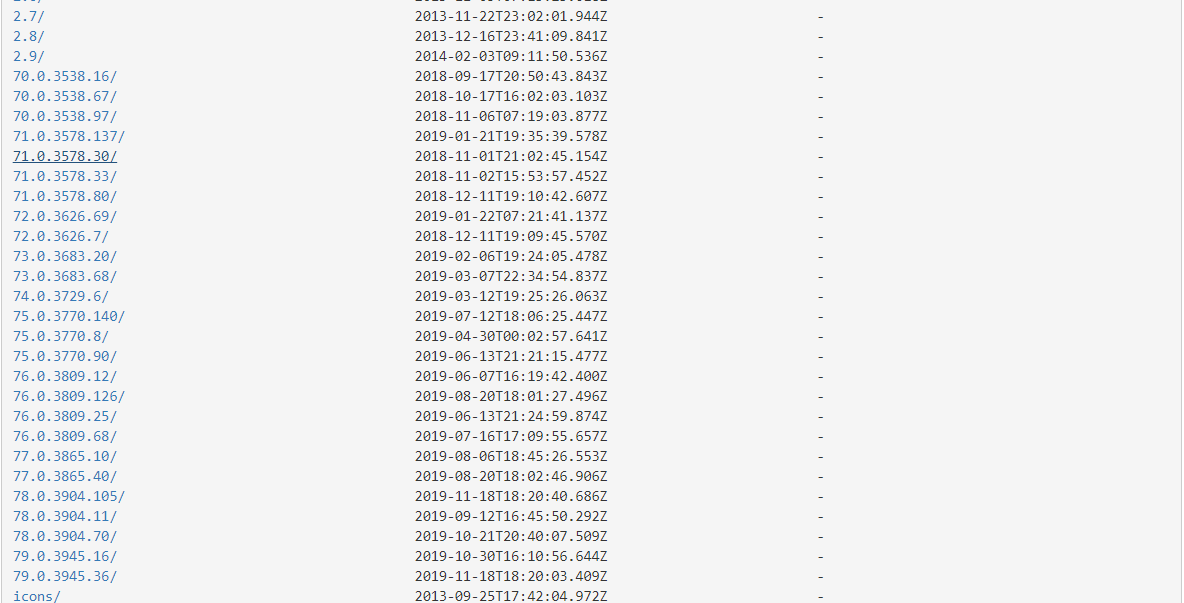
下载后解压出 chromedriver.exe的文件,将其粘贴到自己python安装的主目录下或者python安装目录下的Scripts里就大功告成
下载的时候看错了Chrom的版本,结果出现了如下错:
selenium.common.exceptions.SessionNotCreatedException: Message: session not created: This version of ChromeDriver only supports Chrome version 79
因为下载的chromedriver.exe版本比我的Chrom版本要高,解决办法:列如我使用的Chrom版本是 78.0.3904.108,下载了一个78.0.3904.70.结果也能用
在使用selenium时出现FileNotFoundError: [WinError 2] 系统找不到指定的文件。的更多相关文章
- python FileNotFoundError: [WinError 2] 系统找不到指定的文件。
D:\Test\TestSWP\Scripts\python.exe D:/Test/SWP/TestSWP/chorme/chorme.pyTraceback (most recent call l ...
- 路径不对 导致FileNotFoundError: [WinError 2] 系统找不到指定的文件, 问题解决办法
执行python + selenium 代码 from selenium import webdriver driver = webdriver.Chrome("D:\AutoConf\bi ...
- FileNotFoundError: [WinError 2] 系统找不到指定的文件
用Idle运行Python脚本的时候发现如下错误: Traceback (most recent call last): File "D:\Python\Python36-32\lib\s ...
- FileNotFoundError: [WinError 2] 系统找不到指定的文件。 解决方案
用Idle运行Python脚本的时候发现如下错误: Traceback (most recent call last): File "C:\Users\DangKai\Desktop\pyt ...
- [Python学习]错误篇二:切换当前工作目录时出错——FileNotFoundError: [WinError 3] 系统找不到指定的路径
REFERENCE:<Head First Python> ID:我的第二篇[Python学习] BIRTHDAY:2019.7.13 EXPERIENCE_SHARING:解决切换当前工 ...
- pytesseract.pytesseract.TesseractNotFoundError: tesseract is not installed or it's not in your path && FileNotFoundError: [WinError 2] 系统找不到指定的文件。
C:\Users\k\Desktop\test>python test.py Traceback (most recent call last): File , in run_tesseract ...
- 转换文件格式遭遇 FileNotFoundError:[WinError 2]系统找不到指定的文件
重启试试
- TextClip构造方法报OSError:MoviePy creation of None failed because of the following [WinError 2]系统找不到指定的文件
☞ ░ 前往老猿Python博文目录 ░ 在使用moviepy的构造方法创建实例时报错: "C:\Program Files\Python37\python.exe" F:/stu ...
- building '_mysql' extension error: [WinError 2] 系统找不到指定的文件。
D:\4yanjiiu\APIzidong\MySQL-python-1.2.5>py running install running bdist_egg running egg_info wr ...
随机推荐
- [vim]多行注释和多行删除
vim中多行注释和多行删除命令,这些命令也是经常用到的一些小技巧,可以大大提高工作效率. 1.多行注释: 首先按esc进入命令行模式下,按下Ctrl + v,进入列(也叫区块)模式; 在行首使用上下键 ...
- 预处理、const、static与sizeof-static全局变量与普通的全局变量有什么区别
1:全局变量的说明之前再加上static就构成了静态的全局变量.全局变量本身就是静态存储方式,静态全局变量当然也是静态存储方式.这两者在存储方式上并无不同.这两者的区别在于,非静态全局变量的作用域是整 ...
- 实例分析jdom和dom4j的使用和区别 (转)
实例分析jdom和dom4j的使用和区别 对于xml的解析和生成,我们在实际应用中用的比较多的是JDOM和DOM4J,下面通过例子来分析两者的区别(在这里我就不详细讲解怎么具体解析xml,如果对于 ...
- Vue.js 生命周期、计算属性及侦听器
一.创建一个Vue实例 每个Vue应用都是使用Vue函数创建一个Vue实例.所有的Vue组件都是一个Vue实例,并且接受相同的选项对象(一些根实例特有的选项除外). 数据和方法 当一个实例被创建后,它 ...
- 【JDBC】使用Spring提供的JDBCTemplate通过Statement向MySql数据库插入千万条数据,耗时4m55s,使用insert语句批量插入方式二
这回依然是使用 insert批量插入这种方式 insert into emp(name,age,cdate) values ('A' , 20, '2019-10-13 00:00:00'), ('B ...
- DataFactory连接MySQL数据库
1.下载驱动 https://dev.mysql.com/downloads/connector/odbc/ 需要使用oracle登录账号密码后才能下载 下载完成后进行安装,一路下一步即可 2.连接m ...
- 性能测试 | Linux系统top命令中的io使用率,很多人都误解了它的具体含义
body{ text-align:left; width:80%; margin:10px 100px; } 最近在做连续数据流的缓冲系统,C语言代码实现后,粗略测试了下,功能上应该没有问题.那么,接 ...
- 【8583】ISO8583报文解析
ISO8583报文(简称8583包)又称8583报文,是一个国际标准的包格式,最多由128个字段域组成,每个域都有统一的规定,并有定长与变长之分. [报文格式] POS终端上送POS中心的消息报文结构 ...
- python之scrapy模块下载中间件
知识点 使用方法: 编写一个Downloader Middlewares和我们编写一个pipeline一样,定义一个类,然后在setting中开启 Downloader Middlewares默认的方 ...
- RabbitMQ学习之:(四)回头看刚才写的程序 (转贴+我的评论)
转自:http://lostechies.com/derekgreer/2012/03/18/rabbitmq-for-windows-hello-world-review/ 我的心得: 1. 在创建 ...