
第5章 scrapy爬取知名问答网站
第五章感觉是第四章的练习项目,无非就是多了一个模拟登录。
不分小节记录了,直接上知识点,可能比较乱。
1.常见的httpcode:
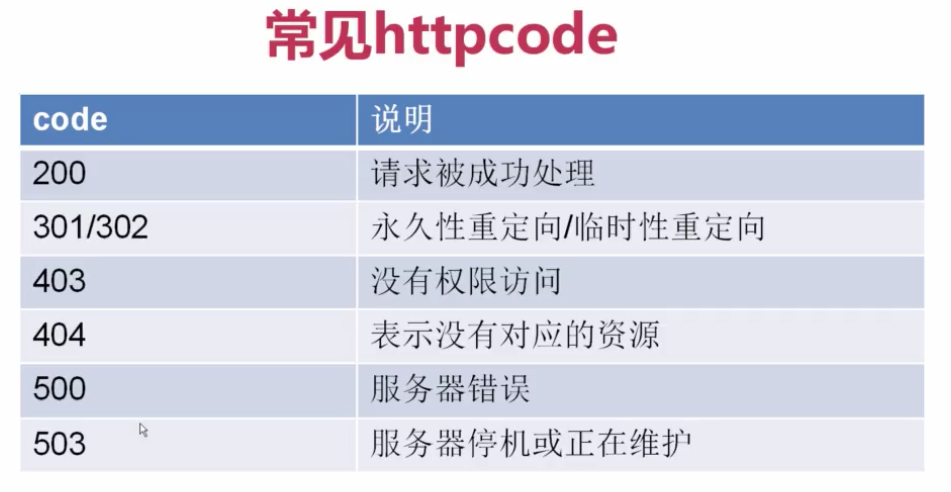
2.怎么找post参数?
先找到登录的页面,打开firebug,输入错误的账号和密码,观察post_url变换,从而确定参数。
3.读取本地的文件,生成cookies。
 try:

     import cookielib #py2

 except:

     import http.cookiejar as cookielib #py3
4.用requests登录知乎
 # -*- coding: utf-8 -*-

 __author__ = 'jinxiao'

 import requests

 try:

     import cookielib

 except:

     import http.cookiejar as cookielib

 import re

 session = requests.session()  #实例化session,下面的requests可以直接换成session

 session.cookies = cookielib.LWPCookieJar(filename="cookies.txt") #实例化cookies,保存cookies

 #读取cookies

 try:

     session.cookies.load(ignore_discard=True)

 except:

     print ("cookie未能加载")

 #知乎一定要加上浏览器的头,其他网站不一定,一般都是要的

 agent = "Mozilla/5.0 (Windows NT 6.1; WOW64; rv:51.0) Gecko/20100101 Firefox/51.0"

 header = {

     "HOST":"www.zhihu.com",

     "Referer": "https://www.zhizhu.com",

     'User-Agent': agent

 }

 def is_login():

     #通过个人中心页面返回状态码来判断是否为登录状态

     inbox_url = "https://www.zhihu.com/question/56250357/answer/148534773"

     response = session.get(inbox_url, headers=header, allow_redirects=False)  #禁止重定向,判断为是否登录

     if response.status_code  != 200:

         return False

     else:

         return True

 def get_xsrf():

     #获取xsrf code

     response = session.get("https://www.zhihu.com", headers=header)

     match_obj = re.match('.*name="_xsrf" value="(.*?)"', response.text)

     if match_obj:

         return (match_obj.group(1))

     else:

         return ""

 def get_index():

     response = session.get("https://www.zhihu.com", headers=header)

     with open("index_page.html", "wb") as f:

         f.write(response.text.encode("utf-8"))

     print ("ok")

 def zhihu_login(account, password):

     #知乎登录

     if re.match("^1\d{10}",account):

         print ("手机号码登录")

         post_url = "https://www.zhihu.com/login/phone_num"

         post_data = {

             "_xsrf": get_xsrf(),

             "phone_num": account,

             "password": password

         }

     else:

         if "@" in account:

             #判断用户名是否为邮箱

             print("邮箱方式登录")

             post_url = "https://www.zhihu.com/login/email"

             post_data = {

                 "_xsrf": get_xsrf(),

                 "email": account,

                 "password": password

             }

     response_text = session.post(post_url, data=post_data, headers=header)

     session.cookies.save()

 zhihu_login("", "admin123")

 # get_index()

 print(is_login())
zhihu_requests_login
5.在shell调试中添加UserAgent
scrapy shell -s USER_AGENT='...' url
6.JsonView插件
可以很好的可视化看json
7.写入html文件
with open(''e:/zhihu.html'',"wb") as f:

    f.write(response.text.encode('utf-8'))
8.yield理解
如果是yield item 会到pipelins中处理
如果是yield Request 会到下载器去下载
9.在mysql中怎么去重,设置主键去重,主键冲突
解决:在插入的sql语句后面加上 ON DUPLICATE KEY UPDATE content=VALUES(content) #这是需要更新的内容
10.手动输入验证码(zhihu.login_requests.py)
 def get_captcha():

     import time

     t=str(int(time.time()*1000))

     captcha_url="https://www.zhihu.com/captcha.gif?r={0}&type=login".format(t)

     t=session.get(captcha_url,headers=header)

     with open("captcha.jpg","wb") as f:

         f.write(t.content)

         f.close()

     captcha=input("输入验证码:")

     return captcha
#为什么是第五行是session,而不是requests?
#因为requests会重新建立一次绘画 session,这与后面的参数不符,输入的验证码并不是当前的验证码。
作者:今孝
出处:http://www.cnblogs.com/jinxiao-pu/p/6749332.html
本文版权归作者和博客园共有,欢迎转载,但未经作者同意必须保留此段声明,且在文章页面明显位置给出原文连接。
第5章 scrapy爬取知名问答网站的更多相关文章
- 第4章 scrapy爬取知名技术文章网站(2)
4-8~9 编写spider爬取jobbole的所有文章 # -*- coding: utf-8 -*- import re import scrapy import datetime from sc ...
- 第4章 scrapy爬取知名技术文章网站(1)
4-1 scrapy安装以及目录结构介绍 安装scrapy可以看我另外一篇博文:Scrapy的安装--------Windows.linux.mac等操作平台,现在是在虚拟环境中安装可能有不同. 1. ...
- scrapy爬取西刺网站ip
# scrapy爬取西刺网站ip # -*- coding: utf-8 -*- import scrapy from xici.items import XiciItem class Xicispi ...
- Python——Scrapy爬取链家网站所有房源信息
用scrapy爬取链家全国以上房源分类的信息: 路径: items.py # -*- coding: utf-8 -*- # Define here the models for your scrap ...
- Python3.6+Scrapy爬取知名技术文章网站
爬取分析 伯乐在线已经提供了所有文章的接口,还有下一页的接口,所有我们可以直接爬取一页,再翻页爬. 环境搭建 Windows下安装Python: http://www.cnblogs.com/0bug ...
- Python网络爬虫 | Scrapy爬取妹子图网站全站照片
根据现有的知识,写了一个下载妹子图(meizitu.com)Scrapy脚本,把全站两万多张照片下载到了本地. 网站的分析 网页的网址分析 打开网站,发现网页的网址都是以 http://www.mei ...
- Scrapy爬取某装修网站部分装修效果图
爬取图片资源 spider文件 from scrapy.linkextractors import LinkExtractor from scrapy.spiders import CrawlSpid ...
- 44.scrapy爬取链家网站二手房信息-2
全面采集二手房数据: 网站二手房总数据量为27650条,但有的参数字段会出现一些问题,因为只给返回100页数据,具体查看就需要去细分请求url参数去请求网站数据.我这里大概的获取了一下筛选条件参数,一 ...
- 43.scrapy爬取链家网站二手房信息-1
首先分析:目的:采集链家网站二手房数据1.先分析一下二手房主界面信息,显示情况如下: url = https://gz.lianjia.com/ershoufang/pg1/显示总数据量为27589套 ...
随机推荐
- Linq的Join == 两个foreach
因为实在太懒了,很久没动笔,今天强迫自己写一个小短篇. 之前讨论过用SelectMany代替两重的foreach循环.今天我们看一下Join和foreach的关系. 首先是Join的定义 public ...
- Deepin personalized transplantation of kali platform tools
首先配置更新源: 把kali的源添加到 Deepin 自带的源后面: 简易换源方法: 1.打开文件管理 -> 地址栏输入路径:/etc/apt/ 然后回车->在目录中右键以管理员身份打开 ...
- 解决 MySQL 1045错误的三种方法 (转)
连接MySQL数据库时难免会遇到1045错误,主要是因为用户输入的用户名或密码错误被拒绝访问,如果不想重装,需要找回密码或者重置密码. 问题描述: 1045-Access denied for use ...
- 有向图的拓扑排序的理解和简单实现(Java)
如果图中存在环(回路),那么该图不存在拓扑排序,在这里我们讨论的都是无环的有向图. 什么是拓扑排序 一个例子 对于一部电影的制作过程,我们可以看成是一个项目工程.所有的工程都可以分为若干个" ...
- C#-WebForm-Request、Response、QueryString
知识点: Request - 获取请求对象 专门用来接传递过来的值 Request["key"](李献策lxc) 1.获取地址栏传递过来的值 get 2.获取表单传递过来的参数值 ...
- O01-Linux CentOS7中利用RDO部署OpenStack
一.前言 1.RDO是红帽Red Hat 的一个开源项目,全称是RPM Distribution of OpenStack,能够帮助我们快捷部署OpenStack项目. 官方部署文档:https:// ...
- Machine learning第6周编程作业
1.linearRegCostFunction: function [J, grad] = linearRegCostFunction(X, y, theta, lambda) %LINEARREGC ...
- 11种绕过CDN查找真实IP方法
0x01 验证是否存在CDN 方法1: 很简单,使用各种多地 ping 的服务,查看对应 IP 地址是否唯一,如果不唯一多半是使用了CDN, 多地 Ping 网站有: http://ping.chin ...
- elment 中 el-table 进行校验
脑洞大开:什么是展示数据最好的方式呢,表格,写得又快,又清晰,又明显,那么就积累一些工作中表格经常使用到的东西. 第一步:效果图: 第二步:举个例子: <template> <div ...
- 收集vcftools所有用法
VCFtools用来处理VCF文档. 筛选特定突变 比较文件 总结突变 转化文件格式 验证并合并文件 取突变交集和差集 Get basic file statistics input可以为VCF或BC ...