
JS框架_(Popup.js)3D对话框窗口插件
百度云盘 传送门 密码:afdo
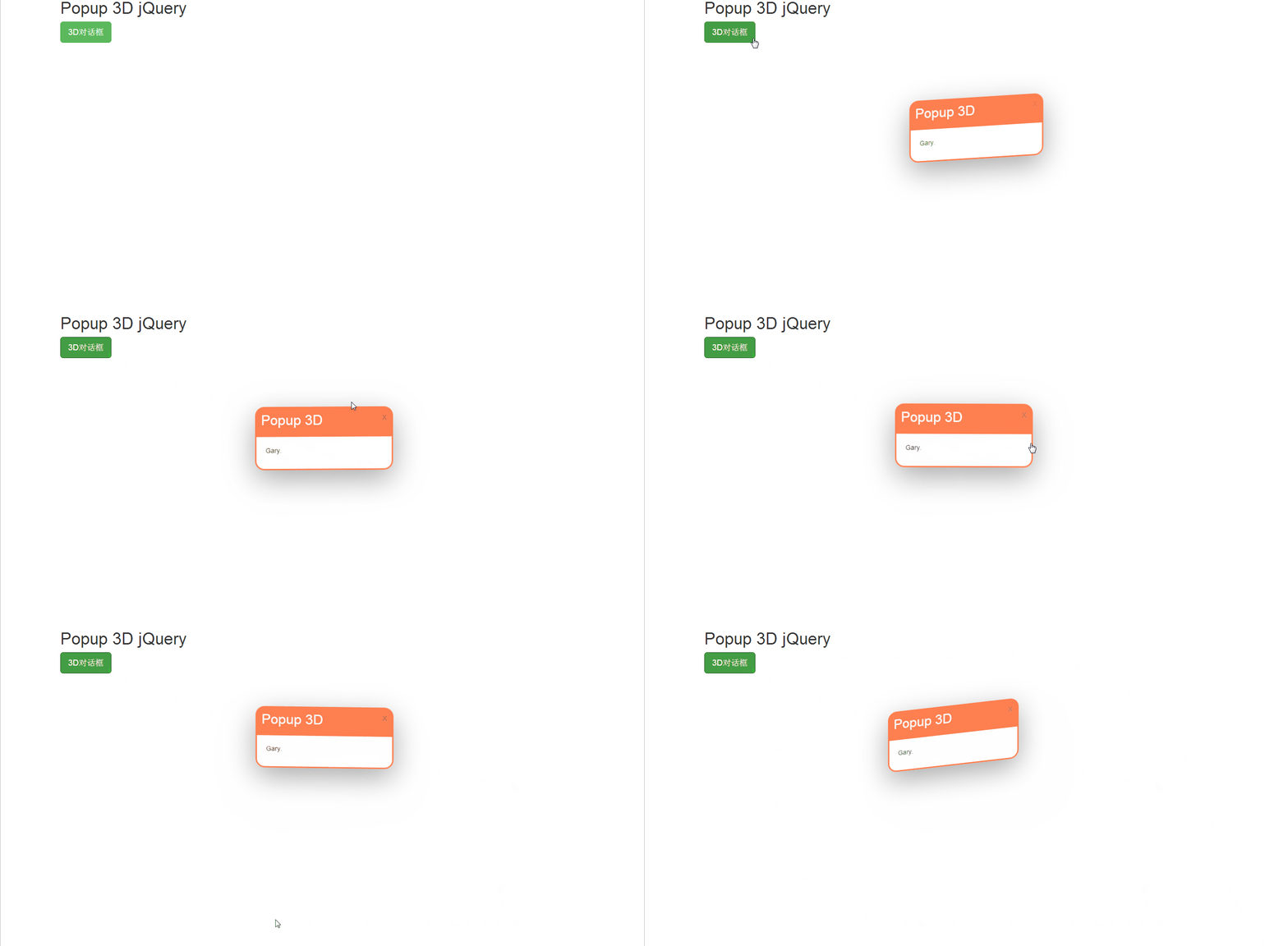
3D对话框窗口插件效果:
<!doctype html>

<html lang="zh">

<head>

<meta charset="UTF-8">

<meta http-equiv="X-UA-Compatible" content="IE=edge,chrome=1">

<meta name="viewport" content="width=device-width, initial-scale=1.0">

<title>jQuery点击按钮弹出3D对话框窗口插件</title>

<link rel="stylesheet" type="text/css" href="https://maxcdn.bootstrapcdn.com/bootstrap/3.3.5/css/bootstrap.min.css" />

<link rel="stylesheet" type="text/css" href="css/htmleaf-demo.css">

<link rel="stylesheet" type="text/css" href="css/popup.css" />

</head>

<body>

    <div class="container center-block">

        <h1>Popup 3D jQuery</h1>

        <a id="tst" rel="popup_name" class="btn btn-success btn-lg" href="#" role="button">3D对话框</a>

        <div class="popup">

            <div id="popup_name" class="popup_block">

                <div class="popup_head">

                    <h2>Popup 3D</h2>

                </div>

                <div class="popup_body">

                    <p>Gary.</p>

                </div>

            </div>

        </div>

    </div>

<script src="js/jquery-1.11.0.min.js" type="text/javascript"></script>

<script src="https://maxcdn.bootstrapcdn.com/bootstrap/3.3.5/js/bootstrap.min.js"></script>

<script src="js/popup.js"></script>

<script src="js/script.js"></script>

</body>

</html>
index.html
.popup{

    position: absolute;

    top:50%;

    left:50%;

}

.popup_block{

    display: none;

    position: absolute;

    width:300px;

    margin:-150px;

    box-sizing: border-box;

    border-radius: 20px;

    border-style:solid;

    border-color:coral;

    cursor: pointer;

    transform-style: preserve-3d;

    box-shadow: 0px 20px 100px #aaa;

}

.close{

    padding:10px;

}

.popup_head{

    background-color:coral;

    padding:10px;

    border-radius: 10px 10px 0 0;

    transition-duration:0.2s;

}

.popup_body{

    padding:20px;

}

.popup_head > h1, h2, h3, h4, h5{

    margin-top:0px;

    color:white;

}

.popup_head:hover{

    padding-left:20px;

}
popup.css
实现过程
popup.js:jQuery和CSS3制作并可以使用鼠标进行互动的3D弹出窗口插件
CSS
设置弹出窗口模式快
.popup_block{

    display: none;

    position: absolute;

    width:300px;

    margin:-150px;

    box-sizing: border-box;

    border-radius: 20px;

    border-style:solid;

    border-color:coral;

    cursor: pointer;

    transform-style: preserve-3d;

    box-shadow: 0px 20px 100px #aaa;

}
box-sizing:为元素指定的任何内边距和边框都将在已设定的宽度和高度内进行绘制
border-radius:向 div 元素添加圆角边框
border-style:设置 4 个边框的样式 传送门
1个参数

border-style:dotted;

所有 4 个边框都是点状

2个参数

border-style:dotted solid;

上边框和下边框是点状

右边框和左边框是实线

3个参数

border-style:dotted solid double;

上边框是点状

右边框和左边框是实线

下边框是双线

4个参数

border-style:dotted solid double dashed;

上边框是点状

右边框是实线

下边框是双线

左边框是虚线
border-style:参数
cursor :规定要显示的光标的类型(形状)
pointer 光标呈现为指示链接的指针 其他参数:传送门
transform-style:被转换的子元素保留其 3D 转换
flat 子元素将不保留其 3D 位置。
preserve-3d 子元素将保留其 3D 位置。
box-shadow::设置一个或多个下拉阴影的框
box-shadow: h-shadow v-shadow blur spread color inset;

h-shadow    :必需的。水平阴影的位置。允许负值

v-shadow    :必需的。垂直阴影的位置。允许负值

blur    :可选。模糊距离

spread    :可选。阴影的大小

color    :可选。阴影的颜色。在CSS颜色值寻找颜色值的完整列表

inset    :可选。从外层的阴影(开始时)改变阴影内侧阴影
box-shadow:参数
设置弹出框头部
.popup_head{

    background-color:coral;

    padding:10px;

    border-radius: 10px 10px 0 0;

    transition-duration:0.2s;

}
transition-duration:规定完成过渡效果需要花费的时间(以秒或毫秒计)
DOM
加载popup.js,写入对话框标题和对话框内容
<div class="popup">

            <div id="popup_name" class="popup_block">

                <div class="popup_head">

                    <h2>Popup 3D</h2>

                </div>

                <div class="popup_body">

                    <p>Gary.</p>

                </div>

            </div>

        </div>
JS框架_(Popup.js)3D对话框窗口插件的更多相关文章
- JS框架_(JQuery.js)绚丽的3D星空动画
百度云盘: 传送门 密码:8ft8 绚丽的3D星空动画效果(纯CSS) (3D星空动画可以用作网页背景,Gary为文本文字) <!doctype html> <html lang=& ...
- JS框架_(Bootstrap.js)实现简单的轮播图
Bootstrap框架中 轮播(Carousel)插件是一种灵活的响应式的向站点添加滑块的方式 轮播图效果: <!DOCTYPE html> <html> <head&g ...
- JS框架_(JQuery.js)Tooltip弹出式按钮插件
百度云盘 传送门 密码:7eh5 弹出式按钮效果 <!DOCTYPE html> <html > <head> <meta charset="UTF ...
- JS框架_(Laydate.js)简单实现日期日历
百度云盘 传送门 密码:71hf JavaScript日期与时间组件_____laydate.js 日期日历效果: <!DOCTYPE html> <html> <hea ...
- JS框架_(JQuery.js)圆形多选菜单选项
百度云盘 传送门 密码:zb1c 圆形多选菜单选项效果: <!DOCTYPE html> <html lang="en" > <head> &l ...
- JS框架_(coolShow.js)图片旋转动画特效
百度云盘 传送门 密码:ble6 coolShow.js插件图片旋转动画效果 <!DOCTYPE HTML> <head> <meta http-equiv=" ...
- JS框架_(JQuery.js)动画效果鼠标跟随
百度云盘 传送门 密码 :4n9u 火狐浏览器上纯CSS_动画效果鼠标跟随效果: (作者:lily_lcj 传送门) <!DOCTYPE html PUBLIC "-//W3C//DT ...
- JS框架_(Typed.js)彩色霓虹灯发光文字动画
百度云盘 传送门 密码:8oei 发光文字动画效果: <!doctype html> <html> <head> <meta charset="ut ...
- JS框架_(JQuery.js)夜晚天空满天星星闪烁动画
百度云盘 传送门 密码:xftr 满天星星闪烁动画效果: (可用星空动画来作为页面背景,白色文字改为文章或者其他的O(∩_∩)O) <!doctype html> <html> ...
随机推荐
- Windows 系统安装 Docker
详细方法参见官方文档. Win10 家庭版 安装Toolbox Win10 家庭版由于功能限制,不能直接安装 Docker for Windows, 需要使用 Toolbox 的形式进行安装. 确认版 ...
- linux基础命令<二>
1.关机 init 0 poweroff halt shutdown –h now 2.重启 init 6 reboot shutdown –r now 3.查询都有那些用户在系统 ...
- python并发编程-多线程实现服务端并发-GIL全局解释器锁-验证python多线程是否有用-死锁-递归锁-信号量-Event事件-线程结合队列-03
目录 结合多线程实现服务端并发(不用socketserver模块) 服务端代码 客户端代码 CIL全局解释器锁****** 可能被问到的两个判断 与普通互斥锁的区别 验证python的多线程是否有用需 ...
- 多边形面积(Area_Of_Polygons)
原理: 任意多边形的面积可由任意一点与多边形上依次两点连线构成的三角形矢量面积求和得出. 分析: 由于给出的点是相对于我们的坐标原点的坐标,每个点实际上我们可以当作一个顶点相对于原点的向量,如下图所示 ...
- WPF最小化窗体后激活函数显示不了窗体
WPF最小化窗体后激活函数显示不了窗体 今天测试小哥给我提了一些问题,其中一个问题是这样的,点击web端的一个链接,是能启动本地的一个应用程序的,如果本地应用程序已启动(通过tcp进程间通信),那么应 ...
- Yii2 常用代码集合
Yii2.0 对数据库查询的一些简单的操作 1 2 3 4 5 6 7 8 9 10 11 12 13 14 15 16 17 18 19 20 21 22 23 24 25 26 27 28 29 ...
- LintCode 53---翻转字符串中的单词
public class Solution { /* * @param s: A string * @return: A string */ public static String reverseW ...
- java中的全局变量、局部变量与静态常量的区别
java中的变量类型分类: 类变量:独立于方法之外的变量,用 static 修饰.实例变量:独立于方法之外的变量,不过没有 static 修饰.局部变量:类的方法中的变量.比如: public cla ...
- window.prompt()和 window.confirm()选择
代码截图: 效果: 代码截图: 效果:
- 第十篇.1、python并发编程之多进程理论部分
一 什么是进程 进程:正在进行的一个过程或者说一个任务.而负责执行任务则是cpu. 举例(单核+多道,实现多个进程的并发执行): egon在一个时间段内有很多任务要做:python备课的任务,写书的任 ...