
JS框架_(Laydate.js)简单实现日期日历
百度云盘 传送门 密码:71hf
JavaScript日期与时间组件_____laydate.js
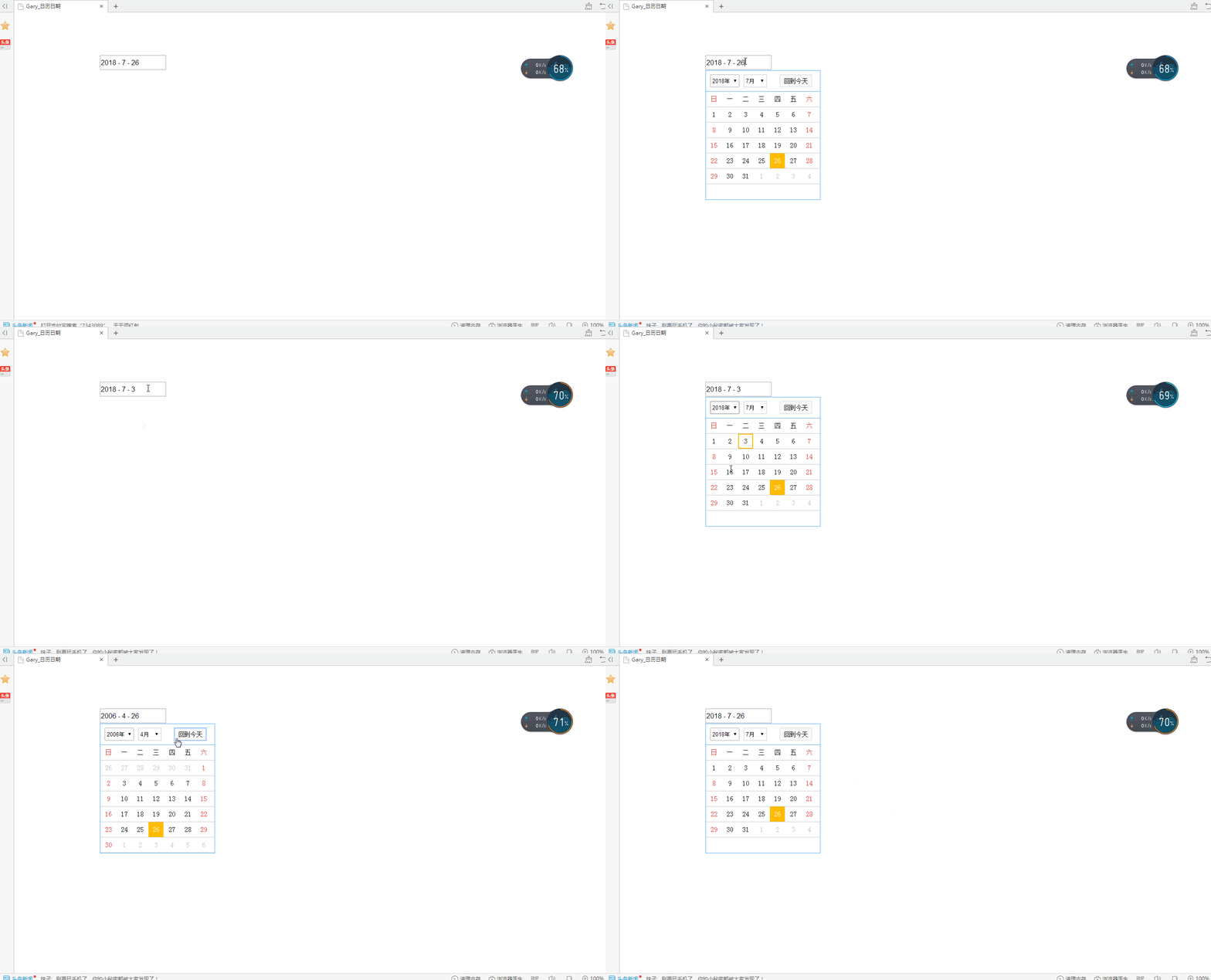
日期日历效果:
<!DOCTYPE html>

<html>

<head>

<meta charset="UTF-8">

<title>Gary_日历日期</title>

<link rel="stylesheet" href="css/laydate.css" />

<script src="js/jquery.min.js"></script>

<script src="js/laydate.js"></script>

<style type="text/css">

 .select-date{font-family:"sta cartman"}

</style>

</head>

<body>

<div class="laydate-box">

    <input type="text" id="laydateInput" placeholder="xxxx年xx月xx日" />

    <div class="select-date">

        <div class="select-date-header">

            <ul class="heade-ul">

                <li class="header-item header-item-one">

                    <select name="" id="yearList"></select>

                </li>

                <li class="header-item header-item-two" onselectstart="return false">

                    <select name="" id="monthList"></select>

                </li>

                <li class="header-item header-item-three" onselectstart="return false" >

                    <span class="reback">回到今天</span>

                </li>

            </ul>

        </div>

        <div class="select-date-body">

            <ul class="week-list">

                <li>日</li><li>一</li><li>二</li><li>三</li><li>四</li><li>五</li><li>六</li>

            </ul>

            <ul class="day-tabel"></ul>

        </div>

    </div>

</div>

<script>

    function getSelectDate(result){

        //这里获取选择的日期

        console.log(result);

    }

</script>

</body>

</html>
index.html
*{

    margin: 0;

    padding: 0;

}

li{

    list-style: none;

}

.icon{

    position: absolute;

    top: 5px;

    right: 5px;

    height: 25px;

    width: 25px;

    background: #fff;

}

.laydate-box{

    height: 34px;

    width: 154px;

    border: none;

    margin: 100px 0 0 200px;

    position: relative;

}

#laydateInput{

    outline: none;

    display: block;

    height: 30px;

    width: 150px;

    font-size: 16px;

    line-height: 30px;

}

.select-date{

    position: absolute;

    left: 0px;

    top:35px;

    width: 266px;

    height: 301px;

    border: 1px solid #58abff;

    display: none;

}

.select-date-header{

    height: 48px;

    border-bottom: 1px solid #58abff;

}

.heade-ul{

    height: 49px;

}

.header-item{

    height: 28px;

    float: left;

    margin-top: 9px;

}

.header-item select{

    height: 28px;

}

.header-item-one select{

    width: 68px;

    margin-left: 10px;

    height: 30px;

    outline: none;

}

.header-item-one{

    height: 30px;

}

.header-item-two i{

    display: block;

    float: left;

    height: 28px;

    width: 28px;

    line-height: 28px;

    text-align: center;

    cursor: pointer;

}

.header-item-two i{

    display: block;

    float: left;

    height: 28px;

    width: 28px;

    line-height: 28px;

    text-align: center;

    cursor: pointer;

}

.header-item-two{

    border: 1px solid #ccc;

    margin-left: 10px;

}

.header-item-two select{

    float: left;

    border: none;

    outline: none;

}

.header-item-two i:nth-child(1){

    border-right: 1px solid #ccc;

}

.header-item-two i:nth-child(3){

    border-left: 1px solid #ccc;

}

.header-item-three{

    margin-left: 30px;

    width: 73px;

}

.header-item-three span{

    display: block;

    height: 100%;

    border: 1px solid #d8d8d8;

    background: #f9f9f9;

    line-height: 28px;

    text-align: center;

    font-size: 14px;

    width: 100%;

    cursor: pointer;

}

.header-item-three span:hover{

    border-color: #388bff;

}

.header-item-three span.active{

    border-color: #388bff;

}

.week-list{

    height: 35px;

    width: 100%;

    border-bottom: 1px solid #c8cacc;

}

.week-list li{

    float: left;

    height: 35px;

    width: 35px;

    text-align: center;

    line-height: 35px;

    font-size: 15px;

    margin: 0 1px;

    /*font-weight: bold;*/

}

.week-list li:nth-child(7){

    color:#e02d2d

}

.week-list li:nth-child(1){

    color:#e02d2d

}

.tabel-line{

    height: 35px;

    border-bottom: 1px solid #c8cacc;

}

.tabel-ul{

    height: 35px;

}

.tabel-li{

    height: 31px;

    width: 31px;

    text-align: center;

    line-height: 31px;

    float: left;

    border: 2px solid #fff;

    margin: 0 1px;

}

.tabel-li.preDays{

    color: #bfbfbf;

}

.tabel-li.nextDay{

    color: #bfbfbf;

}

.tabel-li:hover{

    border-color: #ffbb00;

}

.tabel-li.showClick{

    border-color: #ffbb00;

}

.tabel-li.active{

    background: #ffbb00;

    color: #fff !important;    border-color:#ffbb00;

}

.tabel-li.weekColor{

    color:#e02d2d;

}
laydate.css
源代码:传送门
JS日期与时间组件/插件官方演示与讲解:传送门
参考文档:传送门
实现过程
一、设置日期日历位置
.laydate-box{

    height: 34px;

    width: 154px;

    border: none;

    margin: 100px 0 0 200px;

    position: relative;

}
static :  无特殊定位,对象遵循HTML定位规则

absolute :  将对象从文档流中拖出,使用left,right,top,bottom等属性进行绝对定位。而其层叠通过z-index属性定义。此时对象不具有边距,但仍有补白和边框

relative :  对象不可层叠,但将依据left,right,top,bottom等属性在正常文档流中偏移位置

fixed :  IE5.5及NS6尚不支持此属性
position属性:
二、日期日历
.select-date{

    position: absolute;

    left: 0px;

    top:35px;

    width: 266px;

    height: 301px;

    border: 1px solid #58abff;

    display: none;

}
border设置 4 个边框的样式:
- border-width
- border-style
- border-color
display 属性规定元素应该生成的框的类型
.select-date-header{

    height: 48px;

    border-bottom: 1px solid #58abff;

}
border-bottom 简写属性把下边框的所有属性设置到一个声明中
- border-bottom-width
- border-bottom-style
- border-bottom-color
//年选择器

laydate.render({

  elem: '#test2'

  ,type: 'year'

});

//年月选择器

laydate.render({

  elem: '#test3'

  ,type: 'month'

});

//时间选择器

laydate.render({

  elem: '#test4'

  ,type: 'time'

});

//时间选择器

laydate.render({

  elem: '#test5'

  ,type: 'datetime'

});
年月日选择器
//日期范围

laydate.render({

  elem: '#test6'

  ,range: true

});

//年范围

laydate.render({

  elem: '#test7'

  ,type: 'year'

  ,range: true

});

//年月范围

laydate.render({

  elem: '#test8'

  ,type: 'month'

  ,range: true

});

//时间范围

laydate.render({

  elem: '#test9'

  ,type: 'time'

  ,range: true

});

//日期时间范围

laydate.render({

  elem: '#test10'

  ,type: 'datetime'

  ,range: true

});
范围选择
//限定可选日期

var ins22 = laydate.render({

  elem: '#test-limit1'

  ,min: '2016-10-14'

  ,max: '2080-10-14'

  ,ready: function(){

    ins22.hint('日期可选值设定在 <br> 2016-10-14 到 2080-10-14');

  }

});

//前后若干天可选,这里以7天为例

laydate.render({

  elem: '#test-limit2'

  ,min: -7

  ,max: 7

});

//限定可选时间

laydate.render({

  elem: '#test-limit3'

  ,type: 'time'

  ,min: '09:30:00'

  ,max: '17:30:00'

  ,btns: ['clear', 'confirm']

});
控制选择日历范围
//自定义格式

laydate.render({

  elem: '#test11'

  ,format: 'yyyy年MM月dd日'

});

laydate.render({

  elem: '#test12'

  ,format: 'dd/MM/yyyy'

});

laydate.render({

  elem: '#test13'

  ,format: 'yyyyMM'

});

laydate.render({

  elem: '#test14'

  ,type: 'time'

  ,format: 'H点M分'

});

laydate.render({

  elem: '#test15'

  ,type: 'month'

  ,range: '→'

  ,format: 'yyyy-MM'

});

laydate.render({

  elem: '#test16'

  ,type: 'datetime'

  ,range: '到'

  ,format: 'yyyy年M月d日H时m分s秒'

});
自定义格式
//墨绿主题

laydate.render({

  elem: '#test29'

  ,theme: 'molv'

});

//自定义颜色

laydate.render({

  elem: '#test30'

  ,theme: '#393D49'

});

//格子主题

laydate.render({

  elem: '#test31'

  ,theme: 'grid'

});
日历主题
感谢 layDate 日期与时间组件:传送门
JS框架_(Laydate.js)简单实现日期日历的更多相关文章
- JS框架_(JQuery.js)绚丽的3D星空动画
百度云盘: 传送门 密码:8ft8 绚丽的3D星空动画效果(纯CSS) (3D星空动画可以用作网页背景,Gary为文本文字) <!doctype html> <html lang=& ...
- JS框架_(JQuery.js)圆形多选菜单选项
百度云盘 传送门 密码:zb1c 圆形多选菜单选项效果: <!DOCTYPE html> <html lang="en" > <head> &l ...
- JS框架_(coolShow.js)图片旋转动画特效
百度云盘 传送门 密码:ble6 coolShow.js插件图片旋转动画效果 <!DOCTYPE HTML> <head> <meta http-equiv=" ...
- JS框架_(JQuery.js)Tooltip弹出式按钮插件
百度云盘 传送门 密码:7eh5 弹出式按钮效果 <!DOCTYPE html> <html > <head> <meta charset="UTF ...
- JS框架_(Popup.js)3D对话框窗口插件
百度云盘 传送门 密码:afdo 3D对话框窗口插件效果: <!doctype html> <html lang="zh"> <head> &l ...
- JS框架_(Vue.js)带有星期日期的数字时钟
百度云盘 传送门 密码:tv1v 数字时钟效果: <!doctype html> <html> <head> <meta charset="utf- ...
- JS框架_(Bootstrap.js)实现简单的轮播图
Bootstrap框架中 轮播(Carousel)插件是一种灵活的响应式的向站点添加滑块的方式 轮播图效果: <!DOCTYPE html> <html> <head&g ...
- JS框架_(JQuery.js)文章全屏动画切换
百度云盘 传送门 密码:anap 文章全屏动画切换效果 <!doctype html> <html lang="zh"> <head> < ...
- JS框架_(JQuery.js)动画效果鼠标跟随
百度云盘 传送门 密码 :4n9u 火狐浏览器上纯CSS_动画效果鼠标跟随效果: (作者:lily_lcj 传送门) <!DOCTYPE html PUBLIC "-//W3C//DT ...
随机推荐
- MFC多线程的创建使用
最近学习了MFC多线程的使用, 写了一个继承CWinThread类的类MyThread: 在头文件开头用#define定义一个线程函数入口地址(会在下面定义代码中写出) 在类的开头加上IMPLEMEN ...
- SKCTF管理系统
一开始是一个简洁风的登录界面 康康注册界面 嗯...也是很简洁风呢. 那让我们来查看元素(fn+f12) 没有什么有flag的迹象呢! 那我们试一下注册一个账号 这时候我们已经有解题的线索了: 获得管 ...
- 用python操作mysql数据库
数据库的安装和连接 PyMySQL的安装 pip install PyMySQL python连接数据库 import pymysql db = pymysql.connect("数据库ip ...
- Win32汇编-创建窗体代码
1.一个最简单的窗体的创建 ;>>>>>>>>>>>>>>>>>>>>>& ...
- 构造器(Constructor)--构造函数
构造器是类型的成员之一,其他成员比如,成员字段,成员函数.狭义上,构造器指的是实例构造器(instance constructor) class Student { public int ID; pu ...
- Git复习(十三)之git revert用法及与git reset区别
git revert用法以及与git reset的区别 git revert用法 git revert 撤销 某次操作,此次操作之前和之后的commit和history都会保留,并且把这次撤销 作为一 ...
- 关于redis的几件小事(六)redis的持久化
1.redis持久化的意义 redis持久化的意义,在于 故障恢复 . 如果没有对数据进行持久化,那么如果redis遇到灾难性的故障,就会丢失所有的数据. 如果通过redis的持久化机制将数据持久化到 ...
- java 枚举enum的使用(与在switch中的使用)
实际开发中,很多人可能很少用枚举类型.更多的可能使用常量的方式代替.但枚举比起常量来说,含义更清晰,更容易理解,结构上也更加紧密.看其他人的博文都很详细,长篇大论的,这里理论的东西不说了,一起看看在实 ...
- Zookeeper启动失败,报错 can not open chanel to 2
zookeeper 3.4.8 安装在 7 台不同的虚拟机上,配置文件如下: tickTime= initLimit= syncLimit= dataDir=/var/zookeeper client ...
- 安装vim自动补全插件
1 安装VIM 2 安装vim插件管理工具.过程见链接.(谢谢) 3 在.vimrc中添加下列代码 Bundle 'Valloric/YouCompleteMe' 保存退出后打开vim,在正常模式下输 ...