
Google Chrome 35 Released – Install on RHEL/CentOS 6 and Fedora 20-15
Google Chrome is a freeware web browser developed by Google Inc. Google Chrome team proudly announced the release of Google Chrome 35 on May 20, 2014. The actual version is 35.0.1916.114 for Linux/Mac OS X and Windows operating system. This new version bundled with a number of exciting fixes, features and improvements, including:
- A new interface based on Aura (replacing GTK2).
- Added new app launcher and notification center.
- More developer control over touch input.
- New JavaScript features.
- Unprefixed Shadow DOM..
- A number of new apps/extension APIs..
- Lots of under the hood changes for stability and performance.
If you would like to know more other cool features of this release, please visit at Google’s Chrome Features.

Install Google Chrome in Linux
In our earlier articles we have shown you how to install latest released Opera Browser 12.00 and Firefox 26 versions. In this tutorial we will show you how we have practically installed Google Chrome 35 browser in one of our CentOS 6.5 server using Google’s own repository with Yum tool. By using repository you will keep your Chrome browser up-to-date. However, it should also work on RHEL 6.5/6.4/6.3/6.2/6.1/6.0, CentOS 6.5/6.4/6.3/6.2/6.1/6.0 and Fedora 20,19,18,17,16,15 versions as well.
Step 1: Enable Google YUM repository
Create a file called /etc/yum.repos.d/google-chrome.repo and add the following lines of code to it.
[google-chrome]

name=google-chrome

baseurl=http://dl.google.com/linux/chrome/rpm/stable/$basearch

enabled=1

gpgcheck=1

gpgkey=https://dl-ssl.google.com/linux/linux_signing_key.pub
Step 2: Installing Chrome Web Browser
Download and Install Chrome Web Browser with yum command. It will automatically install all dependencies.
# yum install google-chrome-stable
Update : Sadly, the Google Chrome browser no longer supports the most famous commercial distribution Red Hat and its free clones such as CentOS and Scientific Linux.
Yes, they’ve discontinued support for RHEL 6.X version as of Google Chrome and on other side, latest Firefox and Opera browsers run successfully on the same platforms.
Luckily, there is a script developed by Richard Lloyd, that automatically download and install latest Google Chrome browser by picking libraries from a more recent released distro and put those libraries in (/opt/google/chrome/lib) directory and then you can able to run Google Chrome on CentOS 6.X version.
# wget http://chrome.richardlloyd.org.uk/install_chrome.sh

# chmod u+x install_chrome.sh

# ./install_chrome.sh
Sample Output
Google Chrome Installer 2.00 on the i686 platform

(C) Richard K. Lloyd 2013 <rklloyd@gmail.com>

*** Checking for an update to install_chrome.sh ...

--2013-07-18 17:27:02--  http://chrome.richardlloyd.org.uk/version.dat

Resolving chrome.richardlloyd.org.uk... 193.110.246.53

Connecting to chrome.richardlloyd.org.uk|193.110.246.53|:80... connected.

HTTP request sent, awaiting response... 200 OK

Length: 5 [text/plain]

Saving to: âversion.datâ

100%[===================================================================================================================>] 5           --.-K/s   in 0s

2013-07-18 17:27:02 (264 KB/s) - âversion.datâ

*** install_chrome.sh is already the latest version (2.00) - continuing ...

*** Determining latest Google Chrome version number ...
Step 3: Starting Chrome Web Browser
Start browser with non-root user.
# google-chrome &
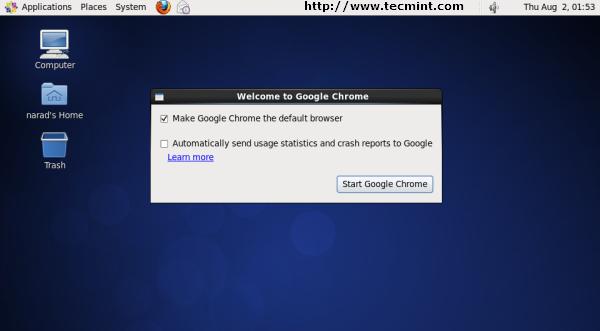
Google Chrome Startup Screen
Welcome screen of Chrome web browser.
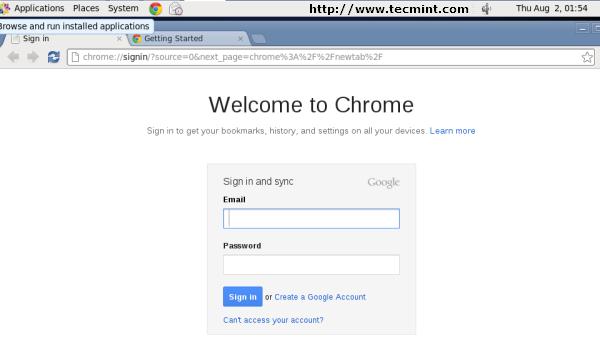
Google Chrome Welcome Screen
Exploring www.tecmint.com with cool Chrome web browser.
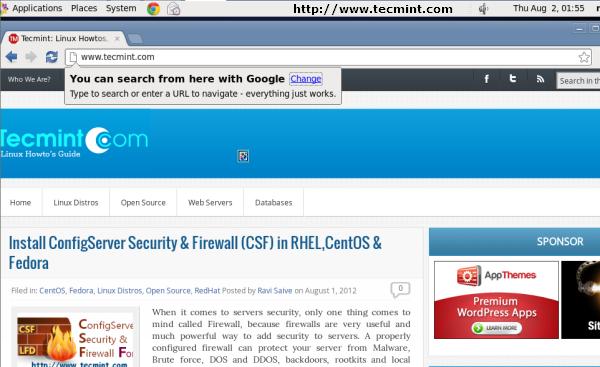
Exploring www.tecmint.com in Google Chrome
Download Two Free Google Chrome eBooks
Google Chrome Cheat Sheet: This free ebook contains
dozens of other helpful keyboard shortcuts that will help you on how to
use Google Chrome efficiently.
10 Essential Chrome Tips:
This free ebook provides certain useful but overlooked Chrome tips that
have the potential to significantly enhance a Chrome user’s everyday
experience.

That’s it, enjoy browsing with Chrome and do let me know your browsing experience with Chrome via comments.
Google Chrome 35 Released – Install on RHEL/CentOS 6 and Fedora 20-15的更多相关文章
- Google Chrome 55 Released – Install on RHEL/CentOS 7/6 and Fedora 25-20
Google Chrome is a freeware web browser developed by Google Inc. Google Chrome team proudly announce ...
- How to install 64-bit Google Chrome 28+ on 64-bit RHEL/CentOS 6 or 7
How to install 64-bit Google Chrome 28+ on 64-bit RHEL/CentOS 6 or 7 The problem Google developers s ...
- [转载]How to Install Google Chrome 39 in CentOS/RHEL 6 and Fedora 19/18
FROM: http://tecadmin.net/install-google-chrome-in-centos-rhel-and-fedora/ Google Chrome is a freewa ...
- Ubuntu 12.04 怎样安装 Google Chrome
方法一: http://www.360doc.com/content/14/0723/19/4338_396584130.shtml 方法2: How to Install Google Chrome ...
- Install Google Chrome on Fedora 28/27, CentOS/RHEL 7.5 (在 fedora 28 等 上 安装 chrome)
今天在使用 fedora 安装 chrome 的时候遇到了问题,今天进行将安装过程进行记录下来.需要安装第三方软件仓库. 我们需要进行安装 fedora-workstation-repositorie ...
- Centos 7.6 安装selenium+firefox+google chrome(支持xshell运行)
1. 查看Linux 版本 [root@penguin selenium]# cat /etc/redhat-release CentOS Linux release 7.6.1810 (Core) ...
- How do you install Google Chrome on Ubuntu?
https://askubuntu.com/questions/510056/how-to-install-google-chrome sudo apt-get install chromium-br ...
- Install Oracle Java JDK/JRE 7u55 on Fedora 20/19, CentOS/RHEL 6.5/5.10
What’s new in Sun/Oracle Java 7 VM Compressed 64-bit object pointers Garbage-First GC (G1) JSR 292: ...
- Steps to Install Hadoop on CentOS/RHEL 6---reference
http://tecadmin.net/steps-to-install-hadoop-on-centosrhel-6/# The Apache Hadoop software library is ...
随机推荐
- 寻找道路(NOIP2014)神奇之题。。
原题传送门 这道题嘛.. 首先根据题目,我们要先知道哪些点能够到达终点.(反向BFS) 然后我们再求最短路的途中,必须随时判断周围的点是否被第一次BFS标记过.. 所以再来一次BFS. 数组记得清零, ...
- greasemonkey
Greasemonkey Hacks/Getting Started < Greasemonkey Hacks Greasemonkey Hacks Foreword Credits Prefa ...
- Centos 查看内存
1. 查看内存使用 free -mh 2. 读出的内核信息进行解释 cat /proc/meminfo MemTotal: kB #所有可用RAM大小 (即物理内存减去一些预留位和内核的二进制代码大小 ...
- 中控考勤机WEB主动上报接收SERVER程序
using System; using System.IO; using System.Net; using System.Text.RegularExpressions; namespace Con ...
- MVC 视图与控制器传值的几种方法
一.页面取值传给控制器 1.表单传值----利用Action 视图页: <form action="方法名" method="post" ...
- 树上各种DFS姿势算法笔记
树是指由n个点,n-1条边构成的联通无向图.如果有一棵树,它的每一条边(u,v)都有一个权值l(u,v),我们把这样的树称作带权树. 我们知道对于树上的任意两个点,他们之间的路径是唯一的.对于两个点u ...
- HDU 1846 Brave Game【巴什博弈裸题】
Brave Game Time Limit: 1000/1000 MS (Java/Others) Memory Limit: 32768/32768 K (Java/Others) Total Su ...
- Educational Codeforces Round 33 (Rated for Div. 2) D. Credit Card
D. Credit Card time limit per test 2 seconds memory limit per test 256 megabytes input standard inpu ...
- Python与数据库[0] -> 数据库概述
数据库概述 / Database Overview 1 关于SQL / About SQL 构化查询语言(Structured Query Language)简称SQL,是一种特殊目的的编程语言,是一 ...
- rsync + inotify 同步
1. 配置rysnc server:同步机,同步被同步机更新的文件,很多台vi /etc/rsyncd.conf uid=rootgid=rootuse chroot=nomax connection ...