
Learning Experience of Big Data: Learn to install CentOs 6.5 on my laptop
I have learnt some experience about Big Data during my summer vocation,I was told that The first thing to start Big Data is to install a Linux system on my laptop,that is what I'm going to discuss about.The system which I have used was CentOs 6.5,besides,the jdk I used in this system was jdk1.8.1_171,which can be found in http://www.oracle.com(the official site of Oracle).The virtual machine I have used was VM Workstation 10(I will called it by VM in my following artical).The material which was used is CentOS 6.5.iso,jsutust like the following image:

So,let's start it.
The first thing to do is open the VM and click the button "create a new virtual machine" to creat it(which is called "创建新的虚拟机" by chinese , I used the version which is translated into chinese),then a optional view will bes shown just like this:
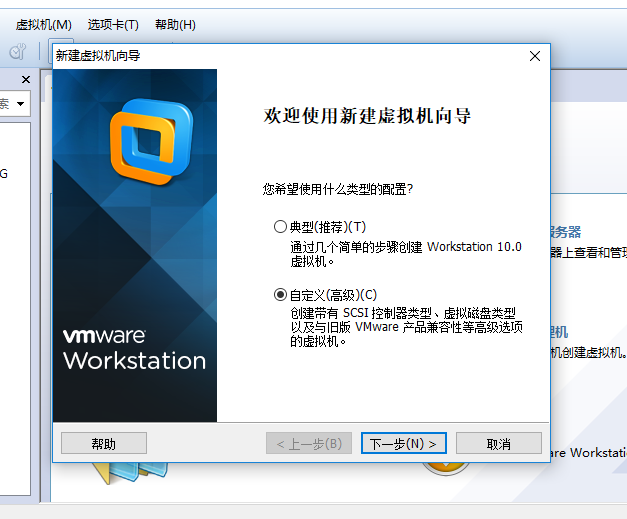
we choose customize(which is called "自定义" by chinese) to begin and Click next.We can continue clicking until this view is shown:
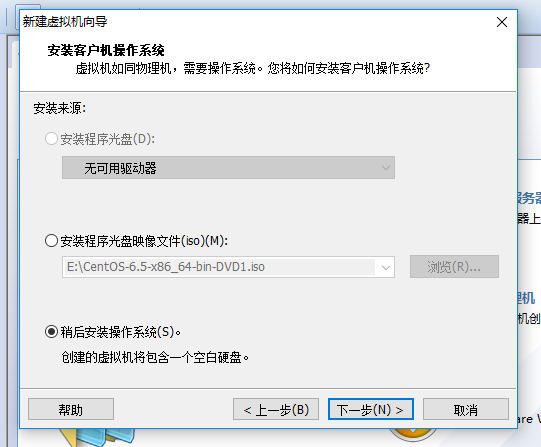
We'd better not to instal the iso file at this time,because if we install it know ,we will come to a view which means to have a quick installation,which will install some drivers we do not need.So we choose I'll install the operation system later.
Next we will choose some settings related to our virtual machine,I'll show you on the picture.The positions which need to change I will marked with red pencil
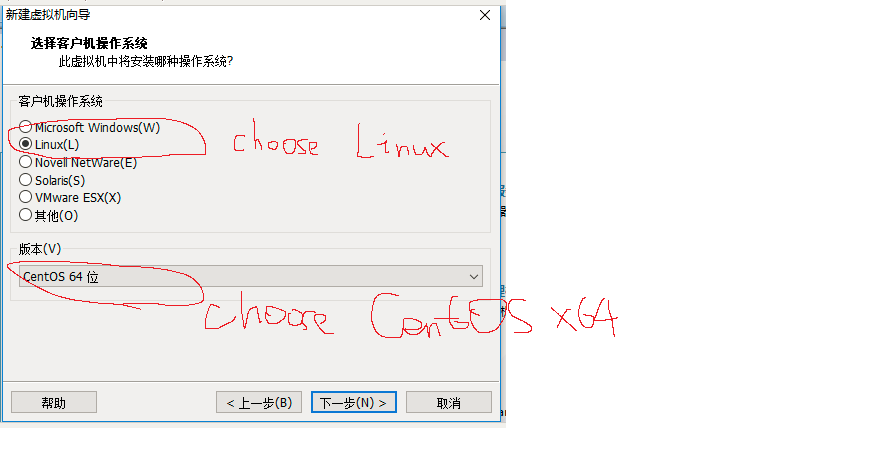
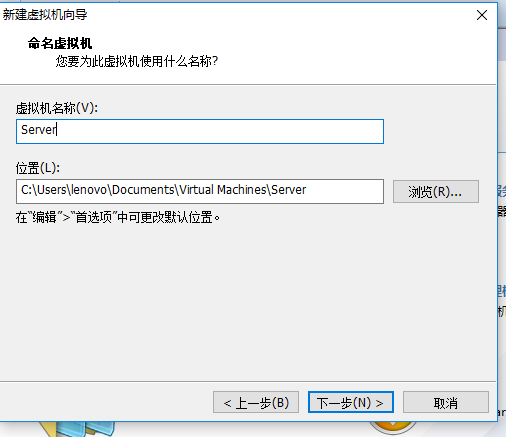
We will click "next" untill this picture(Remeber:The storage you give to the machine can be 512 MB or 1024 MB ,The later will be fatser but occupied more storage on you laptop.And the network model must be NAT!)
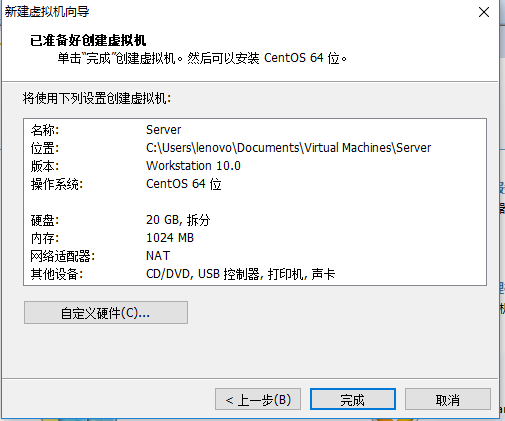
On this step we'll choose customize hardware and delete the drivers we needn't.
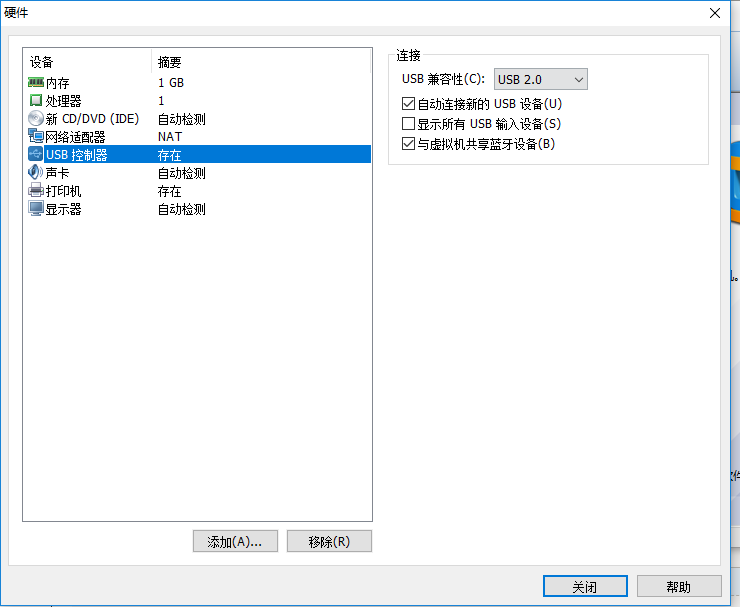
As you can see,the printer,audio driver and the controller of USB are what we need not,so we remove them.And at this time,you can click CD/DVD to add the iso file to initialize our virtual machine.
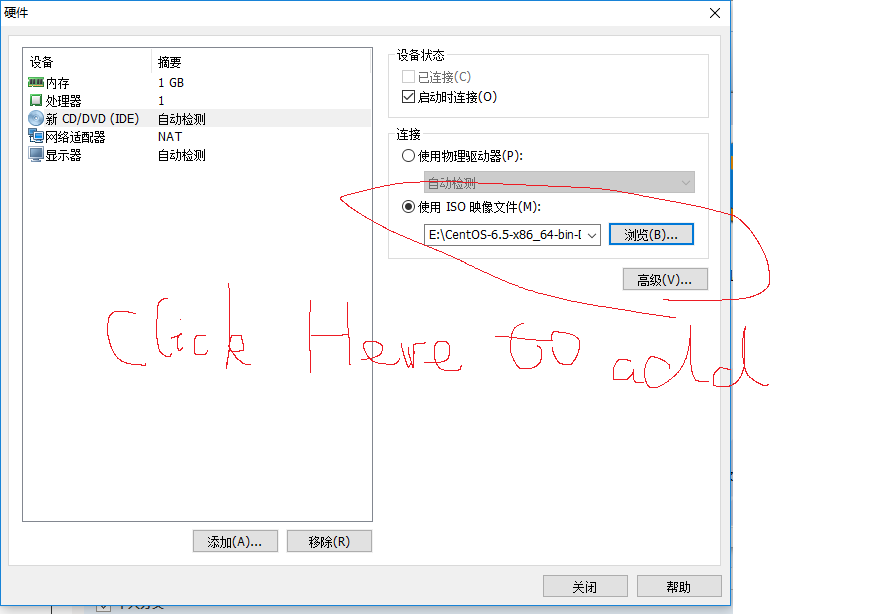
And then click close and finish,the virtual machine will be generated automatically.We open the virtual machine to set some properties of this new baby.
Choose install it and a view will be shown,we choose to skip it because we don't have media .We can click "OK" until we choose the language we use,we choose English as the language of course,and we choose to disgard the data and install it basically.The it will show us with a table to change our hostname,we'd better not to change the name because there are some settings later will use the name "localhost".
Then we choose to set the time and then set root password-which will be used everytime we enter the system.
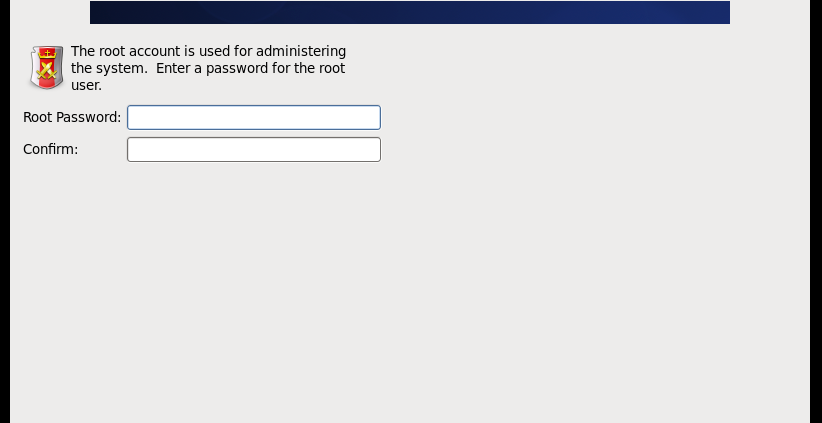
After set the password,we just need to click "next" to install.
After the installation is finished,we click reboot to restart the system.This is the end of Installation.
Learning Experience of Big Data: Learn to install CentOs 6.5 on my laptop的更多相关文章
- Learning Experience of Big Data:The First Day-Try to set up a network connection on my virtural machine
After we install our virtual machine,the first thing we should do is to set up a network connection ...
- Learning Experience of Big Data: Deploying Tomcat 8.0 and connect ssh without password
This mission seems to be easier--we can just decompression Tomcat to our virtural machine and deploy ...
- Learning Experience of Big Data: Connect CentOs to Xshell and set Java environment on CentOS
1.set up connections between vitural machine and Xshell: After we connect the virtural machine to ne ...
- 少标签数据学习:宾夕法尼亚大学Learning with Few Labeled Data
目录 Few-shot image classification Three regimes of image classification Problem formulation A flavor ...
- Learning Spark: Lightning-Fast Big Data Analysis 中文翻译
Learning Spark: Lightning-Fast Big Data Analysis 中文翻译行为纯属个人对于Spark的兴趣,仅供学习. 如果我的翻译行为侵犯您的版权,请您告知,我将停止 ...
- 【Tools】-NO.4.Tools.1.VM.1.001-【VMware Workstation PRO 12 Install CentOS 7.1】-
1.0.0 Summary Tittle:[Tools]-NO.4.Tools.1.VM.1.001-[VMware Workstation PRO 12 Install CentOS 7.1]- S ...
- data mining,machine learning,AI,data science,data science,business analytics
数据挖掘(data mining),机器学习(machine learning),和人工智能(AI)的区别是什么? 数据科学(data science)和商业分析(business analytics ...
- Vue learning experience
一.内置指令[v-ref] Official-document-expression: 父组件在子组件上注册的索引,便于直接访问.不需要表达式,必须提供参数ID,可以通过父组件的$ref对象访问子组件 ...
- mini install centOS log
no ifconfig yum install net-tools ------------------------------------------------------------------ ...
随机推荐
- JavaScript性能优化小知识总结(转)
JavaScript的性能问题不容小觑,这就需要我们开发人员在编写JavaScript程序时多注意一些细节,本文非常详细的介绍了一下JavaScript性能优化方面的知识点,绝对是干货. 前言 一直在 ...
- 【转】JavaScript 简史
本文来自众成翻译.JavaScript 毋庸置疑是当今最重要的语言之一.Web 的兴起已经把 JavaScript 带到一个前所未有的地步.下面我们来看看 JavaScript 在其短短历史中是如何演 ...
- 订阅无法在 ARM 模式下创建虚拟机,只能在 ASM 模式下创建 Azure VM 部署
问题描述 资源组所有者可以在新版 portal 创建经典模式的虚拟机,但是无法创建 ARM 模式的虚拟机. 问题现象 环境中有个相对权限比较高的账户,比如 account admin (以下简称为 A ...
- ThinkPHP5专题
TinkPHP5中 1. model中select()后的查询结果是对象而不是数组 2. model中 假如有 $result=$this->field($fields)->where($ ...
- Sendip 命令行发包工具,支持IP、TCP、UDP等
Sendip是一个linux平台的命令行发数据包工具,目前(2018年2月)支持的协议有ipv4.ipv6.icmp.tcp.udp.bgp.rip.ntp,作者表示其他协议将会后面支持,当他有空写的 ...
- JavaScript工作机制:V8 引擎内部机制及如何编写优化代码的5个诀窍
概述 JavaScript引擎是一个执行JavaScript代码的程序或解释器.JavaScript引擎可以被实现为标准解释器,或者实现为以某种形式将JavaScript编译为字节码的即时编译器. 下 ...
- react-webpack-express
这是一个整合react express 实现前后台交互,并且采用webpack进行打包和解析文件.其实react官方有一个脚手架create react app,也可以看那个,但是这个脚手架webpa ...
- 关于c++对文件读写的封装
namespace { UINT_T GetWriteSizeForNoBuf(UINT_T fsize) { UINT_T write_buf_size = ; == ) { write_buf_s ...
- 动态规划(DP),递推,最大子段和,POJ(2479,2593)
题目链接:http://poj.org/problem?id=2479 解题报告: 1.再求left[i]的时候,先没有考虑a[i]的正负,先把a[i]放到left[i]中,然后left=max(le ...
- 【luogu P3368 树状数组2】 模板
题目链接:https://www.luogu.org/problemnew/show/P3368 #include<iostream> #include<cstdio> #in ...