
Learning Experience of Big Data: Connect CentOs to Xshell and set Java environment on CentOS
1.set up connections between vitural machine and Xshell:
After we connect the virtural machine to network,we can used an application named "Xshell" to operate the machine instead of the inconvenient way to operate it.Definitely,we should connect our machine to Xshell in order to operate it .
After we press the option called "new",a view will be shown like this:
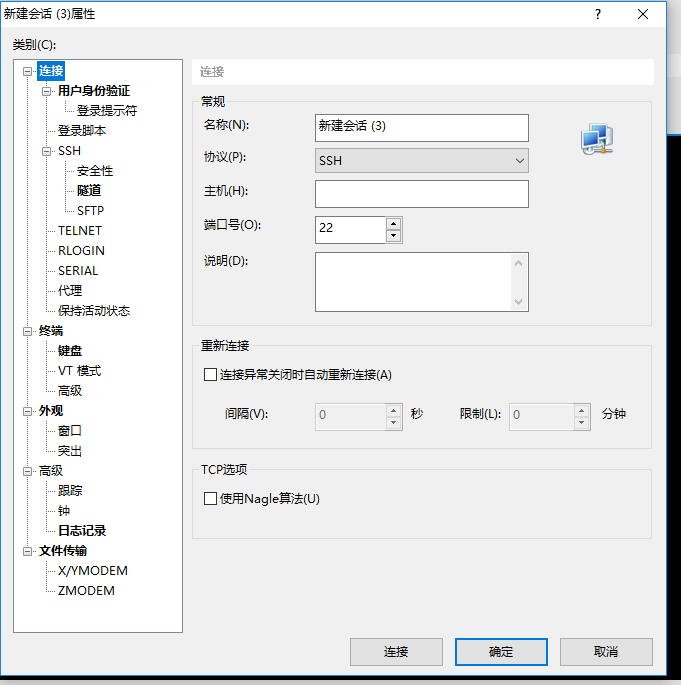
We choose the ssh protocol and insert our ip in the host blank.You will be asked to choose accept for this time or accept and save.Definitely we choose accept and save if we don't want to enter our password over and over again.
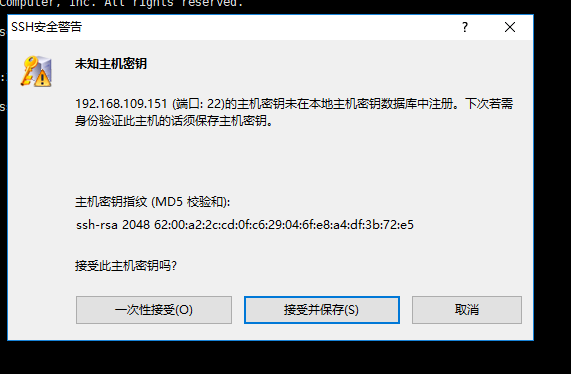
Then you'll be asked to enter username and password to enter CentOS you have just installed.(Don't forget to press remember if you don't want to enter again)
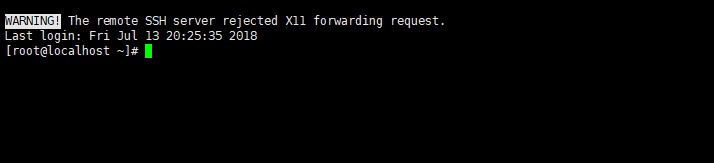
Only if you are into the interface which is same as the following pictures are you succees.
2.set Java runtime environment:
It can be seen that Java runs based on JDK,so if we want to set environment,we must download JDK to our machine.As you can see--I have already downloaded it to my machine(Remember to download the file which is prepared for Linux---whose Suffix name is .tar.gz).
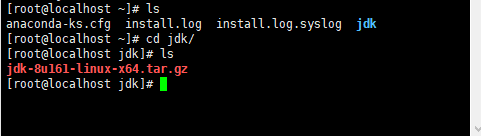
Then I insert the instruction to decompression it:


As you can see,I succeed to decompression it.And then it will be setting Java environment variable.First,we should use vi editor to open a file named profile,which is under the folder named etc:

The you should insert three settings into the file:JAVA_HOME,PATH, and CLASSPATH.JAVA_PATH is the location of your jdk ,PATH and CLASSPATH are based on your JAVA_PATH,so be careful with your JAVA_PATH:

And then save it with the instuction :wq .After that,we should insert a instruction to make sense of this file:

Then we will insert the instruction to test if the Java runtime environment is setted success:

It shows that the java version which I use is "1.8.0_161",which means that I have succeed in setting the environment.
Learning Experience of Big Data: Connect CentOs to Xshell and set Java environment on CentOS的更多相关文章
- Learning Experience of Big Data: Learn to install CentOs 6.5 on my laptop
I have learnt some experience about Big Data during my summer vocation,I was told that The first thi ...
- Learning Experience of Big Data: Deploying Tomcat 8.0 and connect ssh without password
This mission seems to be easier--we can just decompression Tomcat to our virtural machine and deploy ...
- Learning Experience of Big Data:The First Day-Try to set up a network connection on my virtural machine
After we install our virtual machine,the first thing we should do is to set up a network connection ...
- Learning Spark: Lightning-Fast Big Data Analysis 中文翻译
Learning Spark: Lightning-Fast Big Data Analysis 中文翻译行为纯属个人对于Spark的兴趣,仅供学习. 如果我的翻译行为侵犯您的版权,请您告知,我将停止 ...
- 少标签数据学习:宾夕法尼亚大学Learning with Few Labeled Data
目录 Few-shot image classification Three regimes of image classification Problem formulation A flavor ...
- [转]Installing python 2.7 on centos 6.3. Follow this sequence exactly for centos machine only
Okay for centos 6.4 also On apu.0xdata.loc, after this install was done $ which python /usr/local/bi ...
- CentOS 使用yum命令安装Java SDK(openjdk)
CentOS 6.X 和 5.X 自带有OpenJDK runtime environment (openjdk).它是一个在linux上实现开源的java 平台.CentOS yum 命令 安装 ...
- yum命令安装软件时,出现--centos 7 安装apache 出现 Could not resolve host: mirrorlist.centos.org; 未知的错误"--CentOS网络设置 couldn't resolve host 'mirrorlist.centos.org问题解决
CentOS网络设置 couldn't resolve host 'mirrorlist.centos.org问题解决 今天在虚拟机上安装完CentOS6.5之后,首次使用时yum命令安装软件时,出现 ...
- CentOS安装tomcat并且部署Java Web项目具有一定的参考价值
本篇文章主要介绍了CentOS安装tomcat并且部署Java Web项目,具有一定的参考价值,有需要的可以了解一下.(http://m.8682222.com) 1.准备工作 b.因为tomcat的 ...
随机推荐
- 多线程(三)~多线程中数据的可见性-volatile关键字
我们先来看一段代码: ①.线程类,用全局布尔值控制线程是否结束,每隔1s打印一次当前线程的信息 package com.multiThread.thread; publicclassPrintStri ...
- Microsoft Fluent Design System
转载自:http://www.ui.cn/detail/131217.html 就在刚刚举办的 Microsoft Build 2017 中,微软对外公布了它们最新的设计语言--"Fluen ...
- SDET面试之感受篇。
某年某月的某一天,我来到了太监村的一栋大厦,因为早到了半个小时,拿出来提前准备好的code随便的翻看着. 人家都说,面试头五分钟就已经决定了,是否能面试成功.所以,面试真正的真谛可能就是相面.什么写c ...
- Nginx AWS ELB 域名解析后端502问题
转载:http://liyangliang.me/posts/2016/04/nginx-aws-elb-name-resolution/
- 设计模式——观察者模式(ObserverPattern)
观察者模式(ObserverPattern):观察者模式又称发布-订阅(Publish/Subscribe)模式,定义了一个中一对多的依赖关系,让多个观察者对象同时监听某一个主题对象.这个主题对象在状 ...
- GraphQL 到底怎么用?看看这个例子就知道了
转载自: https://www.infoq.cn/article/i5JMm54_aWrRZcem1VgH
- softmax实现cifar10分类
将cifar10改成单一通道后,套用前面的softmax分类,分类率40%左右,想哭... .caret, .dropup > .btn > .caret { border-top-col ...
- 动态规划(DP),递推,最大子段和,POJ(2479,2593)
题目链接:http://poj.org/problem?id=2479 解题报告: 1.再求left[i]的时候,先没有考虑a[i]的正负,先把a[i]放到left[i]中,然后left=max(le ...
- PS中会使用到的快捷键有那些?
P.S:我刚刚在百度上,搜了一些关于PS的快捷键的使用. 我把它总结了一下.对我今后的P图有所帮助. PS的所有快捷键 1. 显示/隐藏选择区域 [Ctrl]+[H] 2. 取消当前命令:Esc: 工 ...
- 【洛谷P2426】删数
删数 题目链接 一道裸的区间DP,f[l][r]表示剩下区间[l,r]时的最大价值 可以由f[1~l-1][r]和f[l][r+1~n]转移过来 详见代码: #include<algorithm ...