
Learning Experience of Big Data: Deploying Tomcat 8.0 and connect ssh without password
This mission seems to be easier--we can just decompression Tomcat to our virtural machine and deploy ssh to login without password.Login ssh without password is very critical,although distributed Systems can also run without it.But,as we know,distributed system are based on many servers,isn't it inconvenient for you if every time you try to connect the server's ssh you should enter your password?So,that's the importance of it.
First of all, we should download Tomcat to our system(As I have said before,download the file whose suffix name is .tar.gz):

Also,we should decompression the file :

Succeed

Next,we should start our Tomcat to observe it can use or not.The starting program of Tomcat is in the folder named bin,whose name is startup.sh
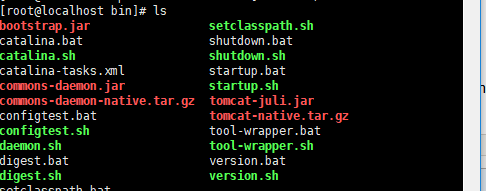
now we execute the starting program:
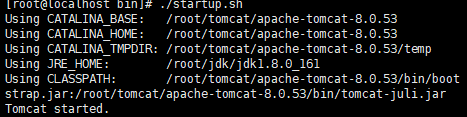
It can be seen on the screen that Tomcat started successfully,now we will start the browser to prove it,definitely,we will unable to access the website:192.168.109.151:8080(your ip + :8080).Why,this is because of the firewall.We must to stop the firewall:
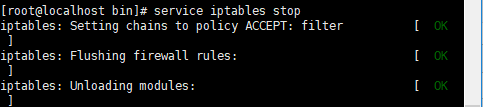
You can connect to the website again and yiou will find we can browse it.
The second step is to download ssh:there are two programs we should download ---openssh.client and openssh.server,we can just use the instruction "yum" to download it rather than DIY:

After this step,we'll try if you can try to connect your own system by the instruction:
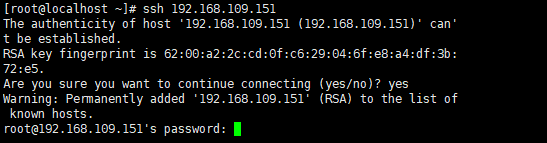
You'll find you should enter your password even if you try to connect your own system!It's so inconvenient for us to enter it!
Then we will change it's authorization file to accomplish login it without password:

Then we just press "enter" to the end
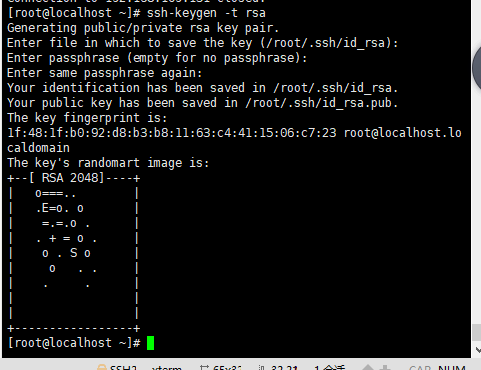
Next we should find a file named file .ssh,which is hidden.We should enter this file and we'll find three text,the thing we should do is to change the name of the text named id_isa.pub into authorized_keys

Then we can try to use our system to connect our own system again,you 'll find you can connect to your system without password!

Learning Experience of Big Data: Deploying Tomcat 8.0 and connect ssh without password的更多相关文章
- Learning Experience of Big Data: Learn to install CentOs 6.5 on my laptop
I have learnt some experience about Big Data during my summer vocation,I was told that The first thi ...
- Learning Experience of Big Data: Connect CentOs to Xshell and set Java environment on CentOS
1.set up connections between vitural machine and Xshell: After we connect the virtural machine to ne ...
- Learning Experience of Big Data:The First Day-Try to set up a network connection on my virtural machine
After we install our virtual machine,the first thing we should do is to set up a network connection ...
- Learning Spark: Lightning-Fast Big Data Analysis 中文翻译
Learning Spark: Lightning-Fast Big Data Analysis 中文翻译行为纯属个人对于Spark的兴趣,仅供学习. 如果我的翻译行为侵犯您的版权,请您告知,我将停止 ...
- 少标签数据学习:宾夕法尼亚大学Learning with Few Labeled Data
目录 Few-shot image classification Three regimes of image classification Problem formulation A flavor ...
- Linux Tomcat 6.0安装配置实践总结
系统环境: Red Hat Enterprise Linux Server release 5.7 (Tikanga) 64位 Tomcat下载 从官方网站 http://tomcat.apache ...
- Solr 5.5.0 + tomcat 7.0.69 + zookeeper-3.4.6 Cloud部署
Solr介绍:Solr是一个独立的企业级搜索应用服务器,Solr基于Lucene的全文搜索服务器,同时对其进行了扩展,提供了比Lucene更为丰富的查询语言,同时实现了可配置.可扩展并对查询性能进行了 ...
- tomcat 8.0 进程没有全部杀死
The web application [FileIO_new_interface] created a ThreadLocal with key of type [java.lang.ThreadL ...
- Server Tomcat v7.0 Server at localhost was unable to start within 45 seconds
错误:Server Tomcat v7.0 Server at localhost was unable to start within 45 seconds 错误提示就是我们限定了部署的时间导致的错 ...
随机推荐
- AWS的load balance
Route53实现了地理上的load balance; ELB实现了region内的load balance CloudFront实现了静态内容的全网加速 ZULh?*;&T(
- javascript fundamental concept
http://hzjavaeyer.group.iteye.com/group/wiki?category_id=283 上面这个url非常适合javascript初学者阅读,感谢原作者的分享 什么是 ...
- devexpress 中 XtraTabcontrol 改变BackColor 的方法
装载自CSDN,原文地址 https://blog.csdn.net/zjzytnn/article/details/53699340 今天在实现CAD文件的读和显示操作的时候,需要将CAD文件显示 ...
- Python学习---递归函数的学习
定义:在函数内部,可以调用其他函数.如果一个函数在内部调用自身本身,这个函数就是递归函数. 递归特性: 1. 必须有一个明确的结束条件 2. 每次进入更深一层递归时,问题规模相比上次递归都应有所减少 ...
- Windows下Redis集群配置
Redis集群学习地址:http://blog.csdn.net/dc_726/article/details/11694437 Windows-32系统下搭建Redis集群 一.Redis主从同步原 ...
- [EffectiveC++]item33:避免遮掩继承而来的名称。
先看看: ZT C++ 重载.覆盖和隐藏的区别 http://www.cnblogs.com/jeanschen/p/3405987.html 隐藏是指派生类的函数屏蔽了与其同名的基类函数,规则如下: ...
- 完整详解GCD系列(三)dispatch_group
http://blog.csdn.net/hello_hwc/article/details/41409135 一.dispatch_group把一组任务提交到队列中,这些队列可以不相关,然后坚挺这组 ...
- Codeforces Round #540 (Div. 3) C. Palindromic Matrix 【暴力】
任意门:http://codeforces.com/contest/1118/problem/C C. Palindromic Matrix time limit per test 2 seconds ...
- thinkphp 和 laravel使用sql语句操作db和源码浅析
thinkphp 和 laravel是phper开发中用的比较多的两个框架,无所谓好坏,看个人习惯及喜爱! 前言对于一个PHP应用,可能最多的就是操作数据,以致于初学者有时只把php当做数据库增删查改 ...
- Spring时间(Date)类型转换+自定义
第一种方法:利用内置的 CustomDateEditor(不推荐,每个类都需要定义) 首先,在我们的 Controller 的 InitBinder 里面,注册 CustomEditor //首先初始 ...