
Python爬虫: "追新番"网站资源链接爬取
“追新番”网站
追新番网站提供最新的日剧和日影下载地址,更新比较快。
个人比较喜欢看日剧,因此想着通过爬取该网站,做一个资源地图
可以查看网站到底有哪些日剧,并且随时可以下载。
资源地图
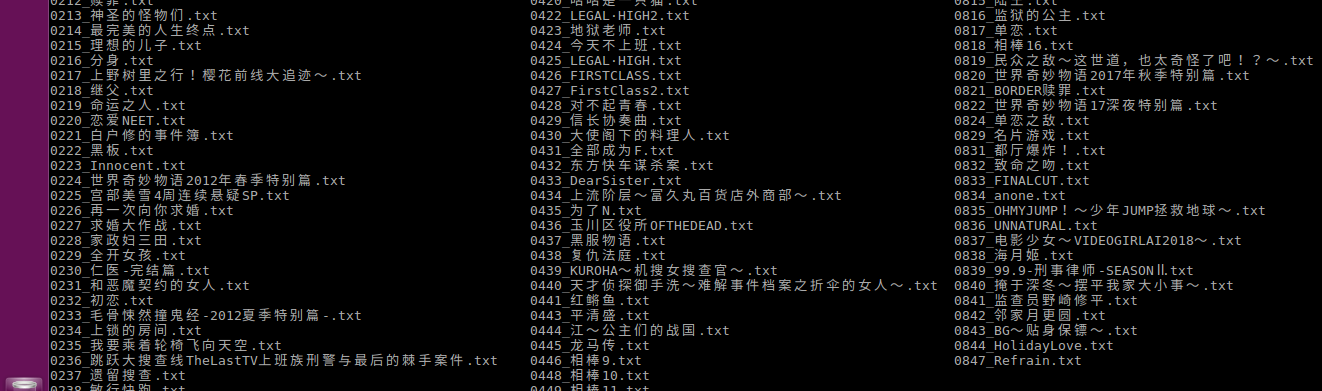
爬取的资源地图如下:
在linux系统上通过 ls | grep keywords 可以轻松找到想要的资源(windows直接搜索就行啦)
爬取脚本开发
1. 确定爬取策略
进入多个日剧,可以查看到每个剧的网址都是如下形式:

可以看出,每个日剧网页都对应一个编号。
因此我们可以通过遍历编号来爬取。
2. 获取日剧的名字
打开其中一个日剧的网页,查看标题的源代码如下:
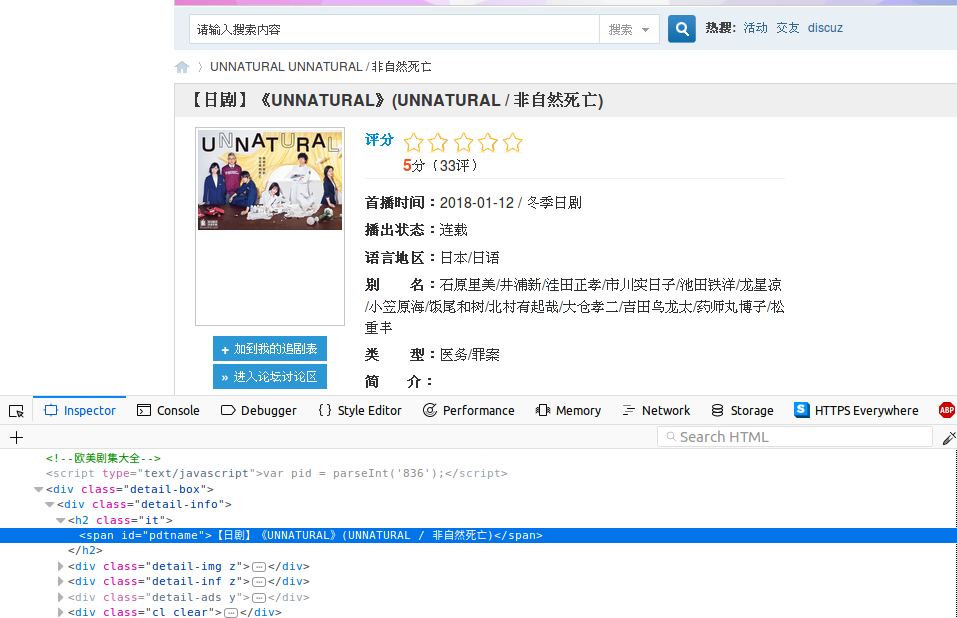
可以看到,标题的标签ID为"pdtname", 我们只要获取该标签的文本即可获取日剧名字
通过beautifulSoup的接口,获取该标签内容(去除了名字中多余东西)
     # try get tv name
     tag_name = soup.find(id='pdtname')
     if None == tag_name:
         print('tv_{:0>4d}: not exist.'.format(num))
         return None

     # remove signs not need
     name = tag_name.get_text().replace(' ', '')
     try:
         name = name.replace(re.search('【.*】', name).group(0), '')
         name = name.replace(re.search('\(.*\)', name).group(0), '')
         name = name.replace('《', '')
         name = name.replace('》', '')
         name = name.replace('/', '')
     except :
         pass
3. 获取资源链接
在每个日剧页面中同时也包含了资源链接的地址,查看源代码如下:
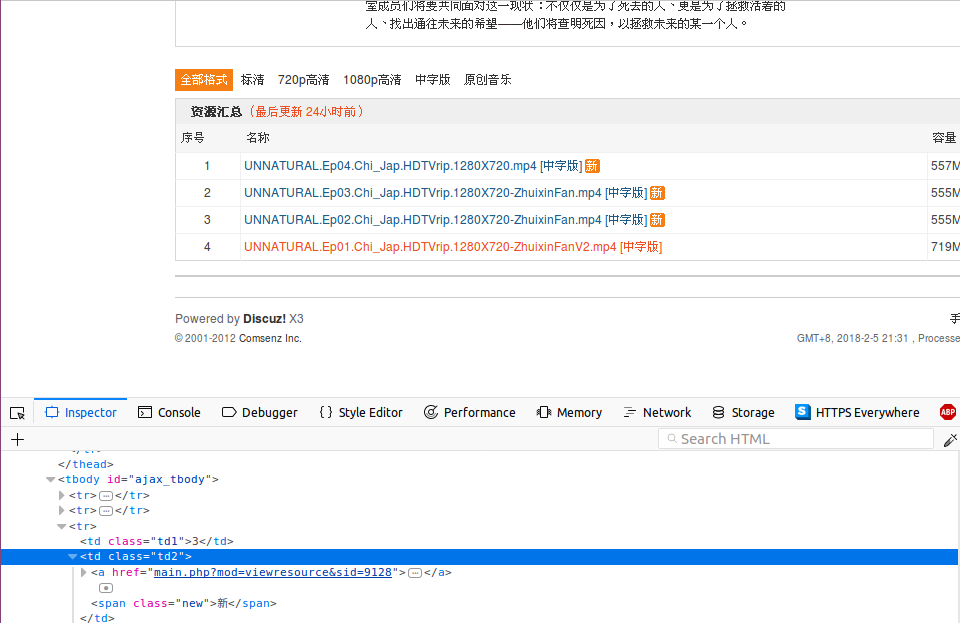
可以看到资源链接使用了一个表块,并且表块的ID为"ajax_tbody"
其中每一集都是表的行元素,每一行又包含了几列来显示资源的各个信息
我们通过遍历表的元素来获取每一集的资源链接
    # try get tv resources list
    tag_resources = soup.find(id='ajax_tbody')
    if None == tag_resources:
        print('tv_{:0>4d}: has no resources.'.format(num))
        return None

    # walk resources
    for res in tag_resources.find_all('tr'):

        # get link tag
        tag_a = res.find('a')
        info = res.find_all('td')
        print('resource: ', tag_a.get_text())

        # get download link
        downlink = get_resources_link(session, tag_a.get('href'))

        # record resouces
        tv.resources.append([tag_a.get_text(), info[2].get_text(), downlink, ''])
        delay(1)
4. 获取下载链接
点击其中一个资源,进入下载链接页面,查看源代码如下
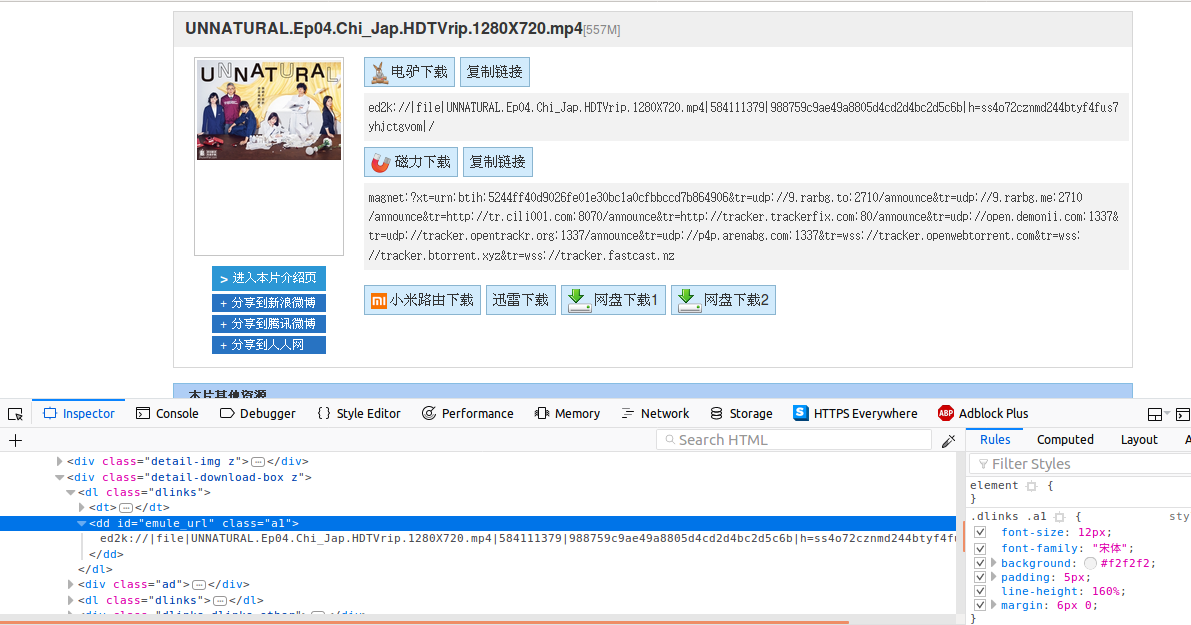
可以看到电驴的下载链接标签ID为"emule_url",因此我们只需要获取该标签的文本就可以了(磁力链接类似)
不过首先我们还需要先获取该下载页面,整体操作代码如下
def get_resources_link(session, url):
    ''' get tv resources download link  '''

    global domain
    res_url = domain + url

    # open resources page
    resp = session.get(res_url, timeout = 10)
    resp.raise_for_status()

    soup = page_decode(resp.content, resp.encoding)

    tag_emule = soup.find(id='emule_url')
    return tag_emule.get_text() if tag_emule != None else ''
5. 将资源下载链接保存到本地
其中,由于爬取所有日剧的下载链接比较耗时,前面做了判断可以只爬取标题,日后根据序号再爬取下载链接
def save_tv(tv):
    ''' save tv infomation on disk '''

    filename = os.path.join(os.path.abspath(save_dir), '{:0>4d}_{}.txt'.format(tv.num, tv.name))

    global only_catalog
    if only_catalog == True:
        with open(filename, 'a+') as f:
            pass
    else:
        with open(filename, 'w') as f:
            for info in tv.resources:
                f.write(os.linesep.join(info))
                f.write('========' + os.linesep)
以上,就是整个爬取脚本的开发过程。
欢迎关注我的代码仓库: https://gitee.com/github-18274965/Python-Spider
以后还会开发其余网站的爬取脚本。
附录
整体代码:
 #!/usr/bin/python3
 # -*- coding:utf-8 -*-

 import os
 import sys
 import re
 import requests
 from bs4 import BeautifulSoup
 from time import sleep

 # website domain
 domain = 'http://www.zhuixinfan.com/'

 # spide infomation save directory
 save_dir = './tvinfo/'

 # only tv catalog
 only_catalog = False

 class TVInfo:
     ''' TV infomation class'''

     def __init__(self, num, name):
         self.num = num
         self.name = name
         self.resources = []

 def delay(seconds):
     ''' sleep for secondes '''

     while seconds > 0:
         sleep(1)
         seconds = seconds - 1

 def page_decode(content, encoding):
     ''' decode page '''

     # lxml may failed, then try html.parser
     try:
         soup = BeautifulSoup(content, 'lxml', from_encoding=encoding)
     except:
         soup = BeautifulSoup(content, 'html.parser', from_encoding=encoding)

     return soup

 def open_home_page(session):
     ''' open home page first as humain being '''

     global domain
     home_url = domain + 'main.php'

     # open home page
     resp = session.get(home_url, timeout = 10)
     resp.raise_for_status()

     # do nothing

 def get_resources_link(session, url):
     ''' get tv resources download link  '''

     global domain
     res_url = domain + url

     # open resources page
     resp = session.get(res_url, timeout = 10)
     resp.raise_for_status()

     soup = page_decode(resp.content, resp.encoding)

     tag_emule = soup.find(id='emule_url')
     return tag_emule.get_text() if tag_emule != None else ''

 def spider_tv(session, num):
     ''' fetch tv infomaion '''

     global domain
     tv_url = domain + 'viewtvplay-{}.html'.format(num)

     # open tv infomation page
     resp = session.get(tv_url, timeout = 10)
     resp.raise_for_status()

     soup = page_decode(resp.content, resp.encoding)

     # try get tv name
     tag_name = soup.find(id='pdtname')
     if None == tag_name:
         print('tv_{:0>4d}: not exist.'.format(num))
         return None

     # try get tv resources list
     tag_resources = soup.find(id='ajax_tbody')
     if None == tag_resources:
         print('tv_{:0>4d}: has no resources.'.format(num))
         return None

     # remove signs not need
     name = tag_name.get_text().replace(' ', '')
     try:
         name = name.replace(re.search('【.*】', name).group(0), '')
         name = name.replace(re.search('\(.*\)', name).group(0), '')
         name = name.replace('《', '')
         name = name.replace('》', '')
         name = name.replace('/', '')
     except :
         pass

     print('tv_{:0>4d}: {}'.format(num, name))

     tv = TVInfo(num, name)

     global only_catalog
     if only_catalog == True:
         return tv

     # walk resources
     for res in tag_resources.find_all('tr'):

         # get link tag
         tag_a = res.find('a')
         info = res.find_all('td')
         print('resource: ', tag_a.get_text())

         # get download link
         downlink = get_resources_link(session, tag_a.get('href'))

         # record resouces
         tv.resources.append([tag_a.get_text(), info[2].get_text(), downlink, ''])
         delay(1)

     return tv

 def save_tv(tv):
     ''' save tv infomation on disk '''

     filename = os.path.join(os.path.abspath(save_dir), '{:0>4d}_{}.txt'.format(tv.num, tv.name))

     global only_catalog
     if only_catalog == True:
         with open(filename, 'a+') as f:
             pass
     else:
         with open(filename, 'w') as f:
             for info in tv.resources:
                 f.write(os.linesep.join(info))
                 f.write('========' + os.linesep)

 def main():

     start = 1
     end = 999

     if len(sys.argv) > 1:
         start = int(sys.argv[1])

     if len(sys.argv) > 2:
         end = int(sys.argv[2])

     global only_catalog
     s = input("Only catalog ?[y/N] ")
     if s == 'y' or s == 'Y':
         only_catalog = True

     # headers: firefox_58 on ubuntu
     headers = {
         'User-Agent': 'Mozilla/5.0 (X11; Ubuntu; Linux x86_64; rv:58.0)'
                 + ' Gecko/20100101 Firefox/58.0',
         'Accept': 'text/html,application/xhtml+xml,application/xml;q=0.9,*/*;q=0.8',
         'Accept-Language': 'zh-CN,en-US;q=0.7,en;q=0.3',
         'Accept-Encoding': 'gzip, deflate',
         }

     # create spider session
     with requests.Session() as s:

         try:
             s.headers.update(headers)
             open_home_page(s)
             for num in range(start, end+1):
                 delay(3)
                 tv = spider_tv(s, num)
                 if tv != None:
                     save_tv(tv)

         except Exception as err:
             print(err)
             exit(-1)

 if __name__ == '__main__':
     main()
Python爬虫: "追新番"网站资源链接爬取的更多相关文章
- Python爬虫教程-13-爬虫使用cookie爬取登录后的页面(人人网)(下)
Python爬虫教程-13-爬虫使用cookie爬取登录后的页面(下) 自动使用cookie的方法,告别手动拷贝cookie http模块包含一些关于cookie的模块,通过他们我们可以自动的使用co ...
- [Python爬虫] 使用 Beautiful Soup 4 快速爬取所需的网页信息
[Python爬虫] 使用 Beautiful Soup 4 快速爬取所需的网页信息 2018-07-21 23:53:02 larger5 阅读数 4123更多 分类专栏: 网络爬虫 版权声明: ...
- python爬虫学习之使用BeautifulSoup库爬取开奖网站信息-模块化
实例需求:运用python语言爬取http://kaijiang.zhcw.com/zhcw/html/ssq/list_1.html这个开奖网站所有的信息,并且保存为txt文件和excel文件. 实 ...
- Python爬虫教程-12-爬虫使用cookie爬取登录后的页面(人人网)(上)
Python爬虫教程-12-爬虫使用cookie(上) 爬虫关于cookie和session,由于http协议无记忆性,比如说登录淘宝网站的浏览记录,下次打开是不能直接记忆下来的,后来就有了cooki ...
- Python爬虫入门教程: 27270图片爬取
今天继续爬取一个网站,http://www.27270.com/ent/meinvtupian/ 这个网站具备反爬,so我们下载的代码有些地方处理的也不是很到位,大家重点学习思路,有啥建议可以在评论的 ...
- Python爬虫实战(2):爬取京东商品列表
1,引言 在上一篇<Python爬虫实战:爬取Drupal论坛帖子列表>,爬取了一个用Drupal做的论坛,是静态页面,抓取比较容易,即使直接解析html源文件都可以抓取到需要的内容.相反 ...
- Python爬虫小白入门(六)爬取披头士乐队历年专辑封面-网易云音乐
一.前言 前文说过我的设计师小伙伴的设计需求,他想做一个披头士乐队历年专辑的瀑布图. 通过搜索,发现网易云音乐上有比较全的历年专辑信息加配图,图片质量还可以,虽然有大有小. 我的例子怎么都是爬取图片? ...
- Python爬虫入门教程 6-100 蜂鸟网图片爬取之一
1. 蜂鸟网图片--简介 国庆假日结束了,新的工作又开始了,今天我们继续爬取一个网站,这个网站为 http://image.fengniao.com/ ,蜂鸟一个摄影大牛聚集的地方,本教程请用来学习, ...
- Python爬虫入门教程 5-100 27270图片爬取
27270图片----获取待爬取页面 今天继续爬取一个网站,http://www.27270.com/ent/meinvtupian/ 这个网站具备反爬,so我们下载的代码有些地方处理的也不是很到位, ...
随机推荐
- 避免if语句的深层次嵌套
公司做了个抢红包的限制,然后ajax请求的返回字段,要进行多层逻辑的判断,想想是真恶心,虽然都是简单逻辑,而且看别人以前写的代码,发现,哎,注释能不能写上吶,像我写代码都是细致到,哪怕初学者也能看懂这 ...
- 为什么未来是全栈project师的世界?
谨以此文献给每个为成为优秀全栈project师奋斗的人. 节选自<Growth: 全栈增长project师指南> 技术在过去的几十年里进步非常快,也将在未来的几十年里发展得更快. 今天技术 ...
- JS实现鼠标经过用户头像显示资料卡的效果,可点击
基于项目的须要.须要制作出例如以下的一种页面效果:当用户鼠标经过好友列表中好友头像时,显示该好友的基本资料.事实上也就是类似QQclient的那种功能. 网上找了非常多代码,基本都实现了鼠标悬浮之后弹 ...
- 使用ant编译项目技能
ant编译时指定jdk的版本号 系统的jdk版本号是1.6,而项目使用的jdk版本号是1.5.所以在编译时须要指定jdk的版本号为1.5,能够使用以下的方法为javac 任务指定fork和execut ...
- 【56.74%】【codeforces 732B】Cormen --- The Best Friend Of a Man
time limit per test1 second memory limit per test256 megabytes inputstandard input outputstandard ou ...
- Method and system for implementing mandatory file access control in native discretionary access control environments
A method is provided for implementing a mandatory access control model in operating systems which na ...
- Android开发者的演示工具——asm.jar
作为Android开发者,我们有时候需要给客户或者其他人演示我们的Android作品.我们可以使用类似豌豆荚.360手机助手这样的软件,今天我来介绍一个Android开发者的演示工具--asm.jar ...
- elasticsearch-jdbc
jprante/elasticsearch-jdbc The Java Database Connection (JDBC) importer allows to fetch data from JD ...
- 自己动手编写一个VS插件(六)
作者:朱金灿 来源:http://blog.csdn.net/clever101 在上篇中我们已经实现了创建和显示一个工具栏出来,它的效果图是这样的: 现在我们实现一些简单功能,具体就是单击按钮弹出一 ...
- SQLite 适用场景
SQLite最佳试用场合 网站 作为数据库引擎SQLite适用于中小规模流量的网站(也就是说, 99.9%的网站). SQLite可以处理多少网站流量在于网站的数据库有多大的压力. 通常来说, 如果一 ...