
python之scrapy爬取jd和qq招聘信息
1、settings.py文件
# -*- coding: utf-8 -*-

# Scrapy settings for jd project

#

# For simplicity, this file contains only settings considered important or

# commonly used. You can find more settings consulting the documentation:

#

#     https://doc.scrapy.org/en/latest/topics/settings.html

#     https://doc.scrapy.org/en/latest/topics/downloader-middleware.html

#     https://doc.scrapy.org/en/latest/topics/spider-middleware.html

BOT_NAME = 'jd'

SPIDER_MODULES = ['jd.spiders']

NEWSPIDER_MODULE = 'jd.spiders'

LOG_LEVEL="WARNING"

LOG_FILE="./jingdong1.log"

# Crawl responsibly by identifying yourself (and your website) on the user-agent

#USER_AGENT = 'jd (+http://www.yourdomain.com)'

# Obey robots.txt rules

ROBOTSTXT_OBEY = True

# Configure maximum concurrent requests performed by Scrapy (default: 16)

#CONCURRENT_REQUESTS = 32

# Configure a delay for requests for the same website (default: 0)

# See https://doc.scrapy.org/en/latest/topics/settings.html#download-delay

# See also autothrottle settings and docs

#DOWNLOAD_DELAY = 3

# The download delay setting will honor only one of:

#CONCURRENT_REQUESTS_PER_DOMAIN = 16

#CONCURRENT_REQUESTS_PER_IP = 16

# Disable cookies (enabled by default)

#COOKIES_ENABLED = False

# Disable Telnet Console (enabled by default)

#TELNETCONSOLE_ENABLED = False

# Override the default request headers:

#DEFAULT_REQUEST_HEADERS = {

#   'Accept': 'text/html,application/xhtml+xml,application/xml;q=0.9,*/*;q=0.8',

#   'Accept-Language': 'en',

#}

# Enable or disable spider middlewares

# See https://doc.scrapy.org/en/latest/topics/spider-middleware.html

#SPIDER_MIDDLEWARES = {

#    'jd.middlewares.JdSpiderMiddleware': 543,

#}

# Enable or disable downloader middlewares

# See https://doc.scrapy.org/en/latest/topics/downloader-middleware.html

#DOWNLOADER_MIDDLEWARES = {

#    'jd.middlewares.JdDownloaderMiddleware': 543,

#}

# Enable or disable extensions

# See https://doc.scrapy.org/en/latest/topics/extensions.html

#EXTENSIONS = {

#    'scrapy.extensions.telnet.TelnetConsole': None,

#}

# Configure item pipelines

# See https://doc.scrapy.org/en/latest/topics/item-pipeline.html

#ITEM_PIPELINES = {

#    'jd.pipelines.JdPipeline': 300,

#}

# Enable and configure the AutoThrottle extension (disabled by default)

# See https://doc.scrapy.org/en/latest/topics/autothrottle.html

#AUTOTHROTTLE_ENABLED = True

# The initial download delay

#AUTOTHROTTLE_START_DELAY = 5

# The maximum download delay to be set in case of high latencies

#AUTOTHROTTLE_MAX_DELAY = 60

# The average number of requests Scrapy should be sending in parallel to

# each remote server

#AUTOTHROTTLE_TARGET_CONCURRENCY = 1.0

# Enable showing throttling stats for every response received:

#AUTOTHROTTLE_DEBUG = False

# Enable and configure HTTP caching (disabled by default)

# See https://doc.scrapy.org/en/latest/topics/downloader-middleware.html#httpcache-middleware-settings

#HTTPCACHE_ENABLED = True

#HTTPCACHE_EXPIRATION_SECS = 0

#HTTPCACHE_DIR = 'httpcache'

#HTTPCACHE_IGNORE_HTTP_CODES = []

#HTTPCACHE_STORAGE = 'scrapy.extensions.httpcache.FilesystemCacheStorage'
2、jingdong.py文件
# -*- coding: utf-8 -*-

import scrapy

import logging

import json

logger = logging.getLogger(__name__)

class JingdongSpider(scrapy.Spider):

    name = 'jingdong'

    allowed_domains = ['zhaopin.jd.com']

    start_urls = ['http://zhaopin.jd.com/web/job/job_list?page=1']

    pageNum = 1

    def parse(self, response):

        content  = response.body.decode()

        content = json.loads(content)

        ##########去除列表中字典集中的空值###########

        for i in range(len(content)):

            #list(content[i].keys()获取当前字典中的key

            for key in list(content[i].keys()): #content[i]为字典

                if not content[i].get(key):#content[i].get(key)根据key获取value

                    del content[i][key] #删除空值字典

        for i in range(len(content)):

            logging.warning(content[i])

        self.pageNum = self.pageNum+1

        if self.pageNum<=355:

            next_url = "http://zhaopin.jd.com/web/job/job_list?page="+str(self.pageNum)

            yield scrapy.Request(

                next_url,

                callback=self.parse

            )

        pass
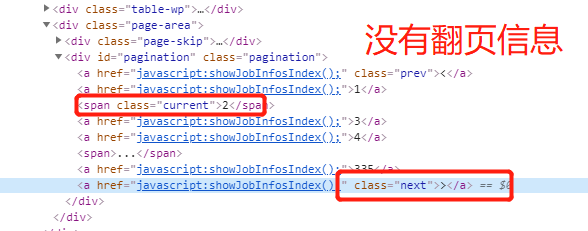
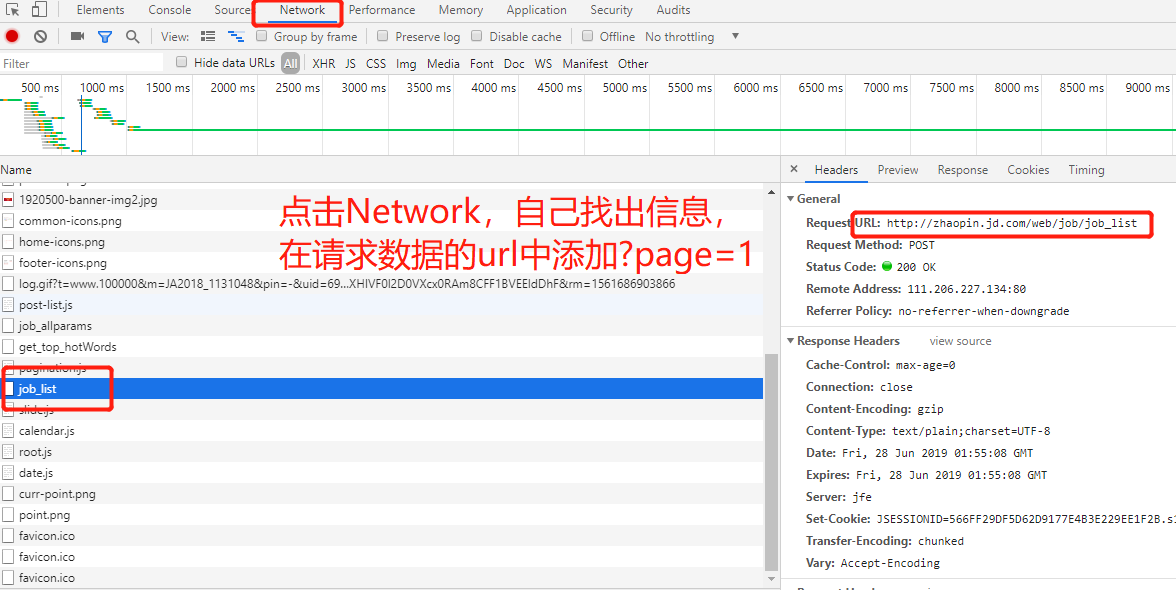
3、注意点,针对jingdong的招聘翻页是使用javascrapt,所以无法使用crawlscrapy进行自动翻页,但是我们再network中查看其获取数据的方法。
如:http://zhaopin.jd.com/web/job/job_list?page=2
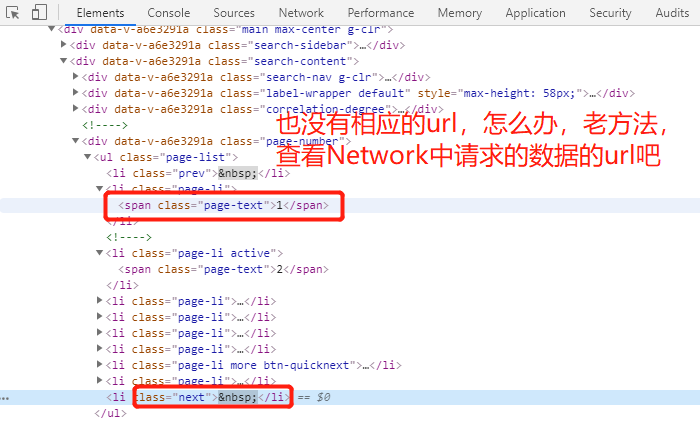
#############jingdong可以了,那么试试tencent公司的招聘信息吧###############
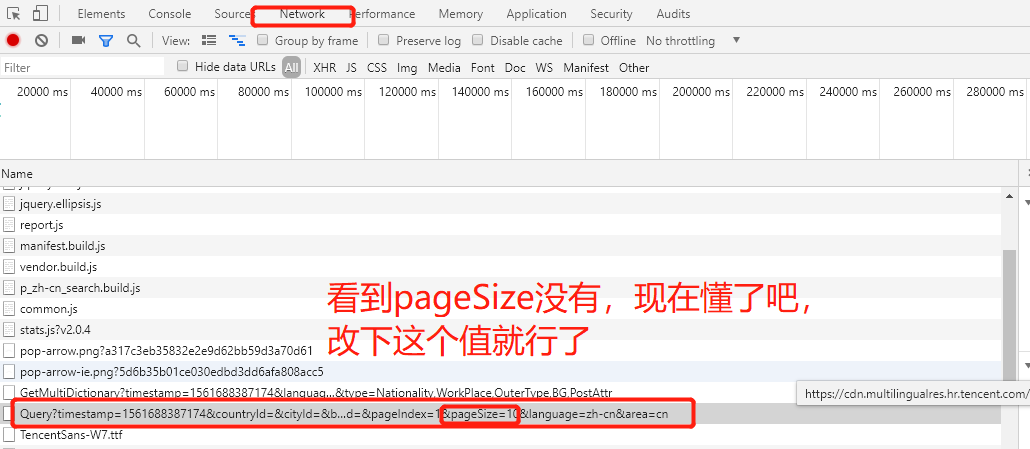
测试下吧!
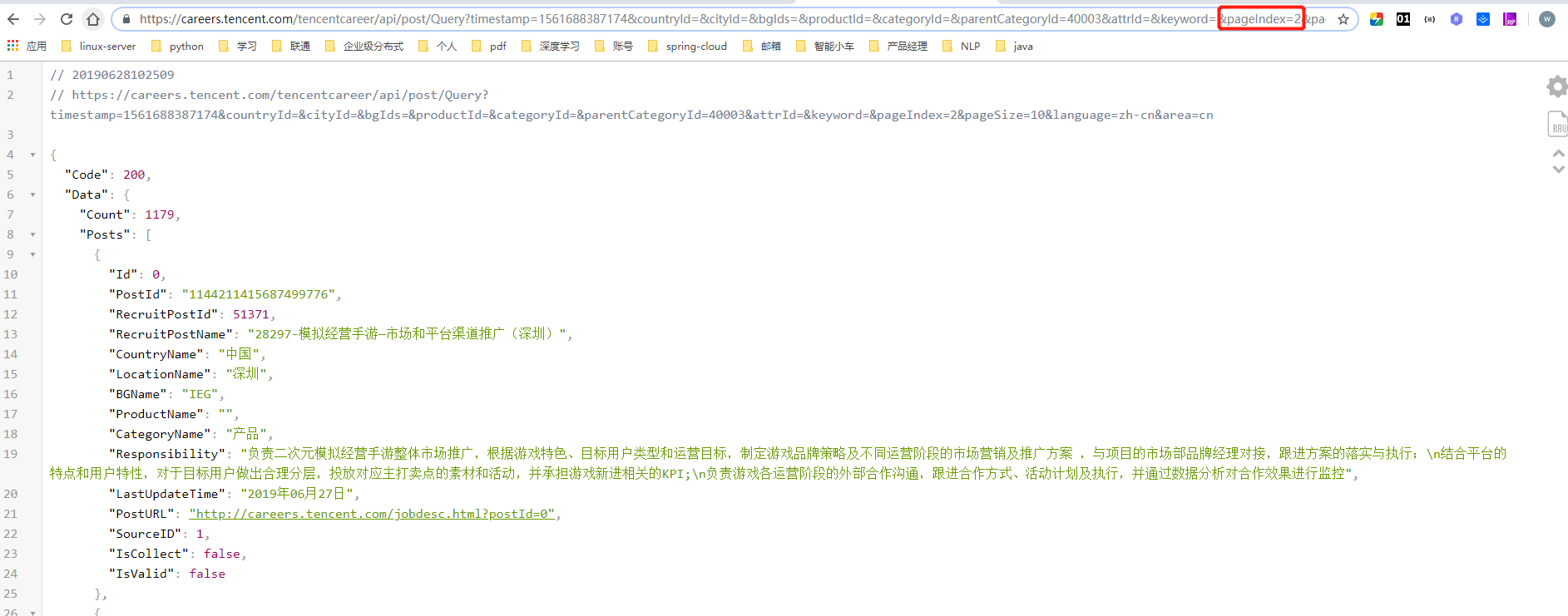
结果知道了吧!!!!! 开始干活!!!!!!!!!!
1、settings.py
# -*- coding: utf-8 -*-

# Scrapy settings for tencent project

#

# For simplicity, this file contains only settings considered important or

# commonly used. You can find more settings consulting the documentation:

#

#     https://doc.scrapy.org/en/latest/topics/settings.html

#     https://doc.scrapy.org/en/latest/topics/downloader-middleware.html

#     https://doc.scrapy.org/en/latest/topics/spider-middleware.html

BOT_NAME = 'tencent'

SPIDER_MODULES = ['tencent.spiders']

NEWSPIDER_MODULE = 'tencent.spiders'

LOG_LEVEL="WARNING"

LOG_FILE="./qq.log"

# Crawl responsibly by identifying yourself (and your website) on the user-agent

USER_AGENT = 'Mozilla/5.0 (Windows NT 10.0; Win64; x64) AppleWebKit/537.36 (KHTML, like Gecko) Chrome/74.0.3729.131 Safari/537.36'

# Obey robots.txt rules

#ROBOTSTXT_OBEY = True

# Configure maximum concurrent requests performed by Scrapy (default: 16)

#CONCURRENT_REQUESTS = 32

# Configure a delay for requests for the same website (default: 0)

# See https://doc.scrapy.org/en/latest/topics/settings.html#download-delay

# See also autothrottle settings and docs

#DOWNLOAD_DELAY = 3

# The download delay setting will honor only one of:

#CONCURRENT_REQUESTS_PER_DOMAIN = 16

#CONCURRENT_REQUESTS_PER_IP = 16

# Disable cookies (enabled by default)

#COOKIES_ENABLED = False

# Disable Telnet Console (enabled by default)

#TELNETCONSOLE_ENABLED = False

# Override the default request headers:

#DEFAULT_REQUEST_HEADERS = {

#   'Accept': 'text/html,application/xhtml+xml,application/xml;q=0.9,*/*;q=0.8',

#   'Accept-Language': 'en',

#}

# Enable or disable spider middlewares

# See https://doc.scrapy.org/en/latest/topics/spider-middleware.html

#SPIDER_MIDDLEWARES = {

#    'tencent.middlewares.TencentSpiderMiddleware': 543,

#}

# Enable or disable downloader middlewares

# See https://doc.scrapy.org/en/latest/topics/downloader-middleware.html

#DOWNLOADER_MIDDLEWARES = {

#    'tencent.middlewares.TencentDownloaderMiddleware': 543,

#}

# Enable or disable extensions

# See https://doc.scrapy.org/en/latest/topics/extensions.html

#EXTENSIONS = {

#    'scrapy.extensions.telnet.TelnetConsole': None,

#}

# Configure item pipelines

# See https://doc.scrapy.org/en/latest/topics/item-pipeline.html

#ITEM_PIPELINES = {

#    'tencent.pipelines.TencentPipeline': 300,

#}

# Enable and configure the AutoThrottle extension (disabled by default)

# See https://doc.scrapy.org/en/latest/topics/autothrottle.html

#AUTOTHROTTLE_ENABLED = True

# The initial download delay

#AUTOTHROTTLE_START_DELAY = 5

# The maximum download delay to be set in case of high latencies

#AUTOTHROTTLE_MAX_DELAY = 60

# The average number of requests Scrapy should be sending in parallel to

# each remote server

#AUTOTHROTTLE_TARGET_CONCURRENCY = 1.0

# Enable showing throttling stats for every response received:

#AUTOTHROTTLE_DEBUG = False

# Enable and configure HTTP caching (disabled by default)

# See https://doc.scrapy.org/en/latest/topics/downloader-middleware.html#httpcache-middleware-settings

#HTTPCACHE_ENABLED = True

#HTTPCACHE_EXPIRATION_SECS = 0

#HTTPCACHE_DIR = 'httpcache'

#HTTPCACHE_IGNORE_HTTP_CODES = []

#HTTPCACHE_STORAGE = 'scrapy.extensions.httpcache.FilesystemCacheStorage'
2、mahuateng.py
# -*- coding: utf-8 -*-

import scrapy

import json

import logging

class MahuatengSpider(scrapy.Spider):

    name = 'mahuateng'

    allowed_domains = ['careers.tencent.com']

    start_urls = ['https://careers.tencent.com/tencentcareer/api/post/Query?timestamp=1561688387174&countryId=&cityId=&bgIds=&productId=&categoryId=&parentCategoryId=40003&attrId=&keyword=&pageIndex=1&pageSize=10&language=zh-cn&area=cn']

    pageNum = 1

    def parse(self, response):

        content = response.body.decode()

        content = json.loads(content)

        content=content['Data']['Posts']

        #删除空字典

        for con in content:

            #print(con)

            for key in list(con.keys()):

                if not con.get(key):

                    del con[key]

        #记录每一个岗位信息

        for con in content:

            logging.warning(con)

        #####翻页######

        self.pageNum = self.pageNum+1

        if self.pageNum<=118:

            next_url = "https://careers.tencent.com/tencentcareer/api/post/Query?timestamp=1561688387174&countryId=&cityId=&bgIds=&productId=&categoryId=&parentCategoryId=40003&attrId=&keyword=&pageIndex="+str(self.pageNum)+"&pageSize=10&language=zh-cn&area=cn"

            yield  scrapy.Request(

                next_url,

                callback=self.parse

            )
个人测试是可以的,你们的就看运气了,哈哈!
这些都是个人玩的,码的比较丑陋。
python之scrapy爬取jd和qq招聘信息的更多相关文章
- 利用scrapy爬取腾讯的招聘信息
利用scrapy框架抓取腾讯的招聘信息,爬取地址为:https://hr.tencent.com/position.php 抓取字段包括:招聘岗位,人数,工作地点,发布时间,及具体的工作要求和工作任务 ...
- python之scrapy爬取某集团招聘信息以及招聘详情
1.定义爬取的字段items.py # -*- coding: utf-8 -*- # Define here the models for your scraped items # # See do ...
- scrapy爬取全部知乎用户信息
# -*- coding: utf-8 -*- # scrapy爬取全部知乎用户信息 # 1:是否遵守robbots_txt协议改为False # 2: 加入爬取所需的headers: user-ag ...
- python之scrapy爬取jingdong招聘信息到mysql数据库
1.创建工程 scrapy startproject jd 2.创建项目 scrapy genspider jingdong 3.安装pymysql pip install pymysql 4.set ...
- Python爬虫从入门到放弃(十八)之 Scrapy爬取所有知乎用户信息(上)
爬取的思路 首先我们应该找到一个账号,这个账号被关注的人和关注的人都相对比较多的,就是下图中金字塔顶端的人,然后通过爬取这个账号的信息后,再爬取他关注的人和被关注的人的账号信息,然后爬取被关注人的账号 ...
- Python爬虫从入门到放弃(十九)之 Scrapy爬取所有知乎用户信息(下)
在上一篇文章中主要写了关于爬虫过程的分析,下面是代码的实现,完整代码在:https://github.com/pythonsite/spider items中的代码主要是我们要爬取的字段的定义 cla ...
- Python之爬虫(二十一) Scrapy爬取所有知乎用户信息(下)
在上一篇文章中主要写了关于爬虫过程的分析,下面是代码的实现,完整代码在:https://github.com/pythonsite/spider items中的代码主要是我们要爬取的字段的定义 cla ...
- Python之爬虫(二十) Scrapy爬取所有知乎用户信息(上)
爬取的思路 首先我们应该找到一个账号,这个账号被关注的人和关注的人都相对比较多的,就是下图中金字塔顶端的人,然后通过爬取这个账号的信息后,再爬取他关注的人和被关注的人的账号信息,然后爬取被关注人的账号 ...
- 使用 Scrapy 爬取去哪儿网景区信息
Scrapy 是一个使用 Python 语言开发,为了爬取网站数据,提取结构性数据而编写的应用框架,它用途广泛,比如:数据挖掘.监测和自动化测试.安装使用终端命令 pip install Scrapy ...
随机推荐
- GOLANG的继承+接口语法练习
继承与接口同时存在 在Golang语言中,可以这么说:接口是继承的功能补充! 武当派有一个徒弟结构体,它继承WuDangMaster结构体的字段及方法 武林之中还有一个泰山北斗,名约少林派,少林入门神 ...
- 008.MVC与数据库的交互
使用ASP.NET MVC实现向数据库插入数据的步骤(程序): (删除,修改,查找)步骤1:创建数据库,创建要使用的表(数据) 表中可以事先插入测试数据步骤2:新建项目,写代码2.1)在配置文件中设置 ...
- java_八大数据类型
一.整型 1.byte 1个字节(8位--一个字节占8位)-128~127 2.short 2个字节 -32768~32767 3.int 4个字节(常用) 4.long 8个字节 ...
- java——从.net再学习java
到底从java中学到了什么? 1,java是由sun公司发明的,sun希望制定一些标准,具体的实现交给具体的厂商来自己实现: 2,java是开源的,第三方做了很多自己的一些组件实现,比如: 很多时候, ...
- Python项目列表
70个Python项目列表: 1.[Python 图片转字符画]2.[200行Python代码实现2048]3.[Python3 实现火车票查询工具]4.[高德API+Python解决租房问题 ]5. ...
- python+Appium自动化:TouchAction九宫格实战
TouchAction Touch Action包含一系列操作,比如按压.长按.点击.移动.暂停. 使用TochAction需要先导入对应的模块 from appium.webdriver.commo ...
- 用cmd 如何输入命令,进入文件夹
用cmd 如何输入命令 进入文件夹 盘符: 例如想进入D盘 d: cd 进入到当前盘某个目录.cd \ 进入当前盘根目录cd \windows 进入到当前盘Windows目录cd.. 退出到上一级目录 ...
- Docker清除容器镜像命令:
# ~/.bash_aliases # Kill all running containers. alias dockerkillall='docker kill $(docker ps -q)' # ...
- MyBatis执行原理图
作者:W&L 推荐: 陶邦仁的博客 (1)加载配置并初始化 触发条件:加载配置文件 配置来源于两个地方,一处是配置文件,一处是Java代码的注解,将SQL的配置信息加载成为一个个M ...
- Git 命令行解决冲突
git add filename 将本地工作区文件加入缓存区 git commit filename -m '提交文件注释' git status 查看当前工作区状态 git fetch ori ...