
利用scrapy爬取腾讯的招聘信息
利用scrapy框架抓取腾讯的招聘信息,爬取地址为:https://hr.tencent.com/position.php
抓取字段包括:招聘岗位,人数,工作地点,发布时间,及具体的工作要求和工作任务
最终结果保存为两个文件,一个文件放前面的四个字段信息,一个放具体内容信息
1.网页分析
通过网页源码和F12显示的代码对比发现,该网页属于静态网页。
可以采用xpath解析网页源码,获取tr标签下的相关内容,具体见代码部分。
2.编辑items.py文件
通过scrapy startproject + 项目名称 生成项目后,来到items.py文件下,首先定义爬取的字段。
# -*- coding: utf-8 -*-

# Define here the models for your scraped items

#

# See documentation in:

# https://doc.scrapy.org/en/latest/topics/items.html

import scrapy

class TencentItem(scrapy.Item):

    # define the fields for your item here like:

    # name = scrapy.Field()

    # 职位名称

    position_name = scrapy.Field()

    # 职位类别

    position_type = scrapy.Field()

    # 招聘人数

    wanted_number = scrapy.Field()

    # 工作地点

    work_location = scrapy.Field()

    # 发布时间

    publish_time = scrapy.Field()

    # 详情信息

    position_link = scrapy.Field()

class DetailsItem(scrapy.Item):

    """

    将详情页提取到的数据另外保存到一个文件中

    """

    # 工作职责

    work_duties = scrapy.Field()

    # 工作要求

    work_skills = scrapy.Field()
3.编写爬虫部分
使用scrapy genspiders + 名称+初始url,生成爬虫后,来到spiders文件夹下的爬虫文件,编写爬虫逻辑,具体代码如下:
# -*- coding: utf-8 -*-

import scrapy

# 导入待爬取字段名

from tencent.items import TencentItem, DetailsItem

class TencentWantedSpider(scrapy.Spider):

    name = 'tencent_wanted'

    allowed_domains = ['hr.tencent.com']

    start_urls = ['https://hr.tencent.com/position.php']

    base_url = 'https://hr.tencent.com/'

    def parse(self, response):

        # 获取页面中招聘信息在网页中位置节点

        node_list = response.xpath('//tr[@class="even"] | //tr[@class="odd"]')

        # 匹配到下一页的按钮

        next_page = response.xpath('//a[@id="next"]/@href').extract_first()

        # 遍历节点,进入详情页,获取其他信息

        for node in node_list:

            # 实例化,填写数据

            item = TencentItem()

            item['position_name'] = node.xpath('./td[1]/a/text()').extract_first()

            item['position_link'] = node.xpath('./td[1]/a/@href').extract_first()

            item['position_type'] = node.xpath('./td[2]/text()').extract_first()

            item['wanted_number'] = node.xpath('./td[3]/text()').extract_first()

            item['work_location'] = node.xpath('./td[4]/text()').extract_first()

            item['publish_time' ] = node.xpath('./td[5]/text()').extract_first()

            yield item

            yield scrapy.Request(url=self.base_url + item['position_link'], callback=self.details)

        # 访问下一页信息

        yield scrapy.Request(url=self.base_url + next_page, callback=self.parse)

    def details(self, response):

        """

        对详情页信息进行抽取和解析

        :return:

        """

        item = DetailsItem()

        # 从详情页获取工作责任和工作技能两个字段名

        item['work_duties'] = ''.join(response.xpath('//ul[@class="squareli"]')[0].xpath('./li/text()').extract())

        item['work_skills'] = ''.join(response.xpath('//ul[@class="squareli"]')[1].xpath('./li/text()').extract())

        yield item
4.编写pipelines.py文件,对抓取数据进行保存。
对爬取的数据进行保存,首先要在settings.py文件里,注册爬虫的管道信息,如:
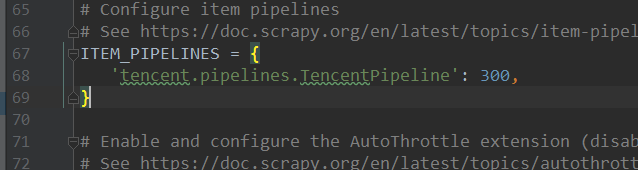
具体代码如下:
# -*- coding: utf-8 -*-

# Define your item pipelines here

#

# Don't forget to add your pipeline to the ITEM_PIPELINES setting

# See: https://doc.scrapy.org/en/latest/topics/item-pipeline.html

import json

from tencent.items import TencentItem, DetailsItem

class TencentPipeline(object):

    def open_spider(self, spider):

        """

        爬虫运行时,执行的方法

        :param spider:

        :return:

        """

        self.file = open('tenc_wanted_2.json', 'w', encoding='utf-8')

        self.file_detail = open('tenc_wanted_detail.json', 'w', encoding='utf-8')

    def process_item(self, item, spider):

        content = json.dumps(dict(item), ensure_ascii=False)

        # 判断数据来源于哪里(是哪个类的实例),写入对应的文件

        if isinstance(item, TencentItem):

            self.file.write(content + '\n')

        if isinstance(item, DetailsItem):

            self.file_detail.write(content + '\n')

        return item

    def close_spider(self, spider):

        """

        爬虫运行结束后执行的方法

        :param spider:

        :return:

        """

        self.file.close()

        self.file_detail.close()
5.运行结果

6.完整代码
参见:https://github.com/zInPython/Tencent_wanted
利用scrapy爬取腾讯的招聘信息的更多相关文章
- python之scrapy爬取jd和qq招聘信息
1.settings.py文件 # -*- coding: utf-8 -*- # Scrapy settings for jd project # # For simplicity, this fi ...
- scrapy爬取全部知乎用户信息
# -*- coding: utf-8 -*- # scrapy爬取全部知乎用户信息 # 1:是否遵守robbots_txt协议改为False # 2: 加入爬取所需的headers: user-ag ...
- 利用 Scrapy 爬取知乎用户信息
思路:通过获取知乎某个大V的关注列表和被关注列表,查看该大V和其关注用户和被关注用户的详细信息,然后通过层层递归调用,实现获取关注用户和被关注用户的关注列表和被关注列表,最终实现获取大量用户信息. 一 ...
- python3 scrapy 爬取腾讯招聘
安装scrapy不再赘述, 在控制台中输入scrapy startproject tencent 创建爬虫项目名字为 tencent 接着cd tencent 用pycharm打开tencent项目 ...
- 利用Crawlspider爬取腾讯招聘数据(全站,深度)
需求: 使用crawlSpider(全站)进行数据爬取 - 首页: 岗位名称,岗位类别 - 详情页:岗位职责 - 持久化存储 代码: 爬虫文件: from scrapy.linkextractors ...
- 利用Scrapy爬取所有知乎用户详细信息并存至MongoDB
欢迎大家关注腾讯云技术社区-博客园官方主页,我们将持续在博客园为大家推荐技术精品文章哦~ 作者 :崔庆才 本节分享一下爬取知乎用户所有用户信息的 Scrapy 爬虫实战. 本节目标 本节要实现的内容有 ...
- <scrapy爬虫>爬取腾讯社招信息
1.创建scrapy项目 dos窗口输入: scrapy startproject tencent cd tencent 2.编写item.py文件(相当于编写模板,需要爬取的数据在这里定义) # - ...
- 利用scrapy爬取文件后并基于管道化的持久化存储
我们在pycharm上爬取 首先我们可以在本文件打开命令框或在Terminal下创建 scrapy startproject xiaohuaPro ------------创建文件 scrapy ...
- Python爬虫从入门到放弃(十八)之 Scrapy爬取所有知乎用户信息(上)
爬取的思路 首先我们应该找到一个账号,这个账号被关注的人和关注的人都相对比较多的,就是下图中金字塔顶端的人,然后通过爬取这个账号的信息后,再爬取他关注的人和被关注的人的账号信息,然后爬取被关注人的账号 ...
随机推荐
- vue事件双向绑定
事件 案例: vue的事件绑定原理:改变图片的背景颜色问题来实现这个框架的使用方法, new Vue({ el:"", data:{}, methord:{}, computed: ...
- 消息中间件-RabbitMQ环境搭建
一直在传统行业工作(早九晚五不加班),没有考虑消息中间件的性能,所以一直再用activeMQ也没有想过学习别的中间件,时间长也没什么技术上的进步,而且感觉到了 工作的麻木,所以决定学一些新的技术(其实 ...
- Linux上安装mysql,实现主从复制
MYSQL(mariadb) MariaDB数据库管理系统是MySQL的一个分支,主要由开源社区在维护,采用GPL授权许可.开发这个分支的原因之一是:甲骨文公司收购了MySQL后,有将MySQL闭源的 ...
- 处理echarts用到的数据格式。。。
1.需求将数据组装: 将typeNumMap中 键为 '1' 的放在数组series 索引为1的data数组中, 将'2'放在索引为2的data数组中,如果 typeNumMap 中没有 对应的 1, ...
- 关于ReentrantLock 中的lockInterruptibly方法的简单探究
今天在看Lock,都知道相比于synchronized,多了公平锁,可中断等优秀性能. 但是说到可中断这个特点,看到很多博客是这么描述的: “与synchronized关键字不同,获取到锁的线程能够响 ...
- 暑期集训20190730 取模(mod)
[题目描述] 给定一个长度为n的非负整数序列a,你需要支持以下操作: 1:给定l,r,输出a[l]+a[l+1]+…+a[r]. 2:给定l,r,x,将a[l],a[l+1],…,a[r]对x取模. ...
- Blue:贪心,单调队列
考场上什么都没想. 显然在扯淡了,应该说是刚开始想了一些没用的. 有决策单调性,所以二分答案? 好,那就二分答案.想想怎么检查每只蛤能不能都跳到终点? 那么每只蛤都不能掉队啊. 如果你现在遇到了一个石 ...
- ElasticSearch(三):通分词器(Analyzer)进行分词(Analysis)
ElasticSearch(三):通过分词器(Analyzer)进行分词(Analysis) 学习课程链接<Elasticsearch核心技术与实战> Analysis与Analyzer ...
- 详解Spring Security的formLogin登录认证模式
一.formLogin的应用场景 在本专栏之前的文章中,已经给大家介绍过Spring Security的HttpBasic模式,该模式比较简单,只是进行了通过携带Http的Header进行简单的登录验 ...
- 比较器中的comparing方法以及涉及到的知识
今天在学习Java核心技术集合程序清单9-3时遇到了问题. 代码如下 public class TreeSetTest { public static void main(String[] args) ...