
《DSP using MATLAB》Problem 7.10

代码:
%% ++++++++++++++++++++++++++++++++++++++++++++++++++++++++++++++++++++++++++++++++

%%            Output Info about this m-file

fprintf('\n***********************************************************\n');

fprintf('        <DSP using MATLAB> Problem 7.10 \n\n');

banner();

%% ++++++++++++++++++++++++++++++++++++++++++++++++++++++++++++++++++++++++++++++++

wp1 = 0.3*pi; ws1 = 0.4*pi; ws2 = 0.6*pi; wp2 = 0.7*pi;

As = 50; Rp = 0.2;

tr_width = min( ws1-wp1, wp2-ws2 );

M = ceil(6.6*pi/tr_width) + 1;                 % Hamming Window

fprintf('\nFilter Length is %d.\n', M);

n = [0:1:M-1];  wc1 = (ws1+wp1)/2; wc2 = (wp2+ws2)/2;

%wc = (ws + wp)/2,                    % ideal LPF cutoff frequency

hd = ideal_lp(wc1, M) + ideal_lp(pi, M) - ideal_lp(wc2, M);

w_ham = (hamming(M))';  h = hd .* w_ham;

[db, mag, pha, grd, w] = freqz_m(h, [1]);  delta_w = 2*pi/1000;

[Hr,ww,P,L] = ampl_res(h);

Rp = -(min(db(1 : 1 : wp1/delta_w+1)));             % Actual Passband Ripple

fprintf('\nActual Passband Ripple is %.4f dB.\n', Rp);

As = -round(max(db(ws1/delta_w+1 : 1 : ws2/delta_w)));        % Min Stopband attenuation

fprintf('\nMin Stopband attenuation is %.4f dB.\n', As);

[delta1, delta2] = db2delta(Rp, As)

%Plot

figure('NumberTitle', 'off', 'Name', 'Problem 7.10 ideal_lp Method')

set(gcf,'Color','white');

subplot(2,2,1); stem(n, hd); axis([0 M-1 -0.2 0.8]); grid on;

xlabel('n'); ylabel('hd(n)'); title('Ideal Impulse Response');

subplot(2,2,2); stem(n, w_ham); axis([0 M-1 0 1.1]); grid on;

xlabel('n'); ylabel('w(n)'); title('Hamming Window');

subplot(2,2,3); stem(n, h); axis([0 M-1 -0.2 0.8]); grid on;

xlabel('n'); ylabel('h(n)'); title('Actual Impulse Response');

subplot(2,2,4); plot(w/pi, db); axis([0 1 -120 10]); grid on;

set(gca,'YTickMode','manual','YTick',[-90,-50,0]);

set(gca,'YTickLabelMode','manual','YTickLabel',['90';'50';' 0']);

set(gca,'XTickMode','manual','XTick',[0,0.3,0.4,0.6,0.7,1]);

xlabel('frequency in \pi units'); ylabel('Decibels'); title('Magnitude Response in dB');

figure('NumberTitle', 'off', 'Name', 'Problem 7.10 h(n) ideal_lp Method')

set(gcf,'Color','white');

subplot(2,2,1); plot(w/pi, db); grid on; axis([0 1 -120 10]);

set(gca,'YTickMode','manual','YTick',[-90,-50,0])

set(gca,'YTickLabelMode','manual','YTickLabel',['90';'50';' 0']);

set(gca,'XTickMode','manual','XTick',[0,0.3,0.4,0.6,0.7,1]);

xlabel('frequency in \pi units'); ylabel('Decibels'); title('Magnitude Response in dB');

subplot(2,2,3); plot(w/pi, mag); grid on; %axis([0 1 -100 10]);

xlabel('frequency in \pi units'); ylabel('Absolute'); title('Magnitude Response in absolute');

set(gca,'XTickMode','manual','XTick',[0,0.3,0.4,0.6,0.7,1,1.3,1.4,1.6,1.7,2]);

set(gca,'YTickMode','manual','YTick',[0,1.0]);

subplot(2,2,2); plot(w/pi, pha); grid on; %axis([0 1 -100 10]);

xlabel('frequency in \pi units'); ylabel('Rad'); title('Phase Response in Radians');

subplot(2,2,4); plot(w/pi, grd*pi/180);  grid on; %axis([0 1 -100 10]);

xlabel('frequency in \pi units'); ylabel('Rad'); title('Group Delay');

figure('NumberTitle', 'off', 'Name', 'Problem 7.10 h(n)')

set(gcf,'Color','white');

plot(ww/pi, Hr); grid on; %axis([0 1 -100 10]);

xlabel('frequency in \pi units'); ylabel('Hr'); title('Amplitude Response');

set(gca,'YTickMode','manual','YTick',[-0.0032, 0,0.0032, 0.9975, 1,1.0025]);

%set(gca,'YTickLabelMode','manual','YTickLabel',['90';'45';' 0']);

%set(gca,'XTickMode','manual','XTick',[0,0.2,0.35,0.55,0.75,1,1.2,1.35,1.55,1.75,2]);
运行结果:
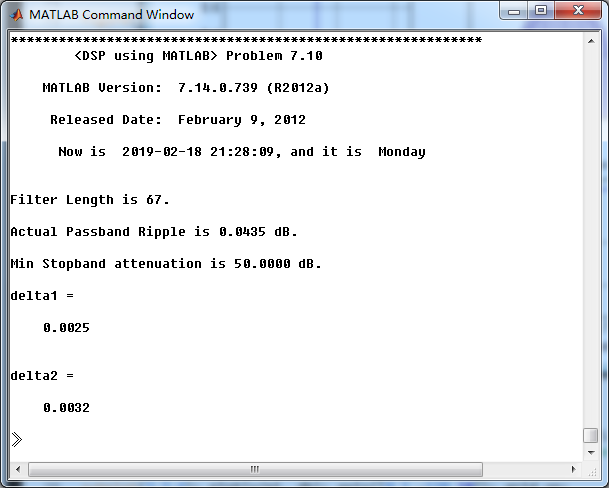
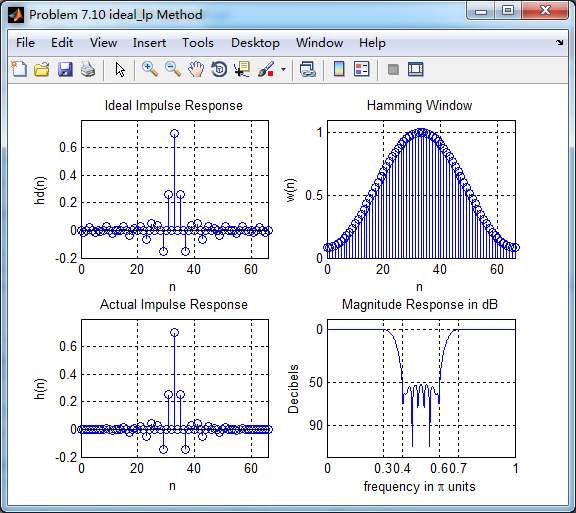
阻带最小衰减为50dB,满足设计要求。
用Hamming窗设计的滤波器脉冲响应,其幅度响应(dB和Absolute单位)、相位响应和群延迟响应。
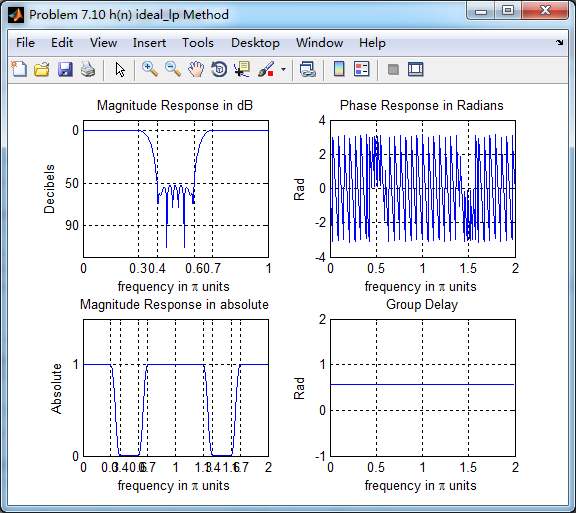
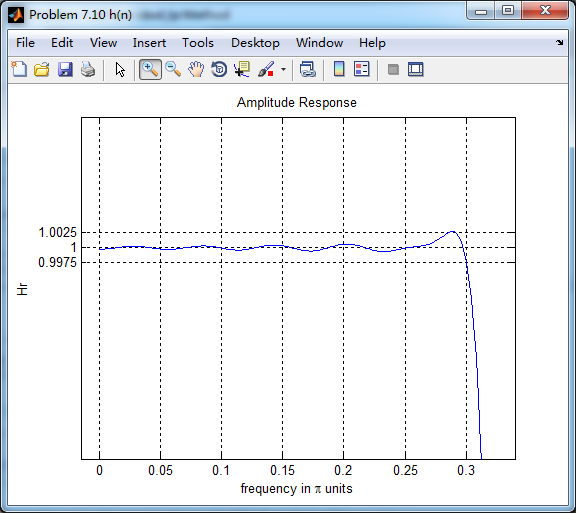
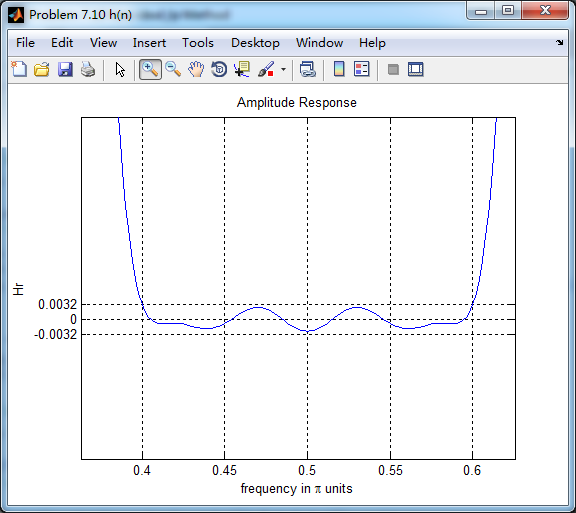
振幅响应(Absolute单位)

通带部分
阻带部分
《DSP using MATLAB》Problem 7.10的更多相关文章
- 《DSP using MATLAB》Problem 6.10
代码: %% ++++++++++++++++++++++++++++++++++++++++++++++++++++++++++++++++++++++++++++++++ %% Output In ...
- 《DSP using MATLAB》Problem 5.10
代码: 第1小题: %% ++++++++++++++++++++++++++++++++++++++++++++++++++++++++++++++++++++++++++++++++ %% Out ...
- 《DSP using MATLAB》Problem 4.10
今天擦完了玻璃,尽管有地方不那么明亮干净,冷风中瑟瑟发抖,年也快临近了. 代码是从网上找的, function [p, np, r, nr] = deconv_m(b, nb, a, na) % Mo ...
- 《DSP using MATLAB》Problem 3.10
用到了三角窗脉冲序列,各小题的DTFT就不写公式了,直接画图(这里只贴长度M=10的情况). 1. 代码: %% ------------------------------------------- ...
- 《DSP using MATLAB》Problem 2.10
代码: %% ------------------------------------------------------------------------ %% Output Info about ...
- 《DSP using MATLAB》Problem 8.10
代码: %% ------------------------------------------------------------------------ %% Output Info about ...
- 《DSP using MATLAB》Problem 7.27
代码: %% ++++++++++++++++++++++++++++++++++++++++++++++++++++++++++++++++++++++++++++++++ %% Output In ...
- 《DSP using MATLAB》Problem 7.26
注意:高通的线性相位FIR滤波器,不能是第2类,所以其长度必须为奇数.这里取M=31,过渡带里采样值抄书上的. 代码: %% +++++++++++++++++++++++++++++++++++++ ...
- 《DSP using MATLAB》Problem 7.25
代码: %% ++++++++++++++++++++++++++++++++++++++++++++++++++++++++++++++++++++++++++++++++ %% Output In ...
随机推荐
- CF932E Team Work
思路 第二类斯特林数和组合数推式子的题目 题目要求\(\sum_{i=1}^n \left(\begin{matrix}n \\ i \end{matrix} \right) i^k\) 一个性质 第 ...
- 一小时学会 C# 6.0
一.字符串插值 (String Interpolation) C# 6之前我们拼接字符串时需要这样 var Name = "Jack"; var results = "H ...
- MapReduce :基于 FileInputFormat 的 mapper 数量控制
本篇分两部分,第一部分分析使用 java 提交 mapreduce 任务时对 mapper 数量的控制,第二部分分析使用 streaming 形式提交 mapreduce 任务时对 mapper 数量 ...
- [Centos7]无法访问配置好的nginx
Centos7无法访问配置好的nginx 临时生效 # 重启虚拟机,将失效 iptables -I INPUT -p TCP --dport 80 -j ACCEPT 永久有效 # 在防火墙中开放80 ...
- 流畅的python笔记
鸭子类型协议不完全总结序列:len,getitem切片:getitemv[0]分量的取值和写值:getitem和setitemv.x属性的取值和写值:getattr和setattr迭代:1)iter, ...
- 『TensorFlow』读书笔记_简单卷积神经网络
如果你可视化CNN的各层级结构,你会发现里面的每一层神经元的激活态都对应了一种特定的信息,越是底层的,就越接近画面的纹理信息,如同物品的材质. 越是上层的,就越接近实际内容(能说出来是个什么东西的那些 ...
- grpc(二)记一次grpc debug--io.grpc.StatusRuntimeException: UNKNOWN
1.起初是dingding一直报错: instance:服务器名 err:GrpcClient#placeOrder: io.grpc.StatusRuntimeException: UNKNOWN ...
- Linux下更换jdk和配置环境变量
目前Linux上安装的是jdk7的java环境,由于项目原因需要升级到jdk8,无需卸载掉原本的jdk7,按如下简单步骤即可: 参考了:https://www.cnblogs.com/jiu0821/ ...
- Python—迭代器与生成器
迭代器与生成器 生成器(generator) 先来了解一下列表生成器: list = [i*2 for i in range(10)] print(list)>>>>[0, 2 ...
- laravel5.5 调用系统自带登陆认证auth
1执行命令 php artisan make:auth 2 编辑文件 config/auth guardes 'admin' => [ 'driver' => 'session', 'pr ...