
Direct2D 几何篇
微软文档:Geometries overview
本篇通过官方文档学习,整理出来的demo,初始样本请先创建一个普通的desktop app。
// Test_Direct2D_Brush.cpp : Defines the entry point for the application.
// #include "framework.h"
#include "Test_Direct2D_Brush.h"
#include <d2d1.h>
#include <wincodec.h> #pragma comment(lib, "D2d1.lib")
#pragma comment(lib, "Windowscodecs.lib") #define MAX_LOADSTRING 100 template <class T> void SafeRelease(T** ppT)
{
if (*ppT)
{
(*ppT)->Release();
*ppT = NULL;
}
} HWND hWnd;
ID2D1Factory* l;
ID2D1HwndRenderTarget* m_pRenderTarget;
ID2D1SolidColorBrush* m_pSceneBrush;
ID2D1GradientStopCollection* pGradientStops = NULL;
ID2D1RadialGradientBrush* m_pRadialGradientBrush;
ID2D1EllipseGeometry* m_pEllipseGeometry1, * m_pEllipseGeometry2, * m_pEllipseGeometry3, * m_pEllipseGeometry4, *m_pCircleGeometry1,*m_pCircleGeometry2;
ID2D1GeometryGroup* m_pGeoGroup_AlternateFill,*m_pGeoGroup_WindingFill;
ID2D1RectangleGeometry* m_pRectangleGeometry;
ID2D1TransformedGeometry *m_pTransformedGeometry;
ID2D1GeometrySink* pGeometrySink = NULL;
ID2D1PathGeometry* m_pPathGeometryUnion,* m_pLeftMountainGeometry,* m_pRightMountainGeometry,* m_pSunGeometry,* m_pRiverGeometry;
ID2D1Geometry* pGeometry;
ID2D1SimplifiedGeometrySink* pGeometrySink1; // Global Variables:
HINSTANCE hInst; // current instance
WCHAR szTitle[MAX_LOADSTRING]; // The title bar text
WCHAR szWindowClass[MAX_LOADSTRING]; // the main window class name // Forward declarations of functions included in this code module:
ATOM MyRegisterClass(HINSTANCE hInstance);
BOOL InitInstance(HINSTANCE, int);
LRESULT CALLBACK WndProc(HWND, UINT, WPARAM, LPARAM);
INT_PTR CALLBACK About(HWND, UINT, WPARAM, LPARAM);
void Render();
void DiscardGraphicsResources();
void Geometry(); int APIENTRY wWinMain(_In_ HINSTANCE hInstance,
_In_opt_ HINSTANCE hPrevInstance,
_In_ LPWSTR lpCmdLine,
_In_ int nCmdShow)
{
UNREFERENCED_PARAMETER(hPrevInstance);
UNREFERENCED_PARAMETER(lpCmdLine); // TODO: Place code here. // Initialize global strings
LoadStringW(hInstance, IDS_APP_TITLE, szTitle, MAX_LOADSTRING);
LoadStringW(hInstance, IDC_TESTDIRECT2DBRUSH, szWindowClass, MAX_LOADSTRING);
MyRegisterClass(hInstance); // Perform application initialization:
if (!InitInstance (hInstance, nCmdShow))
{
return FALSE;
} HACCEL hAccelTable = LoadAccelerators(hInstance, MAKEINTRESOURCE(IDC_TESTDIRECT2DBRUSH)); MSG msg; // Main message loop:
while (GetMessage(&msg, nullptr, 0, 0))
{
if (!TranslateAccelerator(msg.hwnd, hAccelTable, &msg))
{
TranslateMessage(&msg);
DispatchMessage(&msg);
}
} return (int) msg.wParam;
} //
// FUNCTION: MyRegisterClass()
//
// PURPOSE: Registers the window class.
//
ATOM MyRegisterClass(HINSTANCE hInstance)
{
WNDCLASSEXW wcex; wcex.cbSize = sizeof(WNDCLASSEX); wcex.style = CS_HREDRAW | CS_VREDRAW;
wcex.lpfnWndProc = WndProc;
wcex.cbClsExtra = 0;
wcex.cbWndExtra = 0;
wcex.hInstance = hInstance;
wcex.hIcon = LoadIcon(hInstance, MAKEINTRESOURCE(IDI_TESTDIRECT2DBRUSH));
wcex.hCursor = LoadCursor(nullptr, IDC_ARROW);
wcex.hbrBackground = (HBRUSH)(COLOR_WINDOW+1);
wcex.lpszMenuName = MAKEINTRESOURCEW(IDC_TESTDIRECT2DBRUSH);
wcex.lpszClassName = szWindowClass;
wcex.hIconSm = LoadIcon(wcex.hInstance, MAKEINTRESOURCE(IDI_SMALL)); return RegisterClassExW(&wcex);
} //
// FUNCTION: InitInstance(HINSTANCE, int)
//
// PURPOSE: Saves instance handle and creates main window
//
// COMMENTS:
//
// In this function, we save the instance handle in a global variable and
// create and display the main program window.
//
BOOL InitInstance(HINSTANCE hInstance, int nCmdShow)
{
hInst = hInstance; // Store instance handle in our global variable
HRESULT hr = D2D1CreateFactory(D2D1_FACTORY_TYPE_SINGLE_THREADED, &l);
hWnd = CreateWindowW(szWindowClass, szTitle, WS_OVERLAPPEDWINDOW,
CW_USEDEFAULT, 0, CW_USEDEFAULT, 0, nullptr, nullptr, hInstance, nullptr); if (!hWnd)
{
return FALSE;
} ShowWindow(hWnd, nCmdShow);
UpdateWindow(hWnd); return TRUE;
} //
// FUNCTION: WndProc(HWND, UINT, WPARAM, LPARAM)
//
// PURPOSE: Processes messages for the main window.
//
// WM_COMMAND - process the application menu
// WM_PAINT - Paint the main window
// WM_DESTROY - post a quit message and return
//
//
LRESULT CALLBACK WndProc(HWND hWnd, UINT message, WPARAM wParam, LPARAM lParam)
{
switch (message)
{
case WM_COMMAND:
{
int wmId = LOWORD(wParam);
// Parse the menu selections:
switch (wmId)
{
case IDM_ABOUT:
DialogBox(hInst, MAKEINTRESOURCE(IDD_ABOUTBOX), hWnd, About);
break;
case IDM_EXIT:
DestroyWindow(hWnd);
break;
default:
return DefWindowProc(hWnd, message, wParam, lParam);
}
}
break;
case WM_PAINT:
{
// PAINTSTRUCT ps;
// HDC hdc = BeginPaint(hWnd, &ps);
// TODO: Add any drawing code that uses hdc here...
Render();
ValidateRect(hWnd, NULL);
// EndPaint(hWnd, &ps);
}
break;
case WM_DESTROY:
PostQuitMessage(0);
break;
default:
return DefWindowProc(hWnd, message, wParam, lParam);
}
return 0;
} // Message handler for about box.
INT_PTR CALLBACK About(HWND hDlg, UINT message, WPARAM wParam, LPARAM lParam)
{
UNREFERENCED_PARAMETER(lParam);
switch (message)
{
case WM_INITDIALOG:
return (INT_PTR)TRUE; case WM_COMMAND:
if (LOWORD(wParam) == IDOK || LOWORD(wParam) == IDCANCEL)
{
EndDialog(hDlg, LOWORD(wParam));
return (INT_PTR)TRUE;
}
break;
}
return (INT_PTR)FALSE;
} void Render()
{
RECT rc;
GetClientRect(hWnd, &rc); D2D1_SIZE_U size = D2D1::SizeU(
rc.right - rc.left,
rc.bottom - rc.top
);
HRESULT hr = l->CreateHwndRenderTarget(
D2D1::RenderTargetProperties(),
D2D1::HwndRenderTargetProperties(hWnd, size),
&m_pRenderTarget
); m_pRenderTarget->BeginDraw(); m_pRenderTarget->Clear(D2D1::ColorF(D2D1::ColorF::White));
/*************************************************************************************/
Geometry(); /*************************************************************************************/
hr = m_pRenderTarget->EndDraw(); if (FAILED(hr) || hr == D2DERR_RECREATE_TARGET)
{
DiscardGraphicsResources();
}
} void DiscardGraphicsResources()
{
SafeRelease(&m_pRenderTarget);
} void Geometry()
{
HRESULT hr = l->CreateEllipseGeometry(
D2D1::Ellipse(D2D1::Point2F(160.f, 120.f), 25.f, 25.f),
&m_pEllipseGeometry1);
if (SUCCEEDED(hr))
{
hr = l->CreateEllipseGeometry(
D2D1::Ellipse(D2D1::Point2F(160.f, 120.f), 50.f, 50.f),
&m_pEllipseGeometry2);
}
if (SUCCEEDED(hr))
{
hr = l->CreateEllipseGeometry(
D2D1::Ellipse(D2D1::Point2F(160.f, 120.f), 75.f, 75.f),
&m_pEllipseGeometry3);
}
if (SUCCEEDED(hr))
{
hr = l->CreateEllipseGeometry(
D2D1::Ellipse(D2D1::Point2F(160.f, 120.f), 100.f, 100.f),
&m_pEllipseGeometry4);
} ID2D1Geometry* ppGeometries[] =
{
m_pEllipseGeometry1,
m_pEllipseGeometry2,
m_pEllipseGeometry3,
m_pEllipseGeometry4
};
if (SUCCEEDED(hr))
{
hr = l->CreateGeometryGroup(
D2D1_FILL_MODE_ALTERNATE,
ppGeometries,
ARRAYSIZE(ppGeometries),
&m_pGeoGroup_AlternateFill
);
} if (SUCCEEDED(hr))
{
hr = l->CreateGeometryGroup(
D2D1_FILL_MODE_WINDING,
ppGeometries,
ARRAYSIZE(ppGeometries),
&m_pGeoGroup_WindingFill
);
}
if (SUCCEEDED(hr))
{
hr = m_pRenderTarget->CreateSolidColorBrush(
D2D1::ColorF(D2D1::ColorF::Black, 1.0F),
&m_pBlackBrush);
}
// m_pRenderTarget->DrawGeometry(m_pGeoGroup_AlternateFill, m_pBlackBrush, 2);
// m_pRenderTarget->DrawGeometry(m_pGeoGroup_WindingFill, m_pBlackBrush, 2);
/****************************************************************************************/
//变换后的几何
hr = l->CreateRectangleGeometry(
D2D1::RectF(150.f, 150.f, 200.f, 200.f),
&m_pRectangleGeometry
);
// Draw the untransformed rectangle geometry.
// m_pRenderTarget->DrawGeometry(m_pRectangleGeometry, m_pBlackBrush, 1);
//Transform the render target, then draw the rectangle geometry again.
m_pRenderTarget->SetTransform(
D2D1::Matrix3x2F::Scale(
D2D1::SizeF(3.f, 3.f),
D2D1::Point2F(175.f, 175.f)) //上面小矩形的中心点坐标
);
// m_pRenderTarget->DrawGeometry(m_pRectangleGeometry, m_pBlackBrush, 1); hr = l->CreateTransformedGeometry(
m_pRectangleGeometry,
D2D1::Matrix3x2F::Scale(
D2D1::SizeF(3.f, 3.f),
D2D1::Point2F(175.f, 175.f)),
&m_pTransformedGeometry
);
// Replace the previous render target transform.
m_pRenderTarget->SetTransform(D2D1::Matrix3x2F::Identity()); //顾名思义,上面的m_pRenderTarget->SetTransform的设置无效了 // Draw the transformed geometry.
// m_pRenderTarget->DrawGeometry(m_pTransformedGeometry, m_pBlackBrush, 1); //另一种缩放方法,不同之处在于笔的粗细没有受影响
/*****************************************************************************************/
//组合几何
// Create the first ellipse geometry to merge.
const D2D1_ELLIPSE circle1 = D2D1::Ellipse(
D2D1::Point2F(75.0f, 75.0f),
50.0f,
50.0f
);
hr = l->CreateEllipseGeometry(
circle1,
&m_pCircleGeometry1
);
if (SUCCEEDED(hr))
{
// Create the second ellipse geometry to merge.
const D2D1_ELLIPSE circle2 = D2D1::Ellipse(
D2D1::Point2F(125.0f, 75.0f),
50.0f,
50.0f
); hr = l->CreateEllipseGeometry(circle2, &m_pCircleGeometry2);
}
if (SUCCEEDED(hr))
{
//
// Use D2D1_COMBINE_MODE_UNION to combine the geometries.
//
hr = l->CreatePathGeometry(&m_pPathGeometryUnion); if (SUCCEEDED(hr))
{
hr = m_pPathGeometryUnion->Open(&pGeometrySink); if (SUCCEEDED(hr))
{
hr = m_pCircleGeometry1->CombineWithGeometry(
m_pCircleGeometry2,
D2D1_COMBINE_MODE_UNION,
NULL,
NULL,
pGeometrySink
);
} if (SUCCEEDED(hr))
{
hr = pGeometrySink->Close();
} SafeRelease(&pGeometrySink);
}
}
// m_pRenderTarget->DrawGeometry(m_pPathGeometryUnion, m_pBlackBrush, 1); // https://docs.microsoft.com/en-us/windows/win32/direct2d/direct2d-geometries-overview#widen
// widen方法还没实现
/* hr = m_pPathGeometryUnion->Open(&pGeometrySink);
if (SUCCEEDED(hr))
{
hr = pGeometry->Widen(
2,
NULL,
NULL,
pGeometrySink1
);*/
/****************************************************************************/
//Create a Complex Drawing
//左边山
hr = l->CreatePathGeometry(&m_pLeftMountainGeometry);
ID2D1GeometrySink* pSink = NULL;
hr = m_pLeftMountainGeometry->Open(&pSink);
pSink->SetFillMode(D2D1_FILL_MODE_WINDING);
pSink->BeginFigure(
D2D1::Point2F(346, 255),
D2D1_FIGURE_BEGIN_FILLED
);
D2D1_POINT_2F points[5] = {
D2D1::Point2F(267, 177),
D2D1::Point2F(236, 192),
D2D1::Point2F(212, 160),
D2D1::Point2F(156, 255),
D2D1::Point2F(346, 255),
};
pSink->AddLines(points, ARRAYSIZE(points));
pSink->EndFigure(D2D1_FIGURE_END_CLOSED);
hr = pSink->Close();
//右边山
hr = l->CreatePathGeometry(&m_pRightMountainGeometry);
if (SUCCEEDED(hr))
{
hr = m_pRightMountainGeometry->Open(&pSink);
if (SUCCEEDED(hr))
{
pSink->SetFillMode(D2D1_FILL_MODE_WINDING); pSink->BeginFigure(
D2D1::Point2F(575, 263),
D2D1_FIGURE_BEGIN_FILLED
);
D2D1_POINT_2F points[] = {
D2D1::Point2F(481, 146),
D2D1::Point2F(449, 181),
D2D1::Point2F(433, 159),
D2D1::Point2F(401, 214),
D2D1::Point2F(381, 199),
D2D1::Point2F(323, 263),
D2D1::Point2F(575, 263)
};
pSink->AddLines(points, ARRAYSIZE(points));
pSink->EndFigure(D2D1_FIGURE_END_CLOSED);
}
hr = pSink->Close();
}
//太阳
hr = l->CreatePathGeometry(&m_pSunGeometry);
if (SUCCEEDED(hr))
{
hr = m_pSunGeometry->Open(&pSink);
if (SUCCEEDED(hr))
{
pSink->SetFillMode(D2D1_FILL_MODE_WINDING); pSink->BeginFigure(
D2D1::Point2F(270, 255),
D2D1_FIGURE_BEGIN_FILLED
);
pSink->AddArc(
D2D1::ArcSegment(
D2D1::Point2F(440, 255), // end point
D2D1::SizeF(85, 85),
0.0f, // rotation angle
D2D1_SWEEP_DIRECTION_CLOCKWISE,
D2D1_ARC_SIZE_SMALL
));
pSink->EndFigure(D2D1_FIGURE_END_CLOSED); pSink->BeginFigure(
D2D1::Point2F(299, 182),
D2D1_FIGURE_BEGIN_HOLLOW
);
pSink->AddBezier(
D2D1::BezierSegment(
D2D1::Point2F(299, 182),
D2D1::Point2F(294, 176),
D2D1::Point2F(285, 178)
));
pSink->AddBezier(
D2D1::BezierSegment(
D2D1::Point2F(276, 179),
D2D1::Point2F(272, 173),
D2D1::Point2F(272, 173)
));
pSink->EndFigure(D2D1_FIGURE_END_OPEN); pSink->BeginFigure(
D2D1::Point2F(354, 156),
D2D1_FIGURE_BEGIN_HOLLOW
);
pSink->AddBezier(
D2D1::BezierSegment(
D2D1::Point2F(354, 156),
D2D1::Point2F(358, 149),
D2D1::Point2F(354, 142)
));
pSink->AddBezier(
D2D1::BezierSegment(
D2D1::Point2F(349, 134),
D2D1::Point2F(354, 127),
D2D1::Point2F(354, 127)
));
pSink->EndFigure(D2D1_FIGURE_END_OPEN); pSink->BeginFigure(
D2D1::Point2F(322, 164),
D2D1_FIGURE_BEGIN_HOLLOW
);
pSink->AddBezier(
D2D1::BezierSegment(
D2D1::Point2F(322, 164),
D2D1::Point2F(322, 156),
D2D1::Point2F(314, 152)
));
pSink->AddBezier(
D2D1::BezierSegment(
D2D1::Point2F(306, 149),
D2D1::Point2F(305, 141),
D2D1::Point2F(305, 141)
));
pSink->EndFigure(D2D1_FIGURE_END_OPEN); pSink->BeginFigure(
D2D1::Point2F(385, 164),
D2D1_FIGURE_BEGIN_HOLLOW
);
pSink->AddBezier(
D2D1::BezierSegment(
D2D1::Point2F(385, 164),
D2D1::Point2F(392, 161),
D2D1::Point2F(394, 152)
));
pSink->AddBezier(
D2D1::BezierSegment(
D2D1::Point2F(395, 144),
D2D1::Point2F(402, 141),
D2D1::Point2F(402, 142)
));
pSink->EndFigure(D2D1_FIGURE_END_OPEN); pSink->BeginFigure(
D2D1::Point2F(408, 182),
D2D1_FIGURE_BEGIN_HOLLOW
);
pSink->AddBezier(
D2D1::BezierSegment(
D2D1::Point2F(408, 182),
D2D1::Point2F(416, 184),
D2D1::Point2F(422, 178)
));
pSink->AddBezier(
D2D1::BezierSegment(
D2D1::Point2F(428, 171),
D2D1::Point2F(435, 173),
D2D1::Point2F(435, 173)
));
pSink->EndFigure(D2D1_FIGURE_END_OPEN);
}
hr = pSink->Close();
}
//河流
hr = l->CreatePathGeometry(&m_pRiverGeometry); if (SUCCEEDED(hr))
{
hr = m_pRiverGeometry->Open(&pSink);
if (SUCCEEDED(hr))
{
pSink->SetFillMode(D2D1_FILL_MODE_WINDING);
pSink->BeginFigure(
D2D1::Point2F(183, 392),
D2D1_FIGURE_BEGIN_FILLED
);
pSink->AddBezier(
D2D1::BezierSegment(
D2D1::Point2F(238, 284),
D2D1::Point2F(472, 345),
D2D1::Point2F(356, 303)
));
pSink->AddBezier(
D2D1::BezierSegment(
D2D1::Point2F(237, 261),
D2D1::Point2F(333, 256),
D2D1::Point2F(333, 256)
));
pSink->AddBezier(
D2D1::BezierSegment(
D2D1::Point2F(335, 257),
D2D1::Point2F(241, 261),
D2D1::Point2F(411, 306)
));
pSink->AddBezier(
D2D1::BezierSegment(
D2D1::Point2F(574, 350),
D2D1::Point2F(288, 324),
D2D1::Point2F(296, 392)
));
pSink->EndFigure(D2D1_FIGURE_END_OPEN);
}
hr = pSink->Close(); SafeRelease(&pSink);
}
//着色
m_pRenderTarget->SetTransform(D2D1::Matrix3x2F::Identity()); m_pRenderTarget->Clear(D2D1::ColorF(D2D1::ColorF::White)); //D2D1_SIZE_F rtSize = m_pRenderTarget->GetSize();
//m_pRenderTarget->FillRectangle(
// D2D1::RectF(0, 0, rtSize.width, rtSize.height),
// m_pGridPatternBitmapBrush
//); D2D1_GRADIENT_STOP gradientStops[2];
gradientStops[0].color = D2D1::ColorF(D2D1::ColorF::Yellow, 1);
gradientStops[0].position = 0.0f;
gradientStops[1].color = D2D1::ColorF(D2D1::ColorF::OrangeRed, 1);
gradientStops[1].position = 1.0f;
hr = m_pRenderTarget->CreateGradientStopCollection(
gradientStops,
2,
D2D1_GAMMA_2_2,
D2D1_EXTEND_MODE_CLAMP,
&pGradientStops
);
m_pRenderTarget->CreateRadialGradientBrush(
D2D1::RadialGradientBrushProperties(
D2D1::Point2F(355, 255),
D2D1::Point2F(0, 0),
85,
85),
pGradientStops,
&m_pRadialGradientBrush
); hr = m_pRenderTarget->CreateSolidColorBrush(
D2D1::ColorF(D2D1::ColorF::Black, 1.0F),
&m_pSceneBrush);
m_pRenderTarget->FillGeometry(m_pSunGeometry, m_pRadialGradientBrush); m_pSceneBrush->SetColor(D2D1::ColorF(D2D1::ColorF::Black, 1.f));
m_pRenderTarget->DrawGeometry(m_pSunGeometry, m_pSceneBrush, 1.f); m_pSceneBrush->SetColor(D2D1::ColorF(D2D1::ColorF::OliveDrab, 1.f));
m_pRenderTarget->FillGeometry(m_pLeftMountainGeometry, m_pSceneBrush); m_pSceneBrush->SetColor(D2D1::ColorF(D2D1::ColorF::Black, 1.f));
m_pRenderTarget->DrawGeometry(m_pLeftMountainGeometry, m_pSceneBrush, 1.f); m_pSceneBrush->SetColor(D2D1::ColorF(D2D1::ColorF::LightSkyBlue, 1.f));
m_pRenderTarget->FillGeometry(m_pRiverGeometry, m_pSceneBrush); m_pSceneBrush->SetColor(D2D1::ColorF(D2D1::ColorF::Black, 1.f));
m_pRenderTarget->DrawGeometry(m_pRiverGeometry, m_pSceneBrush, 1.f); m_pSceneBrush->SetColor(D2D1::ColorF(D2D1::ColorF::YellowGreen, 1.f));
m_pRenderTarget->FillGeometry(m_pRightMountainGeometry, m_pSceneBrush); m_pSceneBrush->SetColor(D2D1::ColorF(D2D1::ColorF::Black, 1.f));
m_pRenderTarget->DrawGeometry(m_pRightMountainGeometry, m_pSceneBrush, 1.f);
}
效果图:
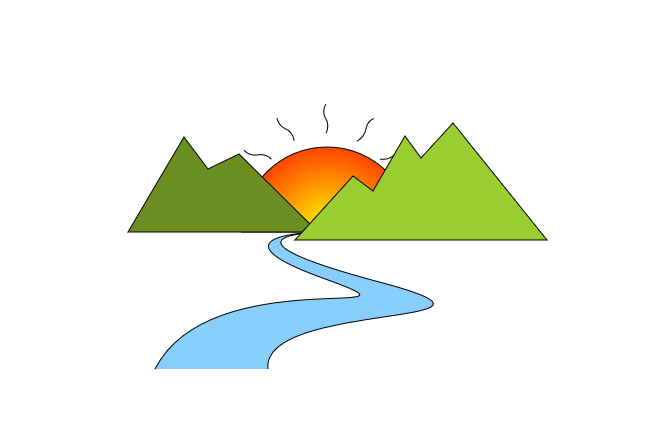
注意: 代码中创建的各种对象都没有释放,如在实际项目中使用该代码需要在使用完释放它们。
几何部分的内容略多,我仅对几个常用的几何形状的代码进行了整理,并且因为窗口的大小问题,一些绘制其他几何的代码被我注释了,详细可见代码。
拓展:Direct2D有专门的篇幅介绍了缩放问题,见: Scaling geometry realizations
Direct2D 几何篇的更多相关文章
- Direct2D 几何计算和几何变幻
D2D不仅可以绘制,还可以对多个几何图形对象进行空间运算.这功能应该在GIS界比较吃香. 这些计算包括: 合并几何对象,可以设置求交还是求并,CombineWithGeometry 边界,加宽边界,查 ...
- C#LeetCode刷题-几何
几何篇 # 题名 刷题 通过率 难度 587 安装栅栏 21.5% 困难 892 三维形体的表面积 C#LeetCode刷题之#892-三维形体的表面积(Surface Area of 3D Sh ...
- TGL站长关于常见问题的回复
问题地址: http://www.thegrouplet.com/thread-112923-1-1.html 问题: 网站配有太多的模板是否影响网站加载速度 月光答复: wp不需要删除其他的模板,不 ...
- Direct2D教程VIII——几何(Geometry)对象的运算,本系列的终结篇
目前博客园中成系列的Direct2D的教程有 1.万一的 Direct2D 系列,用的是Delphi 2009 2.zdd的 Direct2D 系列,用的是VS中的C++ 3.本文所在的 Direct ...
- Direct2D教程VII——变换几何(TransformedGeometry)对象
目前博客园中成系列的Direct2D的教程有 1.万一的 Direct2D 系列,用的是Delphi 2009 2.zdd的 Direct2D 系列,用的是VS中的C++ 3.本文所在的 Direct ...
- Direct2D教程(外篇)环境配置
2014年世界杯首场淘汰赛马上开始了,闲着没事,整理以前的博客草稿打发时间,意外的发现这篇文章,本来是打算加入到Direct2D那个系列的,不知道为什么把它给遗漏了.环境配置,对于熟手来说,不是什么重 ...
- Direct2D教程III——几何(Geometry)对象
目前博客园中成系列的Direct2D的教程有 1.万一的 Direct2D 系列,用的是Delphi 2009 2.zdd的 Direct2D 系列,用的是VS中的C++ 3.本文所在的 Direct ...
- Direct2D 第6篇 绘制多种风格的线条
原文:Direct2D 第6篇 绘制多种风格的线条 上图是使用Direct2D绘制的线条,Direct2D在效率上比GDI/GDI+要快几倍,GDI/GDI+绘图是出了名的"慢", ...
- Direct2D 第5篇 绘制图像
原文:Direct2D 第5篇 绘制图像 我加载的图像是一张透明底PNG图像,背景使用渐变的绿色画刷 #include <windows.h> #include <d2d1.h> ...
- Direct2D 第4篇 渐变画刷
原文:Direct2D 第4篇 渐变画刷 #include <windows.h> #include <d2d1.h> #include <d2d1helper.h> ...
随机推荐
- Oracle Preinstall 调优参数的学习
Oracle Preinstall 调优参数的学习 背景 学习是一个痛苦并快乐的过程. 之前自己手工安装过很多套Oracle数据库,也总结过很多 但是很多都是比较皮毛的. 最近遇到了一些问题. 才发现 ...
- kafka学习之五_多个磁盘的性能验证
kafka学习之五_多个磁盘的性能验证 背景 周末在家学习kafka 上午验证了grafana+kafka_exporter的监控 下午想着验证一把性能相关. kafka学习之三里面,有成套的脚本. ...
- [转帖]深入理解mysql-第十一章 mysql查询优化-Explain 详解(中)
一.执行计划-type属性 执行计划的一条记录就代表着MySQL对某个表的执行查询时的访问方法,其中的type列就表明了这个访问这个单表的方法具体是什么,比方说下边这个查询: mysql> EX ...
- 使用buildx在x86机器上面编译arm64架构的Docker镜像
buildx 多架构编译 安装docker 下载docker 下载buildx 安装架构支持 docker run --privileged --rm tonistiigi/binfmt --inst ...
- Oracle 设置白名单过滤
最近有一个需求 要求开发人员不能随便连接测试的数据库 又不想太过复杂,部分人还得进行连结. 查了下往上是有方案的: 就是 TCP_VALIDNODE_CHECKING 参数 解决方法和说明如下 来源 ...
- 程序启停分析与进程常用API的使用
进程是程序运行的实例,操作系统为进程分配独立的资源,使之拥有独立的空间,互不干扰. 空间布局 拿c程序来说,其空间布局包括如下几个部分: 数据段(初始化的数据段):例如在函数外的声明,int a = ...
- Typescript中存取器getters和setters的使用
1.存取器 存取器可以让我们可以有效的控制对,对象中的中的成员的访问. 可以通过getters和setters来进行操作 在typescript中分别对应 get 和 set 2.如何解决报错 typ ...
- # 继续前行github star突破8k即时通讯IM开源项目OpenIM版本发布计划
项目简介 OpenIM继续领跑开源IM领域,在广大开发者的支持下,目前github star突破8k.在数据泄露.信息外泄.隐私滥用的时代,IM私有化部署需求旺盛.其中,政企协同办公对IM需求猛增,随 ...
- c++全局变量extern
extern extern 是 C++ 中的一个关键字,用于声明一个变量或函数是在其他文件中定义的.它的作用是告诉编译器在链接时在其他文件中寻找该变量或函数的定义. 在 C++ 中,如果一个变量或函数 ...
- 补发一篇tensorflow下MADDPG环境搭建配置
相关文章: [一]MADDPG-单智能体|多智能体总结(理论.算法) [二]MADDPG多智能体算法实现(parl)[追逐游戏复现] 之前用的都是paddle,现在补一下tf的. github上ope ...