
【SpringCloud构建微服务系列】使用Spring Cloud Config统一管理服务配置
一、为什么要统一管理微服务配置
对于传统的单体应用而言,常使用配置文件来管理所有配置,比如SpringBoot的application.yml文件,但是在微服务架构中全部手动修改的话很麻烦而且不易维护。
微服务的配置管理一般有以下需求:
1.集中配置管理,一个微服务架构中可能有成百上千个微服务,所以集中配置管理是很重要的。
2.不同环境不同配置,比如数据源配置在不同环境(开发,生产,测试)中是不同的。
3.运行期间可动态调整。
4.配置修改后可自动更新。
好在Spring Cloud Config已经全部实现了上面几点。
二、Spring Cloud Config简介和使用
2.1原理
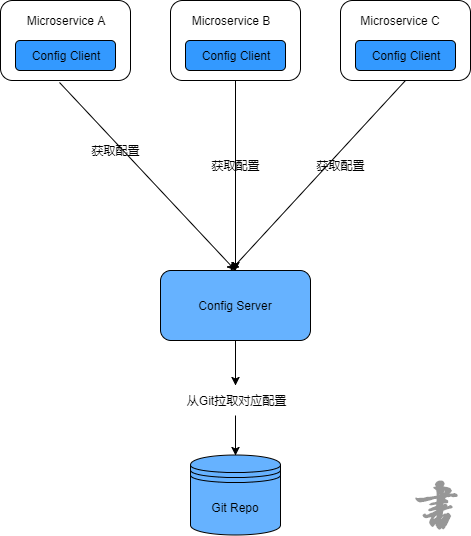
Spring Cloud Config为分布式系统外部化配置提供了服务器端和客户端的支持,它包括Config Client 和 Config Server两个部分。原理是所有的配置信息都存储在Config Server,所有的微服务都指向Config Server,
各个微服务启动时都会请求Config Server来获取配置信息,然后缓存到本地以提高性能。
2.2编写Config Server
1.在Git仓库https://github.com/2YSP/spring-cloud-config-repo(可以使用自己的仓库)新建几个配置文件,例如:

内容分别为:
profile=dev-1.0
profile=production-1.0
profile=test-1.0
profile=default-1.0
2.新建一个SpringBoot项目microservice-config-server,并添加以下依赖
<dependency>

            <groupId>org.springframework.cloud</groupId>

            <artifactId>spring-cloud-config-server</artifactId>

        </dependency>
3.在启动类添加 @EnableConfigServer注解
4.编写application.yml文件
server:

  port: 8080

spring:

  application:

    name: microservice-config-server

  cloud:

    config:

      server:

        git:

          # 配置Git仓库的地址

          uri: https://github.com/2YSP/spring-cloud-config-repo.git

          # 配置Git仓库的用户名

          username: 2YSP

          # 配置Git仓库的密码

          password: XX
这样就完成了,可以使用端点来获取配置文件,端点与配置文件的映射规则如下:
/{application}/{profile}[/{lable}]
/{application}-{profile}.yml
/{lable}/{application}-{profile}.yml
/{application}-{profile}.properties
/{lable}/{application}-{profile}.properties
{application}表示微服务的名称,{profile}代表环境,{lable}表示Git仓库的分支,默认是master。
本例如果要访问microservice-foo-dev.properties,则可以访问这些URL:
http://localhost:8080/microservice-foo/dev
http://localhost:8080/microservice-foo-dev.properties
http://localhost:8080/microservice-foo-dev.yml
2.3编写Config Client
1.创建一个SpringBoot工程,ArtifactId为microservice-config-client,并添加以下依赖
<dependency>

            <groupId>org.springframework.boot</groupId>

            <artifactId>spring-boot-starter-actuator</artifactId>

        </dependency>

        <dependency>

            <groupId>org.springframework.boot</groupId>

            <artifactId>spring-boot-starter-web</artifactId>

        </dependency>

        <dependency>

            <groupId>org.springframework.cloud</groupId>

            <artifactId>spring-cloud-starter-config</artifactId>

        </dependency>
2.编写配置文件application.yml
server:

  port: 8081
3.创建配置文件bootstrap.yml,并添加以下内容。
spring:

  application:

    # 对应Config Server所获取的配置文件的{application}

    name: microservice-foo

  cloud:

    config:

      uri: http://localhost:8080/

      #对应config server所获取配置文件的{profile}

      profile: dev

      # 指定Git仓库的分支,对应config server所获取配置文件的{label}

      label: master
需要注意的是,以上属性应配置在bootstrap.yml而不是application.yml文件中,否则部分配置就不能正常工作。
4.编写Controller
@RestController

public class ConfigClientController {

    @Value("${profile}")

    private String profile;

    @GetMapping("/profile")

    public String hello(){

        return this.profile;

    }

}
这里通过注解 @Value("${profile}") 来绑定Git仓库的profile属性。
5.测试
先启动microservice-config-server,再启动microservice-config-client,访问http://localhost:8081/profile即可获得以下结果。
dev-1.0
说明能够正常的获取Git仓库的配置信息。
三、配置文件的手动刷新和自动刷新
3.1通过/refresh端点手动刷新
1.复制项目microservice-config-client更改为microservice-config-client-refresh
2.为项目添加spring-boot-starter-actuator依赖,如果有了就不添加了。
3.在Controller类上添加@RefreshScope注解
@RestController

@RefreshScope

public class ConfigClientController {

    @Value("${profile}")

    private String profile;

    @GetMapping("/profile")

    public String hello(){

        return this.profile;

    }

}
4.修改Git仓库中microservice-foo-dev.properties文件的内容,然后先发送POST请求到http://localhost:8081/refresh,再访问http://localhost:8081/refresh即可获取最新的配置。
3.2使用Spring Cloud Bus 实现自动刷新配置
1.首先安装RabbitMQ,安装步骤这里不介绍我的博客里有。
2.为项目添加以下依赖
<dependency>

            <groupId>org.springframework.cloud</groupId>

            <artifactId>spring-cloud-starter-bus-amqp</artifactId>

        </dependency>
3.在bootstrap.yml中添加以下内容
spring:

  application:

    # 对应Config Server所获取的配置文件的{application}

    name: microservice-foo

  cloud:

    config:

      uri: http://localhost:8080/

      #对应config server所获取配置文件的{profile}

      profile: dev

      # 指定Git仓库的分支,对应config server所获取配置文件的{label}

      label: master

  rabbitmq:

    host: localhost

    port: 5672 #默认端口 5672

    username: guest

    password: guest
四、Config Server的高可用
【SpringCloud构建微服务系列】使用Spring Cloud Config统一管理服务配置的更多相关文章
- 9.Spring Cloud Config统一管理微服务配置
Spring Cloud Config统一管理微服务配置 9.1. 为什么要统一管理微服务配置 9.2. Spring Cloud Config简介 Spring Cloud Config为分布式系统 ...
- 使用Spring Cloud Config统一管理配置,别再到处放配置文件了
1 前言 欢迎访问南瓜慢说 www.pkslow.com获取更多精彩文章! 可配置是一个成熟软件系统应该提供的特性,而配置管理对于大型系统就显得十分重要,特别是对于拥有多个应用的微服务系统.可喜的是, ...
- .NET Core微服务之基于Steeltoe使用Spring Cloud Config统一管理配置
Tip: 此篇已加入.NET Core微服务基础系列文章索引 => Steeltoe目录快速导航: 1. 基于Steeltoe使用Spring Cloud Eureka 2. 基于Steelt ...
- SpringCloud学习笔记(7):使用Spring Cloud Config配置中心
简介 Spring Cloud Config为分布式系统中的外部化配置提供了服务器端和客户端支持,服务器端统一管理所有配置文件,客户端在启动时从服务端获取配置信息.服务器端有多种配置方式,如将配置文件 ...
- Spring Cloud(九)高可用的分布式配置中心 Spring Cloud Config 集成 Eureka 服务
上一篇文章,讲了SpringCloudConfig 集成Git仓库,这一篇我们讲一下SpringCloudConfig 配和 Eureka 注册中心一起使用 在分布式系统中,由于服务数量巨多,为了方便 ...
- Spring Cloud Config实现集群配置中心
Spring Cloud Config为分布式系统提供了配置服务器和配置客户端,可以管理集群中的配置文件.使用Git.SVN等版本管理系统存放配置文件,配置服务器会到版本管理系统获取配置,集群中的配置 ...
- Spring Cloud config之一:分布式配置中心入门介绍
Spring Cloud Config为服务端和客户端提供了分布式系统的外部化配置支持.配置服务器为各应用的所有环境提供了一个中心化的外部配置.它实现了对服务端和客户端对Spring Environm ...
- Spring Cloud Config 1 (分布式配置中心)
spring cloud config是spring cloud团队创建的一个全新的项目,用来为分布式系统中的基础设施和微服务应用提供集中化的外部配置支持,它分为服务端和客户端两部分. 服务端也被称为 ...
- Spring Cloud Config入门(本地配置)
spring cloud config 简介 Spring Cloud Config为分布式系统中的外部化配置提供服务器和客户端支持.使用Config Server,您可以在所有环境中管理应用程序的外 ...
随机推荐
- ZXing 二维码解析生成工具类
原文:http://www.open-open.com/code/view/1455848023292 import com.google.zxing.*; import com.google.zxi ...
- BZOJ 1055 HAOI2008 玩具取名 动态规划
题目大意:给定一个由'W','I','N','G'构成的字符串.给定一些规则.这些规则能够将两个字符合成为一个,比如"II"能够合成为'W',"WW"能够合成为 ...
- Atitit.软件仪表盘(7)--温度监測子系统--电脑重要部件温度与监控and警报
Atitit.软件仪表盘(7)--温度监測子系统--电脑重要部件温度与监控and警报 Cpu温度.风扇转速 主板温度 显卡温度 硬盘温度 电池温度 鲁大师 硬盘温度 Cpu温度 core temp ...
- 在DIV中自己主动换行
word-break:break-all和word-wrap:break-word都是能使其容器如DIV的内容自己主动换行. 它们的差别就在于: 1,word-break:break-all 比如di ...
- 微信小程序 项目实战(三)list 列表页 及 item 详情页
1.项目结构 2.list 列表页 (1)数据(逻辑) list.js // pages/list/list.js Page({ /** * 页面的初始数据 */ data: { title: '加载 ...
- 责任链模式的具体应用 ServiceStack.Redis订阅发布服务的调用
责任链模式的具体应用 1.业务场景 生产车间中使用的条码扫描,往往一把扫描枪需要扫描不同的条码来处理不同的业务逻辑,比如,扫描投入料工位条码.扫描投入料条码.扫描产出工装条码等,每种类型的条码位数 ...
- ssh配置无password登录
前提.机器A,B,均为RedHat Linux操作系统,均实用户user 1.以usernameuser登录,在A机器上运行 ssh-keygen -t rsa 一路回车.不须要输入password ...
- udhcp源码详解(三)上 之配置信息的读取
上节介绍了存储管理配置信息的结构体struct server_config_t,该结构体贯穿整个server端程序的运行. 在dhcpd.c里的用该结构体定义个一个全局的变量: struct serv ...
- 2016/2/24 1,dotctype有几种? 2,了解html的发展历史
1,dotctype有几种?DOCTYPE是document type(文档类型)的简写,用来说明你用的XHTML或者HTML是什么版本. 其中的DTD(例如上例中的xhtml1-transition ...
- shell 读写远程数据库
http://www.cnblogs.com/wangkangluo1/archive/2012/04/27/2472898.html 利用Shell脚本实现远程MySQL自动查询 目的:对定时任务对 ...