
调试Windows Service
调试Windows Service
使用一般的调试方法调试不了Windows Servers,所以参考了一些调试方法
我服务源码中使用了Timer,注意不能使用工具箱内的Timer,用System.Timers.Timer timer = new System.Timers.Timer()代替;
timer.Elapsed事件委托绑定的方法第三种方法调试的时候无法使用断点,不是timer不运行,目前不知道什么原因,所以调试时把代码放到OnStart()中调试。
默认服务名为Service1,改服务名的时候注意几个地方都要改
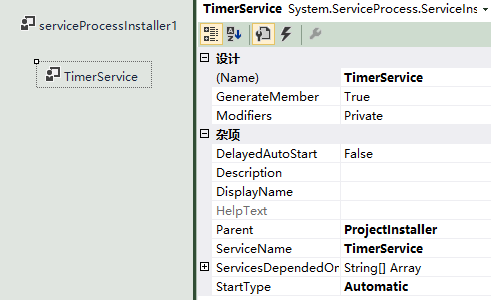
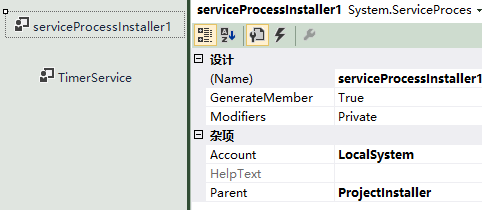
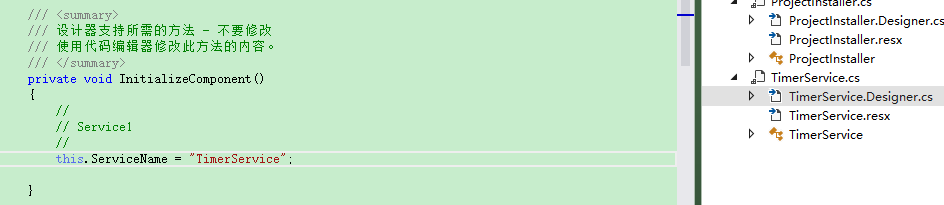

using System;

using System.Collections.Generic;

using System.ComponentModel;

using System.Data;

using System.Linq;

using System.Text;

using System.Windows.Forms;

using System.Net;

using System.IO;

using System.Web;

using System.Data.SqlClient;

using System.Threading;

using System.Configuration;

using SAP.Middleware.Connector;

using TimerService.Helper;

using TimerService.JsonConvert;

using System.ServiceProcess;

using Newtonsoft.Json;

using System.Timers;

namespace TimerService

{

    public partial class TimerService : ServiceBase

    {

        System.Timers.Timer timer = new System.Timers.Timer();

        public TimerService()

        {

            InitializeComponent();

            timer.Elapsed += new System.Timers.ElapsedEventHandler(timer_Tick);

            timer.Interval = 2000;

        }

        //protected override void OnStart(string[] args)

        public void OnStart()

        {

            timer.Enabled = true;

            timer.Start();

        }

        protected override void OnStop()

        {

            timer.Enabled = false;

            timer.Stop();

        }

        private void timer_Tick(object sender, ElapsedEventArgs e)

        {

            //你的代码

        }

    }

}
using System;

using System.Collections.Generic;

using System.Linq;

using System.ServiceProcess;

using System.Text;

using System.Threading.Tasks;

namespace TimerService

{

    static class Program

    {

        /// <summary>

        /// 应用程序的主入口点。

        /// </summary>

        static void Main()

        {

            //ServiceBase[] ServicesToRun;

            //ServicesToRun = new ServiceBase[]

            //{

            //    new TimerService()

            //};

            //ServiceBase.Run(ServicesToRun);

            TimerService obj = new TimerService();

            obj.OnStart();

        }

    }

}
方法1:写日志
是最传统的调试windows service方法,也是大家在调试service 比较管用的方式,但是,调试起来还是不太明朗。你要在你认为可能出现错误的地方全部添加写日志的方法。我上面的代码就采用了AddTextLine 函数实现的这种方法。
方法2:附加进程
附加进程的方法可以像调试正常的widows程序一样,设置断点进行单步调试。但是,我必须在安装启动服务后,才可以进行附加此服务进程,可在附加的同时OnStart 函数已经执行完毕,所以对Onstart 无法调试。但是我可以通过设置启动服务延时来加载调试。
步骤如下:
1,设置启动服务延时,
private System.Timers.Timer timerDelay;
protected override void OnStart(string[] args)
{
try
{
///delay start the SynData 30seconds
timerDelay = new System.Timers.Timer(30000);
timerDelay.Elapsed += new System.Timers.ElapsedEventHandler(timerDelay_Elapsed);
timerDelay.Start();
}
catch (Exception ex)
{
this.PrintExceptions(ex);
}
}
void timerDelay_Elapsed(object sender, System.Timers.ElapsedEventArgs e)
{
timerDelay.Enabled = false;
timerDelay.Close();
//你要加的代码
//.To do ..
..
}
注意:正常服务的启动时间为30秒左右,当服务启动时间超过30秒会报错!,所以不要在OnStart中做过多的操作,也可以用这种延时的方法启动服务,以防在启动服务时超时。
2、首先要对服务进行安装,然后启动服务。
3、打开vs2005 调试—>附加到进程,选择你的服务进程(如果找不到可以勾选 显示所有用户的进程),就可以了。

方法3:
我认为是这次调试对我帮助最大。
在Main 函数中,注释掉原有自动生成的代码,注意红字部分是要根据自己的服务名字来手工添加的
// ServiceBase[] ServicesToRun;
// 同一进程中可以运行多个用户服务。若要将
// 另一个服务添加到此进程中,请更改下行以
// 创建另一个服务对象。例如,
//
// ServicesToRun = new ServiceBase[] {new Service1(), new MySecondUserService()};
//
//ServicesToRun = new ServiceBase[] { new TeamWorldService() };
//ServiceBase.Run(ServicesToRun);
//******************************************
TeamWorldService obj = new TeamWorldService();
obj.OnStart();
//******************************************
然后把 protected override void OnStart(string[] args) 改为 public void OnStart()。
,设置你的断点,按 F5 运行就可以调试了。
调试完成后安装启动服务
原文链接:http://www.cnblogs.com/KSalomo/p/6519878.html?tdsourcetag=s_pctim_aiomsg
调试Windows Service的更多相关文章
- C#创建、安装、卸载、调试Windows Service(Windows 服务)的简单教程
前言:Microsoft Windows 服务能够创建在它们自己的 Windows 会话中可长时间运行的可执行应用程序.这些服务可以在计算机启动时自动启动,可以暂停和重新启动而且不显示任何用户界面.这 ...
- Win7中不能调试windows service
多年前玩过一次windows service,觉得挺简单的. 这次工作要维护产品中的windows service,发现不是那么简单,vs附加调试器的窗体中无法找到windows service进程. ...
- windows Service 之调试过程(附加到进程里调试,而且启动时间不能超过30秒)
最近第一次用C#写了一个windows service ,其实实现的内容比较简单.就是启动remoting 连接,但是调试相对初次写windws service 的我来说,比较烦.没有经验,而且没办法 ...
- C#创建Windows Service(Windows 服务)基础教程
Windows Service这一块并不复杂,但是注意事项太多了,网上资料也很凌乱,偶尔自己写也会丢三落四的.所以本文也就产生了,本文不会写复杂的东西,完全以基础应用的需求来写,所以不会对Window ...
- C# Windows Service 基础
Windows Service这一块并不复杂,但是注意事项太多了,网上资料也很凌乱,偶尔自己写也会丢三落四的.所以本文也就产生了,本文不会写复杂的东西,完全以基础应用的需求来写,所以不会对Window ...
- C#创建一个Windows Service
Windows Service这一块并不复杂,但是注意事项太多了,网上资料也很凌乱,偶尔自己写也会丢三落四的.所以本文也就产生了,本文不会写复杂的东西,完全以基础应用的需求来写,所以不会对Window ...
- 使用Advanced Installer 13.1打包发布 Windows Service服务程序
原文: 使用Advanced Installer 13.1打包发布 Windows Service服务程序 项目中需要用到一个定时推送案件状态的需求,本人小菜一只,在同事建议下要写成一个windows ...
- C# 创建Windows Service(Windows服务)程序
本文介绍了如何用C#创建.安装.启动.监控.卸载简单的Windows Service 的内容步骤和注意事项. 一.创建一个Windows Service 1)创建Windows Service项目 2 ...
- Windows Service 开发,安装与调试
Visual Studio.net 2010 Windows Service 开发,安装与调试 本示例完成一个每隔一分钟向C:\log.txt文件写入一条记录为例,讲述一个Windows Servic ...
随机推荐
- 方法重载(overroad)和方法覆盖(override)------java基础知识总结
a.什么是方法重载?(同一个类中)方法重载是指在同一个类中,出现方法名相同,参数列表不同的情况. b.什么是方法覆盖?(子父类中)方法覆盖是指在子类中,出现和父类一模一样的方法声明的时候,会运行子类的 ...
- MySQL 5.6版本内存占用过高的解决办法
最近在阿里云购买了一台云服务器,因为是自己测试玩的,所以配置按最低的来了,1G内存,然后啪啪啪(指键盘声音)的安装了JDK,Tomcat,MySQL(5.6)等一系列环境,开始很爽,然后噩梦开始了: ...
- .Net MVC个人笔记
关于转向的问题,目前知道的是Response.Redirect 和 location.href 我现在有两个controller,Home和Test <h2>this is Home< ...
- 学习windows编程 day3 之滚动条完善
1.不再使用setscrollrange,setscrollpos,getscrollrange,getscrollpos这些函数,这只是有助于理解其中运行原理 2.改用setscrollinfo,g ...
- mysql常用sql汇总
给一张表新增一个字段 ALTER table student add zz INT() DEFAULT COMMENT '0是授权 1未授权' 给表student 新增一个zz的字段 默认是0 后面是 ...
- redis工具类 ----RedisPoolUtil
这里介绍一下,这个工具类不是在分布式环境下来用的,就是我们平常使用的,单机状况下,为什么博主开头要这样强调呢?因为,之前见网上有些博友有这样封装的,也有RedisShardedPoolUtil 封装的 ...
- UVALive 7143 Room Assignment(组合数学+DP)
题目链接 参考自:http://www.cnblogs.com/oyking/p/4508260.html 题意 n个人,其中有k对双胞胎.现有m间房间,每间房间有容量ci问分配房间的方案数. 分析 ...
- js 拖拽 碰撞 + 重力 运动
<!DOCTYPE html PUBLIC "-//W3C//DTD XHTML 1.0 Transitional//EN" "http://www.w3.org/ ...
- luogu P1979 [NOIP2013] 华容道
传送门 这道题中,棋子的移动是要移动到空格上去,所以空格要在棋子旁边才能移动棋子;而棋子移动的方向由空格决定 所以我们可以记三维状态\(di_{i,j,k}\),表示状态为棋子在\((i,j)\),空 ...
- Gitlab8.5安装后邮件发送不成功的解决过程
Gitlab安装成功有,注册邮件一直接收不到也是很生气,修改了 /etc/gitlab/gitlab.rb文件 gitlab_rails['smtp_enable'] = truegitlab_rai ...