
利用scrapy爬取文件后并基于管道化的持久化存储
我们在pycharm上爬取
首先我们可以在本文件打开命令框或在Terminal下创建
scrapy startproject xiaohuaPro ------------创建文件
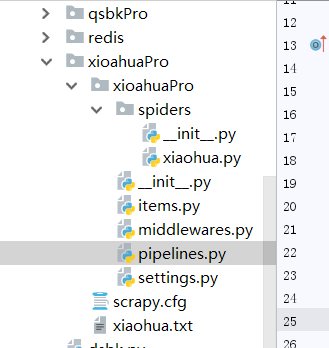
scrapy genspider xiaohua www.xxx.com ----------创建执行文件
一.首先我们要进行数据的爬取
import scrapy

from xioahuaPro.items import XioahuaproItem

class XiaohuaSpider(scrapy.Spider):

    name = 'xiaohua'

    start_urls=['http://www.521609.com/daxuemeinv/']

    #生成一个通用的url模板

    url = 'http://www.521609.com/daxuemeinv/list8%d.html'

    pageNum =1

    def parse(self, response):

        li_list=response.xpath('//div[@class="index_img list_center"]/ul/li')

        for li in li_list:

            name = li.xpath('./a[2]/text() | ./a[2]/b/text()').extract_first()

            img_url = 'http://www.521609.com'+li.xpath('./a[1]/img/@src').extract_first()

            #实例化一个item类型的对象

            item = XioahuaproItem()

            item['name'] = name

            item['img_url'] = img_url

            #item提交给管道

            yield item

        # 对其他页码的url进行手动i请求的发送

        if self.pageNum <= 24:   ------爬取的页数

            self.pageNum += 1

            new_url = format(self.url%self.pageNum)

            yield scrapy.Request(url=new_url,callback=self.parse)
之后再items.py文件下为item对象设置属性
将爬取到的所有信息全部设置为item的属性
# -*- coding: utf-8 -*-

# Define here the models for your scraped items

#

# See documentation in:

# https://doc.scrapy.org/en/latest/topics/items.html

import scrapy

class XioahuaproItem(scrapy.Item):

    # define the fields for your item here like:

    name = scrapy.Field()

    img_url = scrapy.Field()
二.写入pipelines.py内容
首先写入到自定义的文件里去
作用:将解析到的数据存储到某一个平台中。

import pymysql

from redis import Redis

class XioahuaproPipeline(object):

    fp = None

    def open_spider(self,spider):

        print('开始爬虫!')

        self.fp = open('./xiaohua.txt','w',encoding='utf-8')

    #作用:实现持久化存储的操作

    #该方法的item参数就可以接收爬虫文件提交过来的item对象

    #该方法每接收一个item就会被调用一次(调用多次)

    def process_item(self, item, spider):

        name = item['name']

        img_url = item['img_url']

        self.fp.write(name+':'+img_url+'\n')

        #返回值的作用:就是将item传递给下一个即将被执行的管道类

        return item

#

    def close_spider(self,spider):

        print('结束爬虫!')

        self.fp.close()

#
写到数据库里面,我们要在数据库里面创建个表(将mysql和redis都启动)
class MysqlPipeline(object):

    conn = None

    cursor = None

    def open_spider(self, spider):

        #解决数据库字段无法存储中文处理:alter table tableName convert to charset utf8;

        self.conn = pymysql.Connect(host='127.0.0.1',port=3306,user='root',password='',db='test',charset='utf8')

        print(self.conn)

    def process_item(self, item, spider):

        self.cursor = self.conn.cursor()

        try:

            self.cursor.execute('insert into xiaohua values ("%s","%s")'%(item['name'],item['img_url']))

            self.conn.commit()

        except Exception as e:

            print(e)

            self.conn.rollback()

        return item

    def close_spider(self, spider):

        self.cursor.close()

        self.conn.close()
在相同的文件下创建redis类写入数据
class RedisPipeline(object):

    conn = None

    def open_spider(self, spider):

        self.conn = Redis(host='127.0.0.1',port=6379)

        print(self.conn)

    def process_item(self, item, spider):

        dic = {

            'name':item['name'],

            'img_url':item['img_url']

        }

        print(str(dic))

        self.conn.lpush('xiaohua',str(dic))

        return item

    def close_spider(self, spider):

        pass
三.更改配置文件,在settings.py里面
#添加上这行代码
USER_AGENT = 'Mozilla/5.0 (Windows NT 6.1; Win64; x64) AppleWebKit/537.36 (KHTML, like Gecko) Chrome/73.0.3683.86 Safari/537.36'

# Obey robots.txt rules

ROBOTSTXT_OBEY = False       -----改成False
ITEM_PIPELINES = {

    'xioahuaPro.pipelines.XioahuaproPipeline': 300,  ---对应文件

    # 'xioahuaPro.pipelines.MysqlPipeline': 301,    ----对应数据库

    # 'xioahuaPro.pipelines.RedisPipeline': 302,    -----对应redis

}

LOG_LEVEL = 'ERROR'
            # CRITICAL --严重错误
            #ERROR    ---一般错误
            #WARNING ---警告信息
            #INFO  ---一般信息
            #DEBUG  --调试信息
然后我们在终端去指定爬虫程序
scrapy crawl 名字(name对应的值)
利用scrapy爬取文件后并基于管道化的持久化存储的更多相关文章
- 利用Scrapy爬取所有知乎用户详细信息并存至MongoDB
欢迎大家关注腾讯云技术社区-博客园官方主页,我们将持续在博客园为大家推荐技术精品文章哦~ 作者 :崔庆才 本节分享一下爬取知乎用户所有用户信息的 Scrapy 爬虫实战. 本节目标 本节要实现的内容有 ...
- 利用scrapy爬取腾讯的招聘信息
利用scrapy框架抓取腾讯的招聘信息,爬取地址为:https://hr.tencent.com/position.php 抓取字段包括:招聘岗位,人数,工作地点,发布时间,及具体的工作要求和工作任务 ...
- 利用 Scrapy 爬取知乎用户信息
思路:通过获取知乎某个大V的关注列表和被关注列表,查看该大V和其关注用户和被关注用户的详细信息,然后通过层层递归调用,实现获取关注用户和被关注用户的关注列表和被关注列表,最终实现获取大量用户信息. 一 ...
- 爬虫实战--利用Scrapy爬取知乎用户信息
思路: 主要逻辑图:
- 以豌豆荚为例,用 Scrapy 爬取分类多级页面
本文转载自以下网站:以豌豆荚为例,用 Scrapy 爬取分类多级页面 https://www.makcyun.top/web_scraping_withpython17.html 需要学习的地方: 1 ...
- python scrapy爬取HBS 汉堡南美航运公司柜号信息
下面分享个scrapy的例子 利用scrapy爬取HBS 船公司柜号信息 1.前期准备 查询提单号下的柜号有哪些,主要是在下面的网站上,输入提单号,然后点击查询 https://www.hamburg ...
- 【转载】教你分分钟学会用python爬虫框架Scrapy爬取心目中的女神
原文:教你分分钟学会用python爬虫框架Scrapy爬取心目中的女神 本博文将带领你从入门到精通爬虫框架Scrapy,最终具备爬取任何网页的数据的能力.本文以校花网为例进行爬取,校花网:http:/ ...
- Scrapy爬取小说简单逻辑
Scrapy爬取小说简单逻辑 一 准备工作 1)安装Python 2)安装PIP 3)安装scrapy 4)安装pywin32 5)安装VCForPython27.exe ........... 具体 ...
- Scrapy爬取Ajax(异步加载)网页实例——简书付费连载
这两天学习了Scrapy爬虫框架的基本使用,练习的例子爬取的都是传统的直接加载完网页的内容,就想试试爬取用Ajax技术加载的网页. 这里以简书里的优选连载网页为例分享一下我的爬取过程. 网址为: ht ...
随机推荐
- 编译libusb库
之前需要安装依赖库 : libudevautomakeautoconflibtool ./bootstrap.sh ./configure --with-pic --prefix=/home/libu ...
- vi中如何跳转到指定行数
输入:n,代表跳转到第n行,如:100,就跳转到第100行.
- ylbtech-自信:自信
ylbtech-自信:自信 自信心(confidence),在心理学中,与其最接近的是班杜拉(A.Bandura)在社会学习理论中提出的自我效能感 (self-efficacy)的概念,是指个体对自身 ...
- 理解async和await
async 是“异步”的简写,而 await 可以认为是 async wait 的简写. 所以应该很好理解 async 用于申明一个 function 是异步的,而 await 用于等待一个异步方法执 ...
- python学习笔记10--协程、IO、IO多路复用
本节内容 一.协程 1.1.协程概念 1.2.greenlet 1.3.Gevent 1.4.协程之爬虫 1.5.协程之socket 二.论事件驱动与异步IO 三.IO 3.1.概念说明 3.2.IO ...
- idea启动报错:Access denied for user 'root '@'192.168.100.XXX' (using password: YES)
Caused by: org.springframework.beans.factory.UnsatisfiedDependencyException: Error creating bean wit ...
- 使用Git Bash进行代码管理
前提是已经安装了GitBash,这个稍后再出教程 1.新建一个目录,存放下载下来的项目,我在D盘新建了一个“gitspace”文件夹,用来存放下载下来的项目 2.进入刚刚新建的文件夹,即进入“gits ...
- git pull 提示错误,Your local changes to the following files would be overwritten by merge
error: Your local changes to the following files would be overwritten by merge: Please commit your c ...
- bnd.bnd属性文件格式
1.Header以大写字母开头 Bundle-Name: StoreAdminProductsTool 2.Instruction以-和小写字母开头 -sources: true 3. Macro形式 ...
- Linux常用命令3 文件搜索命令
文件搜索非常占用资源,所以尽量不要使用这个命令 避免少用该命令最好的方式是设置好文件夹结构,文件不要乱放 1.文件搜索命令:find 命令名称:find 所在路径:/bin/find 执行权限:所有用 ...