
PS 滤镜— —水波效果
    clc;

    clear all;

    close all;

    addpath('E:\PhotoShop Algortihm\Image Processing\PS Algorithm');

    I=imread('4.jpg');

    I=double(I);

    Image=I/255;

    [height, width, depth]=size(Image);

    wavelength = 20;

    amplitude = 10;

    phase = 0;

    centreX = 0.5;

    centreY = 0.5;

    radius = 0;

    if (radius==0)

        radius=min(height, width)/2;

    end

    icentreX=width*centreX;

    icentreY=height*centreY;

    radius2=radius*radius;

    Image_new=Image;

     for ii=1:height

        for jj=1:width

             dx=jj-icentreX;

             dy=ii-icentreY;

             distance2=dx*dx+dy*dy;

             if (distance2>radius2)

                 x=jj;

                 y=ii;

             else

                 distance=sqrt(distance2);

                 amount=amplitude * sin(distance / wavelength * 2*pi - phase);

                 amount =amount* (radius-distance)/radius;

                 amount=amount*wavelength/(distance+0.0001);

                 x =jj + dx*amount;

                 y = ii + dy*amount;

             end

    % %         if (x<=1)     x=1;  end

    % %         if (x>=width)   x=width-1; end;

    % %         if (y>=height)  y=height-1; end;

    % %         if (y<1)  y=1;     end;

            if (x<=1)     continue;  end

            if (x>=width)   continue; end;

            if (y>=height)  continue; end;

            if (y<1)  continue;     end;

            x1=floor(x);

            y1=floor(y);

            p=x-x1;

            q=y-y1;

            Image_new(ii,jj,:)=(1-p)*(1-q)*Image(y1,x1,:)+p*(1-q)*Image(y1,x1+1,:)...

                +q*(1-p)*Image(y1+1,x1,:)+p*q*Image(y1+1,x1+1,:);

        end

     end

imshow(Image_new);参考来源:http://www.jhlabs.com/index.html
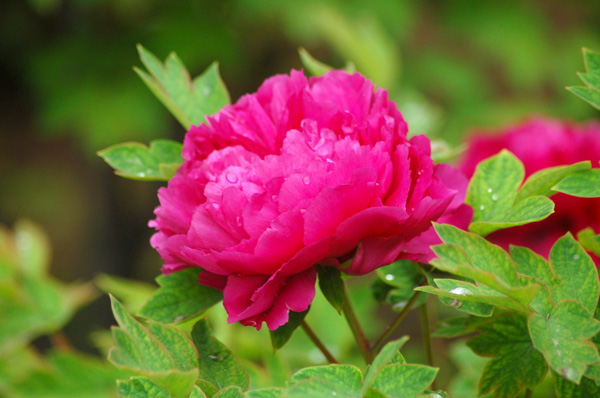
原图:
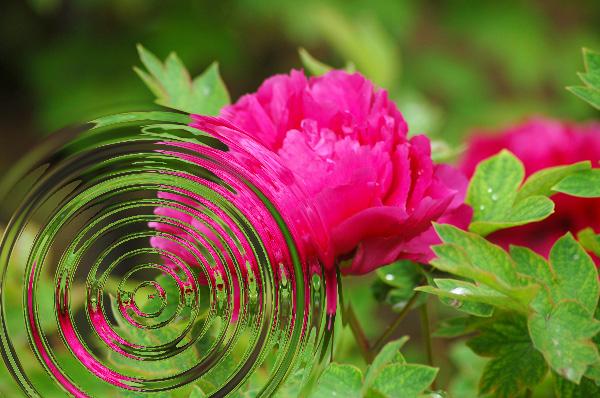
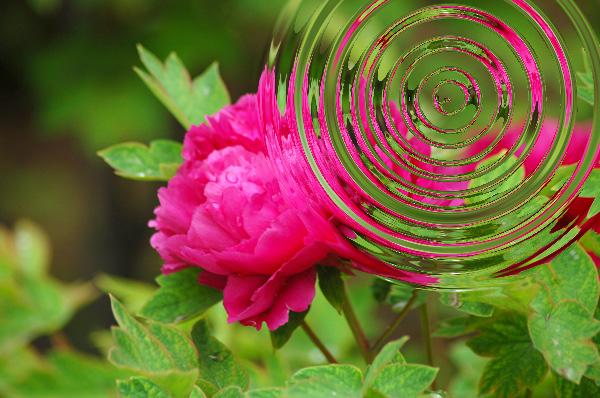
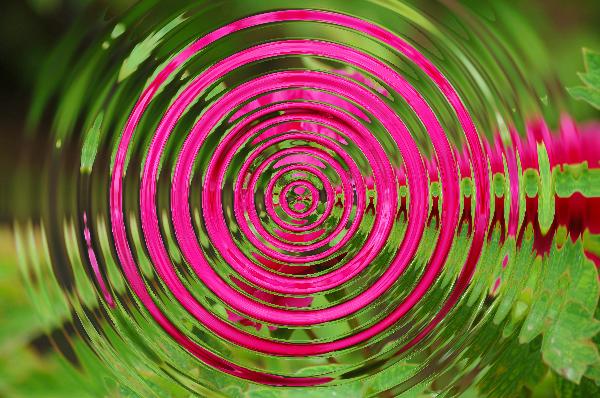
效果图:
PS 滤镜— —水波效果的更多相关文章
- OpenCV——PS滤镜 水波效果
// define head function #ifndef PS_ALGORITHM_H_INCLUDED #define PS_ALGORITHM_H_INCLUDED #include < ...
- PS 滤镜——水波 water wave
%%%% Water wave %%%% 制作水波效果 clc; clear all; close all; addpath('E:\PhotoShop Algortihm\Image Process ...
- Python: PS 滤镜--水波特效
本文用 Python 实现 PS 滤镜中的 水波特效 import numpy as np from skimage import img_as_float import matplotlib.pyp ...
- Python: PS 滤镜--万花筒效果
本文用 Python 实现 PS 的一种滤镜效果,称为万花筒.也是对图像做各种扭曲变换,最后图像呈现的效果就像从万花筒中看到的一样: 图像的效果可以参考之前的博客: http://blog.csdn. ...
- PS 滤镜— —挤压效果
clc; clear all; close all; addpath('E:\PhotoShop Algortihm\Image Processing\PS Algorithm'); I=imread ...
- PS 滤镜— —Marble 效果
clc; clear all; close all; addpath('E:\PhotoShop Algortihm\Image Processing\PS Algorithm'); I=imread ...
- PS 滤镜— — 万花筒效果
clc; clear all; close all; addpath('E:\PhotoShop Algortihm\Image Processing\PS Algorithm'); I=imread ...
- PS 滤镜— — sparkle 效果
clc; clear all; close all; addpath('E:\PhotoShop Algortihm\Image Processing\PS Algorithm'); I=imread ...
- PS 滤镜— —球面化效果
clc; clear all; close all; addpath('E:\PhotoShop Algortihm\Image Processing\PS Algorithm'); I=imread ...
随机推荐
- HTML/CSS开发规范指南
参见文档:https://github.com/doyoe/html-css-guide 1.文档目录结构 |-- 项目名 |-- src 开发环境 |-- html 静态页面模板目录 |-- bgi ...
- jquery实现图片的依次加载图片
css代码: ul#portfolio{margin:0;padding:0;} ul#portfolio li{float:left;margin:0 5px 0 0;width:250px;hei ...
- Allegro skill
https://blog.csdn.net/wyu0725/article/details/52367199 Allegro skill二次开发和更改菜单页面 简单的使用skill;能够使Aleggr ...
- hashmap和ConcurrentHashMap
hashmap市基于table和单向链表 table中存放hash值,table中存放着单向链表,查询时先计算对象hash值,找到table中对应值,然后查询链表. ConcurrentHashMap ...
- PLSQL怎样导出oracle表结构
tools->export tables 是导出表结构还有数据 tools->export user objects是导出表结构 可以用tools->export tables ...
- HDFS源码分析数据块汇报之损坏数据块检测checkReplicaCorrupt()
无论是第一次,还是之后的每次数据块汇报,名字名字节点都会对汇报上来的数据块进行检测,看看其是否为损坏的数据块.那么,损坏数据块是如何被检测的呢?本文,我们将研究下损坏数据块检测的checkReplic ...
- 安装部署zookeeper集群
实验说明: 三台虚拟机做zookeeper集群,集群个数最好是奇数个,原理详见zookeeper 详解 安装zookeeper 请确保jdk 已安装好,否则无法启动 三台虚拟机IP分别为:192. ...
- win本地配置docker环境
先上官网链接:https://docs.docker.com/get-started/part2/#introduction 优质入门教程:http://www.docker.org.cn/book/ ...
- 各种RTMP直播流播放权限_音视频_数据花屏_问题检测与分析工具EasyRTMPClient
之前的一篇博客<网络摄像机IPCamera RTSP直播播放网络/权限/音视频数据/花屏问题检测与分析助手EasyRTSPClient>,我们介绍了RTSP流的检测和分析工具EasyRTS ...
- EasyNVR H5无插件摄像机直播解决方案前端解析之:videojs初始化的一些样式处理
初始化完成对videojs样式的调整 由于不同项目的需要,对于加载出来的videojs播放器样式也有不同的需求:我们需要自主的处理一下加载出来的videojs播放器的样式: 默认加载出来的会包含有暂停 ...